






According to the IBM Systems Sciences Institute, fixing a bug after release costs 4 to 5 times more than catching it during testing, and up to 100 times more than finding it during design. That is exactly why alpha and beta testing exist. They are not just checkboxes before launch. They are the two phases that separate teams who ship with confidence from teams who find out what broke from angry users on Twitter.
If you are a developer or QA engineer, understanding where each phase fits and what it is actually trying to catch can save your team weeks of firefighting after release.
Key Takeaways
- Alpha testing is done internally; beta testing uses real external users
- Alpha catches functional and security bugs; beta catches real-world usability issues
- Both phases together can reduce post-launch bugs by up to 80%
- Skipping alpha testing is the leading cause of costly beta failures
- Real companies like Google and Apple use these phases to ship at massive scale without major outages
What are alpha and beta testing?
Before getting into the details, here is how each phase is defined:
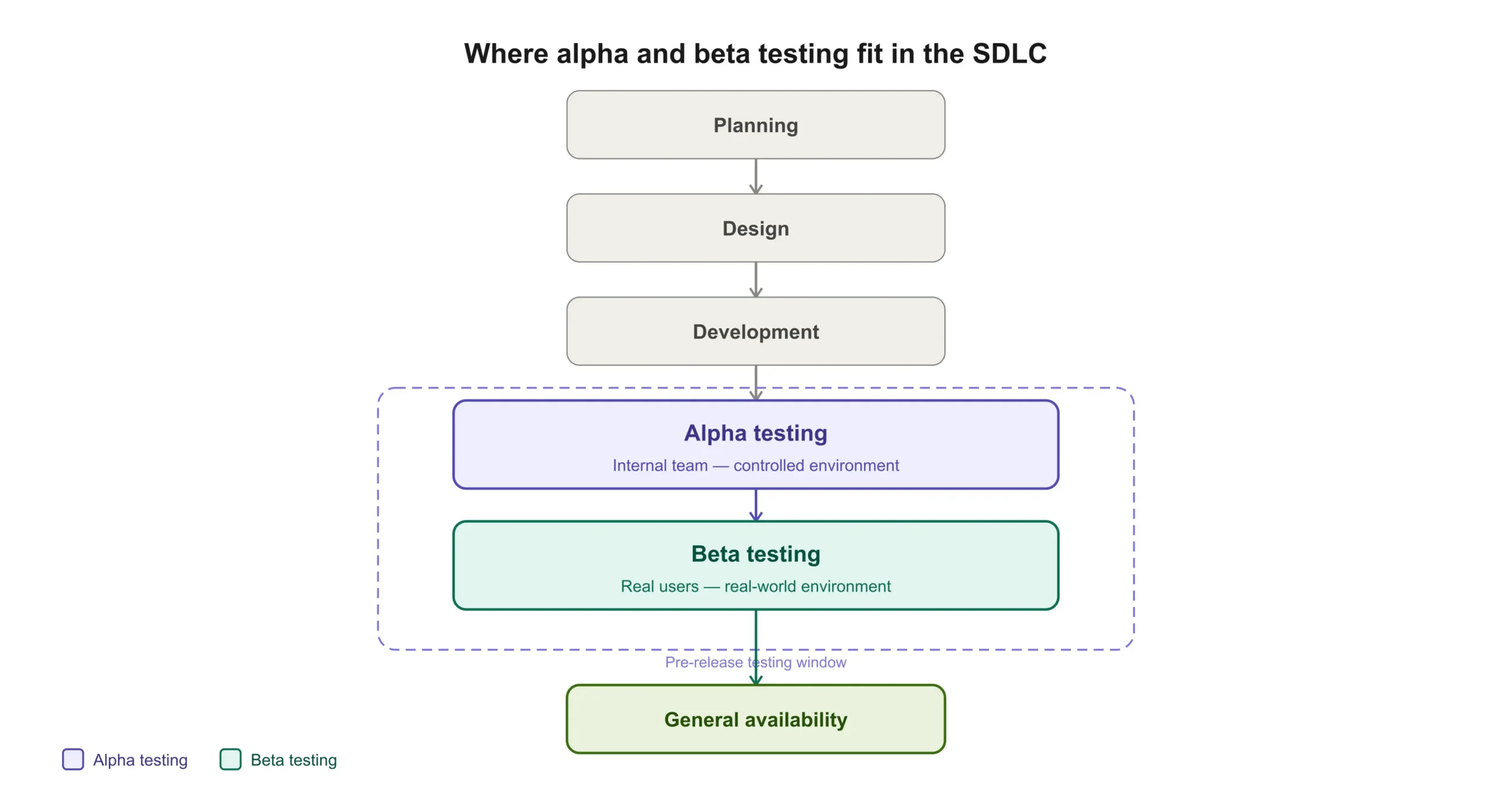
Alpha testing is the first round of testing, performed by internal team members like developers, QA engineers, and stakeholders in a controlled environment. The software never leaves your organization during this phase.
Beta testing is the second round, where real external users try the software in uncontrolled, real-world conditions before the full public release.
Why do these tests matter?
Launching a feature without testing it in real-world conditions is like driving a car onto the highway without checking if the brakes work. Alpha and beta testing reduce the risk of catastrophic failures and improve overall user experience. They help answer the questions that matter most before launch:
- Does the product meet business requirements?
- How does it perform under real-world conditions?
- Are there unexpected usability issues?
- Are customers actually happy with it?
Why testing phases matter: the numbers
The case for investing in structured testing phases is not just logical, it is financial.
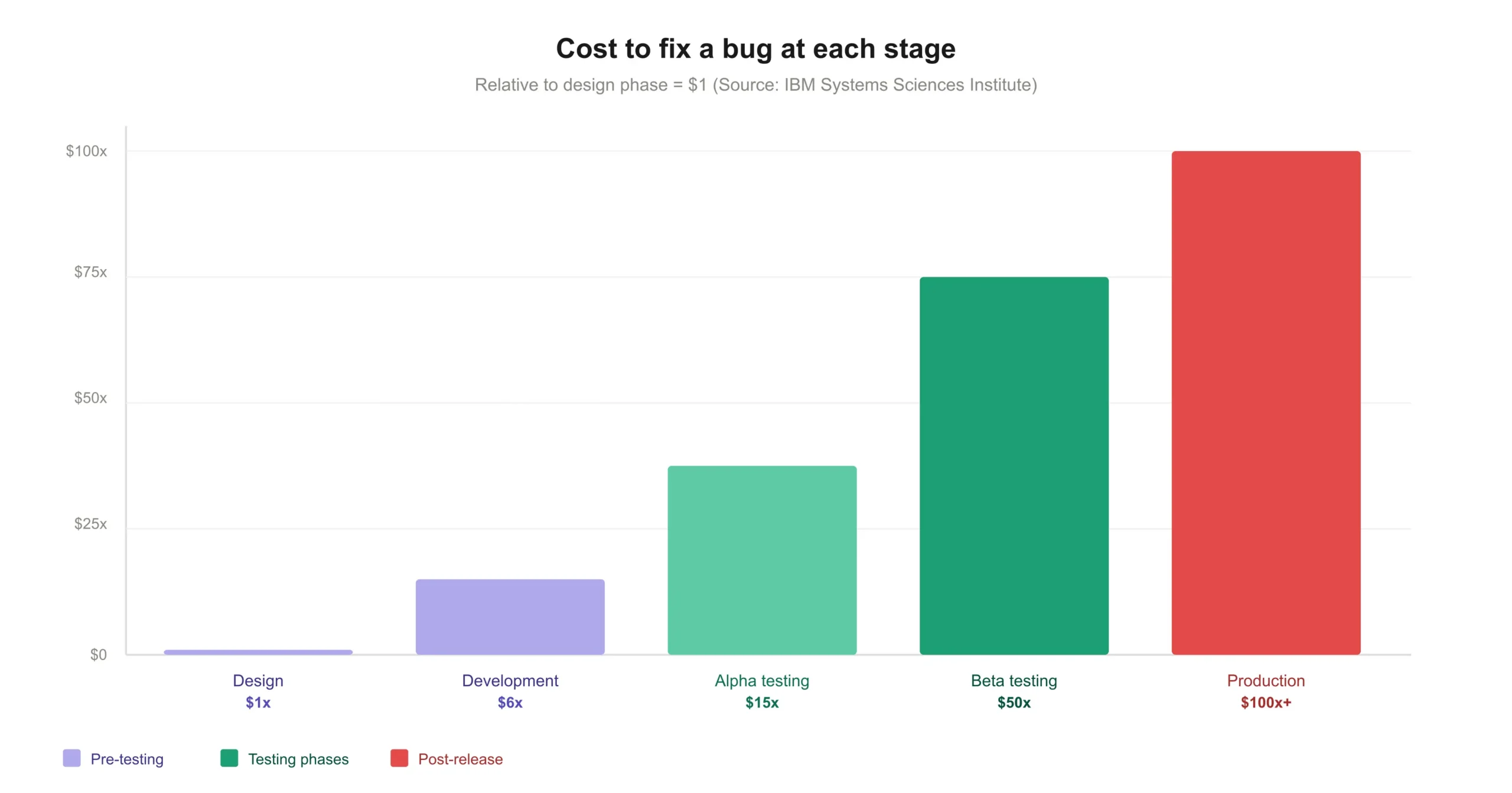
IBM research shows that a defect caught during design costs around $100 to fix. That same defect found after release costs $10,000 or more. A 2022 Capgemini report found that organizations skipping structured test phases spend 15 to 40 percent of their total software budget on post-release fixes and patches.
Google’s Gmail beta ran for nearly two years with invite-only access before going public in 2006. When it finally launched to everyone, it handled millions of users without a major outage. Microsoft uses a ring-based deployment model for Windows updates, moving from internal rings (the alpha equivalent) to Windows Insiders (the beta equivalent) before general availability. This model has reduced critical patch frequency by over 30 percent since 2018.
Alpha testing: your first line of defense
Alpha testing is carried out by the people who built the product: developers, QA engineers, and sometimes product managers or stakeholders. It happens in a controlled environment like a staging server or internal test devices, never in production. The goal is simple: find as many functional, security, and usability bugs as possible before a single real user ever sees the software.
How to conduct alpha testing
- Define test scenarios — Focus on core workflows and expected user interactions.
- Use debugging tools — Leverage logs, debuggers, and profiling tools to catch issues at the root.
- Conduct exploratory testing — Let testers freely navigate the product and find unexpected problems.
- Fix critical bugs — Resolve all high-priority issues before moving on to beta.
- Get stakeholder feedback — Confirm that business goals and requirements are being met.
Real-world example: When Google was building Gmail, internal engineers and employees tested it for nearly two years before any external users saw it. They caught critical data-loss bugs, UI inconsistencies, and performance issues that would have been catastrophic at scale. That is alpha testing done right.
Beta testing: the real-world experiment
Beta testing is where your software meets reality. Real external users test the product in real environments on their own devices, networks, and workflows. Unlike alpha testing, it is unpredictable by design. That unpredictability is the whole point.
How to conduct beta testing
- Choose your beta testers wisely — Select a diverse group that includes tech-savvy users, non-technical users, and different demographics and device types.
- Provide clear testing instructions — Guide users on what to test, but leave room for natural, unscripted interactions.
- Collect and analyze feedback — Use surveys, in-app feedback forms, and bug reports to capture everything.
- Monitor performance metrics — Track errors, crashes, load times, and user behavior analytics in real time.
- Fix and iterate — Address critical issues found before proceeding to full launch.
Real-world example: Apple’s TestFlight platform lets developers release iOS apps to up to 10,000 real beta testers before App Store launch. This is a textbook closed beta: real users, real devices, real network conditions, but a controlled group that signed up to test. Issues that never appeared in internal testing surface immediately when thousands of real people start using the app their own way.
Types of beta testing
Not all beta testing looks the same. The approach you choose depends on how much control you want over who tests and what they test.
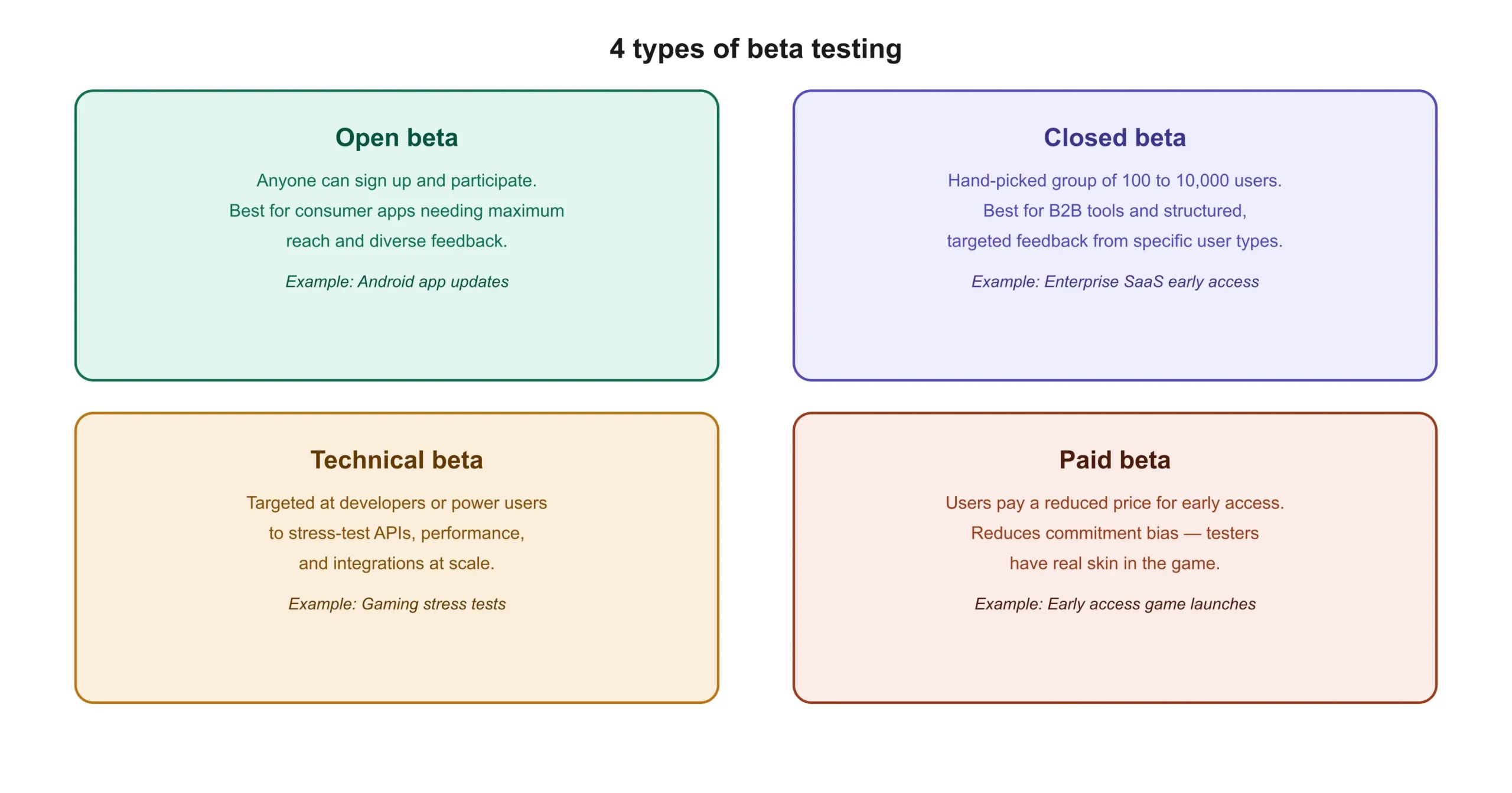
Open beta — Anyone can sign up and participate. Best for consumer apps that need massive reach and diverse feedback. Android uses this model for major app updates.
Closed beta — A hand-picked group of users, usually 100 to 10,000 people. Better for B2B tools, enterprise software, or when you need structured feedback from specific user types.
Technical beta — Targeted at developers or power users to stress-test performance, APIs, or integrations. Common in gaming and developer tools.
Paid beta — Users pay a reduced price to access the product early. This reduces commitment bias in feedback since testers have real skin in the game.
Alpha vs beta testing: key differences
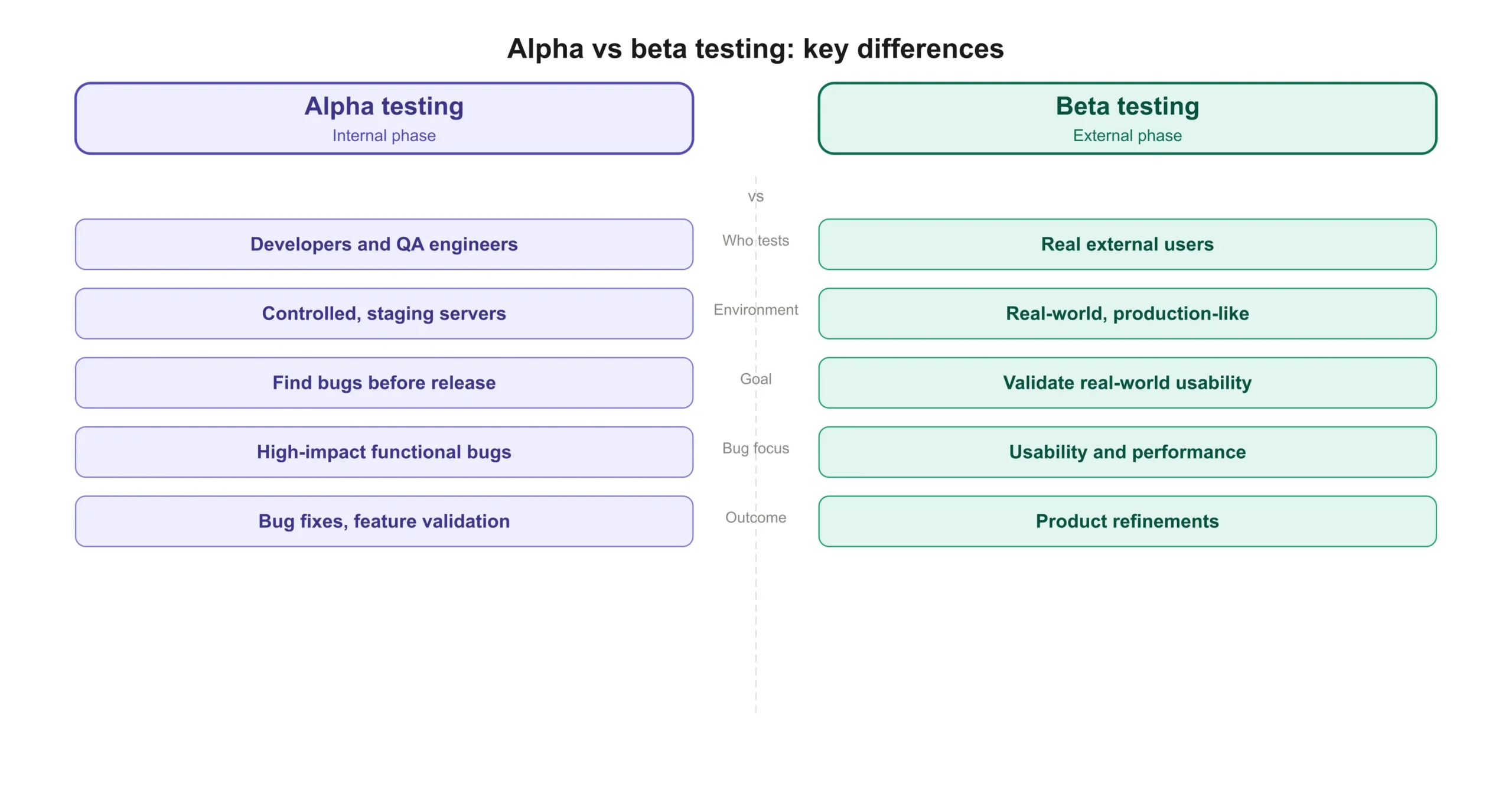
| Feature | Alpha Testing | Beta Testing |
|---|---|---|
| Who tests? | Internal team (devs, QA) | Real users (customers, early adopters) |
| Environment | Controlled, staging servers | Real-world, production-like |
| Goal | Find bugs before external release | Gather user feedback and ensure usability |
| Bug severity | High-impact functional issues | Minor usability or performance issues |
| Test focus | Functional, security, and usability | User experience and performance |
| Outcome | Bug fixes, feature validation | Product refinements before launch |
Tools for alpha and beta testing
Alpha testing tools
- Bug tracking: Jira, Bugzilla, Trello
- Test automation: Selenium, Cypress, JUnit,
- Performance profiling: New Relic, Datadog
- API testing and mocking: Keploy
Beta testing tools
- User feedback: Google Forms, SurveyMonkey
- Crash reporting: Sentry, Firebase Crashlytics
- Feature flagging: LaunchDarkly
Alpha and beta testing checklist
Alpha testing checklist
- Core user flows tested end-to-end
- Edge cases and error states covered
- Performance profiling completed (no memory leaks)
- Security scan done
- All critical and high-severity bugs resolved
- Stakeholder sign-off received
Beta testing checklist
- Beta tester group selected (diverse demographics and devices)
- Feedback collection method set up (form, in-app survey, crash tool)
- Feature flags enabled for beta group only
- Analytics and crash reporting active
- Response SLA for beta bug reports defined
- Exit criteria defined (what metrics trigger full public launch)
Conclusion
Alpha and beta testing are not bureaucratic hurdles. They are the mechanism by which good engineering teams protect their users and their reputation. Alpha keeps your worst bugs from ever reaching the outside world. Beta ensures that what you built actually matches how real people think and work.
The teams that do both well share one thing: they automate what can be automated so their human testers can focus on what only humans can find. If your team spends more time writing test scripts than thinking about test strategy, Keploy can generate API tests automatically from real traffic, freeing your engineers to focus on what alpha and beta testing are actually about: judgment, coverage, and confidence.
Ready to cut your test writing time in half? Try Keploy for free
FAQs
1. What is the main difference between alpha and beta testing?
Alpha testing is done internally by your own developers and QA team in a controlled environment. Beta testing is done by real external users in real-world conditions. Alpha finds bugs before anyone outside sees the product; beta validates that it actually works for the people who will use it.
2. Can a product skip alpha testing and go directly to beta testing?
No. Skipping alpha testing means real users will encounter bugs that your own team should have caught first. This damages your product’s reputation and makes beta feedback harder to act on because critical issues get mixed in with usability feedback.
3. How long should alpha and beta testing last?
Alpha testing typically lasts one to four weeks depending on the complexity of the software. Beta testing can range from a few weeks to several months based on the feedback cycle and the severity of issues found.
4. What are the biggest challenges in beta testing?
Getting consistent participation from testers, managing and prioritizing a high volume of feedback, and reproducing bugs that only occur in specific real-world environments are the most common challenges teams face.
5. How do you choose beta testers?
Select a diverse group that represents your actual target audience. Include different demographics, device types, operating systems, and levels of technical expertise. A beta group that is too similar to your internal team will miss the same things your internal team missed.
6. Is beta testing only for software, or can it apply to hardware too?
Beta testing applies to both. Hardware companies regularly ship pre-production units to real users before mass manufacturing. Smartphone makers, wearable brands, and even car manufacturers use beta programs to catch real-world issues that lab testing never surfaces.