






Last updated: 22 October 2026
API testing for microservices is one of the most important parts of ensuring distributed applications work reliably. If you’re wondering how to test microservices, you need more than unit tests—you need API testing, integration testing, contract testing, and end-to-end validation. In this guide, you’ll learn a practical step-by-step approach to testing microservices and see how Keploy automates API testing using real production traffic.
In this blog, we’ll walk through what microservices are, why testing them matters, and how to approach them step by step. Whether you’re a beginner or someone brushing up, this guide will help you understand the process and tools, like Keploy, that make microservice testing simpler and more reliable.
What is Microservices architecture?
Life Before Microservices: The Monolithic Way
Consider a large department store under one roof selling everything from groceries to electronics, clothing to furniture. A single team manages this monolithic store, opens and closes as one unit, and any change like fixing the billing system requires adjustments across the entire store. That’s how traditional monolithic applications work.
In a monolithic architecture, all components — user interface, business logic, database access, etc, are tightly packaged into one unit. Everything is developed, tested, deployed, and scaled together. If one small module changes, you have to redeploy the entire application.
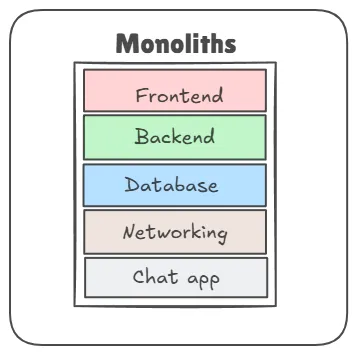
Challenges with Monoliths
While monoliths work fine in the early stages, they become harder to manage as the application grows:
-
Tangled Dependencies: Components are so interconnected that updating one might break another.
-
Scalability Bottlenecks: You can’t scale a single part of the app (like just the login feature); you must scale the whole thing, leading to increased infrastructure costs.
-
Tech Stack Lock-In: You’re bound to one language and framework for everything.
-
Deployment Headaches: A small bug in one module can bring down the entire application.
-
Slow Releases: Every update requires full application testing, building, and deployment, slowing down continuous delivery.
It’s like replacing a bulb in our department store that requires shutting down the whole building.
What are Microservices?
Now, imagine instead of one big department store, you have a shopping street each store sells a different product, managed independently. One sells groceries, another handles electronics, and another handles clothing. Each store can open, close, hire staff, or renovate without disturbing the others.
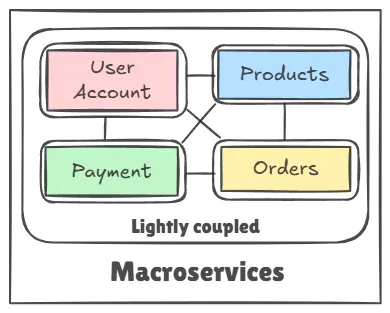
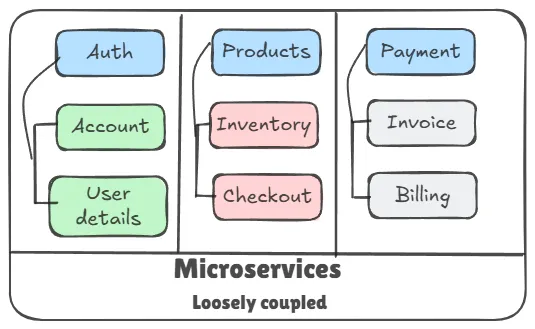
Microservices architecture breaks the application into small, independent services → each focused on a specific business functionality (e.g., authentication, catalog management, payment gateway). These services are:
-
Self-contained
-
Loosely coupled
-
Independently developed, deployed, and scaled
Getting started with microservices testing
Testing microservices involves verifying that each service performs its intended function correctly, both independently and as part of the larger system. It starts with testing the core logic of each service (unit testing), then moves to checking how services talk to each other (integration testing). We also make sure APIs are exchanging data as expected, and finally, we test the entire system from start to finish to see if everything works together smoothly, just like it would in real-life use.
Importance of Testing in Microservices Development
Testing plays a crucial role in microservices development, not just to catch bugs, but to ensure each small service works reliably as part of a larger, distributed system. Here’s why it’s so important:
-
Ensures Each Service Works Independently
Microservices are built to be independent. Testing helps verify that each service functions as expected on its own, reducing the chances of issues when it’s deployed or updated. -
Prevents Breakdowns in Communication Between Services
In microservices, services talk to each other through APIs. Without proper integration and API testing, one small mismatch or failure can cause the whole system to break. For example, in a fintech app, if the payment service can’t fetch data from the user authentication service, transactions can fail. -
Speeds Up Development and Deployment
With automated testing in place, developers can confidently make changes without the fear of breaking something. This supports continuous integration and delivery (CI/CD), helping teams ship features faster. This is especially helpful in domains like e-commerce or social media apps, where updates happen frequently. -
Boosts System Resilience and Scalability
Testing helps uncover weak points in the system before they hit production. In high-traffic domains like healthcare or banking, where downtime can be critical, testing ensures the system can scale and handle failures gracefully. -
Improves Team Collaboration
Since services are often built by different teams, a solid testing strategy ensures everyone is aligned. Shared tests (like contract testing) keep service expectations clear and prevent surprises during integration. -
Reduces Cost of Fixes in Production
Finding bugs early through thorough testing is far cheaper than fixing them after users report issues. For instance, a bug in the booking flow of a travel platform can lead to lost customers if not caught early.
How to Test Microservices (Step-by-Step)
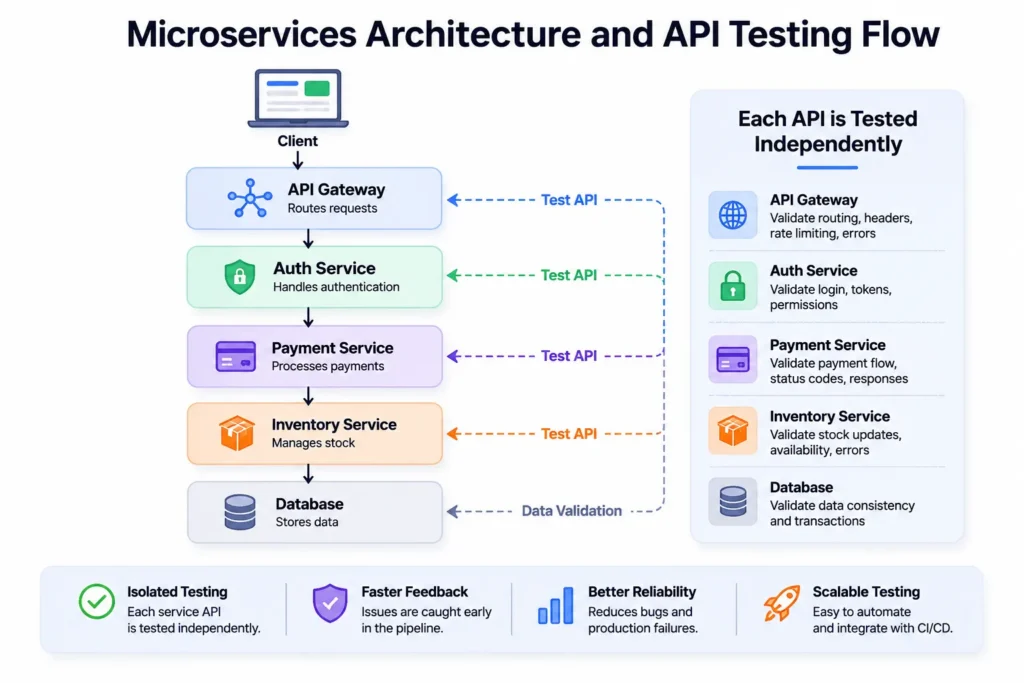
Testing microservices requires multiple layers of testing. Instead of relying on a single testing approach, validate each service independently, verify communication between services, and then test the complete application. Here’s a practical workflow followed by most engineering teams.
Step 1. Test Business Logic with Unit Tests
Start by testing the business logic inside each microservice without calling databases, APIs, or external services. Unit tests should verify that individual functions behave correctly and catch bugs early in development.
Focus on:
- Business rules
- Edge cases
- Input validation
- Exception handling
Step 2. Perform API Testing for Microservices
Once the business logic is validated, test every API exposed by the microservice.
Verify:
- Every endpoint
- Request and response payloads
- HTTP status codes
- Authentication and authorization
- Error handling
- Response time
API testing ensures every service behaves correctly before interacting with other services.
Step 3. Test Communication Between Services
Microservices rarely work in isolation. Validate how services communicate through REST APIs, gRPC, Kafka, RabbitMQ, or event-driven messaging.
Check for:
- Timeout handling
- Retry mechanisms
- Service discovery
- Circuit breakers
- Message delivery
Step 4. Perform Contract Testing
Use contract testing to ensure providers and consumers agree on API contracts without running the full system.
This prevents breaking downstream services when APIs change and enables teams to deploy independently.
Step 5. Run Integration Tests
Integration tests verify that multiple services work together correctly.
Validate:
- Database interactions
- Cache behavior
- External APIs
- Multiple service workflows
- Data consistency
Step 6. Execute End-to-End Tests
End-to-end testing validates complete user journeys across the entire microservices architecture.
Examples include:
- User registration
- Login flow
- Order placement
- Payment processing
- Notification delivery
These tests ensure the entire system behaves as expected.
Step 7. Automate Regression Testing Using Production Traffic
Traditional regression suites are often slow and difficult to maintain.
Modern platforms like Keploy automatically capture real production API traffic and generate regression test cases. These tests replay actual production requests, making regression testing faster, more reliable, and representative of real-world usage.
Benefits include:
- Automatic test generation
- Real production scenarios
- Reduced maintenance
- Faster CI/CD pipelines
- Better test coverage
Types of Testing Used for API Testing and Microservices
Testing microservices isn’t just about running unit tests or checking whether APIs return a 200 OK response. Since every service communicates independently through APIs, databases, or message brokers, an effective testing strategy should validate each service individually while ensuring the entire application works together reliably.
If you’re wondering how to test microservices, the best approach is to build your testing strategy layer by layer. Start by verifying the business logic of each service, then validate APIs, test communication between services, and finally ensure complete user workflows work as expected.
1. Unit Testing
Unit testing is the foundation of every microservices testing strategy. It verifies the business logic of individual functions or components without relying on external services such as databases or APIs.
Unit tests help developers:
- Validate business logic
- Catch bugs early during development
- Reduce debugging time
- Build confidence before integration
Since these tests run quickly, they’re typically executed with every code change.
2. API Testing for Microservices
Once individual components are working correctly, the next step is API testing for microservices. Because microservices communicate primarily through APIs, testing every endpoint is essential to ensure services interact correctly.
API testing verifies:
- Request validation
- Response validation
- HTTP status codes
- Authentication
- Authorization
- Error handling
- Response time
- Schema validation
- Rate limiting
- API version compatibility
For example, if an Order Service sends requests to a Payment Service, API testing ensures both services exchange data correctly before the application reaches production.
Unlike end-to-end testing, API testing isolates each service, making failures easier to identify and fix.
Integration Testing
Integration testing verifies that multiple microservices work together as expected after they have been tested individually. While unit tests validate business logic within a single service, integration tests ensure services can communicate correctly through APIs, databases, and messaging systems.
In a typical microservices architecture, services interact in different ways:
- Synchronous APIs: Most microservices communicate through REST, GraphQL, or gRPC APIs. Integration testing validates request and response flows, error handling, authentication, and response consistency between services.
- Asynchronous APIs: Many distributed applications use event-driven communication where services exchange messages without waiting for immediate responses. These workflows require additional validation to ensure events are delivered and processed correctly.
- Message Brokers: Platforms such as Kafka and RabbitMQ are commonly used for asynchronous communication. Integration tests verify that producers publish events correctly, consumers process them successfully, and no events are lost or duplicated during processing.
- Database Dependencies: Many services rely on shared or independent databases. Integration testing validates database reads, writes, transactions, and data consistency across services.
- Service Discovery: In dynamic environments like Kubernetes, services are constantly scaled or redeployed. Integration tests help verify that services can still discover and communicate with each other through service discovery mechanisms without breaking existing functionality.
Because integration testing validates real interactions between services, it helps uncover issues such as API incompatibilities, network failures, configuration problems, and dependency mismatches that cannot be detected through unit testing alone. Combined with API testing and contract testing, integration testing provides confidence that the entire microservices ecosystem works together as intended.
4. Contract Testing
Contract testing ensures that APIs continue following the agreed contract between service providers and consumers.
Instead of testing the entire application, contract testing validates whether request and response formats remain compatible after code changes.
This helps prevent production failures caused by unexpected API changes and allows independent teams to deploy services confidently.
5. End-to-End Testing
End-to-end (E2E) testing validates complete user journeys across multiple microservices.
Typical workflows include:
- User registration
- Login
- Checkout
- Payment processing
- Order confirmation
Because end-to-end tests involve the entire application, they should focus only on critical business workflows instead of testing every possible scenario.
6. Performance Testing
Performance testing measures how well microservices perform under expected and peak workloads.
It helps evaluate:
- API latency
- Throughput
- Concurrent requests
- Resource utilization
- System scalability
Performance testing ensures the application continues delivering reliable user experiences during traffic spikes.
7. Chaos Testing
Chaos testing intentionally introduces failures into the system to evaluate how well microservices recover from unexpected situations.
Teams commonly simulate:
- Service failures
- Network latency
- Database outages
- Infrastructure failures
Running chaos experiments improves fault tolerance and helps identify weaknesses before they affect production users.
Building a Complete Microservices Testing Strategy
No single testing method is enough for distributed applications. A reliable microservices testing strategy combines unit testing, API testing for microservices, integration testing, contract testing, end-to-end testing, performance testing, and chaos testing.
By following this layered approach, engineering teams can detect issues earlier, automate testing within CI/CD pipelines, and confidently release scalable microservices without introducing regressions.
Comparison of Microservices Testing Types
Each testing type serves a different purpose in a microservices architecture. While unit tests validate individual components, API, integration, contract, and end-to-end tests ensure services communicate reliably and deliver a seamless user experience. The table below summarizes when each type of testing should be used.
| Testing Type | Purpose | When to Use |
|---|---|---|
| Unit Testing | Validate individual functions, methods, or business logic in isolation. | During development and on every code commit. |
| API Testing | Verify API endpoints, request validation, response validation, authentication, authorization, and error handling. | Before every deployment and as part of automated CI/CD pipelines. |
| Integration Testing | Validate communication between services, databases, third-party APIs, and messaging systems. | During continuous integration after unit and API tests pass. |
| Contract Testing | Ensure API contracts remain compatible between service providers and consumers. | Whenever API schemas or service interfaces change. |
| End-to-End Testing | Validate complete user journeys across multiple microservices. | Before production releases or major feature deployments. |
| Performance Testing | Measure scalability, throughput, latency, and overall system performance under load. | Before production releases and during capacity planning. |
| Chaos Testing | Evaluate how services recover from failures, outages, and unexpected infrastructure issues. | Periodically in staging or production-like environments to improve resilience. |
The Challenges of Testing Microservices
Testing microservices introduces several practical challenges due to the distributed and independent nature of each service. Here are some specific issues teams often face:
-
One failing service can block the entire CI/CD pipeline
In microservices, CI/CD workflows often integrate multiple services. If a single module has failing tests, it can halt the deployment process for all dependent services, delaying releases. -
Debugging test failures becomes time-consuming
A failed unit or integration test might be caused by a change in a completely different service. Tracing the root cause through logs and dependencies across services can take hours or even days. -
Cross-team dependencies slow down error resolution
When services are owned by different teams, fixing a broken test in a module owned by another team is often delayed due to unclear responsibilities or lack of ownership. Choosing the right message queue for your microservices architecture is a foundational decision that directly impacts how you test service interactions -
Test coverage suffers as the system grows
As more services are added, developers find it hard to keep tests up to date. This leads to outdated or missing unit and integration tests, especially when deadlines are tight. -
Tests become brittle and hard to maintain
With frequent service updates, test data and mocks need constant changes. This increases maintenance overhead and often discourages teams from writing or updating tests. -
High complexity leads to reduced focus on testing
Under pressure to ship features quickly, some teams start deprioritizing testing altogether. Over time, this affects system reliability and increases the risk of regressions. -
Manual test creation is time-intensive
Creating realistic test cases, especially for edge scenarios, requires manual effort. Teams often skip this step due to time constraints, resulting in lower test quality.
How Keploy Makes Microservices Testing Easier
Testing microservices doesn’t have to be overwhelming and that’s where Keploy comes in. It’s built specifically to reduce the friction in writing, running, and maintaining tests for microservices by automating the hardest parts. Whether you’re tired of writing mocks, struggling with contract mismatches, or losing time debugging test failures, Keploy offers three powerful products that tackle these problems head-on.
1. Keploy for Unit Testing – Auto-Generate Test Cases from Real Traffic
What it does:
Keploy uses AI to auto-generate unit tests directly inside GitHub PRs by analyzing code changes. Tests are suggested inline and are validated before surfacing — meaning they build, pass, and add meaningful new coverage.
How it helps:
-
Keeps your test cases up to date as the application evolves, reducing stale or broken tests.
-
Especially helpful when rapid development leads to poor test coverage (a common challenge in fast-moving teams).
To know more about Keploy Unit testing: https://keploy.io/unit-test-generator
To Try PR agent: https://github.com/marketplace/keploy
To Try VScode extension: https://marketplace.visualstudio.com/items?itemName=Keploy.keployio
Want to take it further? Learn how to Boost Unit Test Efficiency Using AI-Powered Extensions for VS Code and get more out of your testing workflow
Example use case:
If you want to write a unit test for a function in one of your microservices, instead of just asking ChatGPT, you can use the Keploy VSCode extension to create tests without even writing a prompt. Alternatively, if you want to create unit tests while raising a PR, you can use the PR Agent for that.
2. Keploy for Integration Testing
What it does:
Keploy can mock downstream services like databases, third-party APIs, or internal microservices. It records their real responses once and then replays them during tests.
How it helps:
-
Avoids the hassle of writing complex mocks manually. Ensures services continue to work even if dependencies change or go offline.
-
Makes debugging faster by isolating the system under test while simulating real behavior.
-
Great for fixing the problem of flaky CI/CD pipelines or services breaking due to API changes.
Example use case:
Say your booking microservice depends on an external payment API. Keploy can record the payment API’s real response once and then use it for integration testing, ensuring stable and consistent test runs even if the payment service is unavailable.
To know more about Keploy Integration Testing: https://keploy.io/docs/
3. Keploy for API Testing
API testing is one of the most important parts of testing microservices because APIs are the communication layer between independent services. Even a minor change in an API request, response, or schema can cause failures across multiple downstream services. Writing and maintaining API tests manually, however, becomes increasingly difficult as the number of services grows.
Keploy simplifies API testing for microservices by automatically generating API tests from real application traffic. Instead of manually creating hundreds of test cases, developers can capture actual API requests and responses from production or staging environments and replay them whenever the application changes. This approach ensures that tests represent real-world usage instead of artificially created scenarios.
Automatic API Test Generation
One of Keploy’s biggest advantages is its ability to automatically generate API test cases without requiring developers to manually define every request and expected response.
Instead of writing repetitive test scripts, Keploy observes real API traffic and converts those interactions into reusable API tests. This significantly reduces the effort required to achieve comprehensive API coverage while allowing engineering teams to focus on building features rather than maintaining test suites.
Replay Production Traffic
Traditional API testing often relies on manually created test data, which rarely reflects how users interact with production systems.
Keploy records real production traffic and safely replays those requests during testing. Because tests are generated from actual user interactions, they cover realistic business scenarios, edge cases, and request patterns that developers might otherwise overlook.
This approach makes regression testing far more reliable by validating application behavior against real production workloads.
Validate API Responses
Beyond checking HTTP status codes, Keploy validates complete API responses to ensure services continue behaving as expected.
API validation includes:
- Request payload validation
- Response body validation
- HTTP status codes
- Response schemas
- Business logic consistency
- Response headers
This helps detect unexpected API behavior before deployments reach production.
Simplify Regression Testing
As microservices evolve, even small code changes can unintentionally affect existing APIs.
Keploy automatically reruns previously captured API tests whenever the application changes, making regression testing significantly easier. Instead of manually verifying every endpoint after each release, teams can quickly identify whether any API behavior has changed unexpectedly.
This allows developers to release updates more frequently while maintaining confidence in application stability.
Integrate with CI/CD Pipelines
Modern engineering teams deploy applications continuously, making automated API testing essential.
Keploy integrates easily into existing CI/CD pipelines, allowing API tests to execute automatically during every pull request, build, or deployment.
Running API tests as part of CI/CD helps teams detect failures before production, shorten feedback loops, and reduce the risk of shipping breaking API changes.
Schema Validation and Contract Verification
As multiple teams independently develop microservices, maintaining consistent API contracts becomes increasingly important.
Keploy helps validate request and response schemas to ensure APIs continue following expected contracts. Detecting schema changes early prevents downstream services from failing because of incompatible request or response formats.
Combined with contract testing, schema validation improves collaboration between teams while reducing production regressions.
Mock Downstream Services
Microservices frequently depend on databases, payment gateways, authentication providers, and other internal services.
Instead of requiring every dependency to be available during testing, Keploy records real responses from downstream services and replays them as mocks.
This enables developers to:
- Test services independently
- Eliminate flaky integration tests
- Reduce dependency on external systems
- Create consistent and repeatable test environments
Mocking downstream services also speeds up local development and CI pipelines by removing the need to deploy an entire microservices ecosystem for every test run.
Why Keploy Is Well Suited for API Testing for Microservices
Unlike traditional API testing tools that require developers to manually create and maintain test cases, Keploy automates much of the testing workflow by generating tests from real production traffic, replaying realistic requests, validating API responses, verifying schemas, mocking downstream dependencies, and integrating directly into CI/CD pipelines.
For teams building distributed applications, this means less time writing tests, faster feedback during development, and greater confidence that every deployment preserves existing API behavior. By combining automated API testing with unit, integration, contract, and end-to-end testing, Keploy helps engineering teams build reliable, scalable microservices without increasing testing overhead.
Best Practices for Microservices Testing
-
Test Each Service in Isolation
Begin with strong unit and integration tests for each service to catch bugs early. -
Use Contract Testing
Make sure services stick to agreed API contracts to prevent communication issues. -
Mock External Dependencies
Use mocks instead of real third-party APIs during tests for more stability. -
Automate Tests in CI/CD
Add your tests to the deployment pipeline for quick feedback and safer releases. -
Update Tests as Services Change
Regularly update tests to align with changing service logic and data.
Conclusion
Microservices bring flexibility, scalability, and speed, but they truly shine when supported by a solid and dependable testing strategy. As systems become more complex, thoroughly testing each service is crucial to keep everything stable and boost developer confidence. From unit and contract tests to realistic mocks and automated pipelines, each layer is important.
A successful microservices testing strategy starts with strong API testing. By validating every service independently, testing communication between services, and automating regression tests with tools like Keploy, teams can confidently ship reliable distributed applications. Whether you’re learning how to test microservices for the first time or improving an existing workflow, combining API, integration, contract, and end-to-end testing provides the best coverage.
Related Blogs
Frequently Asked Questions
What is API testing for microservices?
API testing for microservices is the process of validating the APIs that allow independent services to communicate with each other. It verifies that every endpoint correctly handles requests, returns expected responses, enforces authentication and authorization, validates request and response schemas, and continues working correctly after code changes. Since APIs are the backbone of microservices communication, API testing helps identify issues early before they impact other services or production users.
How to test microservices?
An effective microservices testing strategy combines multiple testing layers rather than relying on a single testing method.
A typical workflow includes:
- Perform unit testing to validate business logic.
- Execute API testing for microservices to verify endpoints.
- Run integration testing to validate service-to-service communication.
- Perform contract testing to ensure API compatibility.
- Execute end-to-end testing for critical user journeys.
- Run performance and chaos testing to validate scalability and resilience.
- Automate regression testing using CI/CD pipelines.
Using multiple testing layers provides better coverage and reduces the risk of production failures.
Which API testing tool is best for microservices?
The best API testing tool depends on your team’s workflow and testing requirements.
Popular tools include:
- Keploy – Automatically generates API tests from real production traffic, validates responses, mocks downstream services, and integrates with CI/CD pipelines.
- Postman – Suitable for manual and automated API testing.
- REST Assured – Popular for Java-based API automation.
- Karate DSL – Combines API testing, performance testing, and contract validation.
- Insomnia – Lightweight API testing and debugging tool.
For teams building distributed systems, tools that automate API test generation and regression testing can significantly reduce manual effort.
Can API testing replace integration testing?
No. API testing and integration testing solve different problems and should be used together.
API testing validates individual endpoints by checking request validation, response validation, authentication, authorization, status codes, and business logic.
Integration testing verifies that multiple services, databases, message queues, and third-party systems work together correctly.
Using both testing methods provides better confidence than relying on either one alone.
How often should API testing for microservices be tested?
Microservices APIs should be tested throughout the software development lifecycle.
Best practices include:
- Run unit and API tests on every code commit.
- Execute integration and contract tests during continuous integration.
- Perform end-to-end tests before releases.
- Run regression tests after every deployment.
- Schedule performance and chaos testing before major production releases.
Automating API testing within CI/CD pipelines ensures every deployment is validated without slowing down development.
Why is API testing important in a microservices architecture?
Unlike monolithic applications, microservices communicate through APIs. If one API changes unexpectedly, multiple downstream services can fail. API testing helps detect breaking changes early, validates service communication, prevents regressions, and improves software reliability by ensuring every service continues behaving as expected after each deployment.
What is the difference between API testing and contract testing?
API testing validates whether an API functions correctly by checking requests, responses, authentication, status codes, and business logic.
Contract testing focuses on compatibility between service providers and consumers by ensuring request and response schemas remain consistent across deployments.
Both testing methods complement each other and are essential for building reliable microservices.