





Last updated: 15 October 2026
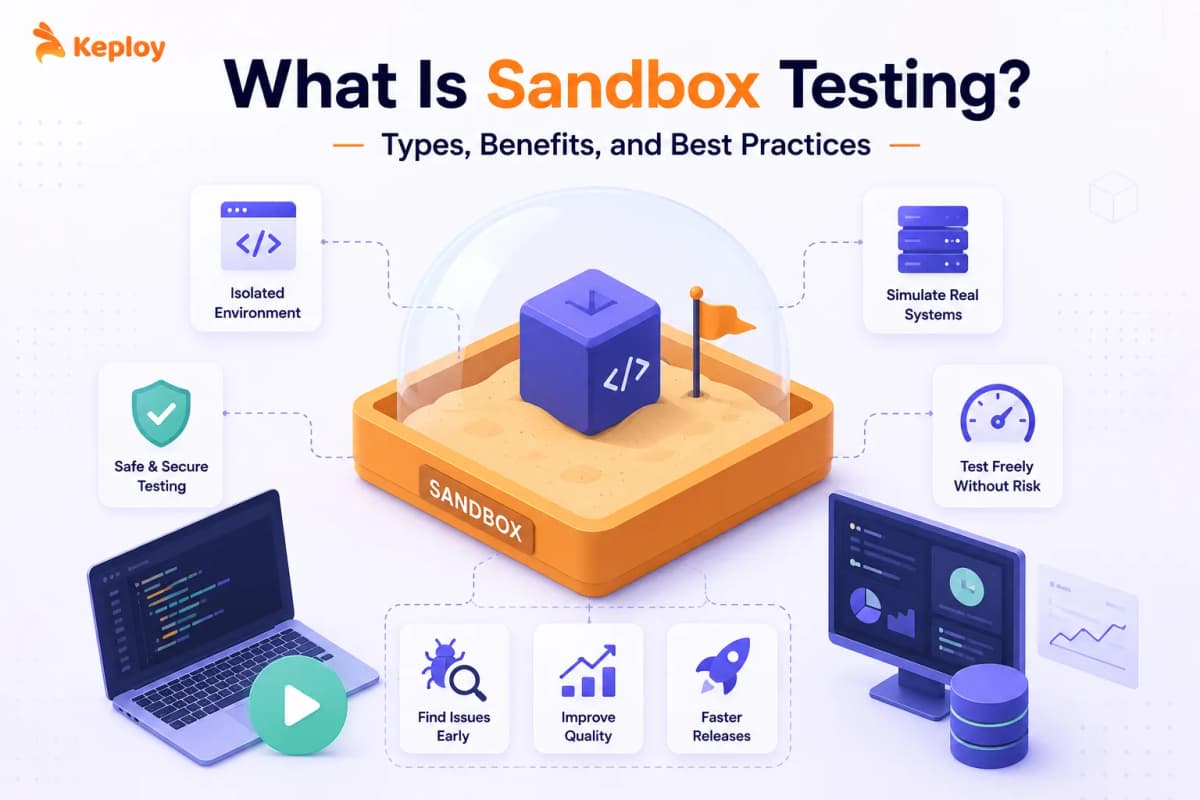
Sandbox testing is the practice of running tests in an isolated environment that can’t affect production systems or real data. Teams use it to validate new features, test third-party integrations like payment APIs, and simulate failure scenarios safely. When vendor sandboxes drift from their production APIs, tools like Keploy capture real traffic and replay it – keeping regression tests accurate regardless.
Sandbox testing catches the failures that staging misses, and production makes expensive. Every team reaches a point where testing against real systems stops being practical. The payment gateway costs money per call. The third-party notification service has rate limits. One wrong database query corrupts shared test data and breaks everyone’s runs.
A sandbox environment for testing gives you an isolated, controlled space where none of that matters. You can break things, simulate failures, and run thousands of tests without touching anything live.
What Is Sandbox Testing?
Sandbox testing is the practice of running tests in an isolated environment designed to prevent test activity from affecting production systems or real data. The environment can closely mimic production or include only the components needed for a specific test. Developers and QA teams use sandbox environments to validate new features, test integrations, and simulate edge cases without putting real users or real data at risk.
The key word is isolated. A sandbox test environment is separated from production by design. What you do inside it stays inside it. Sandbox test environment in practical terms, is the space where nothing you break matters outside of it.
It’s not just a "safe staging server." Sandbox environments can be purpose-built for specific testing scenarios, spun up per developer or per CI (Continuous Integration) run, and torn down when the work is done. They’re as narrow or as broad as the testing they support.
What Is a Sandbox Environment?
A sandbox environment is an isolated copy of an application, service or API where developers and testers can run code, try changes and test integrations without affecting production systems or real data. It can be a local Docker setup, a cloud environment created for each pull request, or a vendor’s test mode such as Stripe’s.
In software testing, it means any isolated environment built for safe, repeatable testing.
Why Do You Need a Sandbox?
The honest answer is that real environments are too expensive to break repeatedly. Payment APIs charge per call. External services enforce rate limits. Shared test databases accumulate state between runs. One developer’s test data change silently breaks another developer’s test suite. Fixing the failure takes longer than the feature that caused it.
A sandbox removes all of that overhead. You get an isolated copy of the system where test runs are cheap, failures are contained, and the environment resets on demand. A well-designed sandbox can shorten feedback loops by allowing teams to run isolated tests without depending on shared or production systems.
The specific need that drives most teams to sandboxes is third-party integration testing. When the system you are building touches payment gateways, identity providers, messaging services, or any external API, testing against the real thing is either expensive, unreliable, or both.
A sandbox – whether an official sandbox mode provided by the vendor or a mock server you control – lets you validate those integrations without the cost or the risk.
Sandbox vs Test Environment: Staging, UAT, and Production Compared
These terms get mixed up constantly. A test environment is a broad term for an environment used for testing; a sandbox is a type of test environment designed to provide stronger isolation and controlled experimentation. Here’s how they actually differ:
| Environment | Purpose | Primary Users | Data | Data Realism | Isolation | Production Readiness |
|---|---|---|---|---|---|---|
| Sandbox | Experimentation, integration testing, API validation | Developers, QA engineers | Synthetic or mocked | Varies | Fully isolated, often ephemeral | Not a gate – used continuously |
| QA / Testing | Functional, regression, and integration validation | QA engineers, automation suites | Anonymized or synthetic | Medium | Isolated, shared within QA team | Gates merge to staging |
| Staging | Pre-release validation, mirrors production | QA, DevOps, product managers | Near-production, anonymized | High | Isolated but persistent | Gates production deployment |
| UAT | Business acceptance, user validation | Business stakeholders, end users | Real-like or anonymized | High | Controlled | Final gate before launch |
| Production | Live system serving real users | End users | Real user data | Production | None | Live |
The sandbox is the most flexible of these. It doesn’t need to mirror production exactly. It needs to be isolated enough that you can test freely, fail safely, and reset cheaply.
For a complete breakdown of each environment’s components and setup, read our guide on test environment.
API Mocking vs API Sandbox Testing: What’s the Difference?
API mocking and API sandbox testing both let you test without hitting real services – but they work differently and serve different purposes. API mocking replaces a real API with a simulated response you define manually. API mocking replaces a real API with responses you control, while API sandbox testing uses an isolated environment that simulates the provider’s API behavior. The sandbox may be provided by the vendor or built and controlled by your team.
The practical difference comes down to who controls the response:
| Criteria | API Mocking | API Sandbox Testing |
|---|---|---|
| Who defines the response | You do, manually | The vendor does, automatically |
| Accuracy | As accurate as your mock definition | As accurate as the vendor’s sandbox |
| Setup effort | Higher – you write and maintain mock configs | Lower – vendor provides the environment |
| Drift risk | Your mock drifts when the real API changes | Vendor’s sandbox drifts from their own production |
| Best for | Services with no official sandbox, edge case simulation | Payment APIs, identity services, messaging platforms |
| Examples | WireMock, Mockoon, Postman mock servers | Stripe test mode, PayPal sandbox, Twilio test credentials |
Use mocks when you need fast, deterministic control over responses; use a vendor sandbox when you need to validate provider-specific integration behavior.
Mocks drift when you forget to update them. Vendor sandboxes drift when providers update production without updating their sandbox. Teams that need regression coverage grounded in actual API behavior use traffic capture tools like Keploy – which records real interactions and replays them, bypassing both sources of drift.
What are the Types of Sandbox Testing?
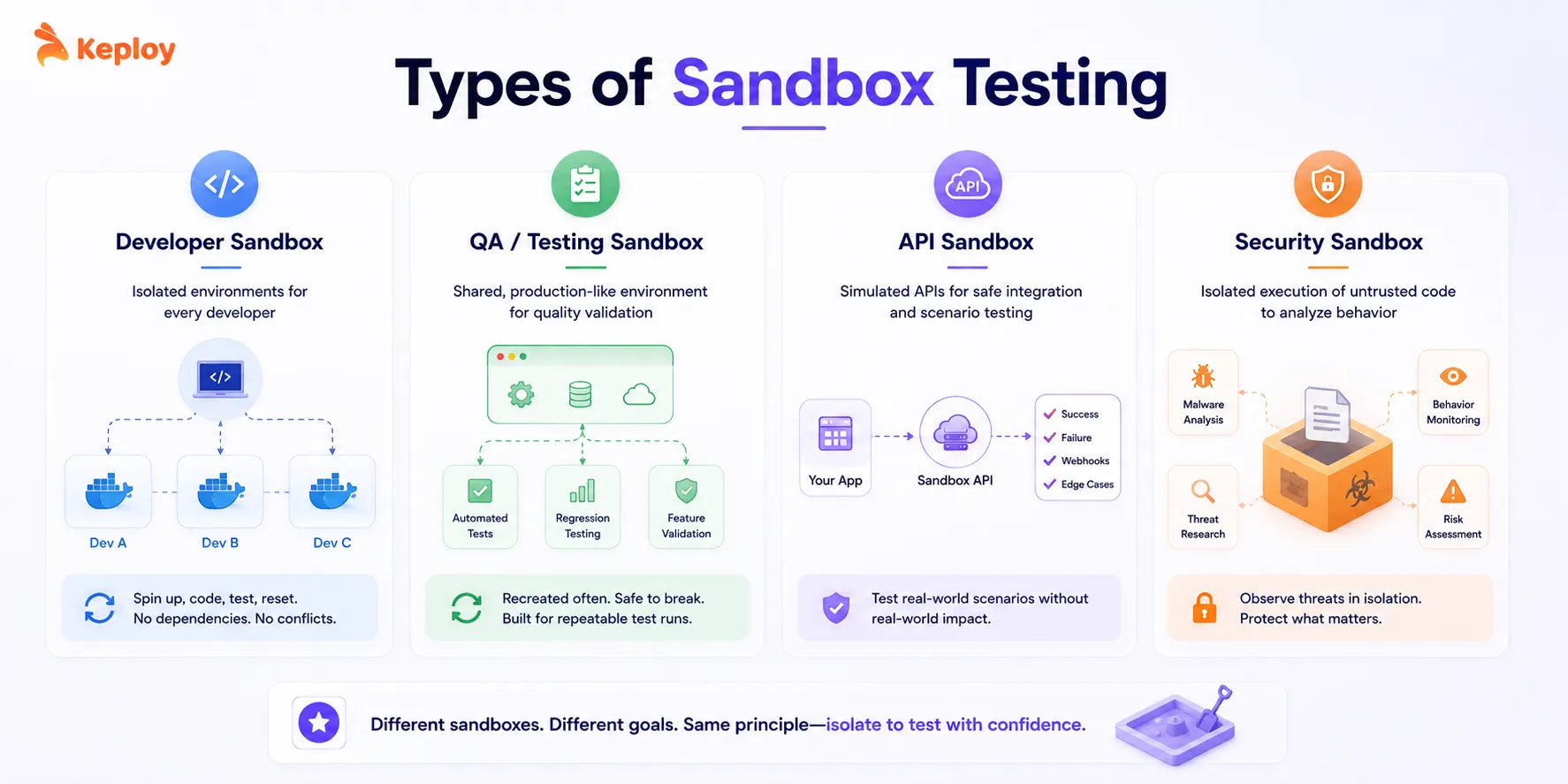
1. Developer Sandbox
When multiple developers share a test database, one person’s data changes silently, breaking someone else’s tests. Developer sandboxes exist to prevent that. Each engineer gets their own isolated environment (usually containerized) that they control, reset on demand, and don’t have to coordinate with anyone else to use.
Vercel is probably the most visible example of this pattern. Every PR (Pull Request) gets a full deployment preview automatically. Test in isolation, merge, environment gone.
- Common tools: Docker Desktop for running local containers, GitHub Codespaces if the team wants cloud-hosted dev environments without local setup, and Gitpod for workspaces that spin up directly from any branch.
2. QA Sandbox / Testing Sandbox
QA sandboxes sit between developer sandboxes and staging. More structured than what an individual dev would spin up locally, but cheaper to reset and more flexible than staging.
The typical use is regression testing, feature validation, and release qualification. The environment closely mirrors production, automated test frameworks plug into it, and multiple runs can happen in parallel without interference.
The staging comparison is worth being precise about. Staging is persistent and lives near staging vs production parity. A QA sandbox gets rebuilt more often and doesn’t need to hold that same fidelity. If something breaks the QA sandbox, you reset it. If something breaks staging, you’ve got a bigger problem.
- Common tools: Testcontainers for per-run database isolation, Docker Compose for the full stack definition, and Sauce Labs for running automated suites against real browsers and devices in a cloud environment.
3. API Sandbox Testing
API sandbox is an isolated copy of an API where you can send real requests and get realistic responses without touching live data or triggering real-world actions. API sandbox testing (sometimes called API sandboxing) is the practice of testing your integrations against that sandbox API instead of the production one. This is where most teams interact with sandbox environments on a daily basis without realizing it.
Stripe’s test mode is the most familiar version of this. When you call api.stripe.com/v1/charges with a test key, nothing real happens. You get a realistic response, a dashboard entry, even webhook events. But no actual money moves. PayPal has the same setup with separate buyer and seller sandbox accounts.
Most teams integrating with payment providers, identity services, or messaging APIs are doing API sandbox testing without necessarily calling it that. It’s particularly important for fintech and e-commerce teams. You can simulate a successful payment, a declined card, a webhook delivery failure, or a chargeback. All the scenarios that are either expensive or impossible to reproduce with real systems.
How Sandboxes Handle Dependencies Like Third-Party Services and APIs?
When your application calls external APIs – payment processors, identity providers, notification services – the sandbox needs a strategy for each one. There are three approaches teams use, and the right one depends on whether the dependency offers its own sandbox mode.
-
Official vendor sandbox modes are the most reliable starting point. Stripe, Twilio, SendGrid, PayPal, and most major API providers maintain separate sandbox environments with test credentials. Calls go to the real infrastructure but have no real-world effect. This is the closest approximation to production behavior without production consequences.
-
Mock servers handle dependencies that don’t offer a vendor sandbox. WireMock and Mockoon let you define expected request patterns and return configured responses. The advantage is full control over response content, timing, and error scenarios. The disadvantage is that the mock only knows what you tell it – if the real API changes its response format, your mock stays wrong until someone updates it.
-
Traffic capture and replay can provide a highly realistic baseline for interactions that were actually observed in production or staging. Tools like Keploy record real API interactions from production or staging and replay those exact responses in the sandbox. Because the recordings come from real interactions, they can reflect observed API behavior more closely than manually defined mocks. Production traffic should be filtered or sanitized before replay to remove sensitive data such as authentication tokens and personally identifiable information.
The catch is that third-party test-mode APIs don’t always stay in sync with their production counterparts. Response formats drift. New fields appear in production before they’re reflected in the vendor sandbox.
When that happens, tools that record real production traffic – such as Keploy or GoReplay – can reduce drift risk by giving tests a more accurate baseline than the third-party sandbox alone.
- Common tools: Stripe test mode and PayPal sandbox for payment integrations, WireMock and Mockoon for services that don’t offer their own sandbox, Postman’s mock server feature for quickly simulating API responses during early development, and Keploy for capturing real production traffic when third-party sandboxes aren’t reliable enough to trust.
How to Build Your Own API Sandbox When a Partner Doesn’t Offer One
Not every partner integration comes with a vendor sandbox. Internal APIs from other teams, smaller SaaS providers and legacy systems often have nothing to test against. In that case, teams build their own API sandbox in one of three ways:
- Mock API from the spec: generate a mock API from the provider’s OpenAPI document, so responses follow the agreed contract.
- Hand-configured mock server: use a tool like WireMock or Mockoon to define the responses and error cases you need.
- Recorded traffic: record real interactions with the API once, in staging or production, and replay them as the sandbox. The responses match what the API actually returned, not what someone assumed it would return.
A sandbox built from simulated dependencies like this is a form of service virtualization: the API becomes a virtual service your tests can call on demand.
4. Security Sandbox
Security sandboxes serve a different purpose: safely executing untrusted code or suspicious files to observe their behavior without exposing the broader system.
Cybersecurity teams use sandboxes to detonate potential malware. ANY.RUN’s 2025 report found sandbox sessions in security contexts grew 72% year over year, driven largely by AI-generated code analysis and threat research. This type of sandbox is more common in security engineering than in QA, but it shares the same core principle: isolation prevents damage.
- Common tools: Cuckoo Sandbox, an open-source automated malware analysis platform; ANY.RUN, an interactive online sandbox for real-time threat analysis; and Joe Sandbox, a commercial platform used by enterprise security teams for deep behavioral analysis of suspicious files and URLs.
How to Set Up a Sandbox Test Environment
The goal is isolation, repeatability, and easy reset. Everything else follows from that.
Step 1: Map Your Dependencies
- Start by mapping what the sandbox actually needs. Not everything from production belongs in it. Which APIs does your code call? Which database tables? Which external services? List those dependencies first and expand only when a test genuinely requires something new.
Step 2: Containerize With Docker Compose
- Use containers. Docker Compose is the standard starting point for defining your stack in a single file that anyone on the team can spin up locally or in CI. Commit that file to version control and treat changes to it the same way you’d treat application code changes.
Step 3: Handle External Services
- For external services, check whether they offer an official sandbox mode first. Stripe, Twilio, and SendGrid do. For everything else, WireMock or Mockoon can simulate the responses you need without calling the real service.
Step 4: Manage Test Data
Managing test data in a sandbox without real user data means generating synthetic data that structurally matches production. Use programmatic data factories (Faker, Factory Boy, Factory Bot) to generate realistic names, emails, addresses, and payment details for each test run. For structured datasets, Mockaroo generates large volumes in JSON, CSV, or SQL format. For database seeding, generate data at test setup and clean it up at teardown – never share seed data between runs.
The rule is simple: if it looks like a real person’s data, it shouldn’t be in your sandbox.
- Test data is where most sandbox setups eventually break down. Static seed files work fine initially, but they go stale as your schema evolves. Switching to programmatic data factories early saves a lot of debugging later. Avoid using production personal or sensitive data in sandboxes. Prefer synthetic or properly anonymized test data and apply the same data-security controls required for your environment.
Step 5: Make CI Ephemeral
- In CI, make the sandbox ephemeral. Each pipeline run gets a fresh environment, runs the tests, and tears it down. Shared, persistent sandboxes accumulate state between runs and produce failures that look random because they sort of are.
One thing most teams skip until it bites them: version-controlling all environment configuration. If the sandbox setup lives in someone’s head or a local file, it will drift. When it does, nobody can tell when it happened or what changed.
Using a Testing Sandbox in Automation
Manual vs. Automated Testing in a Sandbox
Both work. Which you lean on depends on what you’re trying to validate.
-
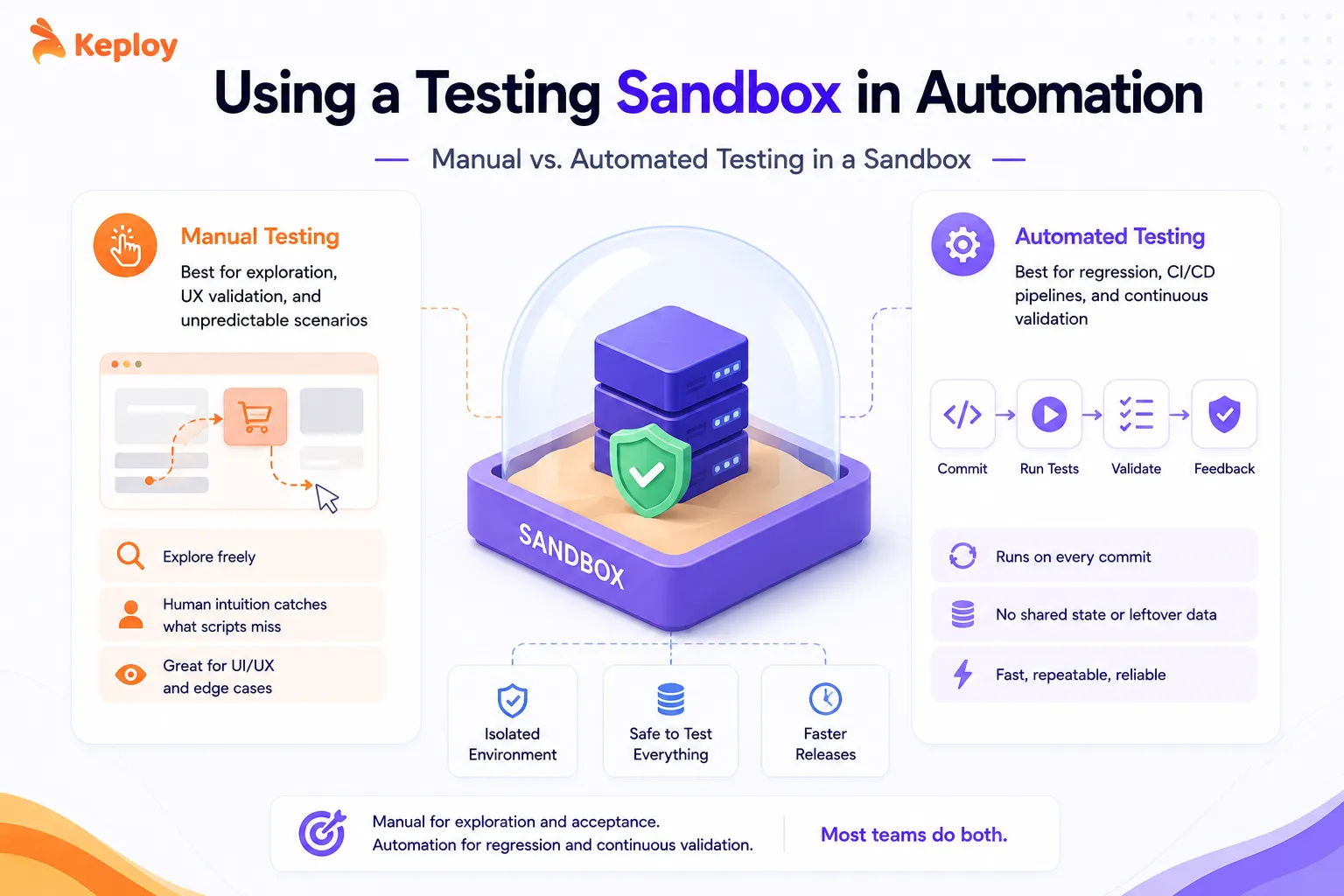
Manual testing in a sandbox is good for exploratory work, UX validation, and situations where the test scenario is too unpredictable to script. A QA engineer manually walking through a payment flow in Stripe’s sandbox will catch UI edge cases and interaction quirks that no automated script would think to check.
-
Automated testing is where sandbox environments earn their keep over time. Regression suites running against the sandbox on every commit catch breakages before they reach staging. No shared state, no external rate limits, no data left over from someone else’s session the day before.
Use manual testing for exploration and acceptance. Use automation for regression and continuous validation. Most teams end up doing both.
How to Integrate Sandbox Testing into Your Automation Pipeline
A common CI pattern is to create the sandbox for each pull request or test run, execute the required tests, collect the results, and tear the environment down afterward.
In practice, this means your CI pipeline spins up the sandbox on PR creation, runs the test suite, and reports results back before the PR can be merged. Here’s how most teams structure this with GitHub Actions:
name: Sandbox Test Suite
on: [push, pull_request]
jobs:
test:
runs-on: ubuntu-latest
A few things worth noting in this setup. The docker-compose.test.yml file is separate from your main compose file specifically for the sandbox configuration. STRIPE_TEST_KEY is a test-mode credential, not a real key. And the teardown step runs regardless of whether tests passed or failed.
Stage your tests by speed. API contract tests and smoke tests run first and should finish in under five minutes. Slower integration tests run after. Don’t run a full stack sandbox for tests that only need an in-memory database.
The other thing that makes a big difference: environment variables for switching between sandbox and production configs. The same test code should run against sandbox credentials in CI and against real service credentials in production smoke tests. Only the environment variables change.
Examples of Sandbox Testing in Practice
1. Stripe
Stripe’s test mode is one of the best-known API sandboxes in the industry. Developers get a full parallel API environment with test card numbers, simulated webhook events, and a dashboard showing test transactions. Teams at companies like Shopify and Notion use Stripe’s sandbox to run complete payment flow tests in CI without touching real money.
2. PayPal
PayPal’s developer sandbox provides separate buyer and seller accounts for testing the full transaction lifecycle. Teams building marketplace and e-commerce integrations simulate everything from successful checkouts to dispute resolution flows before going live.
3. Salesforce
Salesforce offers multiple sandbox tiers (Developer, Developer Pro, Partial Copy, Full) for different testing needs. Engineering teams at enterprise companies use Salesforce sandboxes to validate CRM automation, custom logic, and integration changes before deploying to the production org. Salesforce’s own documentation strongly recommends that no changes go directly to production without sandbox validation first.
4. GitHub Actions Preview Environments
Teams using GitHub Actions often combine ephemeral sandbox environments with PR workflows. Each PR spins up a fully deployed preview version of the application, runs automated tests against it, and tears it down after merge. Vercel and Netlify have made this pattern mainstream for frontend teams.
Crowdtesting vs. Sandbox Testing
These two testing approaches are sometimes compared, but they serve fundamentally different purposes.
| Sandbox Testing | Crowdtesting |
|---|---|
| Controlled, isolated, synthetic | Real devices, real networks, real conditions |
| Internal developers and QA engineers | External crowd of real users |
| Mocked or synthetic data | Real user behavior |
| Fast, automated, repeatable | Slower, qualitative, exploratory |
| Best for integration testing, API validation, and regression | Best for UX testing, real-device coverage, and localization |
| Can’t replicate real user behavior or device diversity | Expensive, hard to reproduce failures consistently |
| Used early and continuously throughout development | Used before major releases, for coverage at scale |
Sandbox testing gives you control. Crowdtesting gives you reality. Teams that ship with confidence use both: sandbox environments for continuous automated validation, crowdtesting for release readiness on real devices with real users.
Benefits of Sandbox Environment Testing
The most immediate one is safety. Destructive operations, failure scenarios, risky integrations – you can test all of it without any real-world consequences. Simulating a database wipe or a payment failure cascade in a sandbox takes a few lines of config. Doing the same in staging risks actual data.
-
Speed is the second thing teams notice. Round-trip latency to real external services adds up fast. No waiting on Stripe’s API, no hitting SendGrid rate limits, no contention on shared infrastructure. Teams using containerized sandbox environments in CI, can cut integration test runtime significantly compared with calling live services.
-
Cost matters more than people expect. A team running thousands of tests daily against real payment APIs, SMS providers, or data enrichment services accumulates real bills. Sandboxes eliminate that cost entirely.
-
Parallel testing without conflicts is something teams don’t appreciate until they’ve lost an afternoon to "someone else broke the shared test database." Each developer gets their own sandbox. They can run the same tests simultaneously without stepping on each other’s data.
-
Edge case coverage is genuinely easier in a sandbox. Forcing a specific error code, simulating a network timeout, triggering a race condition – these are hard to reproduce consistently in staging and impossible to do safely in production. In a sandbox, they’re just test scenarios.
-
Regulatory compliance is non-negotiable for fintech and healthcare teams. Testing with real customer data is often legally prohibited. Sandboxes let you validate against synthetic data that structurally matches production without the compliance exposure.
Where Sandbox Testing Falls Short
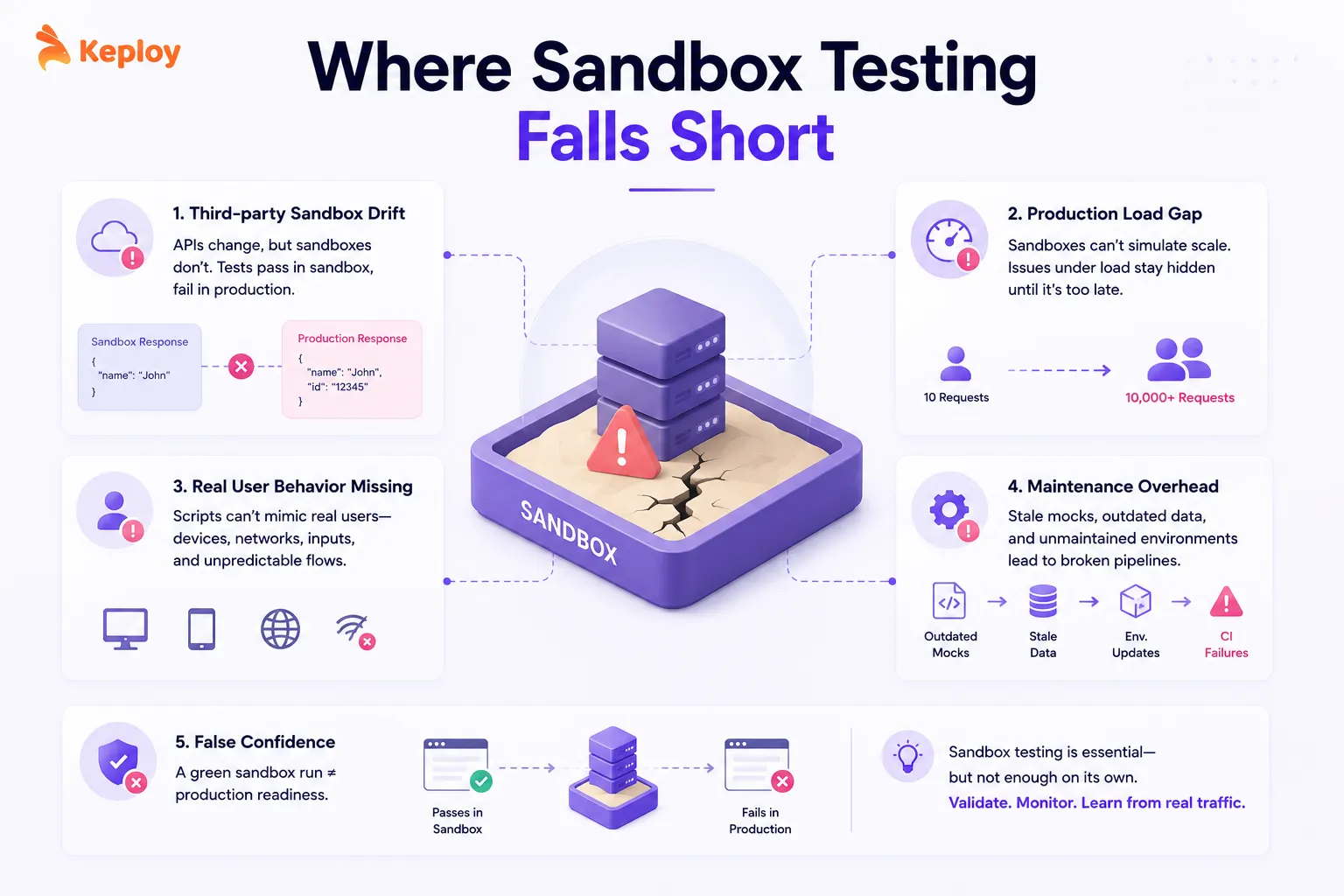
- Third-party sandbox drift is the most underappreciated problem in API sandbox testing. External sandboxes maintained by Stripe, PayPal, banking APIs, or other providers don’t always stay in sync with their production APIs. New fields appear in production responses before they’re reflected in sandbox responses. Rate-limiting behavior differs. Webhook payloads have subtle inconsistencies. Tests pass in the sandbox and fail in production, not because your code is wrong, but because the sandbox was lying.
One practical fix: tools like Keploy that capture real production traffic give you a more accurate baseline than third-party sandbox responses alone. When the sandbox drifts, recorded real interactions don’t.
2. Production load is something sandboxes simply can’t replicate. A sandbox handling 10 concurrent requests tells you nothing about behavior under 10,000. Performance bottlenecks, database contention under load, and caching edge cases at scale all stay hidden until they hit production.
3. Real user behavior is missing. This one’s easy to underestimate. Sandbox environments run scripted, predictable interactions. Real users bring unusual device configurations, intermittent network connections, unexpected input sequences, and browser quirks that no test script anticipates. Crowdtesting covers this gap; sandboxes don’t.
4. Maintenance compounds quietly. Mock configs go stale when APIs change. Seed data stops matching the schema after migrations. Containerized environments need version updates. If nobody specifically owns sandbox maintenance, it slowly becomes the source of CI failures that everyone assumes is a flaky test rather than a broken environment.
Finally, passing in a sandbox doesn’t mean passing in production. Teams that treat a clean sandbox run as the bar for confidence get surprised. It’s a necessary validation layer, not a complete one. Teams that want coverage beyond what sandboxes offer often pair it with production testing strategies.
Sandbox Testing Tools
The right sandbox testing tool depends on the job. To record and replay real API traffic: Keploy, GoReplay or Hoverfly. To create isolated environments: Docker Compose, Testcontainers or Kubernetes namespaces. To simulate external APIs: WireMock, Mockoon or Postman Mock Servers. To generate test data: Faker, Mockaroo or Factory Bot/Boy.
1. Environment Provisioning
These tools create and manage isolated sandbox environments.
-
Docker + Docker Compose: The standard for containerized sandbox environments. Define your entire stack in a single file, spin it up locally or in CI, and tear it down cleanly. Almost every team uses Docker at some layer of their sandbox setup.
-
Testcontainers: Spins up real database and service instances programmatically for each test run, then cleans them up automatically. If your sandbox relies on a shared test database and you’re seeing random failures, Testcontainers solves it at the source.
-
Kubernetes with ephemeral namespaces: For teams running complex multi-service sandboxes, ephemeral Kubernetes namespaces per CI run provide clean isolation at scale without dedicated environments per engineer.
2. API Mocking and Service Virtualization
These tools simulate external services your sandbox needs to interact with.
-
WireMock: Defines HTTP mock services with request matching, dynamic responses, and fault injection – fixed delays, random delays, malformed responses, and connection resets. Use it when you need to simulate downstream failures and error conditions that real APIs rarely produce on demand. Runs standalone or embedded inside a JVM test suite.
-
Mockoon: A desktop and CLI tool for designing and running mock APIs locally with no code. Supports delay simulation and basic fault injection. Use it when you need the fastest local setup with minimal configuration – individual developers and small teams building against APIs with no official sandbox mode.
-
Postman Mock Servers: If your team already uses Postman for API documentation, mock servers let you spin up simulated endpoints from existing API specs with minimal extra work.
When choosing between these tools:
- Use WireMock when fault injection depth and request matching matter.
- Use Mockoon when local setup speed matters.
- Use Postman Mock Servers when your team already uses Postman for API documentation.
- Use Keploy when you want mocks derived from real traffic rather than manually defined responses.
For how virtual services differ from simple mocks and when to use each, read our guide on service virtualization.
3. Test Data Management
Managing realistic, isolated test data in sandbox environments.
-
Faker (various languages): Generates realistic synthetic data for test seeding. Names, addresses, credit card numbers, email addresses that look real but aren’t.
-
Mockaroo: An online and API-based tool for generating large volumes of realistic test data in multiple formats (JSON, CSV, SQL). Useful for teams that need structured datasets without building a factory from scratch.
-
Factory Bot (Ruby) / Factory Boy (Python): Programmatic test data factories that generate exactly what each test needs and clean up afterward.
4. API Traffic Capture and Replay
For teams whose biggest sandbox problem is unreliable third-party API sandboxes.
-
Keploy: Records real API traffic from production or staging environments, including all dependency calls to databases and downstream services, and converts those interactions into replayable test cases that run in CI. When third-party sandboxes drift from production behavior or go down entirely, captured real traffic is a more reliable source of truth for API regression testing.
-
GoReplay: Open-source HTTP traffic mirroring. Captures production traffic and replays it against a new version of your service for comparison testing.
-
Hoverfly: API simulation tool that records real HTTP interactions and replays them in sandbox environments. Supports both capture and synthetic simulation modes.
How Keploy Bridges the Gap in Sandbox API Testing
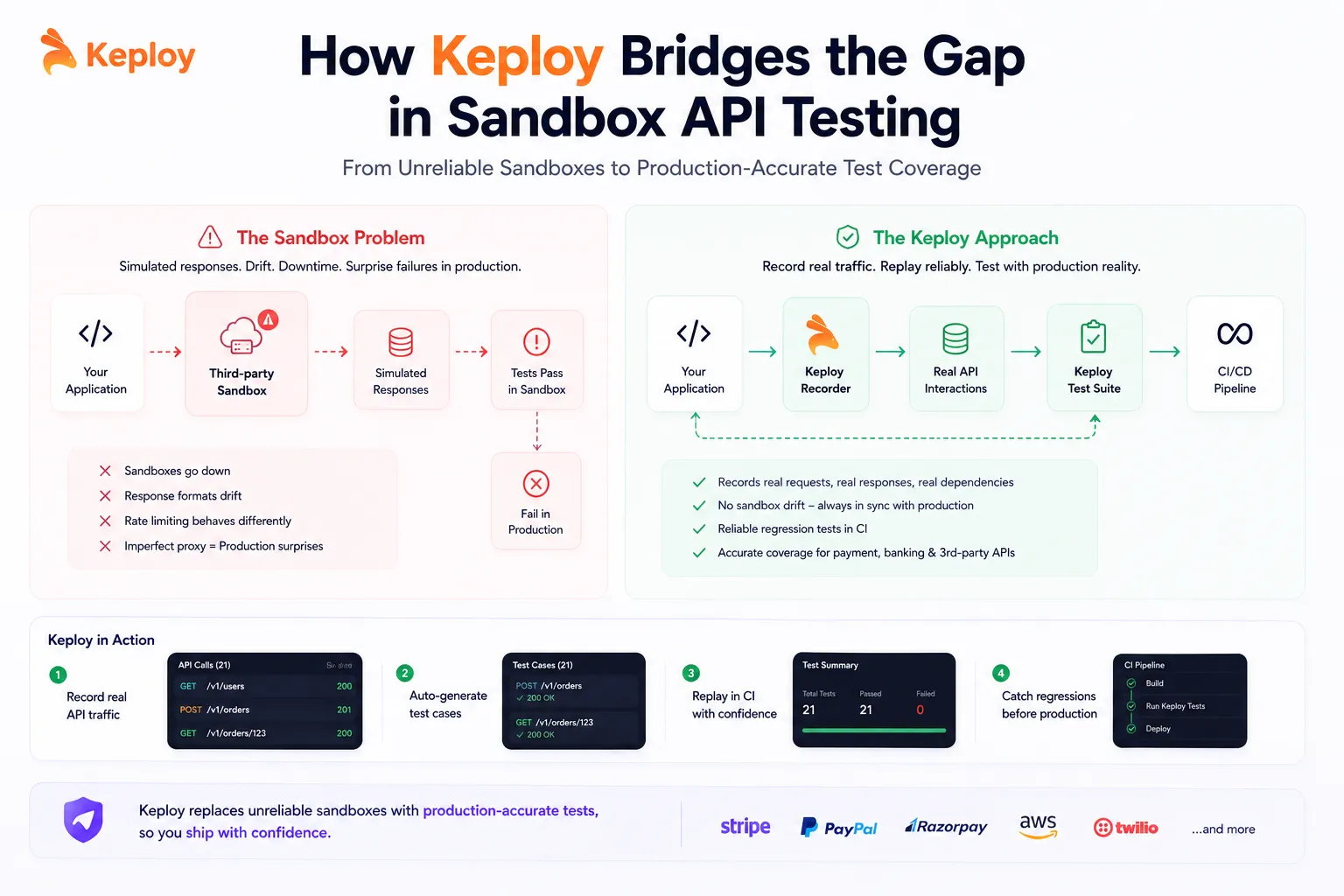
Traffic capture and replay improves sandbox testing by replacing synthetic mock responses with real API interactions recorded from production. Instead of approximating what an API returns, tools like Keploy capture what it actually returned – making regression tests accurate even when third-party sandboxes drift or go down entirely.
The limitation that causes the most production surprises isn’t missing test coverage. It’s the gap between what sandbox environments simulate and what production actually does.
Third-party sandboxes can differ from production in response behavior, supported features, rate limits, data, or availability. These differences can create gaps between integration tests and production behavior. Teams end up with tests that pass consistently in the sandbox and fail in production because the sandbox was an imperfect proxy.
Keploy takes a different approach. Instead of simulating what you expect an API to return, it records what the API actually returned during real usage and replays those interactions in CI. The test data isn’t synthetic. It came from real requests, real responses, and real dependency calls.
For teams building on top of payment APIs, banking integrations, or any third-party service with an unreliable sandbox, this means regression coverage that’s grounded in production reality rather than sandbox approximation.
Traffic capture and replay also serves two use cases that static mocks can’t cover:
- Performance testing based on observed production traffic patterns rather than entirely synthetic request patterns.
- Debugging – when a specific request pattern causes a production incident, replaying that exact traffic in a sandbox reproduces the failure deterministically without waiting for it to recur.
The practical contrast: a mock returns what an engineer assumed the API would return when the mock was written. Captured traffic returns what the API actually returned during real usage. As the API evolves, the mock stays frozen. Captured traffic reflects the API as it actually behaved.
Conclusion
Sandbox testing doesn’t make headlines. It’s not a new framework or a hot methodology. It’s just the practice of not testing in production until you’re ready to, and not waiting until staging to catch things that a proper isolated environment would have caught much earlier. Teams that do it well ship faster. Not because they skip validation, but because their validation loop is cheaper to run, easier to automate, and less likely to produce failures nobody can explain.
The tools are mature. The patterns are well-established. The main thing separating teams that test well from teams that don’t is usually discipline: keeping sandboxes isolated, keeping configurations in version control, and not letting "it worked in sandbox" become the bar for confidence.
Key Takeaways
- Use ephemeral isolated test environments in CI – each pipeline run gets a clean state and tears down after
- Third-party API sandboxes drift from production; don’t rely on them as your only regression source
- Traffic capture and replay gives more accurate test data than synthetic mocks when vendor sandboxes are unreliable
- Never use real user data in a sandbox – generate synthetic data programmatically using tools like Faker or Mockaroo
- Version-control all sandbox configuration or it will drift silently and produce failures nobody can explain
Frequently Asked Questions
What is Sandbox Testing in Software Testing?
Sandbox testing means running your tests in an isolated environment that’s cut off from production. Nothing you do in there affects real users or real data. It’s where you experiment with integrations, simulate failures, and break things on purpose before those things have a chance to break in front of customers.
How Does Traffic Capture and Replay Improve Sandbox Testing?
Traffic capture and replay improves sandbox testing by recording real API interactions from production and replaying them in CI, replacing the need to depend on third-party sandbox environments for accuracy. When a vendor’s sandbox drifts from their production API, which happens regularly with payment, identity, and messaging services, recorded real traffic doesn’t drift with it. Tools like Keploy capture requests, responses, and dependency calls at the network layer without code changes, converting them into replayable test cases that run deterministically in any environment.
What are the Limitations of Third-party Sandbox Environments?
Third-party sandboxes drift from their own production APIs: response formats, new fields, and webhook payloads can diverge without notice. Rate-limiting behavior in the sandbox often doesn’t match production. Some failure scenarios, like a specific decline reason, are hard to trigger on demand. And the sandbox can go down independently of your own systems, blocking CI even when your code hasn’t changed. Recording real traffic with a tool like Keploy gives you a baseline that doesn’t drift with the vendor’s sandbox.
How Do You Choose between API Mocking and Sandbox Testing?
Mock the API when you need full control over the response, you’re testing failure conditions the real API won’t trigger on demand, or the dependency has no official sandbox. Use the vendor’s sandbox when one exists, since it needs no manual upkeep and stays closer to real behavior. Most teams use both: the vendor sandbox for standard flows, mocks for edge cases, and recorded real traffic when both drift from production.
What is the Difference between a Sandbox and a Staging Environment?
A sandbox is one type of test environment; staging is another. In short: sandbox is for experimentation, staging is for release validation. Sandboxes are flexible, often ephemeral, and built for developers and QA to test freely with synthetic data. Staging is more permanent, closer to production parity, and exists to answer the question "is this ready to ship?" You’d typically test a new integration in a sandbox first, then validate the full release in staging.
Is Sandbox Testing the Same as UAT?
No, they’re quite different. UAT is about business validation: real users or stakeholders checking that the system does what it’s supposed to do, typically in a near-production environment. Sandbox testing is a technical practice owned by developers and QA, focused on integration correctness and regression coverage in an isolated environment. Different goals, different people, different stages.
When Should Teams Use Sandbox Testing versus Crowdtesting?
Sandbox testing gives you control; crowdtesting gives you reality. Use a sandbox for continuous automated validation during development: integration tests, regression suites, API contract checks. Use crowdtesting for release readiness on real devices, real networks, and real user conditions a sandbox can’t replicate. Teams that ship with confidence use both in sequence: sandbox first, crowdtesting before launch.
What Tools are Used for Sandbox Testing?
Depends on what layer you’re working on. Docker and Testcontainers handle environment provisioning. WireMock and Mockoon simulate external services that don’t have their own sandbox mode. Faker and Mockaroo generate realistic test data. For API regression testing specifically, tools like Keploy capture real traffic and replay it in CI, which is useful when third-party sandboxes aren’t reliable enough to trust.
What is an API Sandbox?
An API sandbox is an isolated version of an API that accepts real requests and returns realistic responses without affecting live data. Providers like Stripe and PayPal offer sandbox APIs with test credentials so developers can build and test integrations safely. When a provider doesn’t offer one, teams create their own API sandbox with mock servers or recorded traffic.
What is a UAT Sandbox?
A UAT sandbox is a sandbox environment set up for user acceptance testing, where business users check that a feature works as expected using realistic but non-production data. Unlike a developer sandbox, it is shared, kept stable during the test cycle, and configured to match production as closely as possible.
Is Docker a Sandbox Environment?
Docker can be used as a sandbox environment for testing. Each container runs in isolation with its own filesystem and network, so you can start your app and its dependencies, run tests, and tear everything down. For running untrusted code, it is weaker than a virtual machine, because containers share the host’s kernel.
How Can I Create My Own Sandbox?
List the services and data your tests need, then define them in a Docker Compose file. Use vendor test modes (like Stripe’s) or mock servers such as WireMock for external APIs, seed synthetic test data with a tool like Faker, and create a fresh environment for every CI run. The full steps are in "How to Set Up a Sandbox Test Environment" above.
What Is the Best Sandbox Testing Tool for Backend APIs?
It depends on where your test responses come from. If the provider offers a test mode (Stripe, PayPal, Twilio), use it for standard flows. For APIs without one, WireMock or Mockoon let you define responses and failures yourself. If you want tests based on what the API actually returned, Keploy records real API traffic and dependency calls and replays them in CI.