






Automated functional testing means using scripts or tools to check that each feature of an application does what the requirements say, without a person clicking through every step. The tool sends the inputs, compares the result with what was expected and flags anything that breaks, on every build if you want it to.
That is the textbook version. The practical version is simpler: you stop re-testing the login page by hand every Friday afternoon.
Most teams start automating for exactly that reason. A release goes out, someone changes a validation rule, and checkout breaks for users with a saved card. Nobody tested that path because nobody had time to test every path. Automation does not make you smarter about what to test, but it does make sure the things you decided to test actually get tested, every time.
This guide covers what to automate first, how to set it up step by step, where AI helps and where it doesn’t, and the tools teams actually use. If you want the basics of functional testing itself first, start with our guide to what functional testing is.
What is automated functional testing?
Functional testing checks behavior: given this input, does the application produce the right output? Automated functional testing runs those checks with code or a tool instead of a person.
A manual tester might open the app, log in, add a product to the cart, apply a coupon and confirm the total drops by 10%. An automated functional test does the same thing through a browser driver or an API call, then asserts that the total is correct. It takes seconds instead of minutes, and it never forgets a step because it was in a hurry.
Automated functional tests usually work at one of three layers:
- API layer: send requests to endpoints and check status codes, response bodies and side effects. Fast and stable.
- UI layer: drive a real browser or mobile app and check what the user sees. Closest to real usage, but slower and more fragile.
- Service layer: test a single service with its dependencies replaced by mocks, so failures point to that service alone.
Good suites lean heavily on the API layer and keep UI tests for the handful of journeys that matter most.
Manual vs automated functional testing
Neither one replaces the other. They are good at different things.
| Manual functional testing | Automated functional testing | |
|---|---|---|
| Best for | Exploratory testing, new features that are still changing, look and feel | Regression checks, stable features, API tests, smoke tests |
| Speed | Minutes to hours per run | Seconds to minutes per run |
| Repeatability | Varies from person to person | Identical every run |
| Cost over time | Grows with every release | High upfront, low per run |
| Catches | Confusing UX, odd edge cases a human notices | Anything that used to work and now doesn’t |
| Weak spot | Slow, easy to skip under deadline pressure | Breaks when the app changes, needs maintenance |
A rule of thumb that holds up well: if you have run the same manual test more than three times and expect to run it again, automate it. For a deeper comparison, see manual vs automation testing.
What should you automate first?
Teams that try to automate everything at once usually end up with a large, flaky suite that nobody trusts. Start narrow and expand.
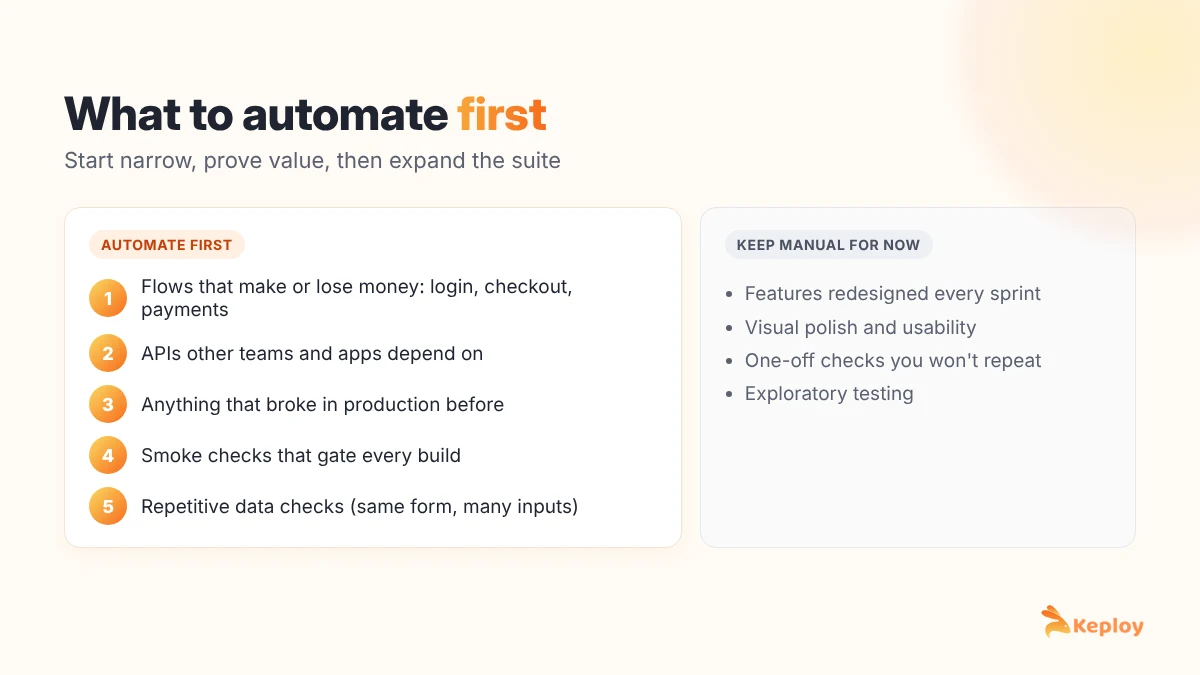
Automate these first:
- Flows that make or lose money: login, signup, checkout, payments, subscription changes.
- APIs other teams depend on: if a mobile app and a partner integration both call your orders API, a broken response breaks both.
- Things that broke before: every production bug is a test case waiting to be written.
- Smoke checks: the five or six checks that tell you a build is worth testing further.
- Repetitive data checks: the same form with fifty input combinations is a perfect job for a data-driven test.
Leave these manual, at least for now:
- Features still being redesigned every sprint. You will rewrite the tests more often than you run them.
- Visual polish and usability. A script can tell you a button exists; it can’t tell you the page feels confusing.
- One-off migrations or checks you will genuinely never run again.
How to automate functional tests, step by step
1. Pick the scenarios
Write down the user flows and API behaviors from the list above. For each one, note the happy path and the two or three failure paths that matter most, such as a wrong password, an expired coupon or a missing required field.
2. Choose the layer for each test
Ask where the behavior actually lives. Price calculation lives in the backend, so test it through the API. The fact that the price shows up correctly on the page is a UI concern, and one UI test for it is enough.
3. Pick your tools
Choose tools that fit your stack and your team. Developers usually prefer code-based frameworks like Playwright or Cypress for the browser. For APIs, you can script tests by hand or generate them. We compare the main options in our guide to functional testing software.
4. Sort out test data and dependencies
This is the step most teams underestimate. Tests need known data: a user that exists, a product with stock, a coupon that is valid. They also need dependencies that behave predictably. A test that calls a real payment gateway will fail the day the sandbox is down, and you will waste an hour finding out it wasn’t your code. Use seeded test data and mock the third-party services you don’t control.
5. Write or generate the tests
Keep each test focused on one behavior with a clear assertion. "Order total equals 90.00 after coupon SAVE10" is a good assertion. "Page loaded" is not.
6. Run them in CI
A test that only runs on someone’s laptop will stop running within a month. Wire the suite into your pipeline so it runs on every pull request.
7. Maintain them like production code
Review test changes in pull requests, delete tests that no longer reflect real behavior, and fix flaky tests the same week they appear. A suite with three known-flaky tests teaches everyone to ignore red builds.
Automated functional testing in CI/CD
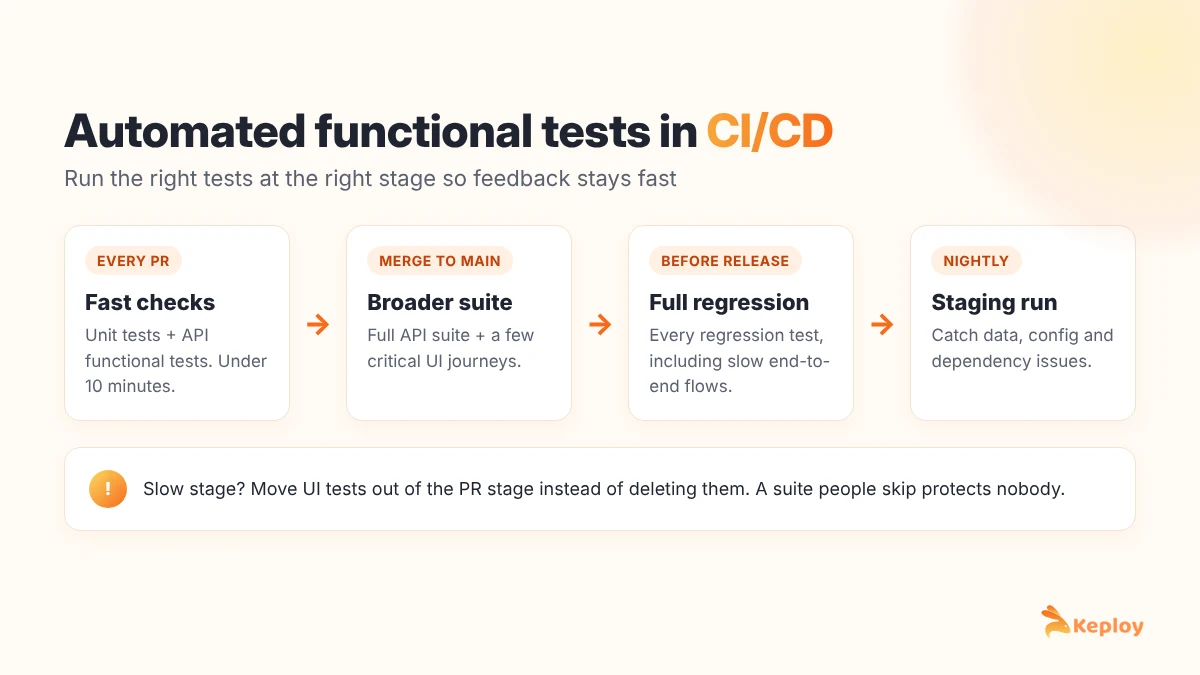
Automation pays off when it runs without anyone remembering to run it. A setup that works for most teams:
- On every pull request: unit tests plus fast API functional tests. Aim for under ten minutes so developers actually wait for the result.
- On merge to main: the full API suite plus a small set of UI tests for critical journeys.
- Before a release: the full regression suite, including slower end-to-end flows.
- On a schedule: nightly runs against staging to catch problems with data or dependencies that don’t show up in a single PR.
If a stage regularly takes too long, move slow UI tests out of the pull request stage instead of deleting them. Our CI/CD testing guide covers pipeline design in more detail.
Where AI helps in automated functional testing
AI is useful here, but it’s worth being specific about where.
Where it helps:
- Generating test cases from real traffic, specifications or existing code, so you start with coverage instead of a blank file.
- Suggesting edge cases you didn’t think of, such as empty strings, unicode names or very large numbers.
- Self-healing UI locators when a button’s ID changes but its label and position don’t.
- Summarizing why a test failed by comparing the expected and actual responses.
Where it doesn’t:
- Deciding what the correct behavior is. If the requirement is ambiguous, a tool can’t resolve that for you.
- Replacing review. Generated tests still need someone to check that the assertions match what the business actually wants.
For a broader look at the tools in this space, see our list of AI testing tools.
How Keploy automates API functional testing
Writing API tests by hand is slow, and keeping them in sync with a changing API is slower. Keploy takes a different route: it builds the tests from traffic your application already handles.
Here’s how it works:
- Record: Keploy captures real API calls to your service using eBPF, along with the calls your service makes to databases, caches and other APIs.
- Generate: each captured request and response becomes a test case. Each downstream call becomes a mock, so the test doesn’t need a live database or third-party service.
- Replay: in CI, Keploy replays the requests against the new build and compares the responses with the recorded ones. Any unexpected change shows up as a failing test.
- Update: when you change an API on purpose, you re-record instead of rewriting assertions by hand.
Because the tests come from real usage, they cover the paths users actually take, including the odd ones nobody would think to script. Keploy handles the API and backend side; pair it with a browser tool for the few UI journeys you want to check end to end.
Try Keploy API testing to generate functional tests for your services.
Automated functional testing tools
| Tool | Layer | Good fit for |
|---|---|---|
| Keploy | API and backend | Generating API functional and regression tests with mocks from real traffic |
| Playwright | Web UI | Fast, reliable cross-browser tests for modern web apps |
| Cypress | Web UI | Frontend teams working in JavaScript |
| Selenium | Web UI | Wide language and browser support, large existing suites |
| Postman | API | Exploring APIs and small scripted test collections (Keploy vs Postman) |
| Appium | Mobile UI | Cross-platform Android and iOS apps |
| UFT One | Desktop, web, enterprise apps | Enterprise teams testing SAP, Oracle or desktop software |
For more options and how to choose between them, see our roundup of test automation tools.
Common mistakes that kill automated suites
- Testing through the UI what belongs in the API. UI tests for business logic are slow and break for reasons unrelated to that logic.
- Shared test data. When test A changes a record that test B depends on, both fail at random depending on run order.
- Calling real third-party services. Your build should not depend on someone else’s sandbox being up.
- Long tests that check twenty things. When one fails, you don’t know which of the twenty broke.
- Ignoring flaky tests. Once people learn to re-run until green, the suite has stopped protecting you.
- No owner. Tests that belong to everyone get fixed by no one.
FAQs
What is automated functional testing?
Automated functional testing uses scripts or tools to check that an application’s features work according to their requirements, without manual effort. The tool runs the inputs, compares the actual results with the expected ones and reports any differences.
What is the difference between functional test automation and test automation?
Test automation is the broad term for automating any kind of test, including performance and security tests. Functional test automation is the part that checks features and behavior against requirements.
Which functional tests should be automated first?
Start with flows that affect revenue or users the most, such as login, checkout and payments, then add APIs other teams depend on, past production bugs and smoke checks.
Can AI fully automate functional testing?
Not fully. AI can generate test cases, suggest edge cases and repair broken UI locators, but people still need to decide what correct behavior looks like and review the assertions.
What is the best automated functional testing software?
It depends on the layer. Playwright, Cypress and Selenium are popular for web UIs, Appium for mobile apps and Keploy for API functional tests generated from real traffic. Most teams combine an API tool with one UI framework.
How do you run automated functional tests in CI/CD?
Run fast API functional tests on every pull request, a broader suite on merge to the main branch and the full regression suite before each release, with nightly runs against staging to catch environment issues.