





Deployment automation is the practice of moving code from a commit to production through a scripted pipeline instead of manual steps. The pipeline builds the software, runs tests, deploys it with a chosen strategy, checks its health and rolls back on failure, all without a person running commands. Done well, it makes deploys faster and safer at the same time.
If your deploy process includes a wiki page titled “How to deploy” with 23 steps, this post is for you. Manual deploys work until the one person who knows the steps is on holiday, or until step 14 gets skipped at 7 pm on a Friday.
Automation fixes that, but it also raises the stakes. A manual process is slow, which gives humans time to notice something off. An automated one will ship a broken build to production in eight minutes if nothing stops it. So this guide covers both halves: how to build an automated deployment pipeline, and how to put the right checks in it so speed doesn’t turn into outages.
What is deployment automation?
Deployment automation uses tools and scripts to release software to an environment without manual steps. A trigger, such as a merge to the main branch or a tagged release, starts a pipeline that builds an artifact, tests it, deploys it and verifies the result. The same steps run the same way every time.
It sits at the end of continuous delivery. CI makes sure every change builds and passes tests. Deployment automation takes that tested artifact and gets it running in staging and production. The terms automated deployment, automated code deployment and automated software deployment all describe the same thing.
The point isn’t only speed. It’s repeatability. A pipeline doesn’t forget a step, doesn’t use the wrong config file, and leaves a log of exactly what it did. That matters a lot when something breaks and you need to know what changed.
Manual vs automated deployment
Manual deployments depend on people following steps, which makes them slow, inconsistent and hard to audit. Automated deployments run the same scripted steps every time, so they are faster, repeatable and traceable. The main risk with automation is that a broken build ships fast if the pipeline has no strong test gate.
| Manual deployment | Automated deployment | |
|---|---|---|
| Speed | Minutes to hours, depends on who is around | Minutes, any time |
| Consistency | Varies by person and day | Same steps every time |
| Audit trail | Whatever someone wrote down | Full logs of every step |
| Rollback | Another manual process under stress | Scripted, often automatic |
| Deploy frequency | Usually weekly or less | Daily or many times a day |
| Main risk | Human error | Shipping a bad build quickly |
That last row is the one to keep in mind. In DORA’s benchmarks, elite teams deploy several times a day and still keep change failure rates around 5%, while low performers deploy monthly or less and see rates near 40%. The difference isn’t that elite teams deploy carefully by hand. It’s that their pipelines test well enough to trust automation.
Building an automated deployment pipeline
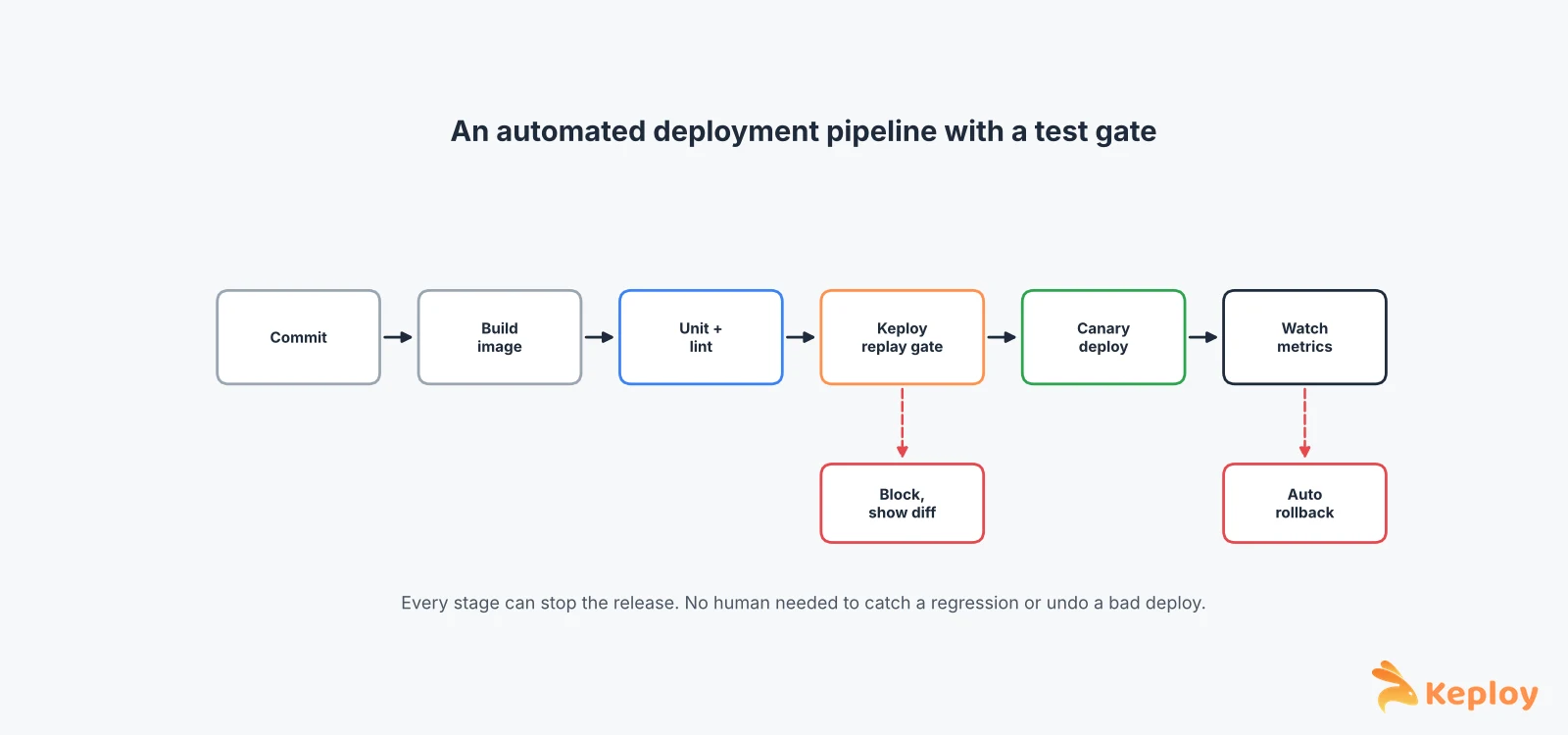
A safe software deployment pipeline has six stages: trigger on merge, build a versioned artifact once, run fast tests, run a regression test gate against realistic traffic, deploy with a progressive strategy like canary, then verify health and roll back automatically if checks fail.
- Trigger. Merges to main (or a release tag) start the pipeline. No one runs a deploy from their laptop.
- Build once. Produce one artifact, usually a container image tagged with the commit SHA, and promote that same image through every environment. Rebuilding per environment is how “works in staging” bugs happen.
- Fast checks. Unit tests, linting, security scans. These should finish in a few minutes.
- Regression gate. Integration and API tests against realistic traffic. This is the stage that decides whether the build is safe, so it gets its own section below.
- Deploy progressively. Use a canary deployment or blue-green deployment instead of replacing everything at once. Our guide to deployment strategies compares the options.
- Verify and roll back. Watch error rates and latency after the deploy. If they cross a threshold, roll back without waiting for a human.
Database changes need their own lane. Run migrations as a separate, versioned pipeline step with tools like Flyway or Liquibase, and keep them backward compatible so a code rollback never leaves the schema ahead of the code.
Deployment automation tools
The main categories of deployment automation tools are CI/CD platforms (GitHub Actions, GitLab CI, Jenkins, CircleCI), GitOps controllers for Kubernetes (Argo CD, Flux), progressive delivery controllers (Argo Rollouts, Flagger, Spinnaker), release orchestration tools (Octopus Deploy, Harness) and database deployment tools (Flyway, Liquibase). Most teams combine two or three.
| Tool | Type | Best for |
|---|---|---|
| GitHub Actions | CI/CD | Teams already on GitHub who want one place for build and deploy |
| GitLab CI/CD | CI/CD | GitLab users, built-in environments and approvals |
| Jenkins | CI/CD | Full control and custom plugins, at the cost of upkeep |
| CircleCI | CI/CD | Fast hosted pipelines with good caching |
| Argo CD | GitOps (Kubernetes) | Syncing cluster state from Git, easy drift detection |
| Flux | GitOps (Kubernetes) | Lightweight GitOps, pairs with Flagger |
| Argo Rollouts | Progressive delivery | Canary and blue-green with automated analysis |
| Flagger | Progressive delivery | Metric-driven canaries on top of a mesh or ingress |
| Spinnaker | Multi-cloud delivery | Large orgs deploying across several clouds |
| Octopus Deploy | Release orchestration | Many environments, tenants and approval steps |
| Flyway / Liquibase | Database deployment automation | Versioned, repeatable schema migrations |
For Kubernetes deployment tools specifically, a very common stack is GitHub Actions or GitLab CI to build and test, Argo CD to sync manifests from Git, and Argo Rollouts for canary releases. It keeps each tool doing one job.
Automated rollback
Automated rollback returns production to the last good version when post-deploy checks fail, without waiting for a person. It needs three things: clear health metrics with thresholds, a controller or script that watches them during the rollout, and a previous version that is still deployable, including a backward-compatible database.
The trigger should be specific. “5xx rate above 1% for three minutes” or “p99 latency 50% higher than the stable version” can be automated. “Things feel off” cannot. Argo Rollouts and Flagger run these checks as part of each canary step and abort on failure. On plain Kubernetes, a failed readiness probe stops a rolling update, and kubectl rollout undo takes you back.
Two things automated rollback can’t fix: data already written in a new format, and messages already published to queues. That is why the test gate before deploy matters so much. Rolling back is the safety net, not the plan.
Adding an automated test gate before each deploy
An automated test gate is a pipeline stage that blocks the deploy unless the new build passes regression tests. The strongest gates replay real production API traffic against the new build and compare responses to known-good ones, so they catch regressions that hand-written tests miss.
Most pipelines have unit tests, and they’re great at catching logic errors in small pieces of code. They are bad at catching the thing that most often breaks in production: an API that now responds a little differently to a request nobody thought to test.
Keploy is built for this stage. It records real API calls to your service, along with the responses from databases and other services those calls depended on, and turns them into test cases with mocks. In the pipeline, Keploy replays those recorded calls against the freshly built image and compares each response with the recorded one. If anything changed that shouldn’t have, the stage fails and the deploy never starts. Since dependencies come from the mocks, the gate runs in CI without a full staging environment.
In practice, adding it looks like one more job between your unit tests and your deploy job. Fast checks first, the Keploy replay gate second, then the progressive deploy. If you want to see how the record and replay setup works, start with Keploy’s API testing page.
FAQs
What is automated deployment?
Automated deployment is releasing software through a scripted pipeline instead of manual commands. A trigger such as a merge to main starts the pipeline, which builds the code, runs tests, deploys to the target environment and checks that the release is healthy. Because the same steps run every time, deploys become faster, repeatable and easy to audit.
What are the best deployment automation tools?
It depends on your stack. GitHub Actions, GitLab CI and Jenkins are popular for building and running the pipeline. Argo CD and Flux handle GitOps deployment to Kubernetes. Argo Rollouts and Flagger add canary and blue-green releases with automated rollback. Octopus Deploy and Harness suit teams with many environments and approval steps, and Flyway or Liquibase automate database changes.
How do you test an automated deployment?
Add test stages that can block the deploy. Run unit tests and static checks first, then a regression gate that tests the new build against realistic API traffic, for example by replaying recorded production requests and comparing responses. After deployment, run smoke tests and watch error rates and latency, with automatic rollback if they cross set thresholds.