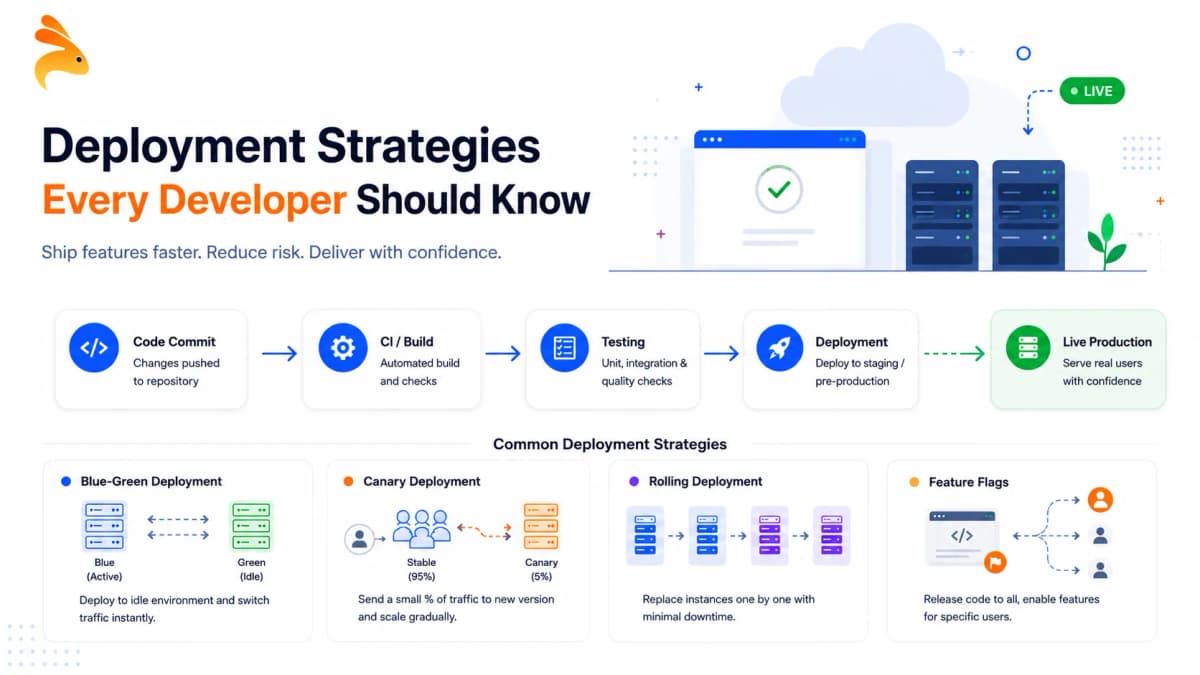






Deployment strategies define how new software versions are released to production while minimizing risk and downtime. Common approaches include blue-green, canary, rolling, and recreate deployments, each balancing speed, safety, and rollback ease differently. The right choice depends on your uptime needs, infrastructure, and tolerance for risk.
The first time I watched a deployment take down a production app, I was a junior engineer with no idea what a deployment strategy actually was. I assumed "deploying" just meant pushing code and refreshing the page. Deployment strategies are the structured approaches development teams use to release software updates into production, defining how, when, and how safely code moves from a repository into the hands of real users. Without one, every release is a gamble you’re taking with your users’ experience.
Most teams start without any strategy at all. You push code, check if the site loads, and call it done. That works until your app becomes business-critical and an hour of downtime costs real money and real trust. The shift from chaotic releases to confident ones almost always starts with picking the right deployment approach before you type git push.
What Are Deployment Strategies?
A deployment strategy is a plan for how your team handles software deployment – specifically whether new versions reach users all at once or gradually, and how quickly your team can recover when something breaks. Can you roll back in seconds or does recovery take an hour? Does your service stay live during the update, or is brief downtime acceptable?
Choosing a strategy is not a one-time decision you make at project kickoff. The right approach shifts depending on your infrastructure, your users, and the nature of the change you’re shipping. A UI text update has a very different risk profile from a database schema migration on a high-traffic API. Knowing your options is the first step toward matching the approach to the moment.
Why Your Deployment Strategy Shapes Your Release Culture
The Netflix engineering team deploys code continuously across a global distributed system, thousands of times per day. Amazon has been documented shipping to production on average every 11.7 seconds. Neither company reached that velocity by being reckless — they built deployment strategies that isolate risk and give engineers fast, reliable recovery paths.
For most teams, the scale is smaller, but the principle holds. A well-chosen strategy reduces the blast radius when something goes wrong. It replaces the "hope for the best" release plan with a repeatable, documented process. And it makes the difference between a team that ships confidently on a Friday and one that dreads the merge button at any time of day.
Deployment strategies reduce release risk, but they’re most effective when backed by comprehensive integration testing that validates how services interact before reaching production. Even the safest rollout strategy can’t prevent issues caused by broken service-to-service communication or unexpected API behavior.
The 5 Core Deployment Strategies at a Glance
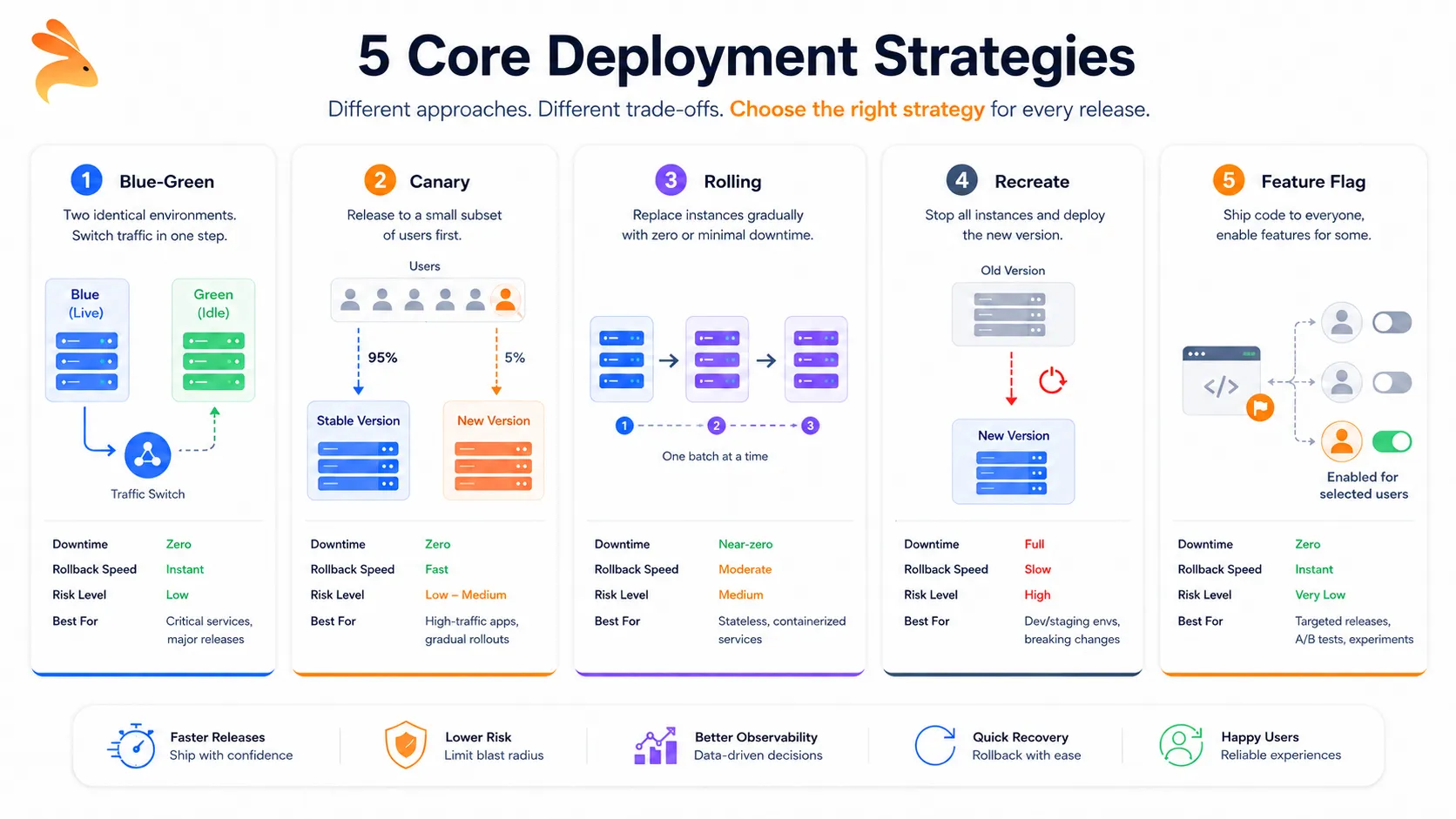
| Strategy | Downtime | Rollback Speed | Risk Level | Best For |
|---|---|---|---|---|
| Blue-Green | Zero | Instant | Low | Critical services, major releases |
| Canary | Zero | Fast | Low-Medium | High-traffic apps, gradual rollouts |
| Rolling | Near-zero | Moderate | Medium | Stateless, containerized services |
| Recreate | Full | Slow | High | Dev/staging environments, breaking schema changes |
| Feature Flag | Zero | Instant | Very Low | Targeted releases, A/B experiments |
Blue-Green Deployment
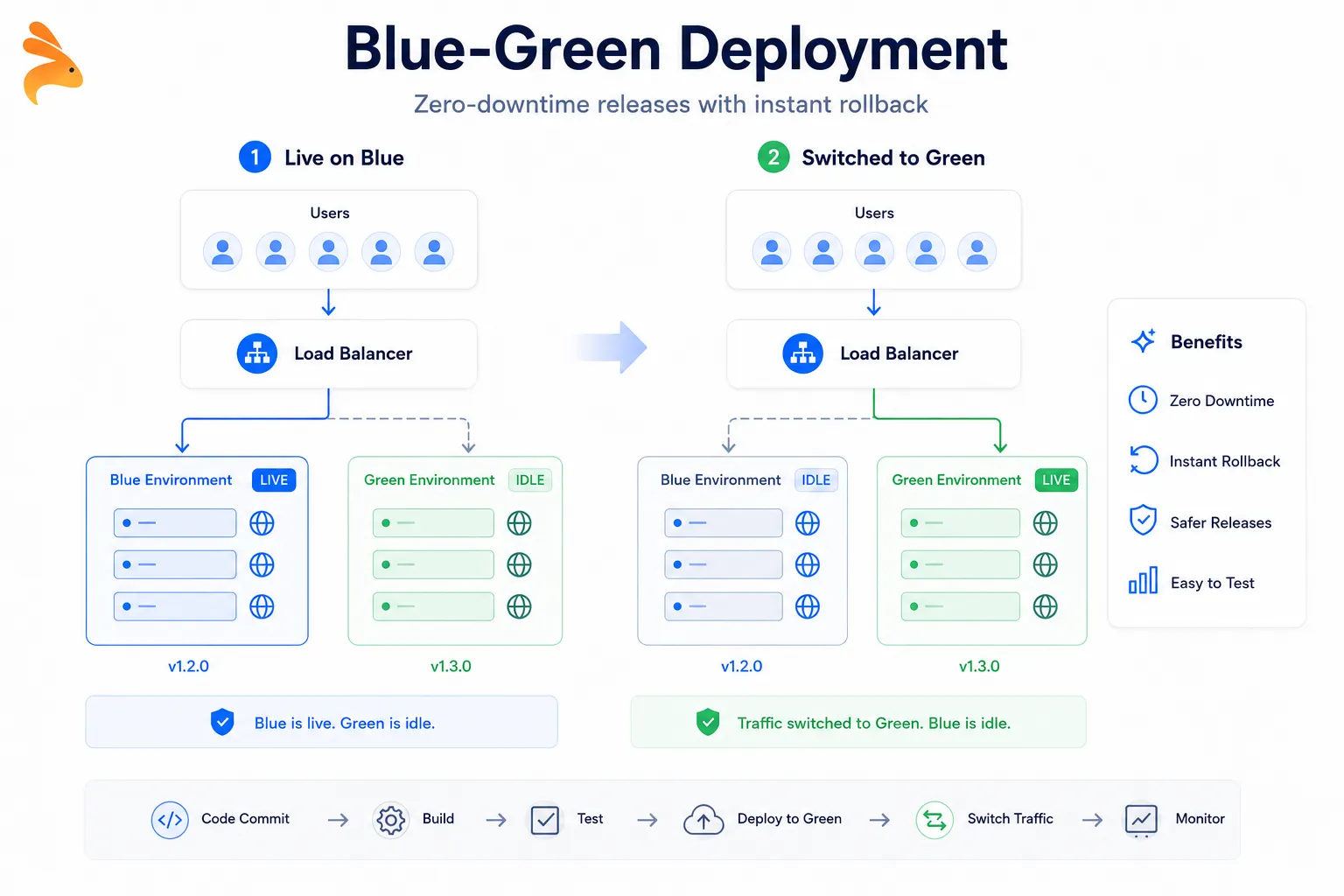
Blue-green is one of the most widely adopted zero-downtime deployment strategies in production today. You keep two identical production environments — one active (serving live traffic), one idle. When you’re ready to ship, you deploy the new version to the idle environment, validate it thoroughly, then switch your load balancer to point all traffic at the updated environment.
The previous environment stays intact and ready. If the new deployment breaks something, rolling back means flipping the load balancer back — no emergency commits, no hotfix coordination at 2 AM. Heroku popularized this pattern with pipeline promotions, and Kubernetes teams implement it natively by swapping service selectors between deployment sets.
When blue-green makes sense:
-
Your service handles payments, auth, or other flows where failures have immediate user and business impact
-
You need instant rollback without any traffic disruption
-
Your infrastructure budget supports running two parallel environments
What to plan for: Database migrations are where blue-green gets complicated. Both environments connect to the same database, which means your new schema changes need to stay backward-compatible with the old code until the traffic switch completes. This is the most common failure pattern teams hit the first time they run blue-green in production.
Canary Deployment
A canary deployment routes a small percentage of real user traffic to the new version before rolling it out fully. The name comes from coal mining, where canaries were used to detect toxic gases before humans entered. If your new release is problematic, only a small slice of users encounters the issue, and you pull back before broader exposure occurs.
Google and Netflix use canary rollouts as standard practice across their production systems. The typical flow: send 1–5% of traffic to the new version,
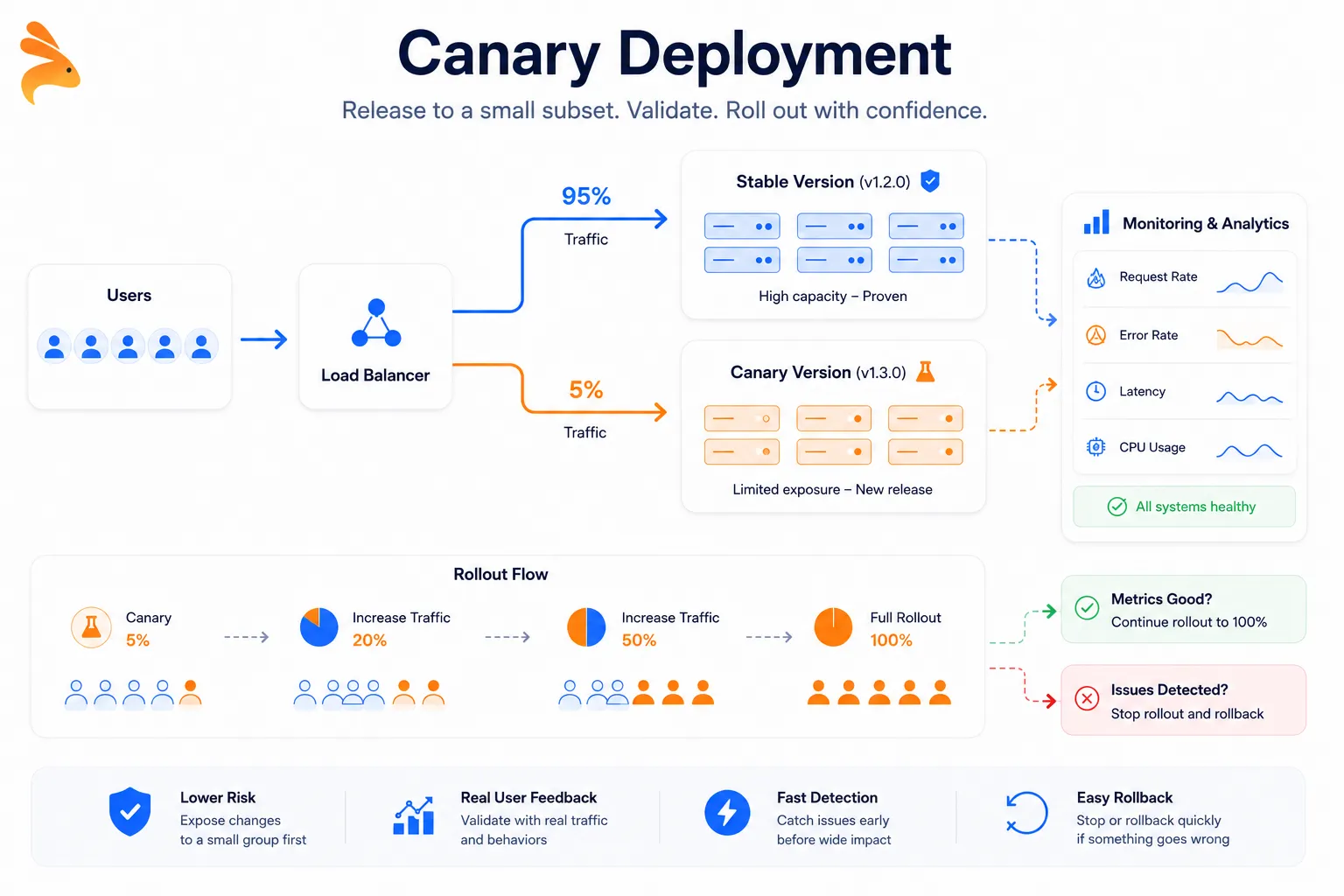
monitor error rates and latency closely, then increase the percentage incrementally as confidence builds. Kubernetes supports this through weighted traffic routing, and tools like Argo Rollouts and AWS CodeDeploy add automated progressive delivery on top.
When canary deployment makes sense:
-
You’re shipping to a large user base and want real-traffic validation before full exposure
-
The change has uncertain performance characteristics under production load
-
You want genuine signal from real users before committing to a full rollout
What to plan for: Session consistency. Users flipping between the canary version and the stable version can hit data inconsistencies if your new code changes how session state is structured. Test this path explicitly before enabling any canary routing in production.
Rolling Deployment
A rolling deployment replaces old application instances with new ones incrementally, a batch at a time. Rather than shutting everything down or running two full parallel environments, you update your fleet gradually — take a subset of nodes offline, deploy the new version, wait for health checks to pass, then move to the next batch.
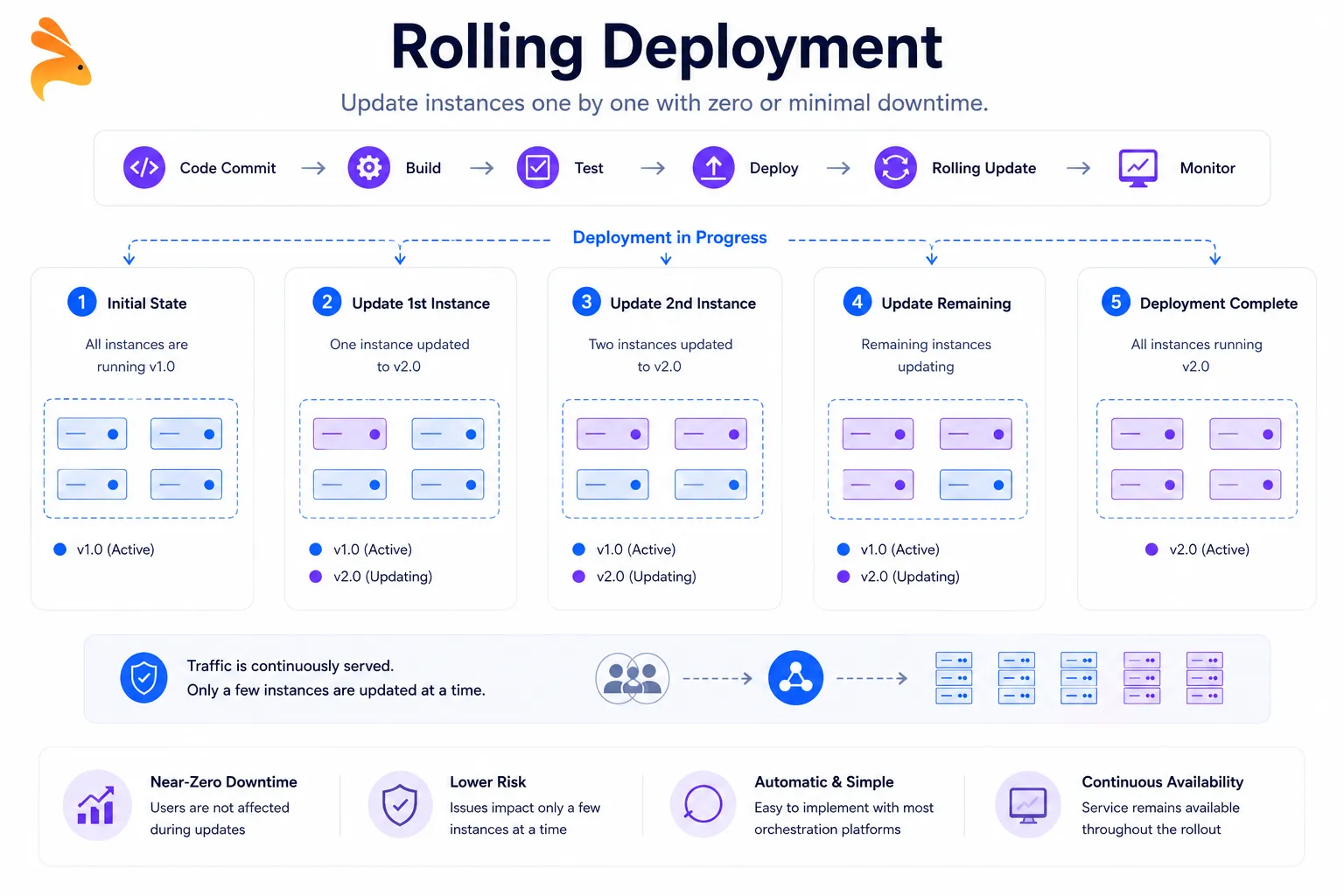
This is the default update behavior in Kubernetes. When you update a deployment spec, Kubernetes replaces pods one at a time, or in configurable batches, while keeping the service available throughout the rollout. Most modern cloud platforms, including Google Cloud Run and Azure Container Apps, apply rolling update logic to their managed services by default.
When rolling deployment makes sense:
-
Your application is stateless and instances are functionally interchangeable
-
You want low operational overhead without the cost of a dual-environment setup
-
Your service runs on container orchestration infrastructure
What to plan for: During a rolling update, the old and new versions of your app coexist for a window of time. If the two versions handle database records or API response shapes differently, you can introduce subtle inconsistencies for users caught mid-transition. Backward compatibility during that window is not optional.
Recreate Deployment
Recreate deployment is exactly what it sounds like: every running instance of the current version is shut down, and the new version is brought up from scratch. It is the simplest approach to implement and the one with the highest tolerance requirement from your users.
This strategy eliminates version coexistence entirely, which makes it the right call when running two versions simultaneously would cause real data integrity problems. It is also the practical default for development and staging environments, where uptime is not the priority and engineers want a clean, predictable environment after each deployment. For production, it works when downtime is scheduled, communicated, and short.
When recreate is actually appropriate:
-
Development and staging environments where downtime is expected
-
Internal tooling with small user counts and advance maintenance communication
-
Releases where schema changes are so significant that version coexistence would corrupt data
Feature Flag Deployment
Feature flag deployment separates the act of deploying code from the act of releasing it to users. You ship the new feature to production with it switched off, then enable it selectively — for specific users, percentages of traffic, or internal beta groups — without deploying anything new.
GitHub used this pattern to roll out GitHub Actions to users gradually over several months. Facebook manages nearly every product change this way through an internal flag system. Purpose-built tools like LaunchDarkly, Unleash, and Flagsmith make this pattern straightforward to adopt without building your own toggle infrastructure from scratch.
When feature flags make sense:
-
You want to test a feature with a real subset of users before full exposure
-
You need an instant kill-switch if the feature causes unexpected behavior in production
-
You’re running A/B experiments tied to specific user segments
What to plan for: Flag debt. Features that shipped months ago tend to leave dead conditional branches in the codebase when flags are never cleaned up. Treat each flag as temporary scaffolding — assign a removal date when you create it and actually honor that date during your next sprint cycle.
How to Choose the Right Deployment Strategy
There is no universally correct answer, but a few practical questions narrow it down quickly.
Start with your risk tolerance. How bad is it if this release breaks something? A checkout service needs blue-green or canary with instant rollback. An internal reporting dashboard can tolerate a recreate deployment. Let the stakes determine the strategy, not convention.
Consider what you can actually operate. Blue-green costs money to run two environments in parallel. Feature flags require a flag management system with its own maintenance overhead. Rolling deployments need container orchestration. Match the strategy to your team’s real capabilities today, not an idealized future state.
Factor in the change type. Database migrations, API contract changes, and authentication system updates carry very different risk profiles compared to a static copy change or a new UI component. Reserve your most conservative deployment approach for high-risk changes, and accept more operational simplicity for low-risk ones.
Build incrementally. If you’re a small team without existing deployment tooling, start with rolling deployments and add canary or feature flag capabilities as your release frequency grows. GitHub, Netflix, and Amazon all started simpler and layered complexity over years. You do not need to implement everything at once.
How Keploy Strengthens Every Deployment Strategy
No matter which deployment strategy your team adopts, the confidence to pull it off cleanly comes down to one thing: test coverage that actually reflects production behavior — not the behavior you imagined when you wrote the tests.
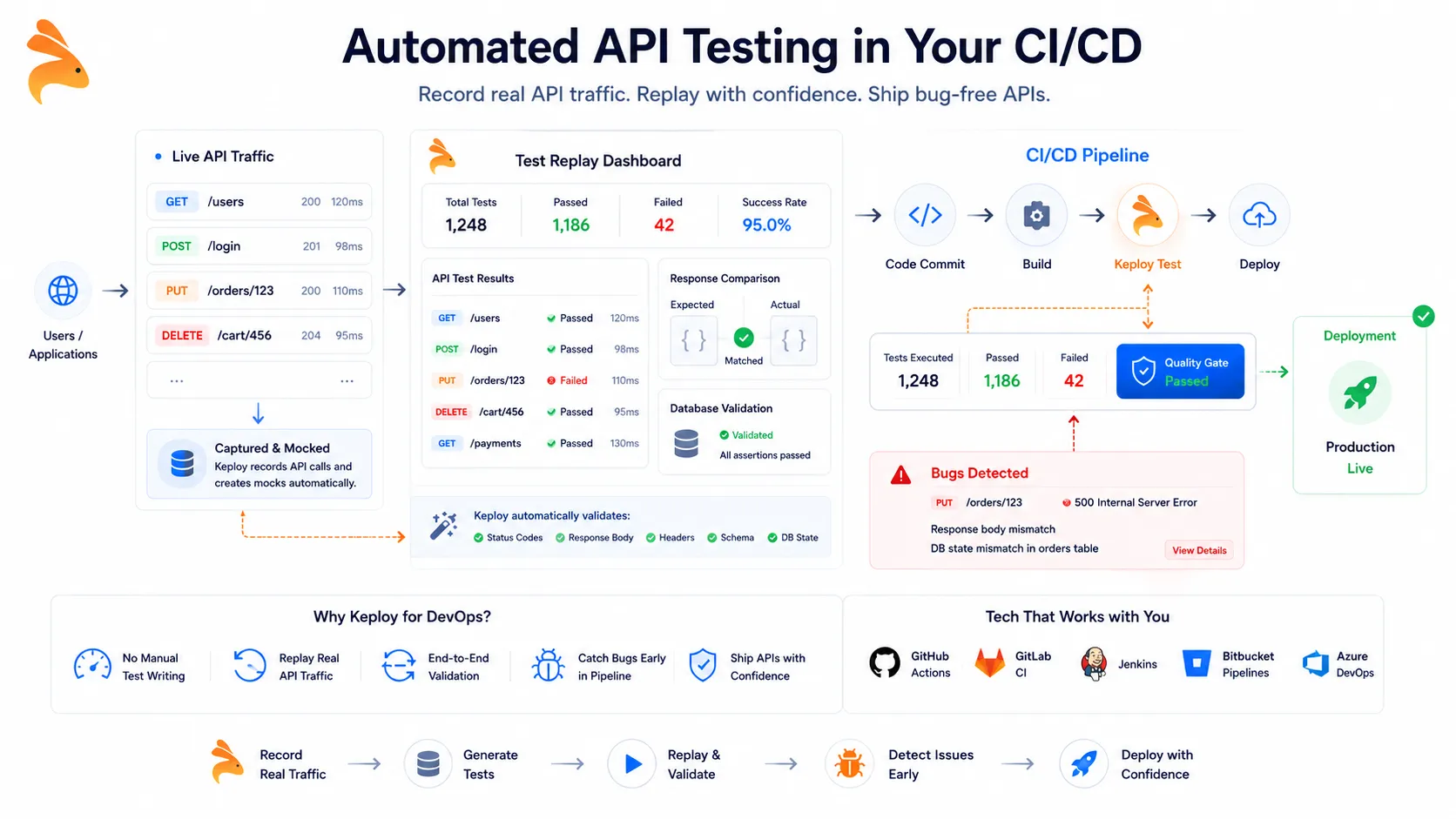
Keploy is an open-source, AI-powered testing tool that captures real API traffic — including database queries and external service calls — and automatically converts those interactions into deterministic, replayable test cases. It uses eBPF to intercept traffic at the kernel level, which means zero code changes on your end and no SDK to instrument. The regression suite it builds comes from actual usage patterns, not hypothetical ones.
Canary deployments
When you’re running a canary rollout, Keploy’s recorded tests can validate your new version against the same traffic shape your production service already handles — before you widen the rollout percentage. You’re not guessing whether the new version behaves correctly. You’re replaying real requests against it and watching the results.
Rolling deployments
In a rolling deployment, Keploy integrates directly into your CI/CD pipeline — with native support for GitHub Actions, GitLab CI, and Jenkins — and gates every batch update on a deterministic replay run. API contract regressions and schema drift get caught before they reach the next batch of users, not after.
Blue-green deployments
For blue-green, running Keploy against the idle environment before the load balancer switch gives you real-traffic validation at the exact moment you need it most. Manual QA can walk through happy paths. Keploy replays the actual requests your users have been making, at scale, against the environment that’s about to go live.
The compounding benefit
The test suite grows automatically as your application gets used. Every deployment cycle adds more captured traffic, which means more coverage — without anyone sitting down to write test scripts. Deployment confidence compounds over time instead of eroding with every new feature you ship.
Frequently Asked Questions
What is the safest deployment strategy for production?
Blue-green deployment provides the strongest safety guarantees for critical production services. The new version is fully validated before receiving any live traffic, and rollback requires only a load balancer switch — no emergency patching, no coexistence window to manage.
Can you combine deployment strategies?
Yes, and many mature teams do. Feature flags and canary releases work well together: use canary to route a subset of traffic to the new version, then use flags to control which features within that version are visible to users. Netflix layers multiple deployment strategies across their platform depending on the type of change being shipped.
What does zero-downtime deployment actually mean?
Zero-downtime deployment means releasing a new software version without interrupting users during the transition. Blue-green, canary, rolling, and feature flag deployments all achieve this when implemented correctly. Recreate deployment is the only common approach that requires taking the service offline.
When should a team invest in a CI/CD pipeline for deployments?
As soon as you’re deploying more than once a week. A CI/CD pipeline automates testing and release steps, reduces human error at each stage, and makes every deployment strategy significantly more consistent to execute. GitHub Actions, CircleCI, and Jenkins are the most common starting points for teams at this stage.
What is the difference between a deployment strategy and a release strategy?
A deployment strategy describes how code reaches production infrastructure. A release strategy describes how features become visible to users. You can deploy code to production without releasing the feature — which is exactly what feature flags enable. Separating these two concerns helps teams isolate infrastructure risk from product risk independently.
Every Deployment Strategy Exists Because Someone Had a Bad Release
Blue-green came from teams who needed faster rollback. Canary releases came from teams who needed real-traffic validation without full exposure. Feature flags came from teams who wanted to decouple shipping code from releasing features to users. Each pattern solves a recurring, concrete problem.
Pick the strategy that fits your team’s current risk tolerance and infrastructure. Evolve it as your release frequency grows. And if you want your integration test coverage to keep pace with every new version you ship, take a look at Keploy — it records real API traffic and converts it into reproducible test cases, so your test suite reflects how your service is actually used in production rather than how you imagined it would be used when you wrote the tests.