






Integration testing verifies that independently built modules or services work correctly when combined, focusing on the interfaces and data passed between them. It catches mismatched contracts and communication errors that unit tests miss. Keploy speeds this up with an automation-first approach, recording real service traffic and generating integration tests and mocks from it.
In this guide you will learn what integration testing is, the main types (big bang, top-down, bottom-up and sandwich), how to plan and run integration tests, real examples, the tools teams use, and the practices that keep integration tests fast and reliable. We also show how Keploy generates integration tests and mocks from real traffic.
What is integration testing?
Integration testing is a level of software testing that checks whether separate components of an application work correctly together. Those components can be internal modules, APIs, databases, message queues, third-party services or microservices. The goal is to confirm correct data flow and communication at every boundary.
An integration test is a single test that exercises at least one of those boundaries. For example, it sends a request to an API and checks that the right row lands in the database, or that the right call goes out to a downstream service.
Integration testing focuses on:
- correct data flow between components
- proper communication over the agreed interface or contract
- expected behaviour when components are connected, including when one of them fails
Within the software testing lifecycle, integration testing comes after unit testing and before system and end-to-end testing.
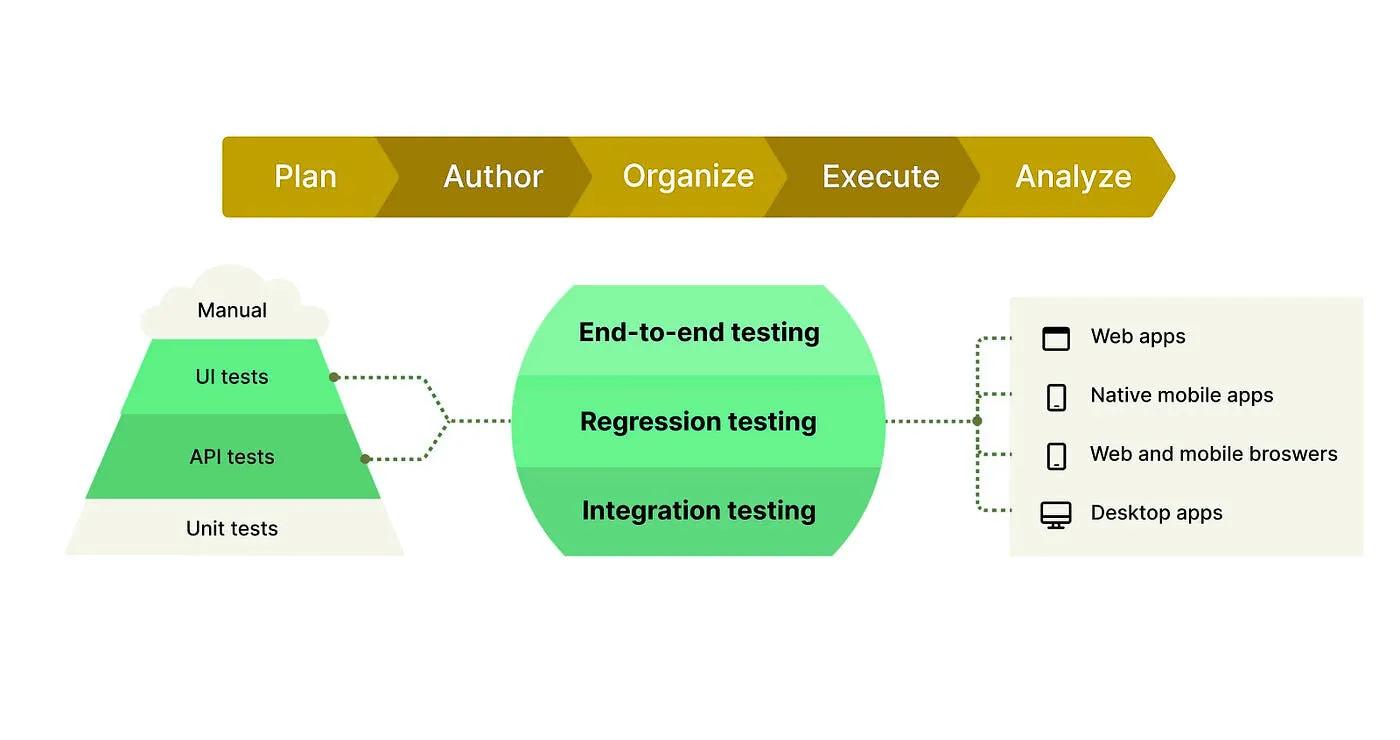
Where integration testing fits in the testing pyramid

| Testing level | Focus |
|---|---|
| Unit testing | Individual functions or classes |
| Integration testing | Interaction between modules and services |
| System and end-to-end testing | Complete user workflows |
Unit tests confirm that the logic is correct. Integration tests confirm that the communication is correct. End-to-end tests confirm that a user can actually complete a task.
Benefits of integration testing
As applications become more distributed, more and more bugs live between components rather than inside them. Whether you run a monolith or a microservices architecture, integration testing is how you catch them.
- Finds bugs in module interactions. Data mismatches, wrong field names and API failures often only show up when two components actually talk to each other.
- Validates data flow. It confirms that data passed from one component to another, for example from an API to a database, stays complete and correct.
- Reduces production risk. Integration issues caught on a pull request are far cheaper than incidents found by users.
- Improves reliability. It shows how the combined system behaves under normal conditions and when a dependency is slow, down or returns errors.
- Makes refactoring safer. A good integration suite tells you quickly if a change in one service broke another.
- Documents how the system fits together. Well-named integration tests are a living description of the contracts between components.
When should you use integration testing?
Integration testing is most valuable when:
- multiple modules or services depend on each other
- APIs exchange structured data
- your application relies on external systems such as payment gateways, identity providers or partner APIs
- changes ship often through CI/CD pipelines
How integration testing works (step by step)
Integration testing verifies how components work together in a controlled environment. Instead of testing functions in isolation, it focuses on real interactions between services, APIs, databases and external systems.
1. Initialize components
Start everything the test needs: application services, databases, message queues and any third-party integrations. Dependencies that are unstable or unavailable are usually mocked or run in containers so the test behaves the same every time.
Goal: a stable environment that closely resembles real-world conditions.
2. Trigger interactions
Run the test scenario. This might mean sending an API request, publishing an event or performing a UI action that calls backend services.
Goal: simulate real usage so the components actually communicate.
3. Observe behaviour
Collect logs, API responses, events and metrics while the scenario runs. This is where failed calls, slow responses and unexpected side effects show up.
Goal: visibility into how data and requests flow across components.
4. Assert results
Compare what happened with what should have happened: HTTP status codes, response payloads, database changes, emitted events and error handling, for both normal and failure scenarios.
Goal: confirm the integration is correct and handles failures properly.
5. Clean up
Reset the environment. Remove or roll back test data, stop mocked services and restore configuration so the next run starts from a clean state.
Goal: repeatable tests with no data leaking between runs.
How to write an integration test plan
An integration test plan describes which integrations you will test, how, in what order and in which environment, and when testing is considered complete. It keeps teams aligned on scope and makes it clear who owns each interface.
A useful integration test plan covers:
- Scope: the components and integration points in and out of scope.
- Approach: big bang, top-down, bottom-up or sandwich (see the next section).
- Integration points: each interface, its protocol (REST, gRPC, queue, database) and its owner.
- Test scenarios: happy paths, error paths, timeouts and edge cases for each integration point.
- Environment and data: where tests run, which dependencies are real and which are mocked, and how test data is prepared.
- Entry and exit criteria: what must be true before testing starts and before it is signed off.
- Defect process: how failures are logged, triaged and retested.
You can use a simple table like this as a template:
| Integration point | Protocol | Scenario | Expected result | Real or mocked | Owner | Status |
|---|---|---|---|---|---|---|
| Order API → Payment service | REST | Valid card payment | Payment captured, order status "Paid" | Payment sandbox | Payments team | Pass |
| Order API → Payment service | REST | Payment service timeout | Order stays "Pending", retry scheduled | Mocked | Payments team | Pass |
| Order API → Orders DB | SQL | Create order | Order row with correct customer ID and total | Real (container) | Orders team | Pass |
| Order service → Email queue | Message queue | Order confirmed | One confirmation event published | Real (container) | Notifications team | Fail |
For a broader view of planning, see our guide on test planning.
Types of integration testing
There are two broad ways to integrate and test components: all at once (big bang) or step by step (incremental). Incremental testing is further split into top-down, bottom-up and sandwich approaches.
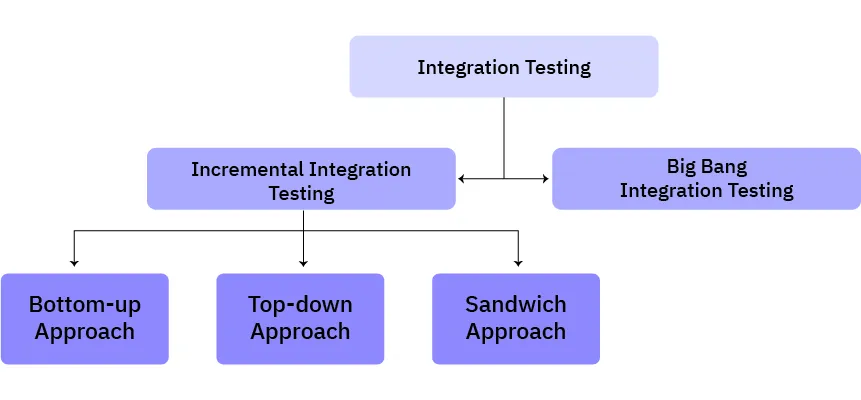
Big bang integration testing
All modules are integrated after unit testing is finished, and the whole system is tested in one go.
- Advantages: easy to set up, no stubs or drivers needed, works for small systems.
- Disadvantages: when something fails, it is hard to find which integration caused it, and testing cannot start until every module is ready.
Incremental integration testing
Modules are added and tested one at a time, or in small groups. Because only a little changes between steps, failures are much easier to trace. Incremental testing uses stubs and drivers to stand in for modules that are not ready yet:
- A stub is a simple stand-in for a lower-level module that is called by the module under test. It returns fixed responses.
- A driver is a simple stand-in for a higher-level module that calls the module under test. It sends inputs and collects outputs.
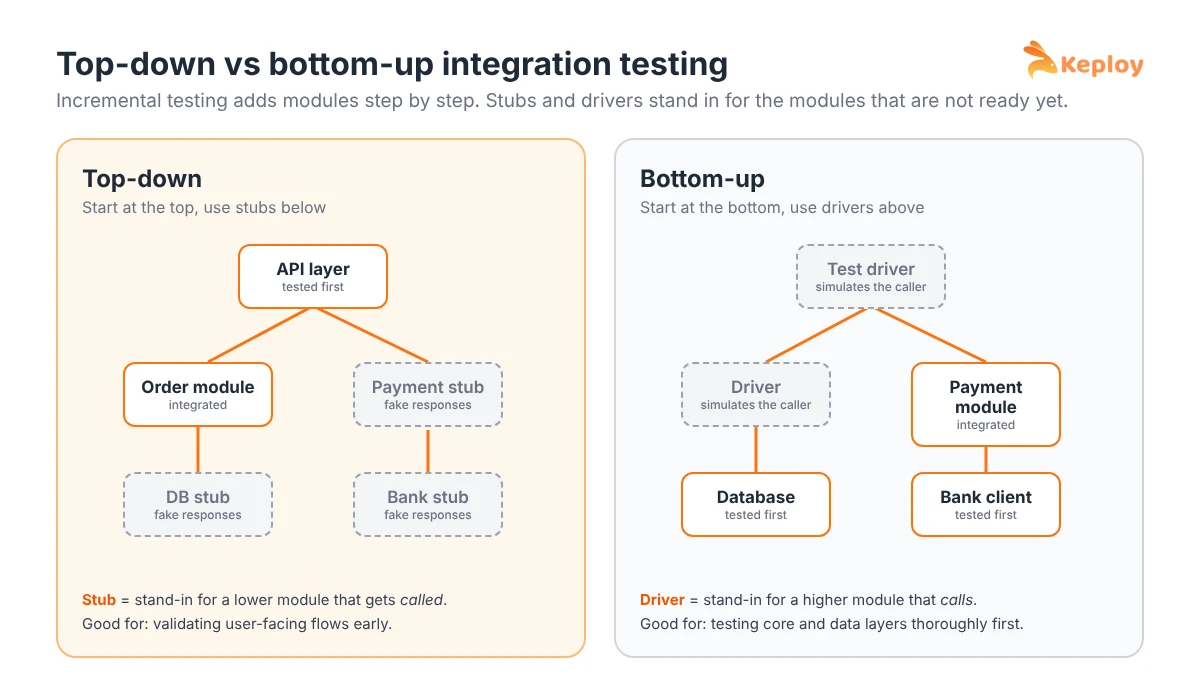
Top-down testing replaces missing lower modules with stubs. Bottom-up testing replaces missing higher modules with drivers.
Top-down integration testing
Testing starts with the top-level modules, such as the user-facing API or UI layer. Lower-level modules are added one by one, and stubs stand in for the ones that are not integrated yet.
- Advantages: user-facing flows and the overall architecture are validated early, and design flaws show up sooner.
- Disadvantages: lower-level modules are tested later, and writing many stubs takes effort.
Bottom-up integration testing
Testing starts with the lowest-level modules, such as data access and core services, and moves up. Drivers simulate the higher-level callers.
- Advantages: the foundations are tested thoroughly first, and failures in core logic are easy to find.
- Disadvantages: the complete user flow is only visible near the end, and drivers have to be written and maintained.
Sandwich (hybrid) integration testing
Top-down and bottom-up testing run at the same time and meet at a middle layer.
- Advantages: parallel work across teams and early defects at both ends of the system.
- Disadvantages: more planning, and both stubs and drivers are needed.
Which approach should you choose?
| Approach | Best for | Needs | Fault isolation |
|---|---|---|---|
| Big bang | Small systems with few modules | Nothing extra | Poor |
| Top-down | Validating user-facing flows early | Stubs | Good |
| Bottom-up | Systems with critical core or data layers | Drivers | Good |
| Sandwich | Large systems built by several teams | Stubs and drivers | Good, but complex |
In modern microservice systems, teams often combine these ideas: they test each service against its real database, and use recorded mocks in place of the other services it calls. That is effectively incremental testing, with mocks doing the job of stubs.
Integration testing examples
Example 1: API and database (user registration)
Flow: the client sends a registration request, the API validates the input, stores the user in the database and returns a confirmation.
What the integration test verifies:
- the API accepts valid payloads and rejects invalid ones
- the database schema matches the API contract
- the transaction commits correctly
- errors, such as a duplicate email, are handled gracefully
A unit test of the validation logic would pass even if the column name in the database had changed. The integration test would fail, which is exactly what you want.
Example 2: microservices (order and payment)
Flow: the order service creates an order, calls the payment service and updates the order status based on the result.
What the integration test verifies:
- the order service sends the correct amount, currency and customer ID
- a successful payment moves the order to "Paid"
- a failed or timed-out payment leaves the order "Pending" and does not charge twice
- retries do not create duplicate orders
Example 3: message queue (order confirmation email)
Flow: when an order is confirmed, the order service publishes an event, and the notification service consumes it and sends an email.
What the integration test verifies:
- exactly one event is published per confirmed order
- the event has the fields the notification service expects
- the consumer handles duplicate or out-of-order events safely
Third-party integration testing
Third-party integration testing checks that your application works correctly with external services you do not control, such as payment gateways, identity providers, shipping APIs and messaging services. It focuses on contracts, error handling and the behaviour of your system when the provider is slow, down or changes its API.
Third-party integrations are some of the riskiest parts of any system, because the other side can change without warning. A practical approach:
- Test against the provider’s sandbox for a small set of critical flows, such as a real test-mode payment.
- Use mocks or recorded responses for everything else, so tests stay fast and do not hit rate limits. A sandbox testing environment helps keep the whole stack isolated.
- Test the failure paths: timeouts, 4xx and 5xx responses, invalid signatures on webhooks and partial outages.
- Validate contracts so you notice when the provider’s response shape changes. Contract testing is built for this.
- Check webhooks and callbacks, including retries and duplicate deliveries.
API integration testing
API integration testing checks that an API works correctly together with the components behind it, such as its database, other internal services and external APIs. Where plain API testing checks one endpoint’s inputs and outputs, API integration testing follows the request across the boundaries it touches.
In practice, most backend integration tests are API integration tests: you call an endpoint and check both the response and the side effects, such as database changes, events and downstream calls. If you are new to the topic, start with what API testing is and then see our guide to API testing strategies.
Integration testing vs unit testing vs end-to-end testing
| Feature | Unit testing | Integration testing | End-to-end testing |
|---|---|---|---|
| Scope | Single function or class | Interaction between modules | Full user workflow |
| Speed | Fast | Medium | Slow |
| Dependencies | None (mocked) | Some real, some mocked | All real |
| Purpose | Logic correctness | Data and API validation | User experience |
Integration tests bridge the gap between isolated logic and full system behaviour. For deeper comparisons, see:
- Unit testing vs integration testing
- Integration testing vs end-to-end testing
- System testing vs integration testing
- Regression testing vs integration testing
Integration testing is also often confused with functional testing. We explain how they differ, and where they overlap, in our guide to integration testing vs functional testing.
Tools for integration testing
The right tool depends on what you integrate: HTTP APIs, message queues, databases or UIs. Here are four widely used options. For a longer comparison, see our list of the top integration testing tools.
1. Keploy
- What it does: records real API traffic and turns it into integration tests and dependency mocks, then replays them.
- Use case: automating API and service integration tests with minimal manual effort.
- Why it is useful: tests come from real behaviour instead of hand-written fixtures, and they run in CI/CD on every change.
2. SoapUI
- What it does: tests SOAP and REST web services.
- Use case: APIs that interact with several external systems.
- Why it is useful: supports functional, load and security testing for APIs.
3. Citrus
- What it does: integration testing for messaging applications and microservices.
- Use case: asynchronous systems and message-based communication.
- Why it is useful: supports JMS, HTTP and other protocols for message-based interactions.
4. Postman
- What it does: sends HTTP requests and checks responses, with scripting and collections.
- Use case: testing RESTful APIs and chaining requests into flows.
- Why it is useful: easy to start with, and collections can run in CI. See how it compares in Keploy vs Postman.
Best practices for integration testing
These practices, grounded in the fundamentals of software testing, keep integration testing effective as your system grows.
- Be strategic about what you test. Not every integration point needs its own test. Prioritise critical interactions and cover minor ones through end-to-end tests.
- Plan around integration points. List where components interact (APIs, databases, queues, third-party services) and design tests for the most important flows first.
- Use realistic test data. Data that looks like real usage uncovers issues that simple dummy data hides.
- Automate and run in CI. Run integration tests on every pull request so issues are caught when the change is still fresh.
- Test incrementally. Add one integration at a time so failures are easy to isolate.
- Isolate external dependencies. Use mocks or stubs for third-party services to keep tests reliable. When several external services are involved, a sandbox testing environment keeps the whole stack controlled and safe to run in CI.
- Test failure paths, not just happy paths. Timeouts, retries, partial failures and bad data are where integrations usually break.
- Keep tests independent. Each test should set up and clean up its own data so tests can run in any order and in parallel.
- Verify data flow and communication. Check that data is validated, transformed and passed on correctly at every step.
- Watch performance and security. Track response times between components and confirm sensitive data is handled securely.
- Confirm with a few end-to-end tests. Use a small set of end-to-end tests against real third-party services for the most critical journeys.
Common integration testing challenges and solutions
| Challenge | Solution |
|---|---|
| External dependency failures | Mock services, recorded responses or containers |
| Flaky tests | Stable test data, isolation and deterministic mocks |
| Asynchronous workflows | Event-aware assertions and tools that understand queues |
| Data inconsistency | Controlled test datasets and cleanup after each test |
| Slow test suites | Run fast integration tests on every PR, slower suites before release |
| Contracts changing silently | Contract tests and alerts on schema changes |
Applications of integration testing
Integration testing is essential wherever multiple components must work together reliably.
Microservices architectures
- Validate service-to-service communication over REST, gRPC or messaging
- Test message queues, event streams and service discovery
- Check fault handling when one service is slow or unavailable
Client-server applications
- Verify API requests and responses between the UI and the server
- Confirm user actions trigger the right backend logic and database updates
- Validate authentication and session management
Third-party integrations
- Validate integrations with payment gateways, authentication providers and mapping APIs
- Test error handling for timeouts, failures and API changes
- Ensure secure data exchange with external systems
Data pipelines
- Validate ETL workflows and data transformations (see our guide to ETL testing)
- Ensure data integrity from source to storage and analytics
- Handle schema changes and missing or malformed data
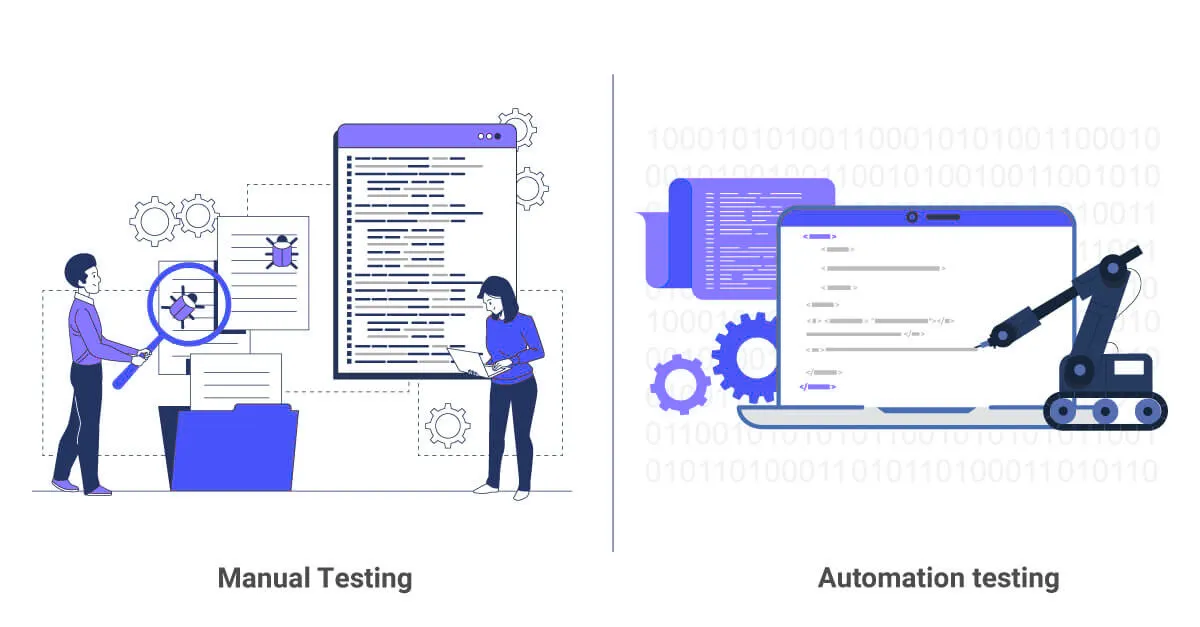
Manual vs automated integration testing
| Aspect | Manual integration testing | Automated integration testing |
|---|---|---|
| Repeatability | Slow and prone to human error | Fast, consistent and repeatable |
| Coverage | Limited by the tester’s time | Many scenarios on every run |
| Maintenance effort | Low setup, high ongoing cost | Higher setup, low ongoing cost |
| Feedback speed | Hours or days | Minutes, on every pull request |
Manual testing still helps when exploring a new integration. For anything you will run more than once, automation is the only approach that scales.
How Keploy helps with integration testing
Writing integration tests by hand means building realistic requests, expected responses and a mock for every dependency, and keeping all of it up to date as APIs change. Keploy takes a different route: it captures real API traffic and the responses from databases and downstream services, then turns them into test cases and mocks automatically. Its API test case generator helps teams get coverage quickly.

For example, with a Node.js app you record traffic once and replay it as tests:
Key benefits:
- Traffic-based test generation: real requests become automated test cases.
- Mocking and isolation: external systems are replaced by recorded mocks, so tests are repeatable.
- Regression detection: replaying tests on every change catches integration issues early.
- CI/CD integration: works with GitHub Actions, Jenkins and GitLab CI.
Teams comparing Keploy with other traffic replay tools can see the differences in Keploy vs Speedscale. To get started, try Keploy for API testing.
Conclusion
Integration testing makes sure your application’s components work together before users find out they do not. Pick an approach that fits your system, plan around your integration points, cover failure paths as well as happy paths, and run your tests automatically on every change. Treat it as one layer of your broader software testing strategy, alongside unit, API and regression testing.
FAQs
What is integration testing?
Integration testing verifies that multiple components, such as APIs, services and databases, work together correctly. It is performed after unit testing to find issues in communication, data flow and interactions before the application moves on to system testing.
What is an example of integration testing?
A common example is an online checkout. The test checks that the order service sends the right amount to the payment service, that a successful payment updates the order status, and that a failed payment does not create a paid order.
What are the types of integration testing?
The main types are big bang integration testing, where all modules are tested together at once, and incremental integration testing, which includes top-down, bottom-up and sandwich (hybrid) approaches.
What is the difference between top-down and bottom-up integration testing?
Top-down testing starts with the highest-level modules and uses stubs for lower-level modules that are not ready yet. Bottom-up testing starts with the lowest-level modules and uses drivers to simulate the higher-level modules that call them.
What are stubs and drivers in integration testing?
A stub is a simple stand-in for a lower-level module that the module under test calls. A driver is a simple stand-in for a higher-level module that calls the module under test. Stubs are used in top-down testing and drivers in bottom-up testing.
What should an integration test plan include?
An integration test plan should include the scope, the integration approach, every integration point and its owner, test scenarios, the test environment and data, entry and exit criteria, and how defects are tracked.
When should integration testing be performed?
Integration testing is performed after unit testing and before system testing. In teams that use CI/CD, integration tests also run automatically on every pull request.
Is API testing the same as integration testing?
No. API testing checks a single API’s behaviour, while integration testing checks that several components, such as an API, its database and other services, work together. API integration tests sit in the overlap between the two.
What is third-party integration testing?
Third-party integration testing checks that your application works correctly with external services you do not control, such as payment gateways or identity providers, including how it handles timeouts, errors and API changes.
Can integration testing be automated?
Yes. Integration tests can be automated and run in CI/CD on every change. Tools like Keploy can also generate integration tests and mocks automatically from real API traffic.
What is the difference between integration testing and unit testing?
Unit testing checks individual functions or classes in isolation with mocked dependencies. Integration testing checks that multiple components work together using real or close-to-real dependencies.
What is the difference between integration testing and end-to-end testing?
Integration testing checks communication between connected components, while end-to-end testing checks complete user workflows across the whole application. Integration tests are faster and point closer to the cause of a failure; end-to-end tests give broader confidence.