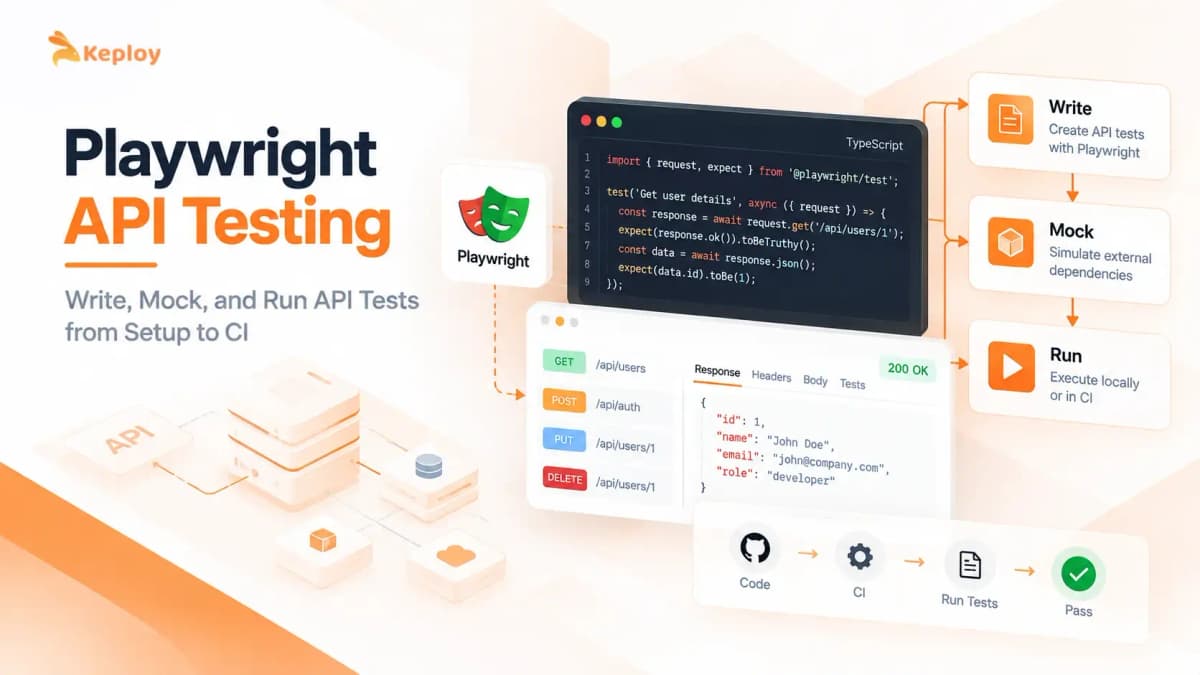






Playwright API testing uses the HTTP client built into Playwright, called APIRequestContext, to send requests and assert on responses inside a Playwright test. You don’t need a browser or a separate tool.
If your team already uses Playwright for end-to-end browser tests, the API layer requires no separate testing framework. It runs inside the same suite, the same CI job, the same configuration. The more interesting question is what changes as the API surface and test suite grow.
What is Playwright API testing?
Playwright API testing uses Playwright’s built-in APIRequestContext to send HTTP requests (GET, POST, PUT, PATCH, DELETE) and assert on responses directly within a Playwright test, without opening a browser. It supports authentication, request headers, response body assertions, and can share session state with browser-based tests, all in the same test file and CI pipeline.
Why Teams Use Playwright for API Testing
Three practical reasons teams reach for Playwright’s built-in API layer over adding a separate tool:
-
Shared auth state. page.context().request carries the browser session’s cookies automatically. Authenticate once via API, drive the browser as that user, hit protected endpoints. All in one test without re-authenticating between steps.
-
Unified test runner. API tests, UI tests, and combined tests all run with npx playwright test. One CI job, one HTML report, one tool to learn and maintain.
-
Built-in debugging. Failed API tests show up in Playwright’s HTML report with the test output and execution details. With tracing enabled, Trace Viewer lets you inspect the full network activity alongside DOM snapshots. Debugging an API failure in CI follows the same workflow as a broken UI test.
How to Set Up Playwright for API Testing
The examples in this guide use Playwright Test and the APIRequestContext APIs, which have been stable across all recent Playwright versions.
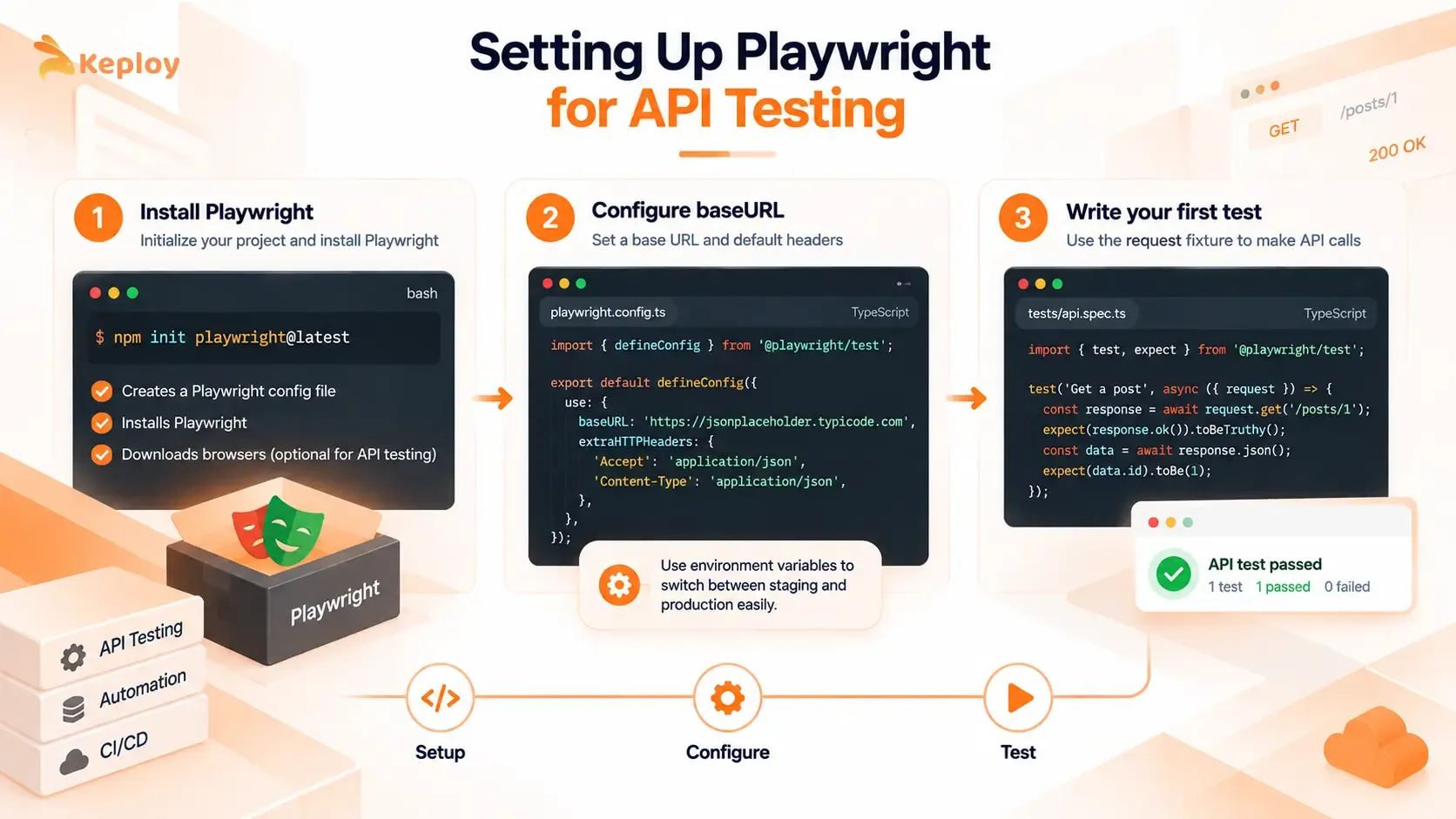
Step 1: Install Playwright
If it’s already installed for E2E testing, skip this. APIRequestContext is part of the core package. Starting fresh:
This scaffolds a config file, installs Playwright, and downloads browsers. For pure API testing you don’t need the browsers, but the install is fast enough it rarely matters.
Step 2: Configure baseURL
One setting makes a measurable difference across the whole suite:
With baseURL set, request.get('/posts/1') works in every test without repeating the hostname. The process.env.BASE_URL fallback means the same config file runs locally against the JSONPlaceholder example API and in CI against your actual staging or production URL, controlled by an environment variable.
Step 3: Write your first test
The request fixture is available in every test automatically. No setup, no teardown for basic use. The examples in the next sections show exactly how it works.
Playwright APIRequestContext and the request Fixture
Playwright gives you three ways to send API requests, and they differ in how they handle cookies:
- request fixture: an isolated APIRequestContext created for each test, with no shared cookies or browser state. It picks up baseURL and extraHTTPHeaders from your config. Use it for standalone API tests.
- page.request / context.request: tied to the browser context, so it sends the browser’s cookies and updates them when the response sets new ones. Use it when an API call must carry the logged-in user’s session in the middle of a UI test.
- playwright.request.newContext(): a context you create yourself, for example in beforeAll, when you need custom headers, a different baseURL, or one context shared across the tests in a file. Call dispose() when you are done.
Playwright API Testing Examples: GET, POST, PUT, PATCH, and DELETE
GET request
response.ok() checks that the status is in the 2xx range. Use it when you care the request succeeded without needing a specific code. Use response.status() when the exact value matters, like asserting 201 on a POST or 404 on a missing resource.
POST request
PUT and DELETE follow the same pattern: pass the resource URL, include the updated payload for PUT, and assert on response.ok(). DELETE typically returns 200 or 204 depending on the API contract. Check yours and assert the specific code rather than relying on ok().
PATCH works identically to PUT but sends only the fields you’re changing rather than a full resource replacement:
Query parameters, headers, and response validation
APIRequestContext accepts a params object for query string parameters and a headers object for request-level headers. You can also assert on response headers, not just the body:
Schema validation
Playwright’s assertion library checks specific fields well. When you need to validate the full shape of an API response against a contract, pair APIRequestContext with a JSON Schema validator like AJV:
Schema validation catches contract breakages that field-by-field assertions miss: when a field type changes or an unexpected property appears.
A note on error responses: Don’t only test the happy path. A 404 for a missing resource, a 400 for a malformed payload, a 401 for an expired token. These are the assertions that catch contract violations before they reach production. Use expect(response.ok()).toBeFalsy() combined with expect(response.status()).toBe(404) to assert on specific failure codes.
Authentication in Playwright API Tests
Most real APIs require authentication. The two patterns teams use most are Bearer token injection and storageState for cookie-based sessions.
Bearer token with beforeAll
Log in once, share the token across the full test suite. Don’t authenticate before every individual test. It’s slow and it means a login endpoint failure breaks every test in the file instead of one.
Set TEST_EMAIL, TEST_PASSWORD, and BASE_URL as environment variables or CI secrets. The pattern works for any API that returns a Bearer token on login . Swap the endpoint path, credentials, and token field name to match your API’s contract.
playwright.request.newContext() creates an isolated HTTP client with its own cookie jar and default headers. Using it in beforeAll and disposing in afterAll keeps resources clean and ensures every test in the describe block shares the same authenticated session without re-authenticating.
Cookie-based sessions with storageState
For cookie-based authentication, the storageState pattern saves the full browser session (cookies and localStorage) to a file and reuses it across tests. This is cleaner than re-logging in through the browser for every test suite.
First, create a global setup file that logs in once and saves the session:
Reference it in playwright.config.ts and set storageState as the default:
API tests in any file now automatically send the saved session cookies:
Use storageState for session-cookie auth and the beforeAll Bearer token pattern for JWT or OAuth flows.
How to Structure a Playwright API Test Framework
A structure that stays maintainable as the suite grows:
Put the API client in one fixture so every test gets the same baseURL and auth headers:
Validate full response shapes with a JSON schema (see Schema validation above) instead of repeating field-by-field assertions in every test.
Why Playwright API suites get slow
- Live dependencies: every test waits on real downstream services. Mock or replay them.
- Repeated logins: each test authenticates again. Log in once in beforeAll or global setup and reuse the token or storageState.
- Serial runs: tests share data, so they cannot run in parallel. Create data per test so workers can run in parallel.
- Shared test data: one test changes data another test depends on. Give each test its own records and clean them up.
How to Mock API Responses in Playwright
page.route() intercepts HTTP requests that the browser initiates and lets you return a controlled response instead of hitting the real server. It works at the browser level, not the Playwright test level. This means it intercepts what the page fetches, not requests your test makes directly through APIRequestContext.
The primary use case is isolating your UI from third-party dependencies during E2E tests: payment processors, feature flags, analytics endpoints, any external API where real calls would slow down tests or cost money.
Return a static mock response
Simulate an API failure
Modify a real response
Mocking Options for Playwright API Tests
page.route() covers requests the browser makes. For requests your test sends directly through APIRequestContext, and for the services your backend calls, use one of these:
| Option | What it mocks | Best for |
|---|---|---|
| page.route() / routeFromHAR() | Requests the browser makes (static responses or a recorded HAR file) | Isolating the UI from external APIs in E2E tests |
| Local mock server via baseURL | Any endpoint your APIRequestContext calls | Pointing API tests at a controlled server |
| Contract tests (e.g. Pact) | The agreement between consumer and provider | Catching breaking changes between services |
| Disposable containers (e.g. Testcontainers) | Real databases and queues, started per run | Realistic integration tests without shared state |
| Keploy mock | Your app’s outgoing dependency calls, at the network layer | Existing Playwright suites, with no SDK; mocks are scoped per Playwright worker |
Combining API and UI Tests in One Playwright Suite
The fastest end-to-end tests create their data through the API and use the browser only for what the user sees. Both the request fixture and page read baseURL from the same playwright.config, so one test can do both:
To reuse a login across API and UI tests, log in once through the API, save storageState, and start browser contexts from it (see Cookie-based sessions with storageState above). API, UI and combined tests then run with the same npx playwright test command and one CI job.
How to Run Playwright API Tests in CI
Playwright API Testing Without a Browser
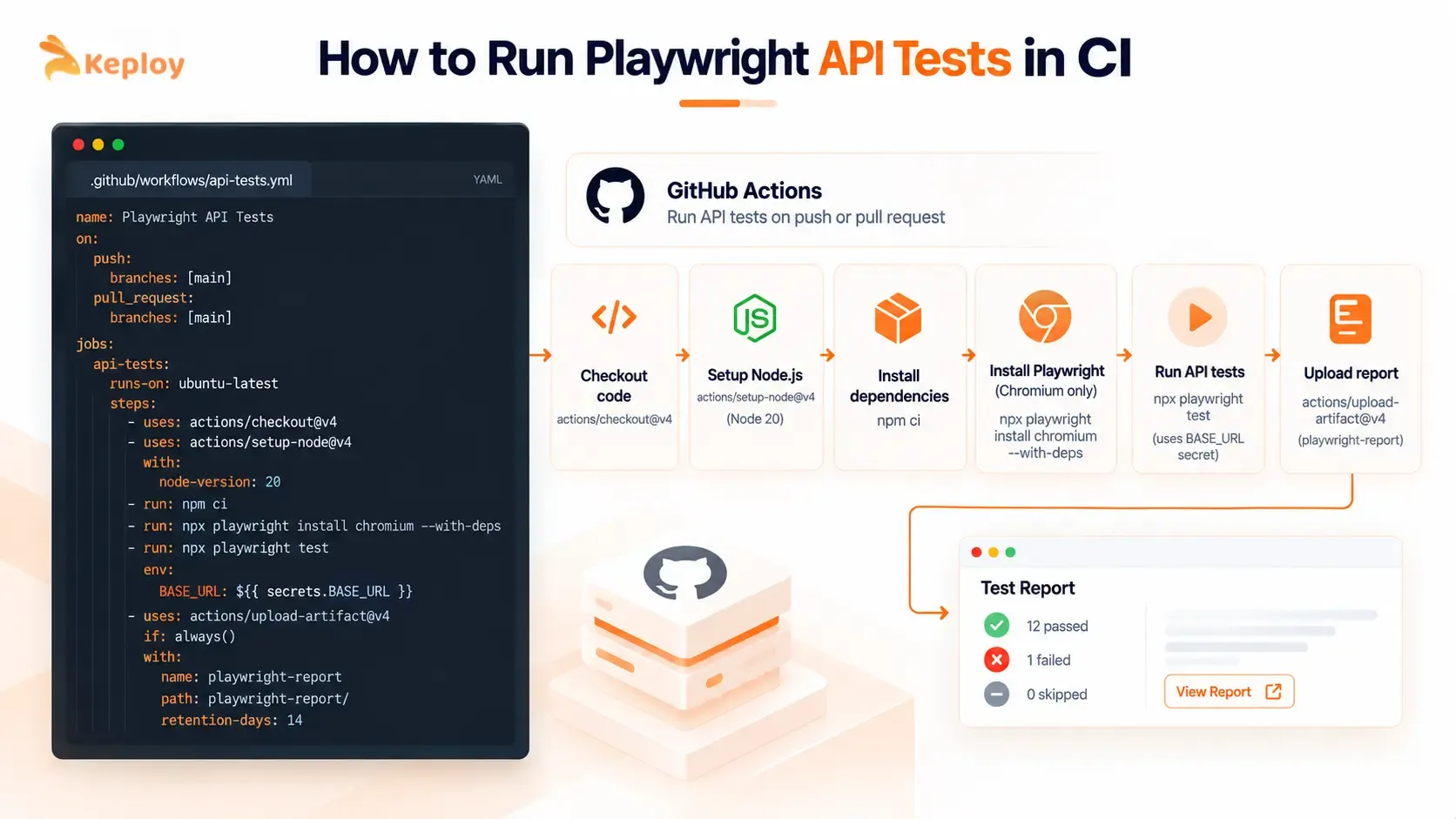
Pure APIRequestContext tests don’t require a browser at all. The CI setup depends on what your suite contains:
API-only suite (no page.* or browser interactions): you can run tests without installing Playwright browser binaries, because APIRequestContext does not launch a browser.
Mixed suite (API tests alongside E2E browser tests): install Chromium only, skip WebKit and Firefox.
Set BASE_URL as a repository secret. The config’s process.env.BASE_URL fallback picks this up automatically, so the same suite runs against staging on PRs and against a different target in production smoke tests, with no config file changes required.
One practical thing: Playwright generates an HTML report after every run. Upload it as a CI artifact and you get the test output for every failed run without re-running locally.
Playwright API testing scales with the people writing tests. Every test case requires an engineer to author it: the request, the assertions, the edge cases. For a focused API surface that’s fine: the code is precise, reviewable in PRs, and easy to reason about. As the API grows and the suite scales, that authoring model becomes the constraint.
The sections below show how teams handle this and where a complementary tool fits in.
Playwright API Testing in Python, Java, and C
Playwright for Python supports the same API testing through pytest-playwright. Create an APIRequestContext in a fixture and use it in your tests:
The Java and .NET versions of Playwright expose the same APIRequestContext.
Playwright API Testing Best Practices
- Set baseURL and auth headers once in playwright.config (or a fixture), not in every test.
- Assert the status code and the response schema, not only a few fields.
- Test error paths (400, 401, 404) as well as the happy path.
- Create test data per test so tests can run in parallel without clashing.
- Keep live third-party services out of CI runs: mock them or replay recorded responses.
- Dispose contexts you create with playwright.request.newContext().
- Put API tests in their own Playwright project so you can run them without browsers.
Playwright API Testing vs Other Tools: How to Choose
Playwright’s API testing fits well for teams already on it for E2E. It’s one of four approaches teams use depending on their stack, test volume, and how much manual scripting they want to maintain. Here’s how they compare:
|
Criteria |
Keploy |
Playwright APIRequest |
Postman / Newman |
REST Assured |
|
Test creation |
Auto-generated from real traffic |
Hand-written scripts |
GUI + scripted collections |
Hand-written Java/Kotlin |
|
Languages |
Language-agnostic (eBPF) |
JS, TS, Python, Java, .NET |
JavaScript |
Java, Kotlin |
|
Browser + API unified |
No (API layer) |
Yes |
No |
No |
|
Mock setup |
Automatic from captured traffic |
Manual page.route() config |
Manual |
Manual |
|
Database and queue coverage |
Yes (SQL, NoSQL, queues) |
No |
No |
No |
|
CI integration |
GitHub Actions, GitLab CI, Jenkins |
npx playwright test |
Newman CLI |
Maven / Gradle |
|
Typical fit |
Traffic-based API regression workflows |
Playwright-based API and UI testing |
Collection-based API workflows |
JVM API testing |
Keploy
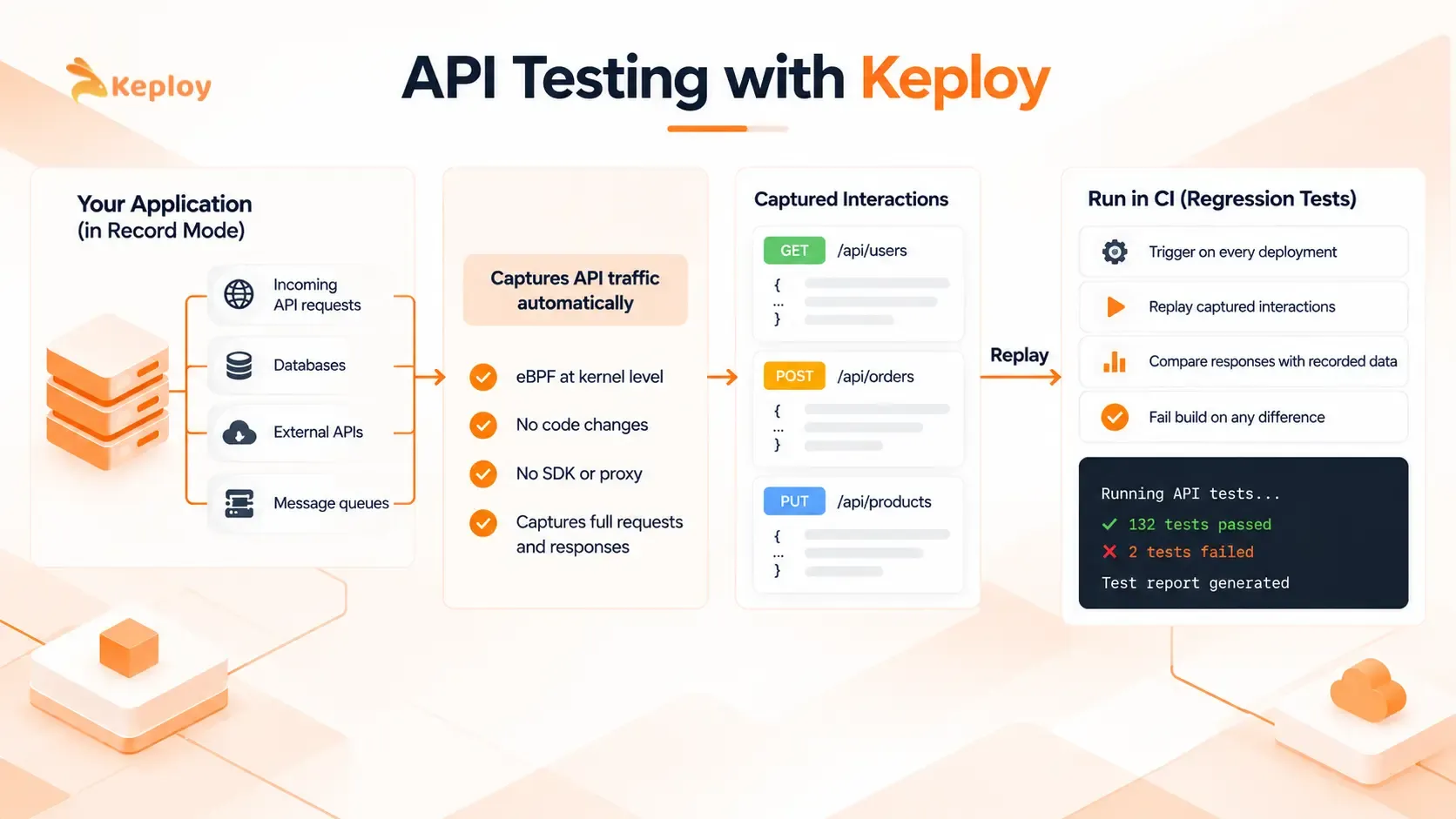
Keploy takes a different approach from the scripted API-testing workflows shown in this comparison. Instead of writing test scripts, it captures real API traffic from your running application and converts those request-response pairs into regression tests automatically. The capture happens at the kernel level via eBPF, with no code changes and no proxy to configure.
The practical consequence: as your API surface grows, your Keploy test suite grows automatically from real usage. You don’t write new tests when you add a new endpoint. You capture traffic that hits it. This is covered in more depth in the API Testing with Keploy section below.
Playwright APIRequest
The right choice when your team already uses Playwright for E2E tests and you want API and browser tests in one runner. The setup is straightforward for teams already using Playwright Test. The authoring model requires a developer to write every test case as code. That keeps tests explicit and reviewable in PRs, but the suite only covers what engineers specifically wrote tests for.
Postman / Newman
Postman and Newman work well for teams that rely heavily on GUI-based API exploration and collection-based workflows, or where non-developers need to build and share requests. Newman runs those collections in CI. The main limitation for Playwright-first teams: Postman and Playwright can’t share authentication state or coordinate assertions across tools.
REST Assured
REST Assured is commonly used by Java and Kotlin teams because it integrates naturally with JUnit or TestNG in the same Maven or Gradle build. If your backend and tests are both JVM-based, it fits naturally. If your frontend team is already on Playwright, you end up with two separate test frameworks with no shared auth state or reporting.
Generating Playwright API Tests Automatically: Options Compared
| Approach | Input | Best for | Limits |
|---|---|---|---|
| IDE AI assistants | Your code and a prompt | Drafting individual test files quickly | Output needs review; assertions can be shallow |
| Schema-driven generators | An OpenAPI spec | Broad endpoint coverage from day one | Only as good as the spec; misses real usage patterns |
| Browser traffic recording (Keploy API Test Recorder) | API calls captured while you use the app | Turning real user flows into API tests without writing them | Covers the flows you actually click through |
| Backend traffic recording (Keploy) | Live traffic to your running service | Regression suites plus dependency mocks that grow with usage | Needs the app running in record mode |
Whichever you use, review generated tests for maintainability, add edge cases the recording or spec did not cover, and add the business-specific assertions a generator cannot infer.
API Testing with Keploy
Playwright’s scripted approach gives you precise, reviewable control over every test case. Every endpoint, every scenario, every assertion needs an engineer to write it. As the API surface grows, that cost grows with it, and real user behavior, including edge cases nobody predicted, stays uncovered.
Keploy takes a different approach to API testing entirely:
-
Instead of writing tests, you run your application in record mode. Keploy sits at the kernel level using eBPF and captures supported incoming API requests and outgoing dependency calls your application makes: to databases, external services, message queues. No proxy to configure, no SDK to install. The application can run without application-level code changes or a language-specific testing SDK.
-
When you stop recording, those captured interactions become a regression test suite. Each captured request becomes a test case with the full expected response recorded. On every future deployment, Keploy replays those interactions and fails the build if any response differs from what was captured, catching API regressions before they reach production.
-
Keploy captures the full dependency chain behind an API endpoint, not just the HTTP response. When your application calls /api/orders/123, it typically queries a database, calls a downstream service, and publishes to a queue. Keploy records all of those interactions in a single capture session using eBPF at the kernel level. On every future deployment, it replays the full chain and flags any deviation from what was recorded.
Teams typically run Keploy alongside Playwright: Playwright for browser flows and scripted API checks, Keploy for API regression that grows from real usage without manual authoring. The two cover different surfaces and work together.
For a deeper insight into Keploy’s workflow, read how Keploy works.
Conclusion
If you’re already running Playwright for E2E tests, adding API coverage is low-friction: the same runner, the same assertions, the same CI pipeline. The API layer doesn’t require a separate tool or a separate process to maintain.
The ceiling arrives when the API surface grows faster than the team can author tests for it. That’s not a Playwright limitation. That’s the scripted testing model working exactly as designed, scaling with the engineers writing the tests. Teams that reach that point often keep Playwright for browser flows and scripted API checks, and add a complementary tool like Keploy for API regression coverage that grows from real traffic rather than manual authoring.
Frequently Asked Questions
How do I share authentication state between Playwright API and UI tests?
Use test.beforeAll to log in via the API and store the token, then create a new playwright.request.newContext() with Authorization headers. For cookie-based sessions, log in through the browser and use page.context().request . This automatically carries the session cookies into any API call you make within that browser context, so you don’t authenticate twice.
Why is page.route() not intercepting my API calls in Playwright?
page.route() only intercepts requests the browser initiates. If your test sends a request directly through request.get() or APIRequestContext, page.route() won’t catch it. There’s no built-in Playwright mechanism to intercept or mock APIRequestContext calls. Those always go to the live server. To avoid hitting live endpoints in those tests, point baseURL at a local mock server or use a traffic-capture tool like Keploy that replays real responses without a live dependency.
Can I run Playwright API tests without installing a browser?
Yes. For pure API tests using APIRequestContext, you don’t need a browser. Install only Chromium for tests that mix UI and API assertions: npx playwright install chromium –with-deps. Skip WebKit and Firefox entirely if your suite is API-first. This reduces CI setup time on large pipelines.
How do I test a GraphQL endpoint with Playwright?
GraphQL uses HTTP POST with a JSON body, so standard APIRequestContext works: [request.post (‘/graphql’, { data: { query: ‘{ users { id name } }’, variables: {} } }). One important nuance: most GraphQL servers return HTTP 200 even when a query fails. Don’t use response.ok() as your pass/fail signal. Assert that body.data exists and body.errors is undefined instead.
What is the difference between the request fixture and page.request in Playwright?
The request fixture creates an isolated HTTP context per test, with no shared cookies or browser state. page.request is tied to the specific page instance and shares its session cookies. Use request for standalone API tests. Use page.request when you need to make API calls that carry the browser user’s session, like checking a protected endpoint mid-E2E flow.
How do I make Playwright API tests run without depending on live external services?
APIRequestContext does not support the page.route() interception model. Its requests go to the URL you configure, so if you want to avoid a live dependency, point baseURL or the request URL at a mock or controlled test service. To record real dependency responses once and replay them in CI, Keploy mock works with existing Playwright suites at the network layer, with no SDK, and keeps each Playwright worker’s mocks separate.
When does Playwright API testing become too slow to maintain?
When the maintenance cost of keeping test scripts current outweighs the value they’re catching. Common signals: frequently broken tests from API contract changes, CI failures caused by unavailable staging dependencies, or test authoring becoming a bottleneck on new feature delivery. Teams typically add a traffic-capture tool alongside Playwright at that point rather than replacing it.
How do I stop Playwright API tests from failing because of dynamic values like timestamps and IDs?
Don’t compare those fields to fixed values. Assert their type or format instead, for example with expect.any(String) inside toMatchObject, validate the full response against a JSON schema, or remove volatile fields before comparing. If you replay recorded responses, use a tool that ignores noisy fields automatically, such as Keploy’s noise handling.
Is Playwright better than Postman for API testing?
It depends on how your team works. Playwright fits teams that already write Playwright tests, since API and UI tests share one runner, one config, and one CI job, and API calls can reuse the browser’s login session. Postman fits teams that explore APIs through a GUI or where non-developers build and share requests, and Newman runs those collections in CI. Many teams use Postman for exploration and Playwright for automated checks in the pipeline.