





White box testing gives testers direct access to source code, designing test cases around internal logic: branches, paths, conditions – rather than what users put in and get back. The core techniques build in depth: statement, branch, path, condition coverage & loop testing. The critical caveat: 90% statement coverage can still miss the branch that fails in production. Coverage measures execution, not verification quality.
White box testing is what separates teams that know their code works from teams that hope it does. High code coverage numbers can be misleading.
A suite with 90% statement coverage can still miss the branch that throws a NullPointerException in production, or the loop condition that behaves differently on an empty list. Most teams discover this the hard way – coverage reports look fine, then production breaks.
What Is White Box Testing?
White box testing gives the tester direct access to the source code. You write tests around the internal logic itself – the branches, paths, and conditions the code follows, not just what users put in and what they get back.
It’s sometimes called glass box testing, clear box testing, or structural testing. All refer to the same thing: testing from the inside out. White box testing sits within the broader category of structural testing. You’re not asking "does this feature work?" You’re asking, "Does every line of code that makes this feature work actually get exercised?"
White Box vs Black Box Testing
Teams often ask which one to use. The honest answer is both, at different stages.
| Criteria | White Box Testing | Black Box Testing |
|---|---|---|
| Tester’s knowledge | Full access to source code | No knowledge of internals |
| Test design basis | Code structure, paths, conditions | Requirements and specifications |
| Best for | Logic errors, dead code, security flaws | Functional validation, user flows |
| Who typically runs it | Developers, SDETs | QA engineers, end users |
| Coverage measured by | Statement, branch, path coverage | Test case pass/fail against requirements |
| Limitation | Can miss user perspective issues | Can miss internal logic errors |
| When used | Unit testing, code review, security audits | System testing, UAT, regression |
For a deeper comparison of both approaches, and an in-depth understanding of black box testing, read our guide on black box and white box testing, which covers the full picture.
Types of White Box Testing
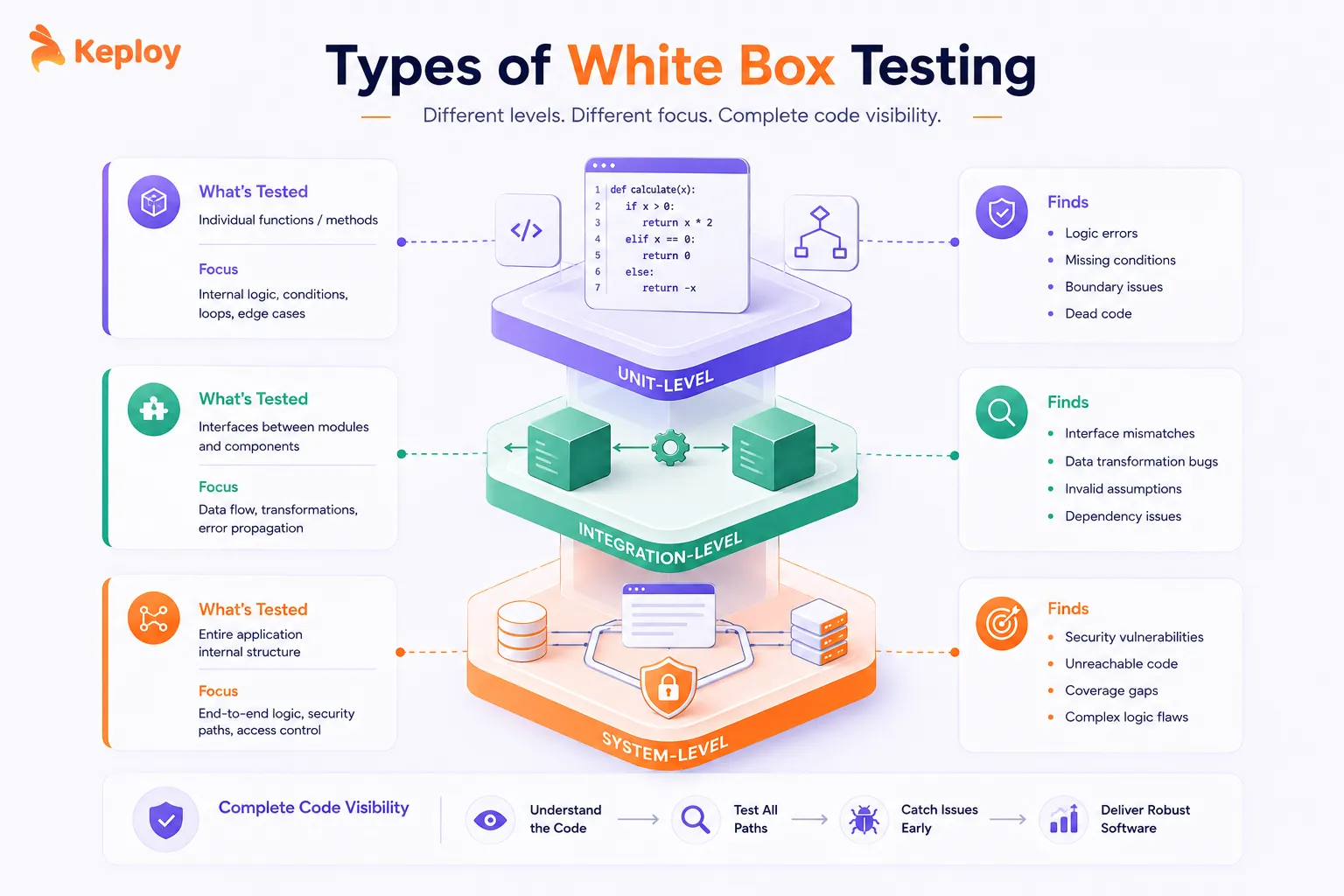
White box testing isn’t one fixed activity. It applies across different levels of testing, and what you’re verifying changes depending on the level.
Unit-Level White Box Testing
This is where most developers first encounter white box testing. You’re testing a single function or method in isolation, verifying that its internal logic handles every condition correctly.
Unit-level white box testing catches logic errors early – missing conditions, off-by-one errors in loops, unhandled edge cases. Google’s engineering practices mandate unit test coverage as a prerequisite for code review. The earlier these issues surface, the cheaper they are to fix.
Common tools:
-
pytest (Python) with the
pytest-covplugin for coverage reporting -
JUnit 5 (Java) with JaCoCo for branch and line coverage
-
Jest (JavaScript) with the built-in
--coverageflag -
Go’s built-in test runner with
go test -cover– no extra setup needed
Integration-Level White Box Testing
At this level, you’re looking at how modules communicate internally. The test has visibility into the interfaces between components – what data passes between them, how errors propagate, whether assumptions one module makes about another are valid.
Integration-level white box testing is where you catch data transformation bugs and interface mismatches that unit tests miss because they’re testing components in isolation.
Common tools:
-
Testcontainers (Python, Java, Go) for spinning up real database instances per test run
-
WireMock / Mockoon for simulating external service responses at the API boundary
-
Keploy for capturing real inter-service API calls and replaying them as test cases – gives you integration-level path coverage from actual traffic without manually writing each interaction
-
pytest with fixtures or Spring Boot Test (Java) for wiring up component interactions in controlled environments
System-Level White Box Testing
System-level white box testing examines the entire application’s internal structure under realistic conditions. Security teams use this extensively – verifying authentication logic, input validation across all entry points, and access control paths.
At this level, tools like SonarQube do static analysis across the full codebase, flagging unreachable code, security vulnerabilities, and coverage gaps before runtime.
Common tools:
-
SonarQube for static analysis across the full codebase – flags dead code, security hotspots, and coverage gaps
-
Veracode / Checkmarx for security-focused white box scanning of authentication and input validation paths
-
Coverage aggregators (Codecov, Coveralls) for tracking system-wide coverage trends over time across all modules
-
- *
White Box Testing Techniques and Methods
This is where white box testing gets precise. Each technique defines a specific criterion for test coverage – what counts as "tested" and what doesn’t.
Statement Coverage
Statement coverage is the most basic criterion. Every executable statement in the code must be executed at least once.
To achieve 100% statement coverage here, you need at least one test where price > 100 and is_member is True, so every line runs. But statement coverage won’t tell you whether the else path of each condition was ever tested. That’s its limitation.
How to measure it: Run pytest --cov=src --cov-report=term-missing. The term-missing flag prints the exact line numbers not covered, so you know precisely which statements were skipped.
For a deeper look at how statement coverage works across different languages, see our guide on statement coverage
Branch Coverage
Branch coverage goes further. Every possible branch (true and false) at every decision point must be exercised. This is stronger than statement coverage because it forces you to test both sides of every condition.
Statement coverage could be achieved with a single test (weight=15, is_express=True). Branch coverage requires at least two tests: one where weight > 10 and one where it isn’t, and the same for is_express.
How to measure it: Use pytest --cov=src --cov-branch. The --cov-branch flag enables branch tracking. Your coverage report will show "branch coverage" as a separate column, flagging any decision point where only one side was tested.
Path Coverage
Path coverage is the most thorough – and most expensive. Every possible execution path through the code must be tested. For code with multiple conditional branches, the number of paths grows quickly.
This function has 8 possible paths (2 x 2 x 2). Full path coverage means a test case for each combination. In practice, teams use path coverage selectively on the most critical or complex functions rather than everywhere.
How to measure it: Standard coverage tools don’t report path coverage directly – they report statement and branch coverage as proxies. For critical functions where full path coverage matters, mutation testing tools like Mutmut (Python) or PIT (Java) are more useful: they verify that your tests actually catch logic errors, not just that they execute code. Teams using Keploy also get path coverage naturally from captured production traffic – real API calls exercise the specific paths real users take, which is often more representative than manually constructed path combinations.
Condition Coverage
Condition coverage ensures every individual boolean sub-expression is evaluated as both true and false, independently of other conditions.
For condition coverage, age >= 18, has_id, and is_student must each be tested as both true and false. This catches bugs where one condition masks another – for example, a bug in has_id logic that’s never caught because is_student was always true in other tests.
How to measure it: pytest-cov with --cov-branch captures condition coverage as part of branch tracking. JaCoCo reports it as "complexity coverage." For stricter MC/DC (modified condition/decision coverage) used in safety-critical systems, specialised tools like LDRA or VectorCAST are needed.
Loop Testing
Loops are a common source of bugs, particularly at boundaries. Loop testing specifies test cases that target the edge cases loops are most likely to fail at.
For this function, loop testing covers:
-
Empty input (zero iterations)
-
Single element (one iteration)
-
Two elements (minimum multi-element case)
-
Typical multi-element list
-
Very large list (performance boundary)
How to measure it: No single tool measures loop boundary coverage specifically. It’s a design discipline rather than a metric. Your standard coverage tool (pytest-cov, JaCoCo) will show whether the loop body was executed, but won’t flag whether you tested the zero-iteration or single-iteration cases. That’s on the test author to cover deliberately.
White Box Testing Examples in Practice
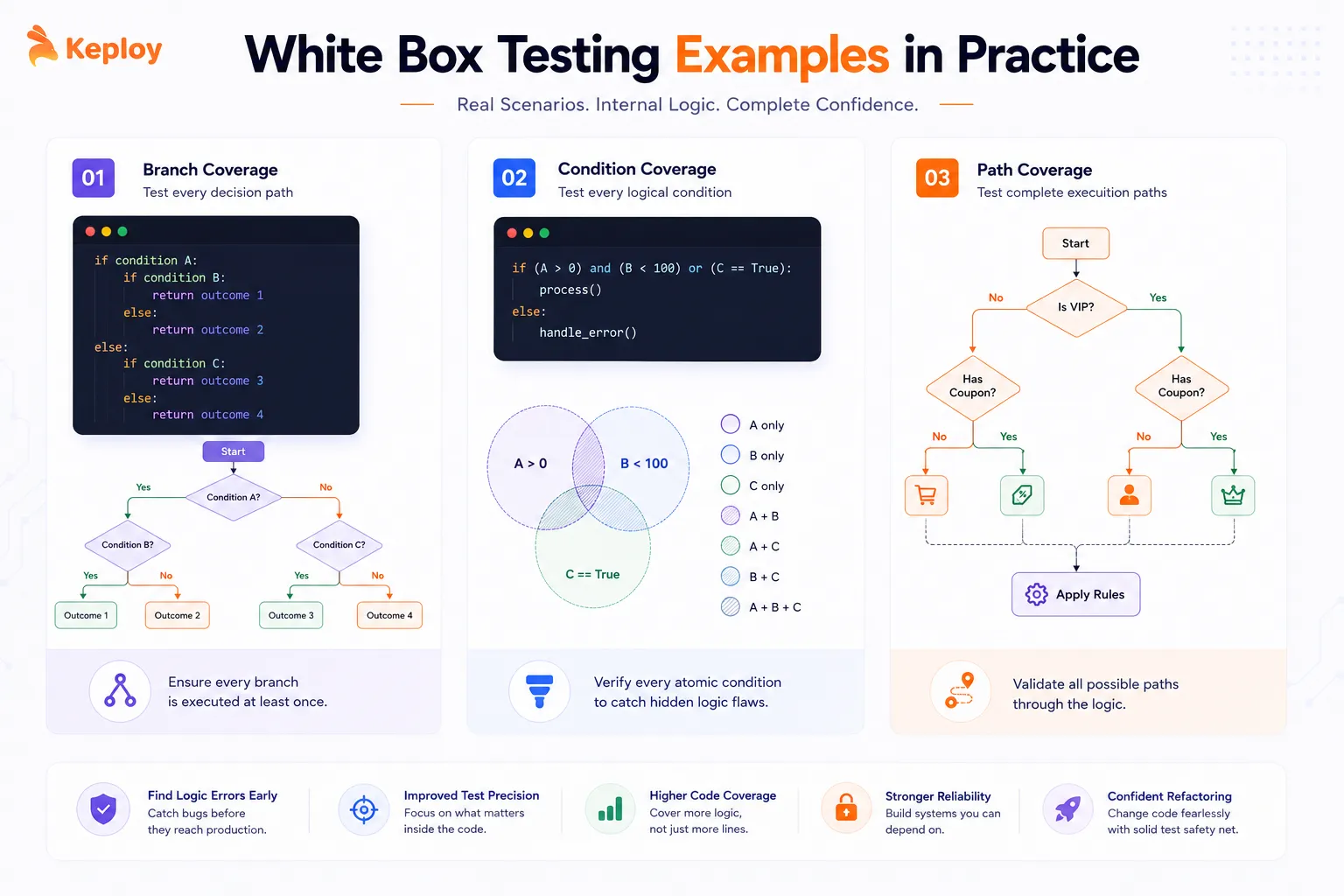
Example 1: Testing a Login Function with Branch Coverage
A login function has multiple decision branches: missing credentials, password too short, and invalid credentials. Branch coverage requires tests for every outcome.
Each return path is now covered. Without branch coverage, a test that only verifies the happy path would leave four of these five branches untested.
Example 2: Testing Input Validation with Condition Coverage
Payment amount validation has multiple compound conditions. Condition coverage catches bugs that simpler tests miss.
Example 3: Testing a Discount Calculator with Path Coverage
A tiered discount function has multiple interacting conditions. This example shows how path coverage catches combinations that individual branch tests miss.
White Box Testing vs Unit Testing
This comparison trips up a lot of developers. They’re related but not the same thing.
| Aspect | White Box Testing | Unit Testing |
|---|---|---|
| What it is | A testing methodology (how you design tests) | A testing level (what you’re testing) |
| Scope | Can apply at unit, integration, or system level | Tests individual functions or components only |
| Focus | Internal code structure, paths, coverage criteria | Functional correctness of isolated units |
| Determines | Whether code paths are exercised | Whether outputs match expected values |
| Tools | Coverage tools (pytest-cov, JaCoCo) | Test frameworks (pytest, JUnit, Jest) |
Unit testing can use white box techniques (and usually does), but it can also be done as black box testing where you only care about inputs and outputs. White box testing is the methodology; unit testing is the level at which you apply it.
Integrating White Box Testing into CI/CD Pipelines
White box testing only delivers consistent value when it runs automatically on every code change. Running it manually is how coverage gaps slip through unnoticed.
Code Coverage Tools by Language
Pick the tool that matches your stack:
-
Python: pytest-cov (runs alongside pytest, generates XML and HTML reports)
-
Java: JaCoCo (integrates with Maven and Gradle, generates detailed branch and line reports)
-
JavaScript/TypeScript: Istanbul/NYC (built into Jest via
--coverageflag) -
Go: built-in
go test -cover(no extra tools needed)
Enforcing Coverage Thresholds in GitHub Actions
Here’s a practical GitHub Actions workflow that runs white box tests with coverage and fails the build if coverage drops below your threshold:
The --cov-fail-under=80 flag fails the pipeline if overall coverage drops below 80%. The --cov-report=term-missing output shows exactly which lines weren’t covered, so developers know what to fix.
When to Fail a Build on Coverage Drops
A few notes on setting thresholds in practice. 80% is a reasonable starting point for most teams, but the number matters less than the trend. A codebase that drops from 85% to 79% on a single PR is more concerning than one that stays steady at 75%.
Consider failing the build on:
-
Overall coverage dropping below your baseline
-
New files added with less than a minimum threshold (e.g., 70%)
-
Critical modules (authentication, payment processing) dropping below a stricter threshold (e.g., 90%)
Tools like SonarQube let you set different thresholds per module, which is more useful than a single project-wide number.
Advantages of White Box Testing
-
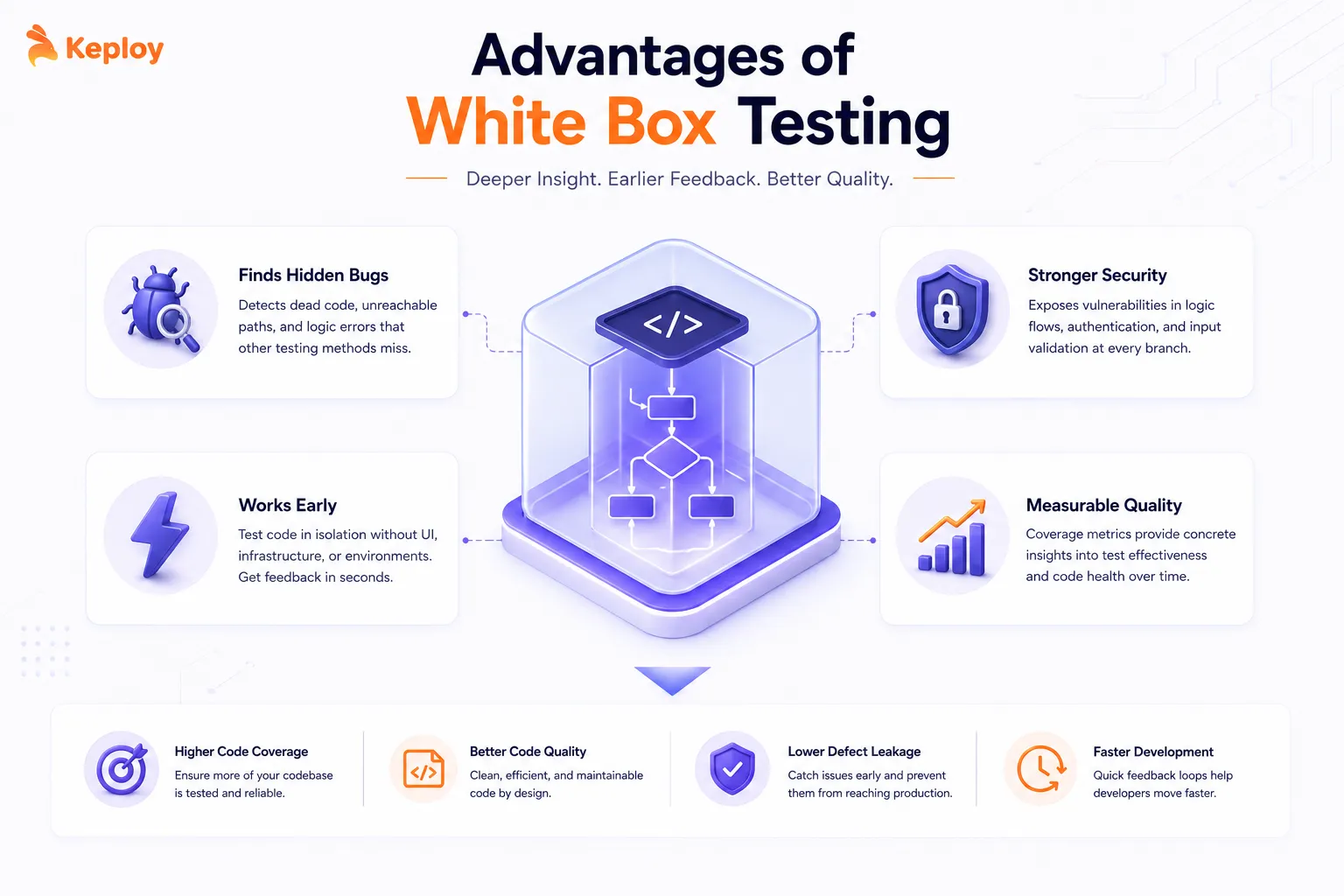
White box testing finds bugs that no other testing method catches reliably.
-
Dead code is the obvious one. If a function exists in the codebase but no test ever executes it, you don’t know if it works. White box coverage reports make dead code visible. Teams at companies like Google and Meta include coverage analysis in their code review process specifically to prevent dead code from accumulating.
-
It finds security vulnerabilities in logic flows. Authentication bypass bugs, insecure default conditions, and missing input validation at specific branches are hard to find from the outside. Access to the code makes them straightforward to identify and test explicitly.
-
White box testing works early. You don’t need a UI, a complete system, or a staging environment. Tests run against the code directly, which means developers get feedback in seconds rather than waiting for a full integration build.
-
It also gives you measurable quality signals. Code coverage percentages are imperfect, but they’re concrete. Teams that track branch coverage over time have a quantitative indicator of where their test suite is weakest, which is more actionable than general impressions of test quality.
Limitations of White Box Testing
-
High code coverage doesn’t mean high-quality tests. This is the most important limitation to understand.
-
A test that calls every function but makes no meaningful assertions can produce 100% statement coverage while testing nothing useful. Coverage measures execution, not verification. Teams that optimise for coverage numbers rather than test quality end up with suites that look impressive and catch very little.
-
White box testing requires programming knowledge. Writing tests that target specific branches and paths isn’t a task you can hand to non-technical stakeholders. It needs developers or engineers who understand the codebase well enough to design meaningful coverage.
-
It misses user perspective issues. A function can pass every white box test and still produce an experience that confuses or frustrates users. The internal logic works correctly while the system fails to meet user expectations. That’s why black box and exploratory testing still matter alongside white box methods.
-
Maintenance overhead compounds as codebases grow. Every time a function’s logic changes, the white box tests for that function may need updating. Highly specific path-coverage tests are particularly brittle – a small refactor can break multiple tests without changing any observable behavior.
-
White box testing can’t find what the spec missed. If the requirements were wrong or incomplete, the code might implement them correctly and the tests will pass. The tests verify that the code matches the implementation, not that the implementation matches what users actually need. That’s where regression testing picks up the gap white box testing leaves behind
White Box Testing Tools
Code Coverage Measurement
These tools track which statements, branches, and paths your test suite actually exercises.
-
pytest-cov (Python): Runs alongside pytest with a single flag (
--cov). Outputs line-by-line coverage reports, identifies untested branches, and generates XML for CI integration. -
JaCoCo (Java): The standard for Java coverage. Integrates with Maven and Gradle, produces detailed HTML reports broken down by class, method, line, and branch.
-
Istanbul/NYC (JavaScript): Built into Jest via the
--coverageflag. Works with TypeScript too. Shows branch coverage per file and highlights uncovered lines directly in the report.
Static Analysis
These tools find code quality and security issues without running the code.
-
SonarQube: Scans for bugs, security vulnerabilities, code smells, and coverage gaps across most major languages. Used by teams at Microsoft, Siemens, and many mid-to-large engineering orgs.
-
Pylint / ESLint: Language-specific linters that catch unreachable code, unused variables, and logic issues before tests even run.
Testing Frameworks
These provide the structure for writing and executing white box test cases.
-
pytest (Python): Clean syntax, powerful fixtures, parameterized testing for covering multiple branches in one test function.
pytest-covhandles coverage reporting alongside it. -
JUnit 5 (Java): The standard for Java unit testing. Parameterized tests, nested test classes, and native Maven/Gradle integration.
-
Jest (JavaScript): Built-in coverage, mocking, and snapshot testing in one package. The default choice for most JavaScript and TypeScript projects.
Automated Test Generation
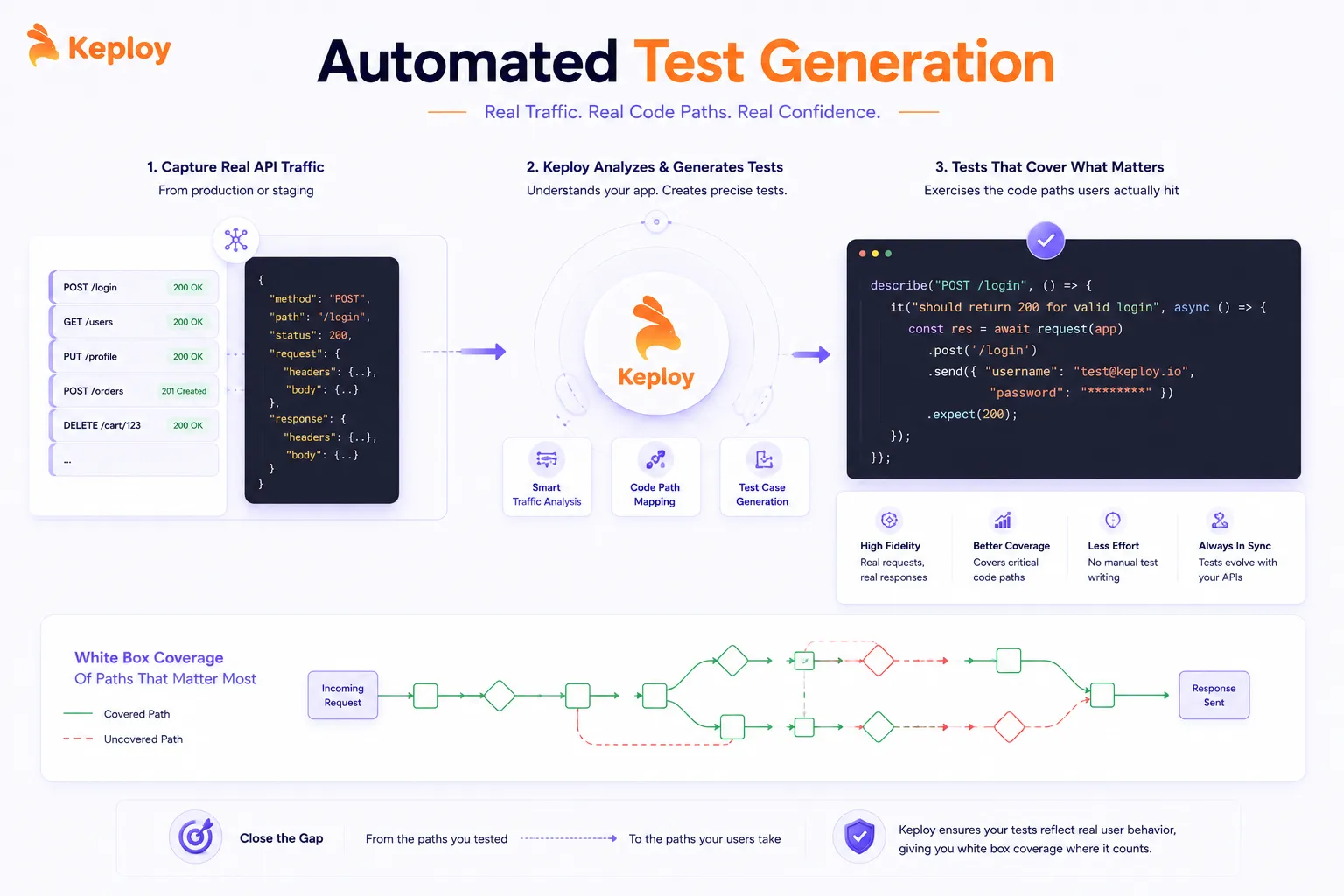
When Keploy captures real API traffic from production or staging, the generated tests exercise the specific code paths that actual users trigger. That gives you white box coverage of the paths that matter most – the ones that real requests actually hit – without manually writing test cases for each branch. For API-heavy backends, this closes the gap between the paths you tested and the paths your users take.
Conclusion
White box testing isn’t the most glamorous part of software development. You’re not shipping features or improving user experience – you’re verifying that the logic inside the code that powers those features actually works the way you think it does. But the teams that do it consistently are the ones whose "it passed in CI" actually means something. They know which paths have been tested and which haven’t. They catch logic bugs before users do. They have coverage metrics that tell them where the risk in their codebase lives.
The techniques aren’t complicated. Statement coverage, branch coverage, path coverage – each one builds on the last. What makes white box testing hard in practice is the discipline of doing it consistently, tracking coverage as a real metric, and not treating a green test suite as proof that the code is correct. Start with branch coverage on your most critical modules. Wire it into CI with a threshold. Build from there.
Frequently Asked Questions
What is white box testing in software testing?
White box testing is a method where test cases are designed based on the internal structure and source code of the application. Testers have full visibility into the code and write tests that specifically exercise its logic paths, conditions, branches, and loops.
What are the main white box testing techniques?
The five core techniques are statement coverage (every line runs at least once), branch coverage (every true/false path is tested), path coverage (every complete execution path runs), condition coverage (every boolean sub-expression is tested independently), and loop testing (edge cases at loop boundaries are covered).
What is the difference between white box and black box testing?
White box testing designs test cases from the code’s internal structure. Black box testing designs test cases from the external requirements and user-facing behavior, with no knowledge of internal implementation. Both are necessary at different stages.
Is white box testing the same as unit testing?
No. White box testing is a methodology that defines how test cases are designed (based on internal code structure). Unit testing is a level that defines what’s being tested (individual functions or components). Unit testing often uses white box techniques, but the two aren’t the same thing.
What are the advantages of white box testing?
It finds dead code, logic errors, and security vulnerabilities that black box testing misses. It gives measurable coverage metrics. It can run early in development without a complete system or UI. And it provides precise feedback on exactly which code paths are untested.
What are the limitations of white box testing?
High coverage doesn’t guarantee good tests. It requires programming knowledge. It misses user perspective issues. Tests can become brittle with refactors. And it can’t catch errors in the original specification – if the requirements were wrong, well-covered code can still fail users.
What tools are used for white box testing?
pytest-cov, JaCoCo, and Istanbul for coverage measurement. SonarQube and Pylint/ESLint for static analysis. pytest, JUnit, and Jest for test frameworks. For automated test generation from real traffic, Keploy captures API interactions and generates tests that cover the paths real users trigger.
How do you integrate white box testing into CI/CD?
Use a coverage tool (pytest-cov, JaCoCo, or Istanbul) alongside your test runner, add coverage reporting to your CI workflow, and set a --cov-fail-under threshold that fails the build when coverage drops below your baseline. Track coverage trends over time rather than optimizing for a single number.