Behavior driven development (BDD): process, examples and tools
What is behavior driven development (BDD)?
Behavior driven development (BDD), also spelled behaviour driven development, is an Agile practice where developers, testers and business stakeholders agree on how software should behave before it is built. The team describes that behavior as concrete examples written in plain language, usually in a Given-When-Then format, and then turns those examples into automated tests.
BDD is a collaboration process first and a testing technique second. The conversations and shared examples are the point. The automated tests are the proof that the software does what everyone agreed on, and they stay in the codebase as living documentation.
A short history of BDD
Dan North coined the term behavior driven development around 2003 as a response to problems teams had with test driven development: where to start, what to test, and what to call tests. He described the idea publicly in his 2006 article "Introducing BDD". Replacing the word "test" with "behavior" shifted the conversation from code correctness to what the software should do for its users.
BDD grew out of TDD and acceptance test driven development (ATDD), and borrows ideas from domain driven design, especially the use of a shared vocabulary between business and technical people. Tools such as JBehave and later Cucumber made the approach practical by turning plain-language scenarios into executable tests.
BDD vs BDD testing
The two terms are often used interchangeably, but they mean different things:
- BDD is the whole practice: discovering requirements through conversation, writing them as examples, and building software to meet them.
- BDD testing is the part where those examples are automated and run against the application to confirm it behaves as described.
A team can get much of the value of BDD from the conversations alone. A team that only writes Gherkin files without the conversations is doing BDD testing, not BDD.
How BDD works
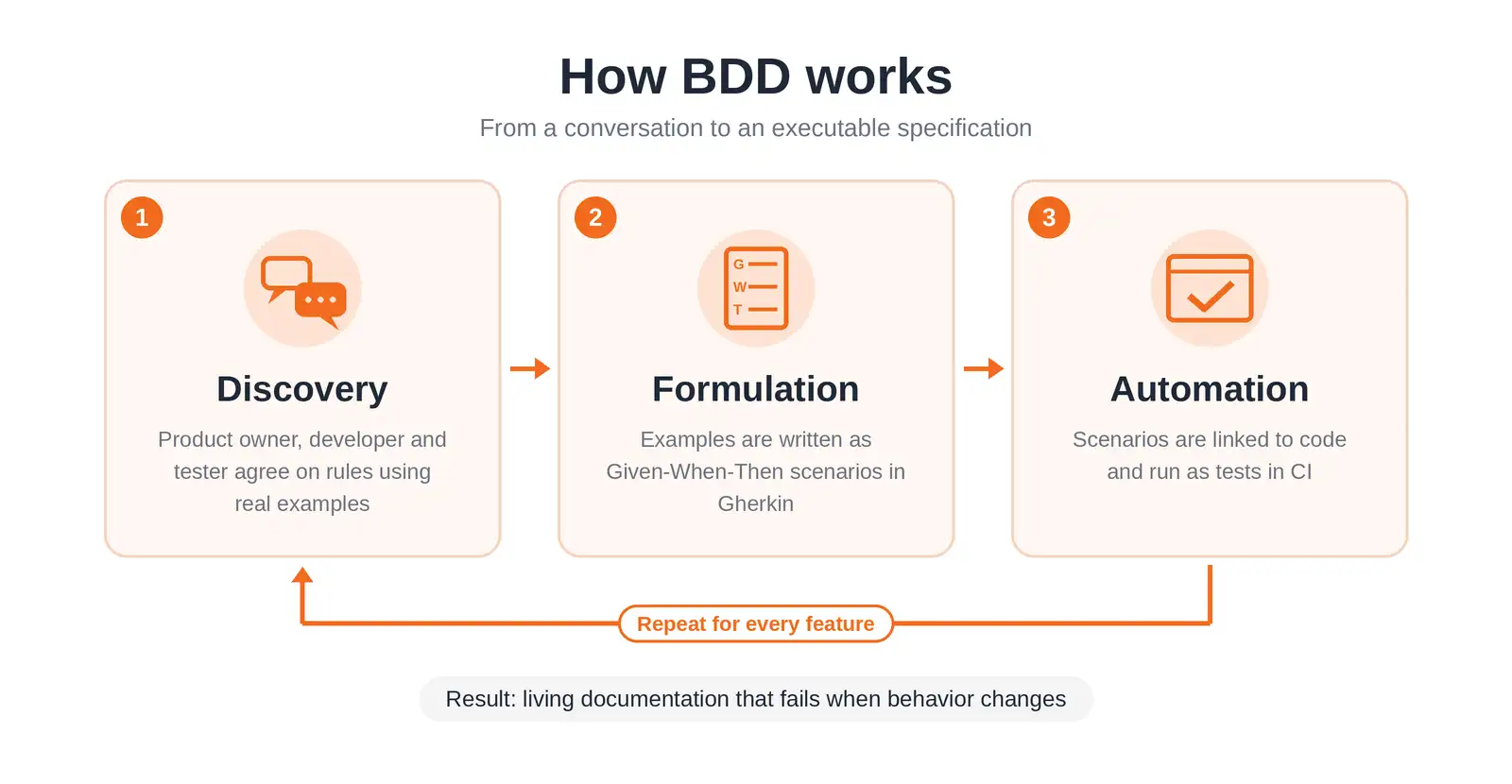
BDD work happens in three practices that repeat for every feature:
- Discovery: the team talks through a user story and uses concrete examples to uncover rules, edge cases and open questions.
- Formulation: the agreed examples are written as structured scenarios in Gherkin that both business and technical people can read.
- Automation: developers connect each scenario step to code so the scenario runs as an automated test.
The BDD lifecycle step by step
- Write the user story. Use the "As a [role], I want [feature] so that [benefit]" format to capture who needs what and why.
- Hold a Three Amigos session. A product owner or business analyst, a developer and a tester review the story together, each bringing a different view: business value, implementation and risk.
- Map examples. Use example mapping to list the rules of the story and at least one concrete example per rule. Questions nobody can answer become follow-ups instead of hidden assumptions.
- Write scenarios in Gherkin. Each example becomes a scenario. The scenarios double as the acceptance testing criteria for the story.
- Automate and implement. Developers write step definitions, watch the scenarios fail, then write just enough code to make them pass.
- Run in CI and refine. Scenarios run on every build. When behavior changes, the team updates the scenarios first, so the documentation never drifts from the system.
Gherkin syntax explained
Gherkin is the plain-language format most BDD tools read. Scenarios live in files with a .feature extension, and each line starts with a keyword:
| Keyword | Purpose |
|---|---|
Feature | Names the capability being described and usually includes the user story. |
Background | Steps that run before every scenario in the file, used for shared setup. |
Scenario | One concrete example of behavior. |
Given | The starting context or state. |
When | The action or event. |
Then | The expected outcome. |
And / But | Adds more steps of the same type as the previous line. |
Scenario Outline + Examples | Runs the same scenario with several rows of data. |
@tags | Labels scenarios so you can run subsets, for example @smoke or @regression. |
Here is a complete feature file with a happy path and two failure cases:
@login
Feature: User login
  As a registered user
  I want to log in to my account
  So that I can see my dashboard

  Background:
    Given the user is on the login page

  Scenario: Successful login with valid credentials
    When the user logs in with "ana@example.com" and "correct-password"
    Then the user should see the dashboard

  Scenario Outline: Login fails with invalid credentials
    When the user logs in with "<email>" and "<password>"
    Then the user should see the error "<message>"

    Examples:
      | email           | password       | message                   |
      | ana@example.com | wrong-password | Invalid email or password |
      |                 | any-password   | Email is required         |
BDD example: from scenario to automated test
BDD tools match each Gherkin step to a method called a step definition. A test runner then executes the feature file. The example below uses Cucumber with Java and Selenium to automate the login feature above.
Step definitions in Java (Cucumber)
import io.cucumber.java.en.Given;
import io.cucumber.java.en.When;
import io.cucumber.java.en.Then;
import org.openqa.selenium.By;
import org.openqa.selenium.WebDriver;
import org.openqa.selenium.chrome.ChromeDriver;
import static org.junit.jupiter.api.Assertions.assertEquals;
import static org.junit.jupiter.api.Assertions.assertTrue;

public class LoginSteps {
    private WebDriver driver;

    @Given("the user is on the login page")
    public void userIsOnLoginPage() {
        driver = new ChromeDriver();
        driver.get("https://example.com/login");
    }

    @When("the user logs in with {string} and {string}")
    public void userLogsIn(String email, String password) {
        driver.findElement(By.id("email")).sendKeys(email);
        driver.findElement(By.id("password")).sendKeys(password);
        driver.findElement(By.id("login")).click();
    }

    @Then("the user should see the dashboard")
    public void userSeesDashboard() {
        assertTrue(driver.getCurrentUrl().endsWith("/dashboard"));
        driver.quit();
    }

    @Then("the user should see the error {string}")
    public void userSeesError(String message) {
        assertEquals(message, driver.findElement(By.id("error")).getText());
        driver.quit();
    }
}
Notice that the Scenario Outline reuses the same step definitions for every row in the Examples table. That reuse is what keeps BDD suites maintainable as they grow.
BDD for API testing
BDD is often shown with UI examples, but it works well for APIs and microservices, where behavior is defined by requests and responses rather than screens. API scenarios also run faster and break less often than browser tests.
Feature: Checkout API

  Scenario: Checkout succeeds for a cart with items
    Given a cart with 2 items
    When the client sends POST /checkout for that cart
    Then the response status should be 201
    And the response should contain an order id
Step definitions in Python (behave)
import requests
from behave import given, when, then

BASE_URL = "http://localhost:8080"

@given("a cart with {count:d} items")
def step_create_cart(context, count):
    items = [{"sku": f"SKU-{i}", "qty": 1} for i in range(count)]
    resp = requests.post(f"{BASE_URL}/carts", json={"items": items})
    context.cart_id = resp.json()["id"]

@when("the client sends POST /checkout for that cart")
def step_checkout(context):
    context.response = requests.post(
        f"{BASE_URL}/checkout", json={"cart_id": context.cart_id}
    )

@then("the response status should be {status:d}")
def step_status(context, status):
    assert context.response.status_code == status

@then("the response should contain an order id")
def step_order_id(context):
    assert "order_id" in context.response.json()
BDD tools and frameworks
| Tool | Language | Scenario format | Notes |
|---|---|---|---|
| Cucumber | Java, JavaScript, Ruby and more | Gherkin | The most widely used BDD framework. |
| Behave | Python | Gherkin | Standalone runner for Python projects. |
| pytest-bdd | Python | Gherkin | Runs scenarios inside pytest, so you keep fixtures and plugins. |
| Reqnroll | .NET | Gherkin | Open-source successor to SpecFlow. Works with NUnit, xUnit and MSTest. |
| SpecFlow | .NET | Gherkin | Reached end-of-life on December 31, 2024. Migrate to Reqnroll. |
| JBehave | Java | Story files | One of the first BDD frameworks. Integrates with JUnit. |
| Gauge | Multiple languages | Markdown | Specs are written in Markdown rather than Gherkin. |
| Concordion | Java | HTML or Markdown | Executable specifications that read like documentation. |
BDD vs TDD vs ATDD
BDD is sometimes described as an extension of TDD, but it is better understood as a combination of practices from both test driven development and acceptance test driven development, with a stronger focus on shared language.
| Aspect | TDD | ATDD | BDD |
|---|---|---|---|
| Main question | Is the code correct? | Does the feature meet acceptance criteria? | Does the system behave the way users and the business expect? |
| Written by | Developers | Developers, testers, customer | Developers, testers, business stakeholders |
| Format | Code in the app language | Acceptance tests, often tables | Given-When-Then scenarios in Gherkin |
| Test level | Unit | Acceptance | Acceptance, integration, system |
| Typical tools | JUnit, pytest, NUnit | FitNesse, Robot Framework | Cucumber, Behave, Reqnroll |
| Cycle | Red, green, refactor | Discuss, distill, develop, demo | Discover, formulate, automate |
The approaches work together. Many teams use BDD scenarios to define features at the acceptance level and TDD to build the code underneath them.
Benefits of BDD
- Fewer misunderstood requirements: concrete examples surface gaps and edge cases before any code is written.
- Shared language: business and technical people describe features the same way, in the same documents.
- Clear definition of done: a story is complete when its scenarios pass.
- Living documentation: scenarios describe what the system actually does today, because they fail when it stops doing it.
- Safer changes: automated scenarios in CI catch regressions in business-critical flows on every build.
- Better tests: scenarios focus on outcomes rather than implementation, so they survive refactoring.
Limitations of BDD
- Time cost of collaboration: discovery sessions take time from people who are often the busiest on the team.
- Needs real business involvement: if only developers write scenarios, BDD becomes extra syntax on top of ordinary tests.
- Maintenance overhead: large suites with duplicated or overly detailed steps become slow and fragile.
- Learning curve: writing good scenarios is a skill, and early suites are often too imperative.
- Not full coverage: BDD scenarios cover key behaviors, not every code path. You still need unit, integration and regression tests.
When BDD may not be a good fit
- Solo projects or very small teams where the developer is also the domain expert.
- Technical libraries and infrastructure code with no business-facing behavior.
- Short-lived prototypes where requirements change daily.
- Teams where business stakeholders cannot commit time to discovery.
Best practices for writing BDD scenarios
- Write declarative steps. Describe what the user achieves ("When the user logs in"), not how they click through the UI ("When the user clicks the email field and types...").
- Test one behavior per scenario. If a scenario needs several
Whensteps, it probably covers more than one rule. - Use domain language. Name things the way the business does, so stakeholders can review scenarios without translation.
- Keep scenarios BRIEF: Business language, Real data, Intention revealing, Essential and Focused.
- Include failure cases. Rules are defined as much by what the system rejects as by what it accepts.
- Reuse steps, not scenarios. Share step definitions across features and use
Backgroundonly for setup every scenario truly needs. - Tag and split suites. Run fast
@smokescenarios on every commit and the full suite before release.
How Keploy complements BDD
BDD scenarios capture the behavior a team intends to build. They do not capture every request, edge case and dependency interaction that real users trigger once the service is live, and writing scenarios for all of that by hand is not practical.
Keploy fills that gap for APIs. It records real API traffic and turns it into test cases along with mocks for databases and downstream services, so you get a regression suite based on how the system is actually used. Teams can keep BDD for defining and agreeing on new behavior, and use Keploy to protect existing behavior from regressions without writing and maintaining that coverage manually.
To generate API tests from real traffic, see the Keploy API test generator guide, or install Keploy for integration testing.
Related terms
- Test Driven Development: the developer-focused practice BDD grew out of.
- Cucumber Testing: the most popular tool for automating BDD scenarios.
- Acceptance Testing: BDD scenarios double as acceptance criteria.
- Agile Unit Testing: unit testing practices that sit underneath BDD scenarios.
- Browse all testing terms: the full Keploy glossary.
FAQs about behavior driven development (BDD)
1. What is behavior driven development (BDD)?
BDD is an Agile practice where developers, testers and business stakeholders agree on software behavior through concrete examples written in plain language, then automate those examples as tests.
2. Who created behavior driven development?
Dan North coined the term around 2003 and described it in his 2006 article "Introducing BDD", as a response to common difficulties teams had with test driven development.
3. What is Gherkin in BDD?
Gherkin is a plain-language format for writing BDD scenarios. It uses keywords such as Feature, Scenario, Given, When and Then so that both technical and non-technical people can read the scenarios, and tools like Cucumber can execute them.
4. What is a feature file?
A feature file is a text file with a .feature extension that holds one feature and its scenarios written in Gherkin. BDD tools read feature files and match each step to a step definition in code.
5. How does BDD differ from TDD?
TDD is a developer practice focused on writing unit tests before code to confirm the code is correct. BDD involves business stakeholders and focuses on whether the system behaves the way users expect, using plain-language scenarios.
6. What is the difference between BDD and ATDD?
Both define acceptance criteria before development. ATDD focuses on the acceptance tests themselves, while BDD puts more weight on the conversations, shared domain language and Given-When-Then scenarios that describe behavior.
7. What are the Three Amigos in BDD?
The Three Amigos are the three perspectives in a BDD discovery session: business (usually a product owner or analyst), development and testing. They review a user story together to agree on rules and examples.
8. Which tools are popular for BDD?
Popular tools include Cucumber, Behave, pytest-bdd, Reqnroll, JBehave, Gauge and Concordion. SpecFlow reached end-of-life at the end of 2024, and Reqnroll is its recommended successor for .NET.
9. Can BDD be used for API testing?
Yes. BDD scenarios can describe API behavior in terms of requests and responses, and tools like Cucumber, Behave and pytest-bdd can call the API in step definitions. API scenarios are usually faster and more stable than UI scenarios.
10. Is BDD a replacement for other testing methods?
No. BDD covers key business behaviors at the acceptance level. Teams still need unit, integration and regression testing for full coverage.