Adding Labels to Test Suites
FreeTeamsScaleEnterpriseSelf-HostedDedicated
Labels help you organize, categorize, and filter your test suites effectively. Keploy provides flexible labeling options that allow you to add labels to individual test suites or multiple suites at once.
Overview
The labeling system includes:
- Individual Labeling: Add labels to specific test suites
- Bulk Labeling: Apply labels to multiple suites simultaneously
- Label Management: Create, edit, and delete custom labels
- Filtering: Use labels to filter and organize your test collection
Adding Labels to Individual Test Suites
Method 1: Using the Three Dots Menu
-
Navigate to Test Suites
- Go to your Test Suites Dashboard
-
Access Suite Options
- Locate the test suite you want to label
- Click the three dots (⋮) menu next to the test suite name
-
Select Add Label Option
- From the dropdown menu, click "Add Labels"
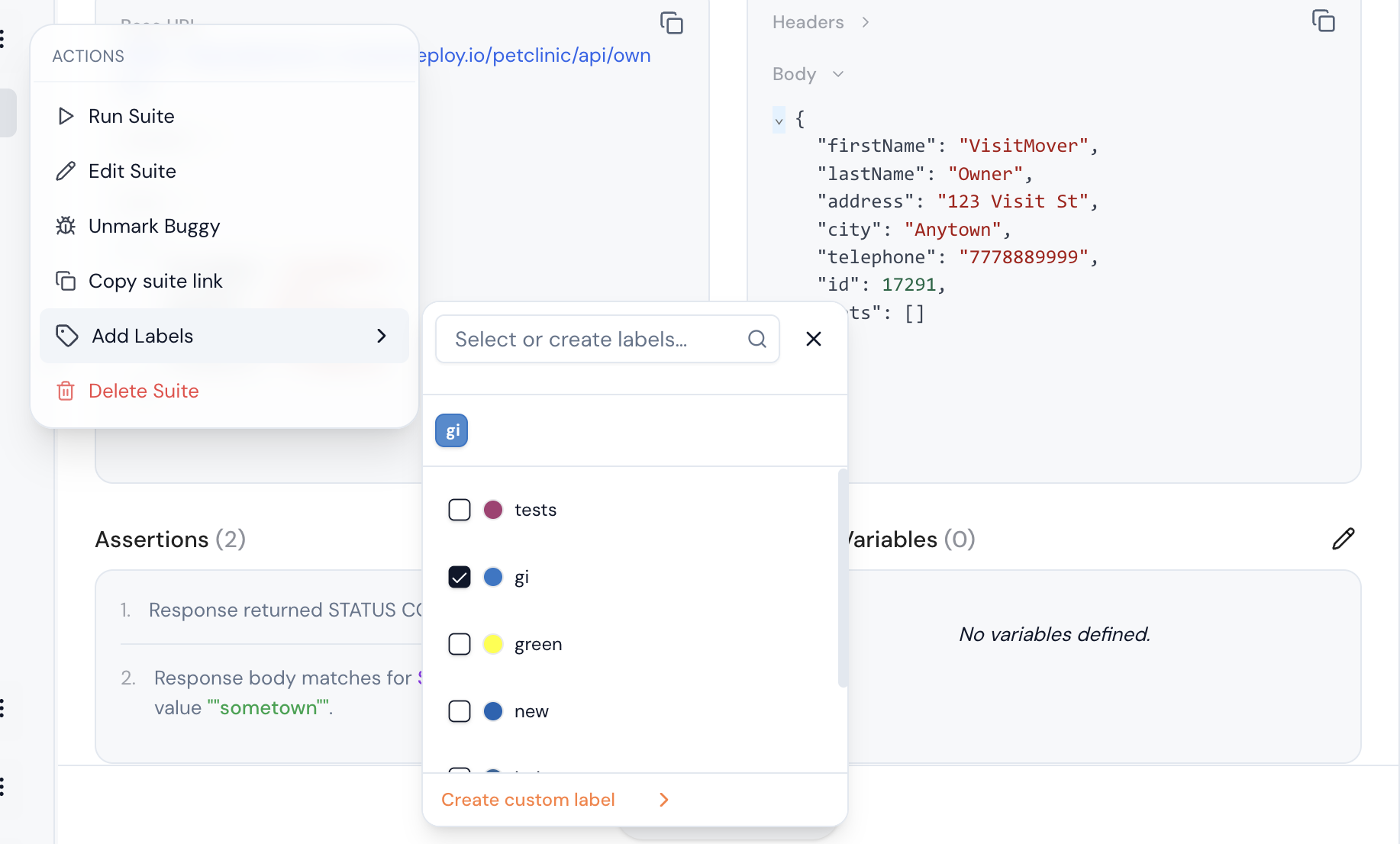
Label Assignment Interface
When you open the label assignment dialog, you'll see:
Existing Labels Section
🏷️ Available Labels
├── 📊 Priority
│   ├── high-priority (P0)
│   ├── medium-priority(P1)
│   └── low-priority(P2)
Assigning Existing Labels
-
Browse Categories
- Expand label categories to see available options
- Use the search box to find specific labels quickly
-
Select Labels
- Click on labels to select them
- Selected labels will be highlighted or marked with a checkmark ✓
- You can select multiple labels from different categories
-
Apply Labels
- Review your selections in the "Selected Labels" preview
- Click "Apply Labels" to assign them to the test suite
Creating New Labels
Creating During Assignment
-
Open Label Dialog
- Follow the steps above to open the label assignment interface
-
Create New Label
- Click "Create Custom Label"
- Enter label details in the creation form
-
Label Creation Form
- For Example:
Label Name: [smoke-critical]
Color: [🔴] (color picker)
Bulk Label Assignment
Using Checkbox Selection
- Select Multiple Suites
- Navigate to the Test Suites list
- Use checkboxes to select multiple test suites
- After selecting suites, Click "Add Labels" or "Create Custom Labels" button
Label Management Best Practices
Naming Conventions
-
Use Consistent Formatting
✅ Good Examples:
- team-frontend
- priority-high
- env-production
- type-smoke-test

❌ Avoid:
- TeamFrontend
- HIGH_PRIORITY
- prod env
- smoke test type -
Category-Based Organization
Priority: critical, high, medium, low
Environment: production, staging, development
Type: smoke, regression, integration, e2e
Team: frontend, backend, qa, devops
Status: active, deprecated, experimental
Related Features
- Test Suite Management: Edit and organize test suites
- Selective Test Execution: Run tests using label filters
- Test Reports: Generate reports filtered by labels
- Custom Assertions: Create assertions for labeled suites
Labels are a powerful organizational tool that help you maintain order in large test collections and enable efficient test management workflows.