





Last updated: 15 October 2026
A test case in software testing is a structured document that defines the inputs, execution steps, and expected results needed to verify a single behavior of an application – turning testing from a manual judgment call into a repeatable, traceable process.
In software development, test cases are the building blocks that validate the functionality, quality, and reliability of an application. Writing effective test cases ensures that the code behaves as expected in every scenario, and helps maintain a proper traceability matrix between requirements and test coverage.
This guide covers everything you need to know about test cases, including what they are, the different types with examples, a template you can copy, how to write them step by step, test coverage, and the tools teams use to manage them. Whether you are a beginner or an experienced developer, you will find a solid foundation here for writing and managing test cases.
What is a Test Case in Software Testing?
A test case in software testing is a documented set of inputs, execution steps, and expected results created to verify that a specific feature of an application works as intended.
These test cases are typically derived from clearly defined software requirements, often documented in an SRS document, to ensure that the expected behavior can be validated systematically.
Each test case checks one condition or behavior, and the software passes the test when the actual result matches the expected result.
Test cases matter because they turn testing from guesswork into a repeatable process. They give QA engineers exact instructions to follow, make results comparable across builds, and create a written record of what was verified and when. When a bug slips through, a well maintained test case suite tells you exactly which scenario was never covered.
Components of a Test Case
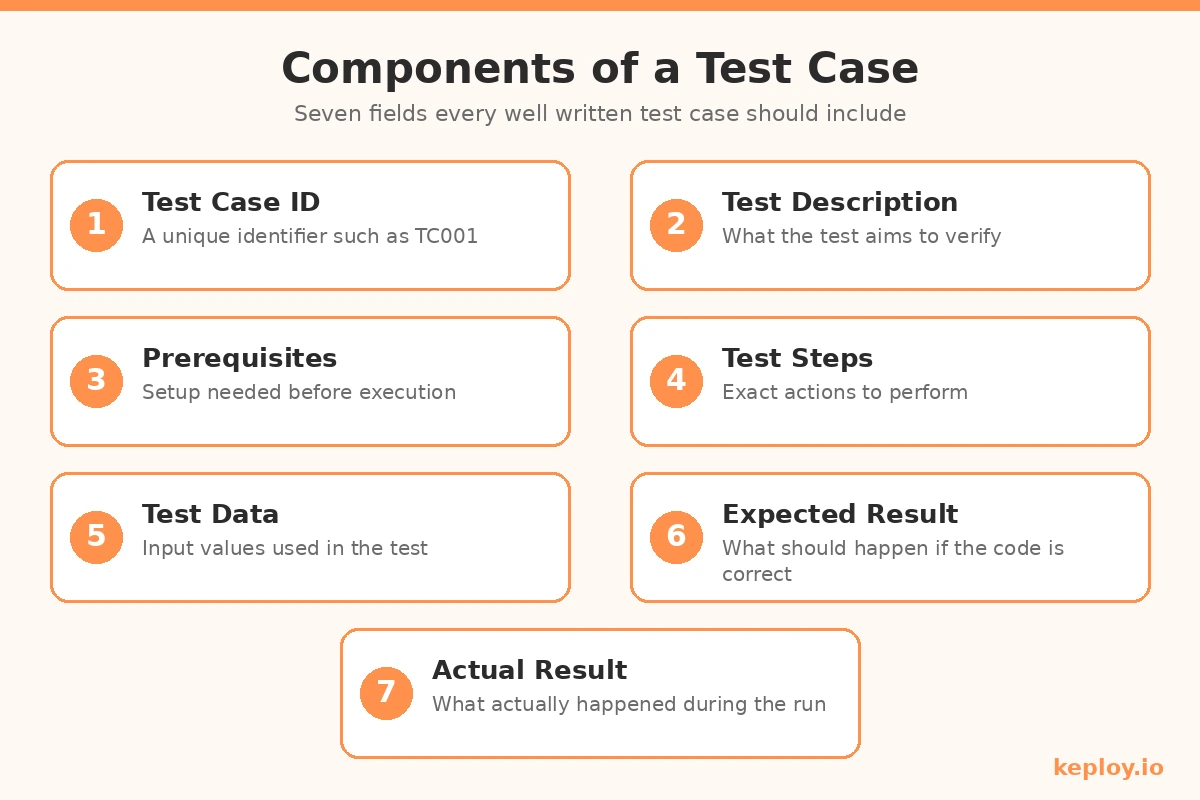
A standard test case includes the following fields:
- Test case ID: A unique identifier for the test case, such as TC001.
- Test description: A short summary of what the test aims to verify.
- Test prerequisites: The setup or state required before running the test.
- Test steps: The exact actions taken to perform the test.
- Test data: The input values used during testing.
- Expected result: What should happen if the system works correctly.
- Actual result: What actually happened when the test was executed.
Test Case Example in Software Testing
The easiest way to understand test cases is to look at a real set. Here is an example based on a login function, with a mix of passing and failing scenarios:
| Test Case ID | Test Description | Prerequisites | Test Steps | Expected Result | Actual Result | Status |
|---|---|---|---|---|---|---|
| TC001 | Validate login function | User logged out | 1. Enter a valid username and password 2. Click login | The user is redirected to the dashboard | The user is redirected to the dashboard | Pass |
| TC002 | Validate login with invalid password | User logged out | 1. Enter a valid username and invalid password 2. Click login | An error message is displayed | An error message is displayed | Pass |
| TC003 | Validate login with empty fields | User logged out | 1. Leave username and password fields empty 2. Click login | An error message is displayed | No response, page reloads | Fail |
| TC004 | Validate login with special characters | User logged out | 1. Enter special characters in username and password fields 2. Click login | An error message is displayed | An error message is displayed | Pass |
| TC005 | Validate login with expired session | Session expired | 1. Reopen login page 2. Enter a valid username and password 3. Click login | The user is redirected to the login page | The user is redirected to the dashboard | Fail |
| TC006 | Validate login with SQL injection | User logged out | 1. Enter SQL injection code as username 2. Enter any value for password 3. Click login | An error message or warning is displayed | No response, SQL code executed | Fail |
This table covers valid inputs, error handling, UI behavior, and security testing. Notice how the failing cases (TC003, TC005, TC006) are the ones that reveal real problems, which is exactly why negative scenarios belong in every test suite.
Test Case Template You Can Copy
If you are writing test cases for the first time, start with this blank template. It works in Excel, Google Sheets, or any test management tool:
| Field | What to Fill In |
|---|---|
| Test Case ID | Unique ID, e.g. TC_LOGIN_001 |
| Title | One line describing the objective |
| Module / Feature | The part of the application under test |
| Prerequisites | Required state or setup before execution |
| Test Data | Specific input values to use |
| Test Steps | Numbered, exact actions to perform |
| Expected Result | The correct behavior of the system |
| Actual Result | Filled in during execution |
| Status | Pass / Fail / Blocked |
| Remarks | Bug ID, screenshots, or notes |
Keep IDs consistent across the suite, write steps so specific that a new team member could execute them without asking questions, and always state one expected result per test case.
Test Case vs Test Scenario vs Use Case
These three terms get mixed up constantly, so here is the difference in plain language:
| Aspect | Test Case | Test Scenario | Use Case |
|---|---|---|---|
| What it is | Detailed steps, data, and expected results for one condition | A high level situation to be tested | How a user interacts with the system to achieve a goal |
| Level of detail | Very detailed | Broad, one line | Focused on user journey |
| Example | Verify login fails with an invalid password and shows an error | Verify the login functionality | User logs in to view their order history |
| Written by | QA engineers | QA leads or engineers | Business analysts |
| Derived from | Test scenarios | Requirements | Requirements and user goals |
In short, a use case describes what the user wants to do, a test scenario identifies what needs testing, and a test case spells out exactly how to test it. One scenario like "verify the login functionality" typically expands into many test cases, as you saw in the example table above.
Types of Test Cases in Software Testing
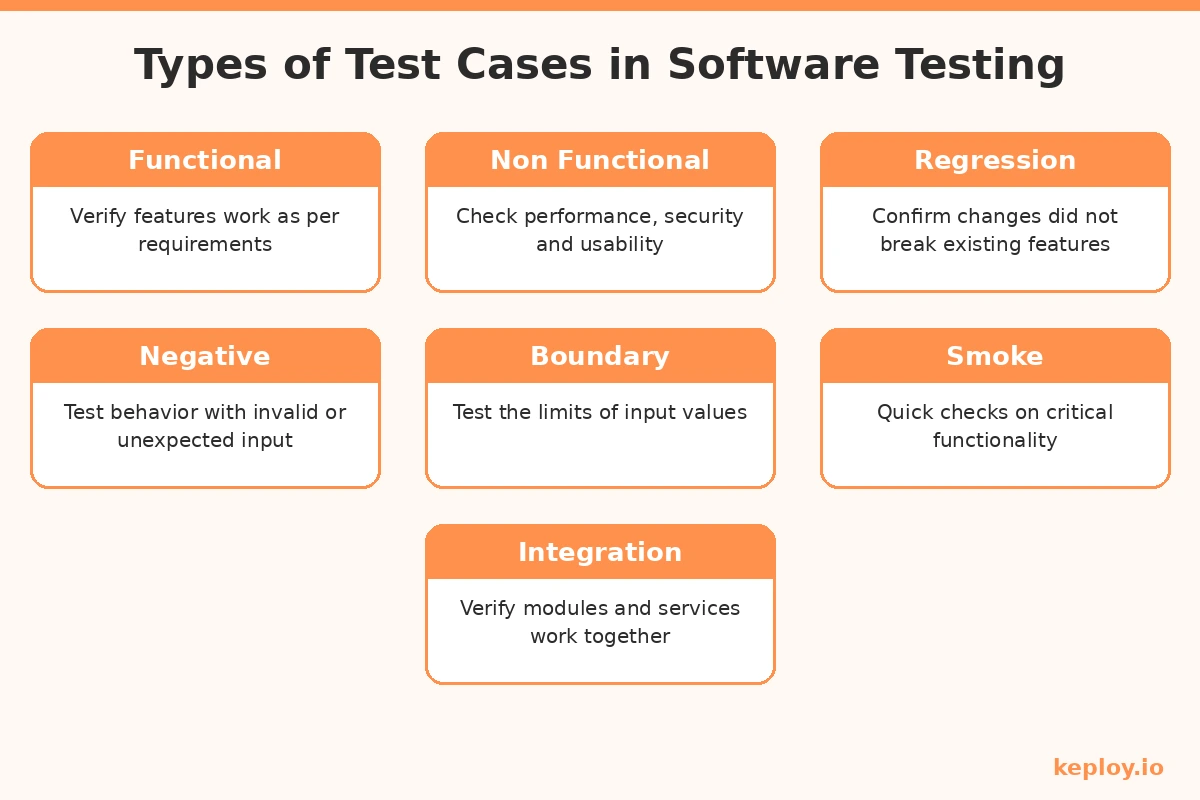
There are several types of test cases, each designed to check a different aspect of the application. To make each type concrete, we will use one running scenario: an e-commerce application where users browse products, add them to a cart, and check out. The application includes user authentication, product management, cart operations, and payment integration.
a. Functional Test Cases
Functional test cases verify that the software behaves according to the specified requirements. They focus on business logic, the user interface, APIs, and other functional components.
Scenario: Testing the user registration and login process.
Test Case:
- Title: Verify successful login with valid credentials.
- Steps:
- Navigate to the login page.
- Enter a valid username and password.
- Click the "Login" button.
- Expected Result: The user is logged in and redirected to the homepage.
b. Non-Functional Test Cases
Non-functional test cases check attributes like performance, usability, security, and reliability. The goal is to confirm the system meets requirements such as load handling and response time, not just feature correctness.
Scenario: Testing application performance when many users access it at once.
Test Case:
- Title: Verify application performance with 1000 concurrent users.
- Steps:
- Simulate 1000 users browsing products and adding items to the cart simultaneously.
- Expected Result: The application maintains a response time under 2 seconds without crashes or slowdowns.
c. Regression Test Cases
Regression test cases confirm that recent changes have not broken existing functionality. They are re-run after every code change, which is why teams usually automate them. If you want to go deeper, we have a full guide on regression testing covering techniques and best practices.
Scenario: Testing core cart functionality after adding a new wishlist feature.
Test Case:
- Title: Ensure cart functionality works correctly after the wishlist feature implementation.
- Steps:
- Add an item to the cart.
- Proceed to checkout.
- Expected Result: The user can add items to the cart and complete checkout without issues caused by the new wishlist feature.
d. Negative Test Cases
Negative test cases check how the system behaves with invalid or unexpected inputs. They make sure the application fails gracefully instead of breaking.
Scenario: Testing the login system with an incorrect password.
Test Case:
- Title: Verify that login fails with an invalid password.
- Steps:
- Enter a valid username and an incorrect password.
- Click the "Login" button.
- Expected Result: The user sees an error message: "Invalid credentials."
e. Boundary Test Cases
Boundary test cases focus on the edge limits of input values. They are especially good at catching off-by-one errors, which are among the most common bugs in input validation.
Scenario: Testing a product description field that accepts a maximum of 500 characters.
Test Case:
- Title: Verify the product description field accepts up to 500 characters.
- Steps:
- Enter exactly 500 characters in the description field.
- Attempt to save the product.
- Expected Result: The product is saved successfully.
f. Smoke Test Cases
Smoke test cases confirm that basic, critical functionality works after a deployment or build. They act as a quick health check before deeper testing begins. If you are wondering how smoke tests differ from regression tests, this comparison of smoke testing vs regression testing breaks it down.
Scenario: Checking that the e-commerce site works after deployment.
Test Case:
- Title: Verify basic site functionality after deployment.
- Steps:
- Open the e-commerce homepage.
- Click on the "Shop" button.
- Expected Result: The homepage loads and the user can navigate to the shop page.
g. Integration Test Cases
Integration test cases verify that different modules or services work together correctly. They focus on the communication between systems, APIs, and modules. For API-heavy applications, integration testing is often where the most critical bugs hide, because individual components can pass in isolation and still fail when connected.
Scenario: Testing the connection between the payment gateway and the order management system.
Test Case:
- Title: Verify successful integration between the payment gateway and the order system.
- Steps:
- Add items to the cart.
- Proceed to checkout and complete payment using a credit card.
- Expected Result: The payment is processed successfully and the order is recorded in the order management system.
How to Write Test Cases Step by Step
Knowing the types is half the job. Here is the process experienced QA engineers follow to actually write good test cases.
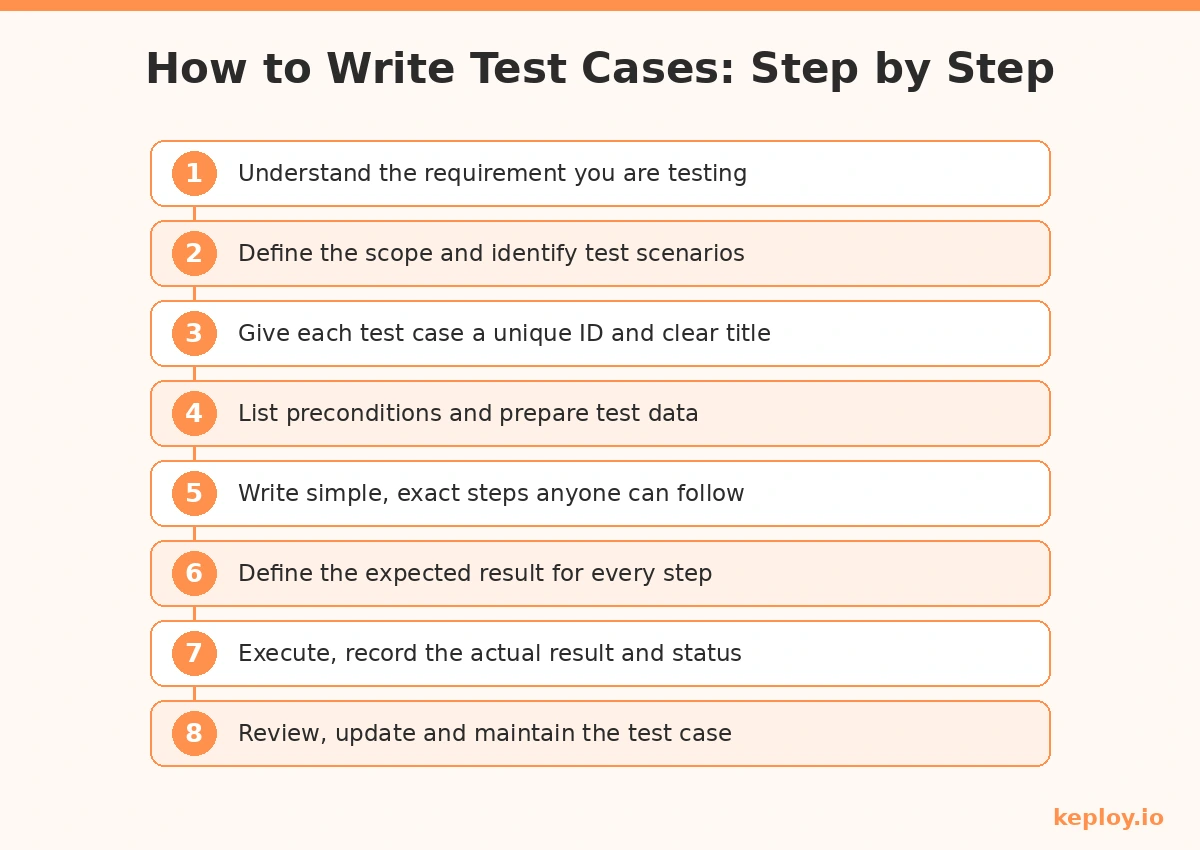
Step 1: Understand the requirement. Read the user story, PRD, or acceptance criteria before writing anything. If the requirement is ambiguous, clarify it first, because a test case built on a wrong assumption verifies the wrong behavior.
Step 2: Define the scope and identify test scenarios. Break the feature into scenarios like "verify login functionality" or "verify password reset." Each scenario will expand into multiple test cases covering positive, negative, and boundary conditions.
Step 3: Assign a unique ID and a clear title. Use a consistent naming pattern such as TC_LOGIN_001. The title should state the objective in one line so anyone scanning the suite understands it instantly.
Step 4: List preconditions and prepare test data. State what must be true before execution, for example "user account exists and is logged out." Specify exact test data instead of vague placeholders, so results are reproducible.
Step 5: Write simple, exact steps. Number every action and keep each step atomic. A good benchmark is that a new joiner should be able to execute your test case without asking a single question.
Step 6: Define the expected result. Every test case needs a clear, measurable expected outcome. "It should work" is not an expected result. "An error message reading Invalid credentials is displayed within 2 seconds" is.
Step 7: Execute and record the actual result. Run the test, note what actually happened, and mark the status as Pass, Fail, or Blocked. Attach screenshots or logs for failures so developers can reproduce the bug quickly.
Step 8: Review, update, and maintain. Test cases decay as the product changes. Get them peer reviewed, remove obsolete ones, and update steps whenever the feature changes, otherwise your suite slowly fills with false failures.
Test Case Design Techniques
When a feature has too many possible inputs to test everything, design techniques help you pick the smallest set of test cases with the highest chance of finding bugs.
Equivalence partitioning divides inputs into groups that should behave the same way, so you only need one test per group. If a field accepts ages 18 to 60, you test one valid value like 30, one below like 15, and one above like 65, instead of testing all 43 valid ages.
Boundary value analysis targets the edges of those partitions, since that is where bugs cluster. For the same age field, you would test 17, 18, 60, and 61.
Decision table testing maps combinations of conditions to expected outcomes, which is useful for business rules like discount logic that depends on user type, cart value, and coupon status together.
State transition testing verifies how the system moves between states, such as an order going from placed to paid to shipped, including invalid transitions like cancelling an already shipped order.
Error guessing relies on experience. Testers deliberately try inputs that historically break software: empty fields, special characters, very long strings, and rapid repeated clicks.
Test Coverage in Software Testing
Test coverage is a metric that measures how much of the application’s code is executed when your test cases run. It tells you how thoroughly the software is being tested and, more importantly, which parts are not being tested at all.
Types of Test Coverage
Statement coverage checks whether each line of code has been executed at least once. Many organizations treat 90% as a baseline target, with critical systems aiming for 95% to 100%. Low statement coverage means entire parts of the codebase are never exercised by tests.
Branch coverage tests both the true and false outcomes of every logical branch. 80% is generally considered a strong standard, although mission-critical systems in fields like aerospace and healthcare often require close to 100%.
Condition coverage measures whether each individual condition inside a decision has been tested. For a statement like if (A && B), the tests should cover the true and false outcomes of both A and B. Around 80% offers a reasonable balance between effort and confidence for most teams.
Tools for Measuring Test Coverage
Several tools generate detailed coverage reports and highlight the code your test cases never touch:
- JaCoCo (Java)
- Clover (Java, Groovy)
- Coverage.py (Python)
- Istanbul (JavaScript, Node.js)
- Cobertura (Java)
Coverage numbers are most meaningful at the unit level, and generating those tests by hand is slow. Keploy’s unit test generator can create unit tests automatically to lift coverage without weeks of manual effort.
Tools for Writing and Managing Test Cases
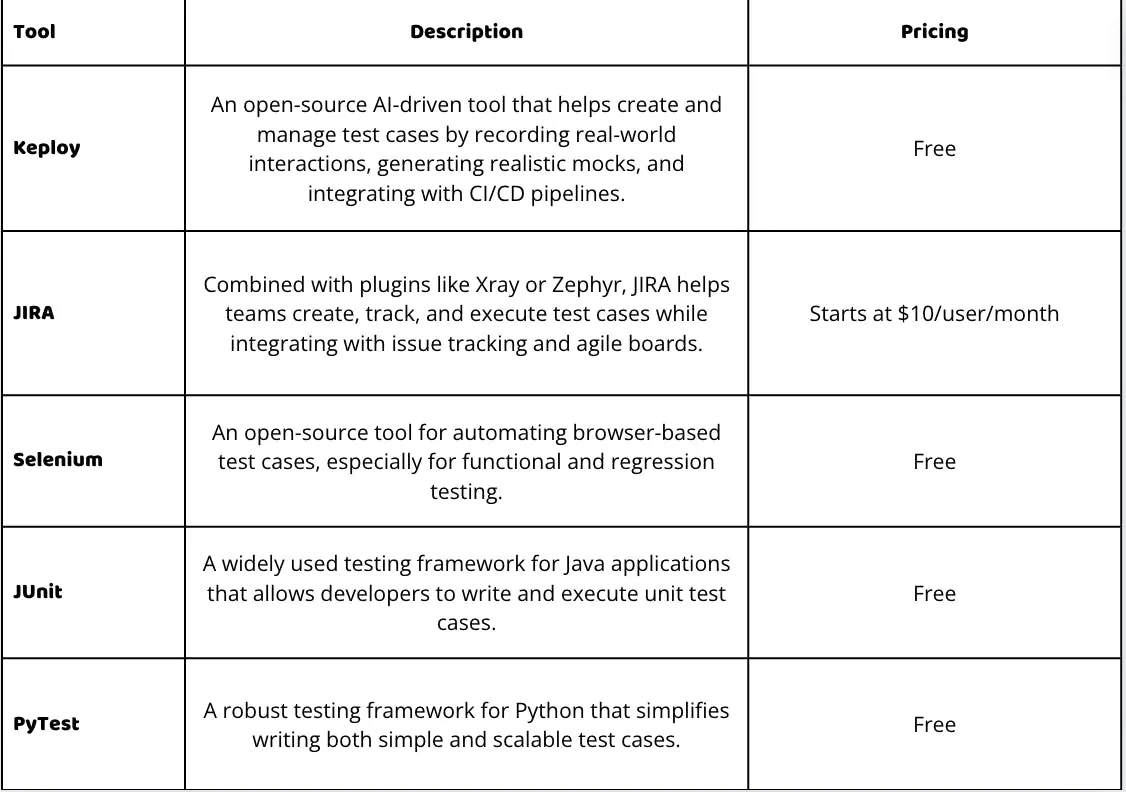
Once your suite grows past a few dozen test cases, a spreadsheet stops being enough. These are the tools teams commonly use to write, organize, and execute test cases:
- Jira (with Zephyr or Xray): The most common setup in Agile teams. Test cases live alongside user stories and bugs, so traceability from requirement to test to defect is built in.
- TestRail: A dedicated test case management tool with structured suites, milestones, execution runs, and reporting dashboards.
- qTest: An enterprise test management platform with strong Jira integration and analytics, suited to large QA organizations.
- TestLink: A free, open-source option covering test specification, execution, and requirement mapping. Basic but dependable.
- Keploy: An open-source platform that generates API test cases and mocks automatically from real traffic, so the suite reflects how users actually use the application instead of what someone remembered to script.
The right choice depends on team size and workflow. Small teams often start with Jira plus a plugin, while dedicated QA teams tend to prefer TestRail or qTest for the reporting depth.
How to Use AI to Identify Edge Cases
Edge cases are scenarios at the extreme ends of input parameters or outside normal conditions. They are easy to overlook and are responsible for a large share of production failures, precisely because nobody thought to test them.
This is where AI has changed the workflow. Generative AI tools trained on a codebase, existing tests, and failure logs can recognize patterns and anomalies, then generate test scenarios covering rare and extreme conditions that a human writing cases from a requirements document would never think of. An AI test case generator can produce a broad set of scenarios in minutes from just an API schema.
Keploy takes this further by recording real user traffic and turning it into test cases and mocks. Because the tests come from actual usage rather than assumptions, they naturally capture the odd inputs and unusual flows real users produce. Combined with schema-based generation, this surfaces edge cases that traditional test writing misses, and it does so without anyone writing test code by hand.
Examples of Edge Cases
- Text input validation: Testing a string field with an empty string, a single character, and a string exceeding the maximum length.
- Date validation: Testing past, present, and future dates, plus invalid dates like February 30.
- Concurrent access: Simulating multiple users updating the same record at the same time to expose race conditions and data consistency issues.
Conclusion
Bugs found by end users cost far more to fix than bugs caught during testing, in engineering hours, in emergency releases, and in user trust. Most of those escaped bugs trace back to the same root cause: a scenario nobody wrote a test case for.
Writing structured test cases across functional, negative, boundary, and regression scenarios, measuring coverage honestly, and using AI to surface the edge cases humans miss is how teams close that gap. If your application is API-driven, Keploy’s API testing platform can generate that test suite automatically from real traffic, so you spend your time fixing bugs instead of writing test cases to find them.
FAQs
What is a test case in software testing?
A test case is a documented set of inputs, steps, and expected results used to verify that a specific feature of an application behaves as intended. It passes when the actual result matches the expected result, and fails when they differ.
What is the difference between a test case and a test scenario?
A test scenario is a high level statement of what to test, such as "verify the login functionality." A test case is the detailed version, with exact steps, test data, and an expected result. One scenario usually expands into several test cases.
What is the purpose of writing test cases?
Test cases verify that software functions as intended by defining specific inputs, actions, and expected outcomes. They make testing repeatable, help catch bugs and edge cases before release, and create a record of what was verified.
What is the difference between functional and non-functional test cases?
Functional test cases check whether the software performs its intended functions, such as login or data processing. Non-functional test cases assess qualities like performance, security, and usability, focusing on how well the software works rather than what it does.
What is test coverage, and why is it important?
Test coverage measures how much of the code is executed when tests run. It reveals which parts of the application are untested, so teams can close gaps before those untested paths turn into production bugs.
Which tools can be used to measure test coverage?
Popular options include JaCoCo for Java, Coverage.py for Python, Istanbul for JavaScript, and Cobertura for Java. Each produces reports showing which lines and branches your tests execute and which they miss.
How do I handle edge cases in test cases?
Test inputs at the boundaries of acceptable ranges, try unexpected or extreme values, check null and empty inputs, and simulate concurrent access. AI-based tools can also generate edge case scenarios automatically from your schema or real traffic.
How often should regression test cases be run?
Regression test cases should run every time code is added or modified, ideally automatically in the CI pipeline. There are also several types of regression testing, from selective runs for small changes to full suite runs before major releases.