





API automation testing uses scripts and tools to validate APIs automatically instead of testing them manually. Automated suites send requests, assert on responses, and run continuously in CI/CD to catch regressions on every change. Tools like Postman, REST Assured, and Keploy, which generates tests from real traffic, make this faster to build and maintain.
APIs power nearly every modern digital experience, from mobile apps and online payments to AI-driven services and real-time data processing. As software systems increasingly rely on microservices and distributed architectures, API interactions keep growing, making API reliability more important than ever.
If you’re wondering how to automate API testing, the answer lies in using automation tools to validate API requests, responses, performance, and integrations without manual effort. Instead of repeatedly executing the same tests by hand, teams can automatically generate, run, and maintain API tests as part of their development workflow.
Akamai has reported that API calls make up 83% of all web traffic, yet many engineering teams still rely on partial manual validation. This approach slows releases, increases the risk of regressions, and makes it difficult to maintain API quality at scale.
In 2026, API test automation is an essential part of modern software delivery. By integrating automated API tests into CI/CD pipelines, teams get faster feedback, detect issues earlier, and release software with greater confidence. In this guide, you’ll learn how to automate API testing step by step, see a working example with Keploy and GitHub Actions, compare the most popular API automation tools, and pick up best practices for building reliable, scalable test suites.
What is API automation testing?
API automation testing, also called API test automation or automated API testing, is the practice of using scripts or specialized tools to automatically validate the behavior, performance, and security of an Application Programming Interface (API), without manual intervention.
An automated API test checks that:
- The API returns valid responses when it receives requests with correct parameters.
- The API returns informative error messages when it receives requests with invalid parameters.
- Authenticated and authorized users consistently receive the correct responses.
- All responses conform to the response schema.
- Response times and performance levels stay stable over time.
- Dependent microservices communicate successfully.
Automated API tests act as a safety net against:
- Regressions
- Features that silently stop working
- Unpredictable behavior in APIs deployed to production
They are a core part of modern Continuous Integration and Continuous Deployment (CI/CD) processes, because they catch regressions, broken functionality, and unpredictable behavior before an API reaches production.
Automated tests also remove the human error that creeps into manual runs. Manual testing is still useful for exploratory work and debugging, but it cannot match the consistency of an automated process. With automation, every critical scenario is tested on every change, without depending on someone remembering to run it.
How to automate API testing (step by step)
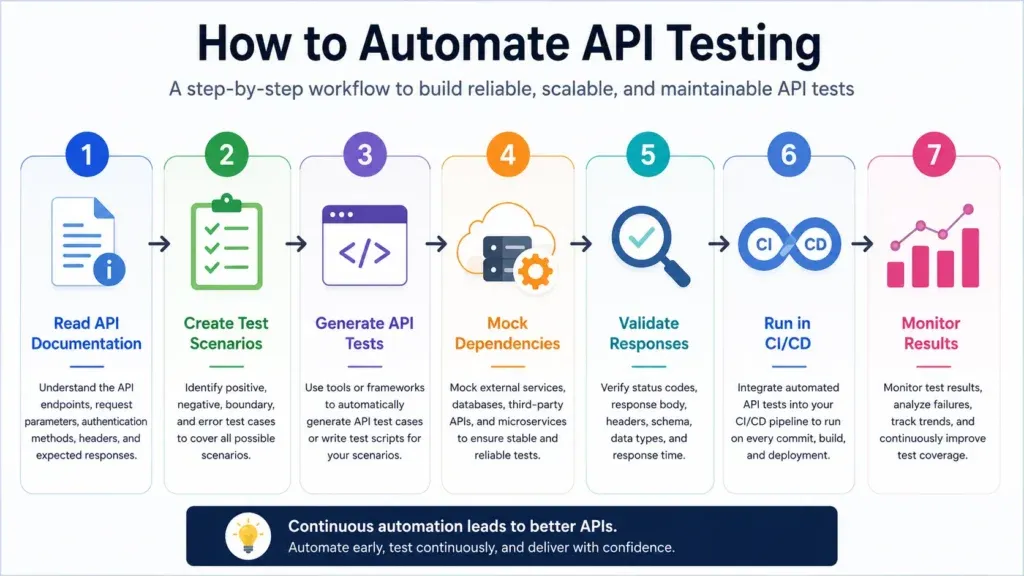
The key to automating API testing is a repeatable workflow that validates every API consistently. Instead of executing the same requests by hand, automated API tests verify functionality, detect regressions, and confirm that new code changes don’t introduce unexpected failures.
Whether you’re testing a REST API, a GraphQL API, or a microservices architecture, the process follows the same pattern.
Step 1. Understand the API
Before writing or generating automated tests, spend time understanding how the API works. Review the API documentation to identify:
- Available endpoints
- HTTP methods (GET, POST, PUT, DELETE, PATCH)
- Authentication mechanisms
- Request parameters and headers
- Request body format
- Response schema
- Error responses
- Rate limits
A clear understanding of the API helps you create meaningful test cases instead of blindly testing endpoints. For example, before testing a payment API, understand how authentication, transaction IDs, error codes, and response formats work.
Step 2. Identify test scenarios
Once you understand the API, define the scenarios to automate. A good API automation strategy includes both positive and negative test cases. Typical scenarios include:
- Successful API requests
- Invalid request payloads
- Missing required fields
- Invalid authentication tokens
- Unauthorized access
- Incorrect HTTP methods
- Boundary values
- Empty requests
- Large payload handling
- Error response validation
Don’t test only happy paths. Automate the scenarios users are most likely to hit in production.
Step 3. Generate or write automated API tests
Next, create the automated test cases. Traditionally, developers write API tests by hand using tools such as Postman, REST Assured, Karate, or Cypress. These frameworks are flexible, but maintaining large hand-written suites becomes time-consuming.
Modern tools like Keploy simplify this by automatically generating API test cases from real application traffic. Instead of writing every assertion manually, Keploy records actual API interactions and converts them into reusable automated tests. This cuts test creation time while improving coverage.
Teams that prefer a visual, script-free approach can also explore no-code API testing tools.
Step 4. Mock external dependencies
Many APIs depend on external systems such as:
- Payment gateways
- Authentication providers
- Databases
- Third-party APIs
- Internal microservices
Testing against live dependencies makes automated tests slow and unreliable. Instead, mock external services or use a sandbox testing environment to create deterministic, repeatable test conditions, especially when the dependency is a payment gateway or third-party API with a dedicated test mode.
Mocking gives you:
- Faster execution
- Stable test results
- Less network dependency
- Easier local development
- Consistent CI/CD runs
Keploy generates realistic mocks automatically from recorded API traffic, which removes most of the manual setup.
Step 5. Validate API responses
Every automated API test should verify more than the HTTP status code. A thorough validation checks:
- Status code
- Response body
- Response schema
- Required fields
- Header values
- Authentication behavior
- Business logic
- Response time
For example, a login API should not only return 200 OK. The test should also verify that:
- A valid access token is returned
- User information is correct
- Required headers exist
- The response matches the expected schema
Thorough assertions make automated API tests far more reliable.
Step 6. Run automated API tests in CI/CD
API automation delivers the most value inside a CI/CD pipeline. Configure your pipeline to run API tests automatically whenever:
- Code is pushed
- A pull request is opened
- A deployment starts
- A release candidate is created
Running automated API tests in CI/CD helps teams:
- Detect regressions early
- Prevent broken deployments
- Reduce manual QA effort
- Increase release confidence
- Ship software faster
Step 7. Monitor, maintain, and improve test suites
API automation is an ongoing process, not a one-time task. As APIs evolve, update your automated tests to reflect:
- New endpoints
- Changed response formats
- Updated authentication methods
- New business rules
- Deprecated APIs
Review failed tests regularly to tell genuine bugs apart from outdated test cases. AI-powered tools that regenerate tests and mocks automatically can significantly reduce this maintenance effort.
In short, automating API testing means understanding the API, choosing the right scenarios, generating or writing tests, mocking dependencies, validating responses thoroughly, running everything in CI/CD, and keeping the suite up to date.
Example: Automating API tests with Keploy (record and replay)
The steps above apply to any tool. Here’s what the workflow looks like in practice with Keploy, which generates API tests and mocks from real traffic instead of hand-written scripts.
Step 1. Install Keploy
Install the Keploy CLI on Linux, macOS, or Windows (via WSL):
Keploy works with applications written in Go, Java, Node.js, Python, and other languages, because it captures traffic at the network layer rather than inside your code.
Step 2. Record real API traffic
Start your application through Keploy in record mode. Replace the command in quotes with whatever you normally use to start your app:
Now call your API endpoints the way a real client would, for example:
Exercise the flows that matter most, such as login, registration, creating an order, updating a profile, and fetching product data. As requests flow through your application, Keploy records:
- HTTP requests and response payloads
- Headers and status codes
- Database interactions
- External service calls
Step 3. Review the generated tests and mocks
When you stop recording, Keploy saves the captured interactions as test cases, along with mocks for every dependency your app called, such as databases and third-party APIs. These files live in a keploy folder in your project, so you can review them and commit them to version control like any other test code.
Because the mocks are generated from real responses, your tests no longer depend on live external services, which removes a major source of flaky tests.
Step 4. Replay the tests
Run the generated suite against the latest version of your application:
The --delay flag gives your application time to start before tests run. Keploy replays the recorded requests, serves the recorded mocks, and compares the new responses with the expected ones. If an endpoint behaves differently after a code change, the test reports the regression immediately.
Step 5. Run the tests on every pull request with GitHub Actions
To make API testing fully automatic, add Keploy to your CI pipeline. Here’s a minimal GitHub Actions workflow for a Go service:
Every pull request now triggers the generated API test suite, so developers see immediately whether a change broke existing behavior. For other languages, swap the setup step and the start command. See the Keploy GitHub CI/CD docs for more options.
Why use Keploy for API automation?
Traditional API testing tools require you to create and maintain test scripts by hand. Keploy generates tests directly from real user traffic, which reduces test creation time, improves coverage, and minimizes maintenance as your application evolves.
Why API automation testing matters in 2026
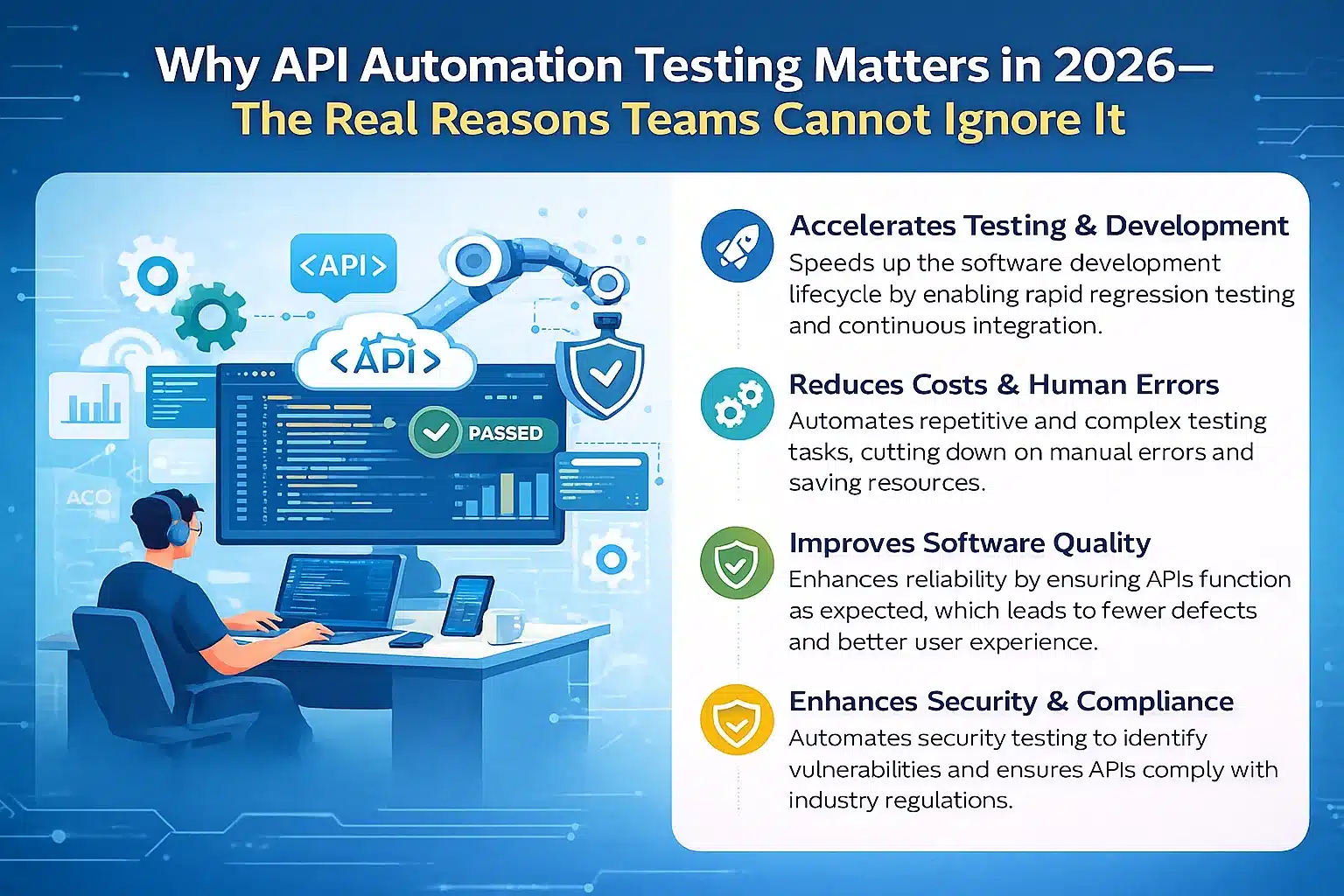
APIs are central to modern software systems. A single change in a request, backend logic, or an integration can break a critical function somewhere else that depends on it, even when the change is small. In a microservices setup, one deployment can affect several connected applications at once. Without automated API tests, a team often doesn’t find out about an issue until a customer hits it, which means lost revenue, a poor user experience, or damage to brand reputation.
1. Modern applications have hundreds of API dependencies
A typical web or mobile application makes many API calls in a single user session. As the user base grows, requests can climb to thousands per hour and millions per day, which makes manual testing at that scale impossible.
2. Faster release cycles demand continuous validation
Many teams now ship weekly, daily, or several times a day. Automation lets them validate every change the moment the code is pushed.
3. Automation detects issues earlier in the development cycle
Bugs found early in the lifecycle are far cheaper to fix. API automation lets developers run tests alongside code reviews, catching issues before they escalate.
4. Improved accuracy and less human error
Manual testing varies with the tester’s experience and attention. Automated API tests run the same way every time, giving you precision and repeatability.
5. Better coverage across complex scenarios
Automation lets teams run far more combinations than manual testing ever could. Boundary conditions, large payloads, invalid inputs, and multi-step workflows all become easier to cover.
6. Support for microservices and distributed architecture
Microservices communicate through APIs. Automated API tests continuously verify that this communication holds, making it safer to deploy services independently.
7. More reliable and stable products
End users expect fast, seamless interactions. By catching failures before production, automated API testing helps teams ship products that consistently meet high quality standards.
Types of automated API tests
Test automation for APIs covers several test types, each focused on a different aspect of API behavior. An effective strategy combines several of them.
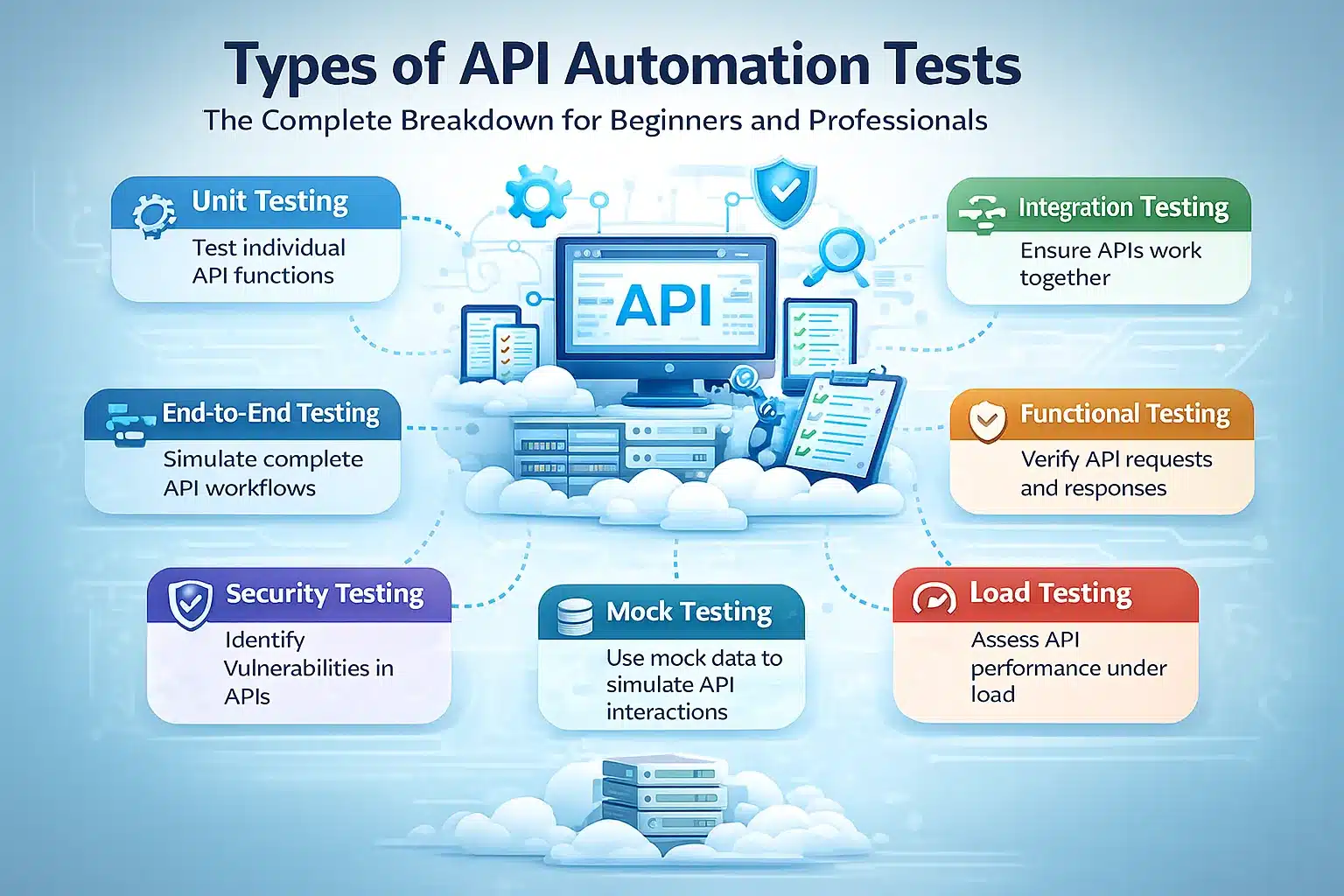
1. Functional tests
Functional tests check whether your API behaves as its specification requires: the right output for correct input, following the expected business rules. Examples:
- Verifying that
/loginreturns a token when given correct credentials - Verifying that
/productsreturns a valid, complete product list - Verifying that
/orders/createcreates a new order
Functional tests form the foundation of API automation.
2. Integration tests
Integration testing verifies that the API works correctly with other services, external systems, or databases. Examples:
- Creating an order reduces the stock count in the inventory API.
- A payment gateway response triggers an email notification to the customer.
- Updating a user’s profile through the API is reflected in the CRM.
Integration tests ensure that different microservices work together without breaking one another.
3. Regression tests
When code changes, functionality that used to work can stop working. Regression tests confirm that everything that worked before still works after each change. Automation makes regression testing fast enough to run on every commit.
4. Load and performance tests
Performance testing shows how an API behaves under different traffic and stress levels. It surfaces bottlenecks, timeouts, and slow responses, and reveals the API’s maximum capacity. Examples:
- Sending thousands of requests to a
/searchendpoint within one second - Simulating Black Friday-level traffic on a checkout API
- Measuring long-running endpoints under heavy load
5. Security tests
Security tests confirm that the right protections are in place to guard data and prevent unauthorized access. They include:
- Token expiry testing
- SQL and JSON injection testing
- Access control validation
- Vulnerability scanning
- Authorization flow testing
For a complete checklist of API security risks, refer to the OWASP API Security Top 10, the industry-standard reference for the most critical API vulnerabilities.
6. Negative tests
Negative testing verifies how an API responds to malformed, invalid, missing, or malicious input. Examples:
- Missing authorization headers
- The wrong HTTP method sent to an endpoint
- Invalid JSON in the request body
- Requests for a resource that doesn’t exist
Negative tests expose weaknesses in error handling and make your APIs more resilient.
API automation testing tools
The right tool depends on your team’s skills, tech stack, and how much you want to automate. These are the tools teams reach for most often. For a wider comparison of every major API test automation tool, see our complete guide.
1. Keploy
Keploy is an open-source, AI-powered tool that records real API calls and turns them into test cases, assertions, and mocks that replay deterministically. It suits teams with little automation experience, fast-growing engineering teams, microservices environments, and anyone maintaining large test suites. Its automatically generated mocks also reduce flaky tests.
2. Postman
Postman is popular for both manual and automated testing. You write JavaScript snippets to validate responses and run collections in CI/CD through Newman, which makes it an easy starting point for teams new to automation.
3. REST Assured
REST Assured is a Java library with a fluent, domain-specific syntax that gives developers fine-grained control over advanced API validations. It suits backend developers and automation engineers working in Java.
4. Karate
Karate combines API testing, UI testing, and performance testing in a single test automation platform. Its readable, Gherkin-style syntax lets less-experienced testers become productive quickly.
5. Cypress
Cypress is best known for UI automation but can also send API requests. It suits JavaScript teams that want one tool for both frontend and backend testing.
6. SoapUI / ReadyAPI
SoapUI is an open-source tool built primarily for SOAP services. ReadyAPI is its commercial version, adding stronger REST support, advanced reporting, and enterprise features.
API automation testing tools: quick comparison
| Tool | Best for | Language | Free tier | CI/CD ready | Learning curve |
|---|---|---|---|---|---|
| Keploy | AI-powered traffic recording and test generation | Any | Yes | Yes | Low |
| Postman | Beginners moving from manual to automated testing | JavaScript | Yes | Yes | Low |
| REST Assured | Java backend teams and advanced validations | Java | Yes | Yes | Medium |
| Karate | Low-code testers and combined API + UI testing | DSL (Gherkin) | Yes | Yes | Low–Medium |
| Cypress | JavaScript teams testing frontend and APIs together | JavaScript | Yes | Yes | Medium |
| SoapUI / ReadyAPI | Enterprise SOAP and REST testing with advanced reporting | Groovy | Limited | Yes | High |
Best practices for API test automation
These are the practices engineering teams rely on to build a comprehensive, dependable API automation suite.
1. Start with the most important scenarios
Begin by automating critical user journeys such as login, payments, and data retrieval. You get the biggest return from automating the APIs with the most business impact.
2. Cover both positive and negative cases
Testing only positive flows leaves hidden bugs in your application. Negative tests confirm that error handling works and make your APIs more reliable.
3. Use realistic test data
Realistic data is far more likely to surface real problems than dummy placeholders. Use production-like data wherever you safely can.
4. Mock external dependencies
Tests that depend on live external APIs are often unstable. Mocks, including the ones Keploy generates from recorded traffic, keep results consistent from run to run.
5. Keep tests light and fast
Slow tests hold up your CI pipeline. Keep test data lean and remove unnecessary waits so feedback stays fast.
6. Document each test suite
Clear documentation keeps test suites maintainable, especially on larger teams where the people maintaining tests didn’t write them.
7. Keep tests in version control
Store your tests in version control alongside your API code, so tests and API changes move together and are reviewed together.
Common challenges in API automation testing and how to solve them
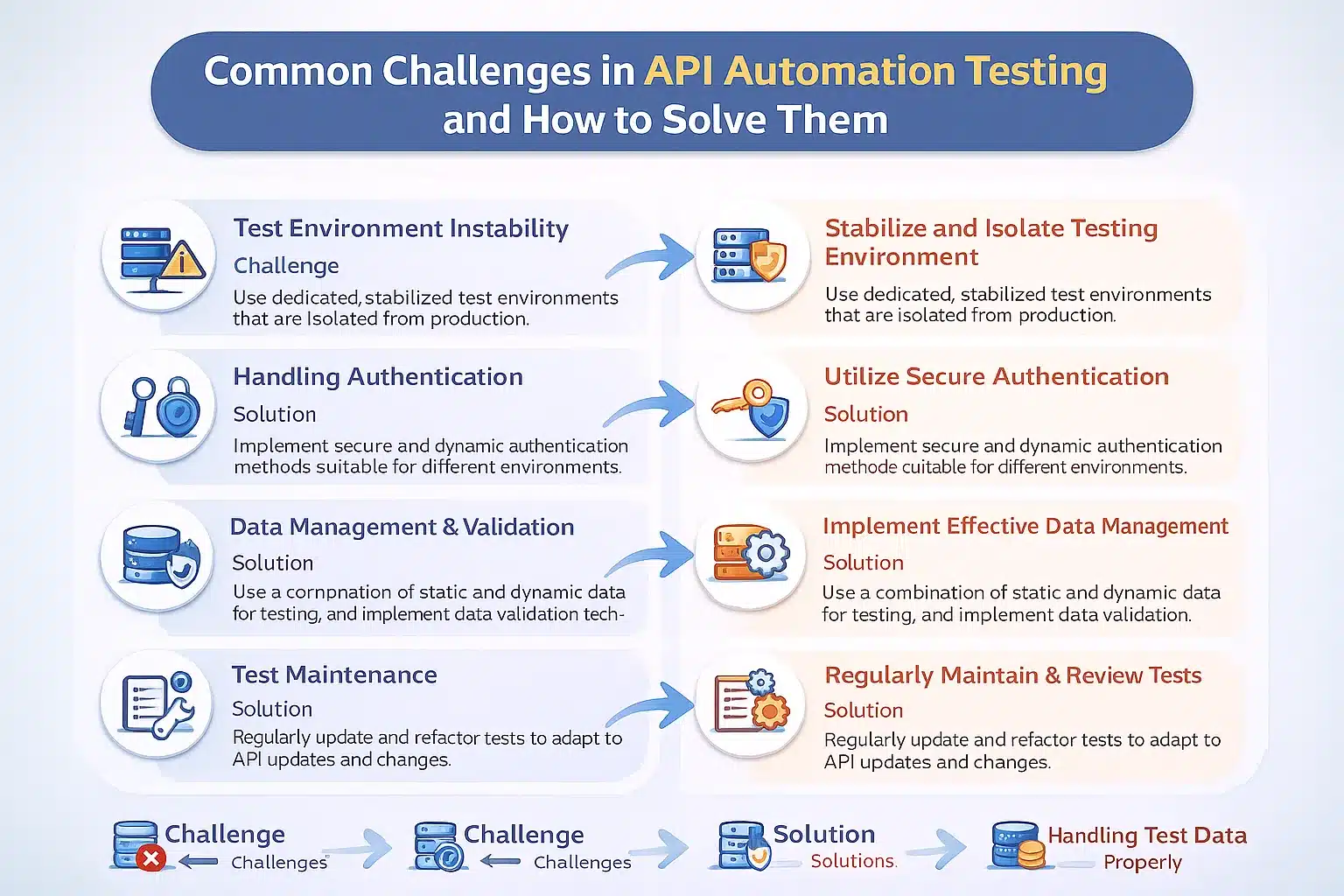
API automation has many advantages, but it brings challenges of its own. Here are five of the most common, and how to solve them.
1. Flaky tests caused by external dependencies
Unstable external APIs cause intermittent test failures. Solution: mock external dependencies, add sensible retry logic, and keep test environments stable. Keploy’s traffic-based mocks are built for exactly this problem.
2. Authentication and token issues
Authentication tokens expire or rotate regularly, which breaks tests that hardcode them. Solution: automate the login flow and refresh tokens dynamically during test runs.
3. Maintaining large test suites
As test suites grow, keeping every test current gets harder. Solution: generate tests automatically from traffic where possible, and use stable mocks so tests don’t break for reasons unrelated to your code.
4. Breakage from changing API contracts
API contracts can change quickly, producing broken tests and false failure reports. Solution: add contract testing and monitor schema changes proactively.
5. Differences between environments
Dev, staging, and production can behave quite differently. Solution: standardize configuration across environments and use the same stable mocks everywhere.
The future of API automation testing: trends for 2026–2030

Several shifts already underway will define API automation over the next few years: AI-generated automation suites, self-healing tests, autonomous testing pipelines, observability-driven testing, and AI used to validate API-served models.
1. AI-generated test suites
AI will generate test suites from captured user traffic, removing the need to script every scenario by hand.
2. Self-healing tests
Tests will update themselves when API behavior changes intentionally, keeping maintenance to a minimum.
3. Autonomous testing pipelines
Pipelines will decide which tests to run based on the riskiest areas of each change.
4. Observability-driven testing
Anomalies in logs, traces, and metrics will automatically trigger deeper testing.
5. Automated validation of AI models served through APIs
As more AI models are deployed behind APIs, automated validation will check their output quality, fairness, and performance before release.
6. Fully automated end-to-end testing of microservices
Complex microservice systems will rely on AI-powered, monitoring-driven end-to-end automated testing.
Conclusion
Learning how to automate API testing is essential for building reliable, scalable, high-quality applications. By understanding your APIs, covering the right scenarios, validating responses thoroughly, mocking external dependencies, and running tests in CI/CD, teams catch issues early and release with confidence.
Tools like Keploy make API test automation faster by generating test cases and mocks from real application traffic, so you spend less time writing scripts and more time shipping. Whether you’re just starting with API testing or improving an existing workflow, automating your API tests will give you faster releases, better software quality, and more resilient applications.
FAQs
1. How do you automate API testing?
API testing can be automated by creating reusable test cases, validating requests and responses, mocking dependencies, and running the tests in a CI/CD pipeline. Tools like Keploy automatically generate API tests from real application traffic, reducing manual effort.
2. Can API automation testing be integrated into CI/CD pipelines?
Yes. Most engineering teams run automated API tests in their CI/CD pipelines, so every code change is checked automatically and teams get instant feedback when something breaks.
3. Why is API automation testing important?
API automation testing lets teams release faster, catch issues earlier, and maintain quality across complex systems, without relying on repetitive manual checks.
4. What skills do testers need for API automation testing?
Testers need a basic understanding of HTTP and how APIs communicate, JSON, core testing concepts, and familiarity with tools such as Keploy or Postman.
5. What is the difference between API testing and UI testing?
API testing validates the backend logic and data layer directly, while UI testing interacts with the frontend interface. API tests run faster, are less brittle, and catch issues closer to the source.
6. Which tool is best for automating API testing?
It depends on your stack and how much scripting you want to do. Keploy is best for generating tests and mocks automatically from real traffic, Postman suits beginners moving from manual to automated testing, REST Assured fits Java teams, Karate works well for low-code testers, and Cypress suits JavaScript teams testing frontend and APIs together.