






API testing is a software testing practice that validates application programming interfaces directly at the message and logic layer, rather than through a user interface. It checks that endpoints return correct responses, handle errors, enforce security, and perform reliably under load, verifying functionality, data integrity, and reliability before an application reaches production.
API testing operates at the business logic layer. It catches broken integrations, bad data transformations, and security gaps before they reach production. In microservices architectures, where dozens of services exchange data through APIs, a single failing endpoint can cascade into system-wide outages. That is why API testing is now a non-negotiable part of every CI/CD pipeline.
What API testing validates:
- Correct HTTP status codes (200, 201, 400, 401, 404, 500)
- Response body structure and data accuracy
- Authentication and authorization enforcement
- Error handling for invalid or missing inputs
- Response time and behavior under load
When to use API testing:
API testing is most critical when building microservices, integrating third-party services, automating regression testing in CI/CD pipelines, or validating that a breaking change in one service does not silently break dependent services.
This guide covers:
- What API testing is (with examples)
- Types of API testing (functional, load, security, contract)
- HTTP methods (GET, POST, PUT, DELETE) explained
- REST vs SOAP vs GraphQL API testing
- Common HTTP status codes for validation
- Best API testing tools in 2026
- API testing checklist before deployment
Whether you are new to API testing or building out an automated test suite, this guide gives you the foundation and the framework.
API Testing Example
Here’s a simple example:
Request:
GET /users/1
Response:
Real-World Example
In a real-world project, an authentication API failed under high load due to improper token validation. API testing helped identify this issue early, preventing production downtime and improving system reliability.
HTTP Methods in API Testing
Every REST API test starts with an HTTP method. Understanding what each method does — and what response to expect — is the foundation of functional API testing.
| Method | Purpose | Expected Success Code |
|---|---|---|
| GET | Retrieve a resource | 200 OK |
| POST | Create a new resource | 201 Created |
| PUT | Update or replace a resource | 200 OK |
| PATCH | Partially update a resource | 200 OK |
| DELETE | Remove a resource | 200 OK or 204 No Content |
Common HTTP Status Codes to Validate
When writing API test cases, always assert the response status code. Here are the codes you will encounter most often:
| Code | Meaning | When to Expect It |
|---|---|---|
| 200 | OK | Successful GET, PUT, PATCH, DELETE |
| 201 | Created | Successful POST creating a new resource |
| 400 | Bad Request | Malformed request, missing required parameters |
| 401 | Unauthorized | Missing or invalid authentication token |
| 403 | Forbidden | Authenticated but not authorised for this resource |
| 404 | Not Found | Endpoint or resource does not exist |
| 422 | Unprocessable Entity | Validation error on a valid request |
| 429 | Too Many Requests | Rate limit exceeded |
| 500 | Internal Server Error | Unhandled server-side exception |
A well-structured API test suite asserts the correct status code for every scenario — both happy paths (200, 201) and error paths (400, 401, 404, 500).
The Need for API Testing in Today’s Software Development
The discussions about API testing has increased due to the popularity of microservices, cloud computing, and mobile applications. APIs are at the heart of digital transformations, making it essential that they work as intended and reliably. API testing plays a critical role in modern microservices and cloud-based architectures.

Business Implications
Recognizing what is api testing in software development helps organizations prioritize quality assurance investments effectively. When an API fails, all systems that depend on it may yield a failure and require down time for repairs, resulting in a negative effect on a business’s services, customer experience, and financial capacity.
Proper API testing is designed to accurately identify issues and mitigate failures before production. Organizations that invest in comprehensive API testing tools often assert that they observe a significant reduction in incidents in their production environment and gain improved reliability from troubled systems.
Technical Benefits
From a technological perspective, API testing enables faster development cycles by allowing teams to validate business logic without relying on the user interface.
Guaranteeing Integration
As systems become less centralized, the integration between their components becomes more complicated. API Testing validates those integration points to ensure data makes its way from one service to another and the system works in an integrated way. To understand this better, read our complete guide on API Integration — Importance and Best Practices and how it impacts your system.
The Different Types of API Testing
Understanding different types of API testing helps teams choose the right strategy for various scenarios. Awareness of the types of API testing will assist organizations in devising a complete testing strategy associated with the different angles taken with regards to the functional and performance characteristics of an API.

Functional Testing of an API
Functional Testing of the APIs verifies that the APIs effectively perform their functions. Functional API testing may include testing an individual API method, parameter validation of inputs, processing the right data, and returning the data accurately. Functional testing confirms that an API meets the specified requirements and behaves predictably in normal operating order. Functional api testing serves as the foundation for ensuring APIs deliver expected business value and meet user requirements.
Take a deeper look at how functionality testing software improves product quality.
Non-Functional Testing
Non-Functional Testing assesses performance characteristics such as response time, throughput, reliability, and scalability. Non-Functional Testing tells us the limitations of the API in relation to the expected volume of transaction loads and the performance requirements when under stress.
Security Testing
Security testing is the aspect of API testing that verifies API authentication and API authorization processes. To understand this better, read our complete guide on API Authentication and how it works. Security testing includes access controls, data encryption, input validation, and known security vulnerabilities such as injection attacks and attempts for unauthorized access. Proper api authentication mechanisms are essential components of comprehensive security testing protocols.
API Contract Testing
Contract testing is a distinct type of API testing that verifies the agreement (the "contract") between a consumer and a provider — without requiring both services to be running at the same time.
A contract defines the expected request format and the expected response schema. If a provider changes an endpoint in a way that breaks a consumer’s expectations — even a minor field rename — the contract test catches it immediately.
Why it matters:
In microservices architectures, dozens of services depend on each other’s APIs. Integration tests can catch breaking changes, but they are slow and require full environment setups.
Contract tests run fast, in isolation, and catch breaking changes at the source.
Popular tools:
Pact is the most widely used contract testing framework. It supports REST and message-based APIs across multiple languages.
Difference from functional testing:
| Functional Testing | Contract Testing | |
|---|---|---|
| What it checks | Business logic, data correctness | Schema and interface agreement |
| Requires live service? | Yes | No — uses mocks |
| When it runs | After deployment | On every commit |
| Best for | End-to-end validation | Preventing breaking changes between services |
Load and Performance Testing
Performance testing is the testing approach that observes how APIs respond under various load conditions to help identify bottlenecks and breakdowns in scalability. This testing type is crucial for APIs serving high-traffic applications or supporting critical business operations.
Stop writing API tests by hand. Keploy’s AI-powered test generator records real API traffic from your browser and turns it into complete test suites automatically — no manual scripting, no boilerplate. Try Keploy free →
REST, SOAP, and GraphQL API testing
Not all APIs are built the same way, and the testing approach varies by protocol.
REST (Representational State Transfer) is the most common API architecture today. REST APIs use standard HTTP methods and return data in JSON or XML, but for teams working with gRPC traffic, capturing and testing it requires a different approach. They are stateless, meaning each request contains all the information needed to process it. REST API testing focuses on endpoint validation, HTTP method correctness, status codes, and response body structure.
SOAP (Simple Object Access Protocol) is an older, more rigid protocol that uses XML exclusively and enforces a strict contract via a WSDL (Web Services Description Language) file. SOAP testing validates the XML envelope structure, the WSDL contract, and fault responses. Tools like SoapUI are purpose-built for SOAP testing.
GraphQL lets clients request exactly the data they need through a single /graphql endpoint, using queries and mutations instead of multiple REST endpoints. GraphQL testing requires validating query structure, field-level responses, error handling for invalid fields, and mutation side effects.
| Protocol | Format | Endpoint style | Primary test focus |
|---|---|---|---|
| REST | JSON / XML | Multiple endpoints | Status codes, HTTP methods, response schema |
| SOAP | XML only | Single endpoint + WSDL | Envelope structure, contract compliance |
| GraphQL | JSON | Single /graphql |
Query depth, field validation, mutations |
API Testing vs UI Testing
| API Testing | UI Testing |
|---|---|
| Backend testing | Frontend testing |
| Faster | Slower |
| More stable | More fragile |
| No UI required | UI required |
API Testing Tools and Technologies
The ecosystem of API testing tools has evolved substantially, and now offers everything from simple command-line utilities to comprehensive testing platforms. Organizations can choose among commercial, open-source, and cloud-based solutions that best meet their unique needs and constraints. When considering what is api testing from a tooling perspective, organizations have numerous options to choose from:
Commercial API Testing Tools
Commercial tools like Postman, SoapUI Pro and ReadyAPI are considered more full feature solutions — offering not only test automation but also collaboration and reporting features. These tools typically offer user-friendly interfaces as well as professional support, but require licensing fees.
Open Source API Testing Tools
Open source API testing tools offer low-cost options, they also provide opportunities for customization, as they are actively developed by communities.
For teams evaluating open source tools against commercial traffic replay platforms, the Keploy vs Speedscale comparison covers the key differences in test generation approach, infrastructure requirements, and pricing model.
Among the most common options are REST Assured, Newman, and Dredd, all of which have solid testing capabilities without the operational costs of licenses.
Some tools like Apache JMeter are also great in performance testing contexts, while you could use frameworks like Jest and Mocha for writing API test and performing API testing in JavaScript development environments. The number of free api testing tools continues to grow, providing organizations with flexibility in deciding how to implement a more comprehensive API testing strategy.
How to Get Started with Keploy for API Testing
Revamping API test automation, Keploy offers a novel approach to API testing with way less manual work, all while improving the test coverage and test reliability! For teams new to understanding what is api testing, Keploy provides an intuitive entry point into comprehensive API validation.
Core Features and Capabilities
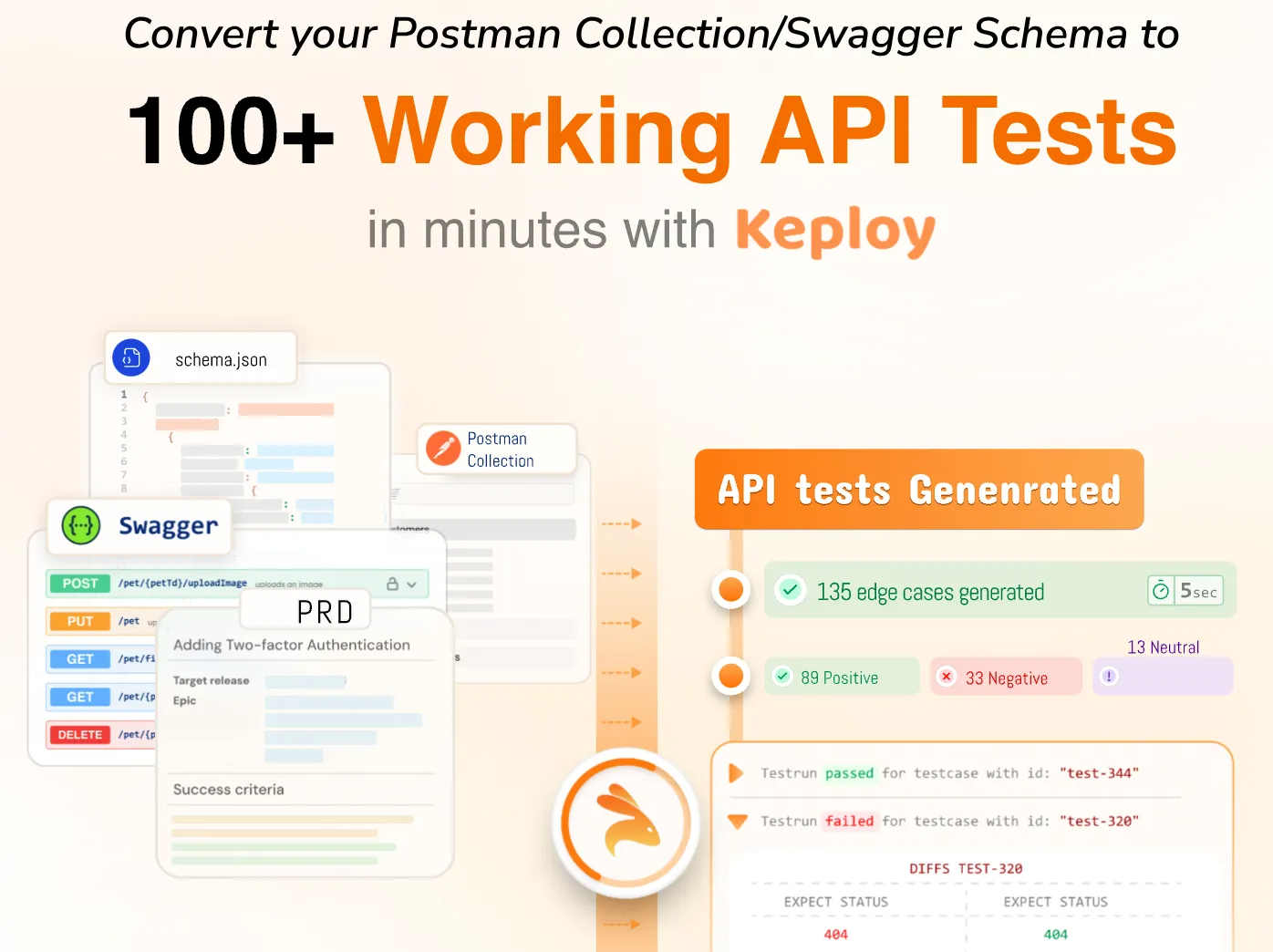
Keploy’s automated API testing platform streamlines the testing process in general, using an easy-to-navigate web application at app.keploy.io. Users simply input an endpoint URL or a cURL command and Keploy will deliver fully functional API test! By automating the test generation process, Keploy users can eliminate the time-consuming manual process of writing tests and build complete API testing suites more efficiently.
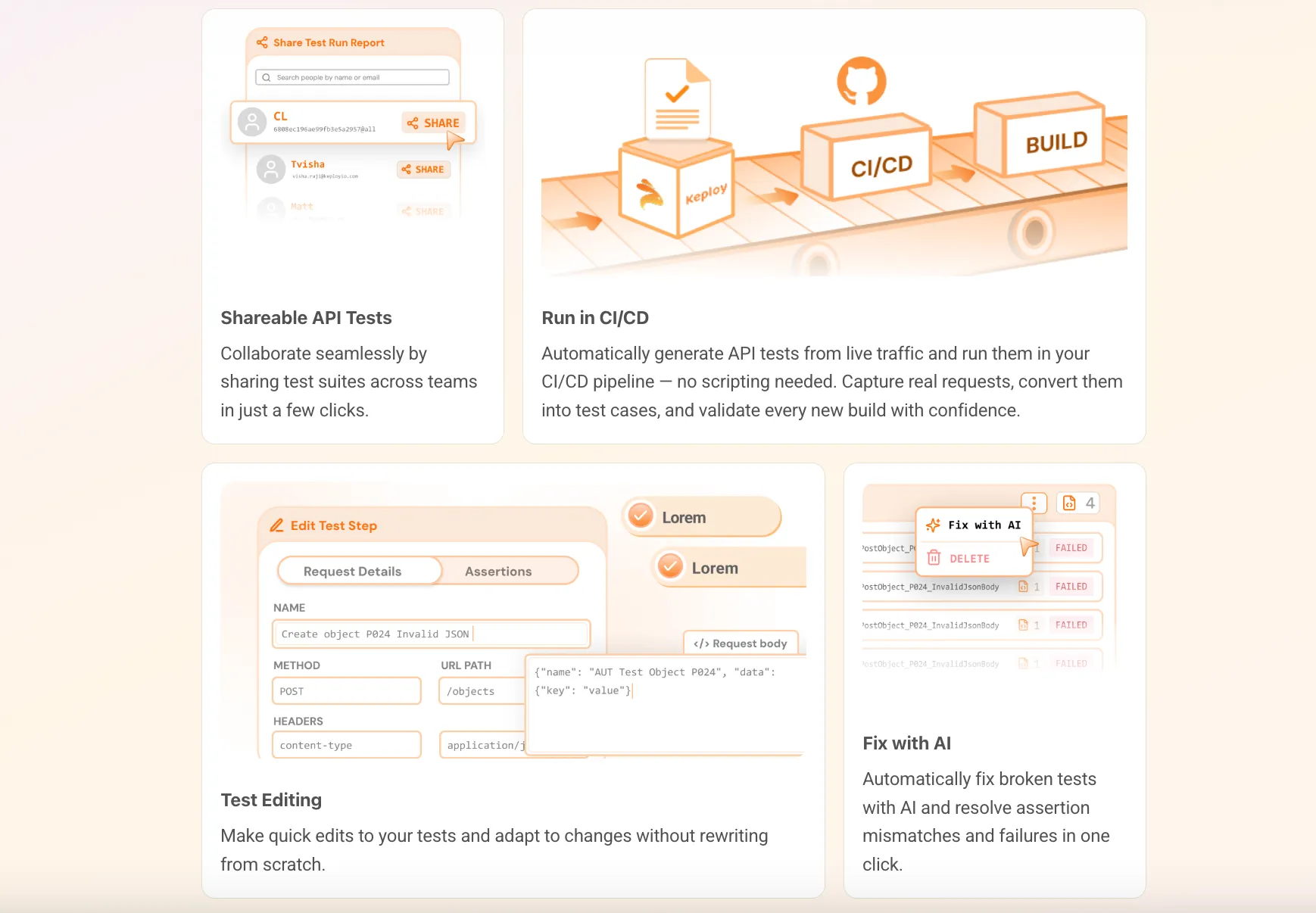
What takes Keploy apart from the rest is its AI-powered test generation. Keploy is essentially a smart interface, once a user passes their API endpoints and cURL commands, it intelligently determines the API structure, suggests possible test scenarios and produces test cases! If modifications are necessary, Keploy’s integrated AI feature provides you with the ability to easily refine and optimize your tests with little manual preparation.
Chrome Extension for Enhanced Productivity
Keploy’s Chrome extension has taken efficiency to another level. Developers and testers can use Keploy and record their API calls directly from their browser sessions, automatically capturing the required cURL commands and parameters.
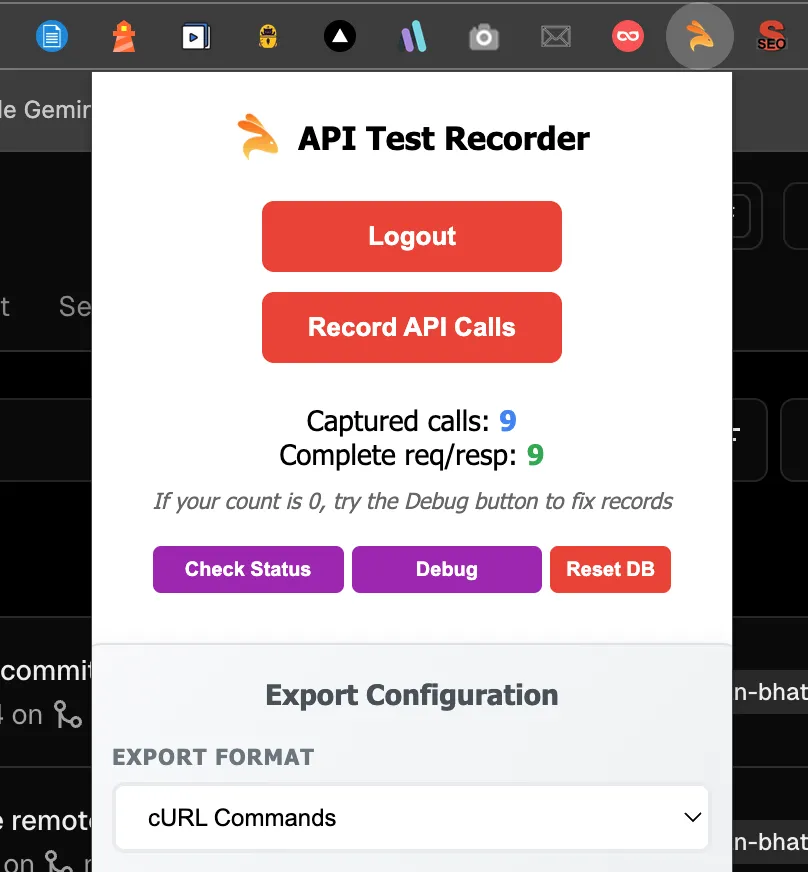
The workflow is very simple: users log into the Chrome extension and traverse their application while recording API interactions, while the extension captures all the appropriate API calls. The extension automatically transcribes these API interactions into cURL commands that can be transferred to app.keploy.io to quickly generate the tests.
Recording in this browser-based environment obviates the need for users to keep a separate record of any API calls and ensures that the generated test scenarios reflect actual user interactions. The extension saves users valuable time and energy by automating what had been a time-consuming data collection process that was previously all manual.
Competitive Advantages
Compared to traditional API Testing, Keploy offers a number of unique advantages:
Speed and efficiency. The combination of API test generation and browser recording cuts the time in establishing comprehensive API testing suites. What would take hours or days, can now happen in minutes.
Accuracy and Completeness: By recording real user interactions, test scenarios are extremely relevant since they record real-world usage, providing rich context to parsing out API processes.
AI-Enhanced Optimization: The AI capabilities associated with the platform intelligently improves the quality of tests by recommending optimized content and identifies edge cases that human testing may likely overlook.
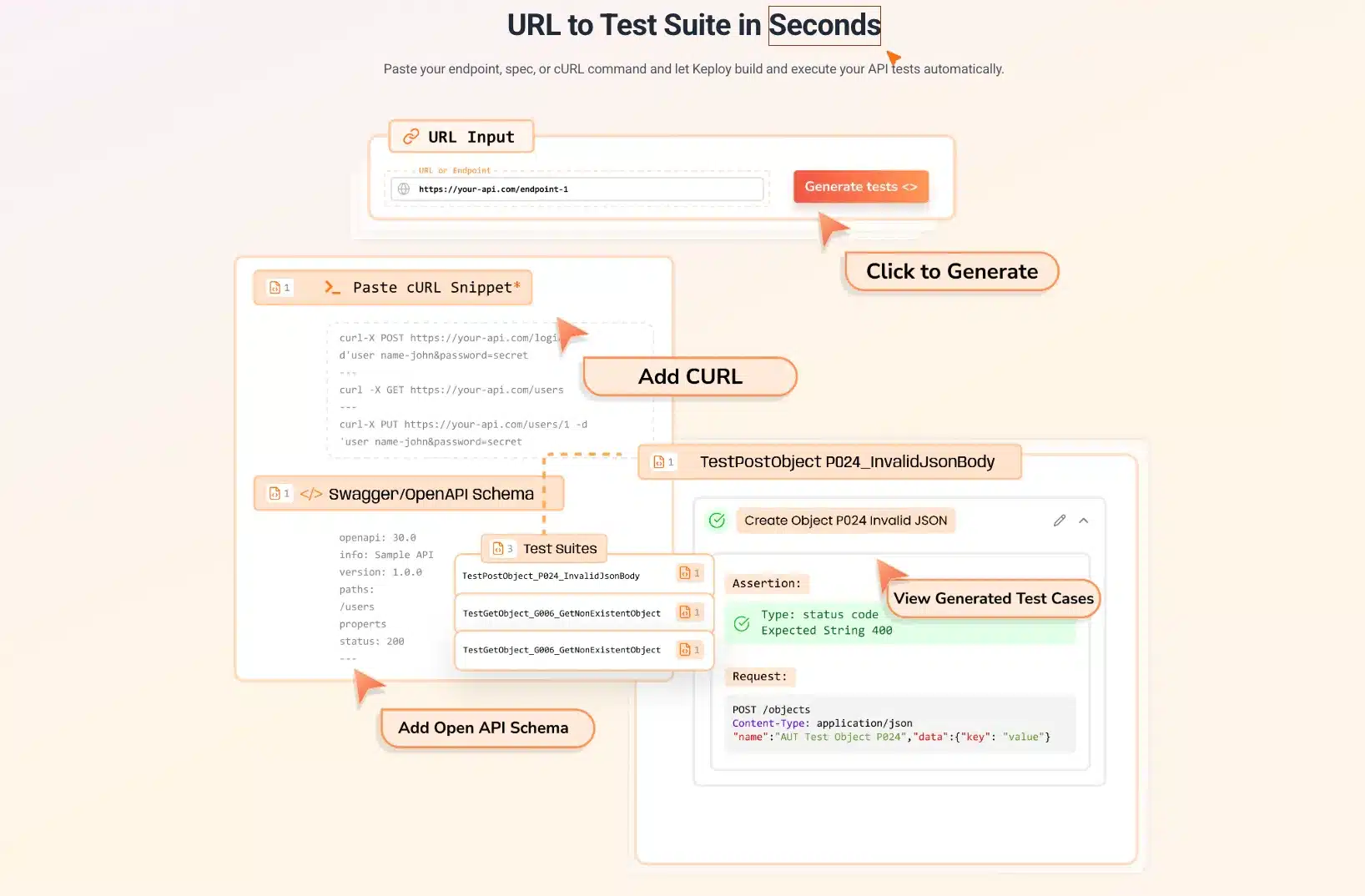
User-Friendly Interface: The web interface is intuitive, allowing API testing to become a reality for team members lacking the technical skills to do so, significantly increasing the chances for adoption of better testing practices.
Integration and Scalability
Keploy’s architecture allows for more seamless integration into existing dev workflow and pipelines. Keploy can support testing needs across the spectrum from an individual API endpoint to an entire service architecture.
Since the product is based in the cloud, teams can scale use and do it together regardless of physical distance or location, while maintaining connections in testing efforts with similar parameters in various environments.
What to Check in API Testing
Completeness in API testing includes consistent checking of a number of aspects to ensure code is working well and performing well. Implementing robust api authentication strategies helps prevent unauthorized access and maintains data integrity across all endpoints.

Request and Response Validation
Testing should check that APIs accept the expected requests and that the requests produce requested responses as appropriate. This involves parameter response checking, data format checking, and response structure checking. Validating expected reactions will help ensure that API endpoints represent the intended behavior across expected inputs. When API responses contain dynamic values such as tokens, timestamps, or session IDs, JSON templatization can help keep test cases stable across repeated executions.
Data Accuracy and Integrity
APIs often handle critical business data, making it essential to ensure accuracy and consistency. Testing should verify that data transformations, calculations, and responses remain correct across all scenarios.
Error Handling and Edge Cases
There must be proper error handling in your APIs. They should be able to handle error conditions, provide meaningful error information, and remain fault tolerant. Testing should include invalid inputs, missing parameters, and boundary testing to ensure coverage with respect to error handling.
Performance and Response Times
Performance testing validates that an API responds within the performance response time goals provided by gauges under different loads. Performance testing establishes the limits of an API by revealing bottlenecks, while those limits were meant to simulate anticipated operational volumes without undue delay or deterioration.
Security and Access Control
Security testing validates that the identified authentication, authorization and data protection (especially of confidential data) measures are secure. Security testing also includes testing for classes of security vulnerabilities (e.g. SQL injection, unauthorized access attempts, data leakage testing, etc).
API Testing Approaches: Manual vs Automated
Organizations should employ a flexible approach where both manual and automated testing are balanced to achieve coverage balanced with time and resource considerations. Functional api testing can be performed both manually and through automation, depending on the complexity and frequency of test scenarios.
Manual API Testing
Manual testing provides a means to do exploratory testing and complex scenario validation that may be difficult to automate at the beginning (and typically in an early project). In manual API testing, testers can delve further in unexpected behaviors, while validating characteristics concerning the user experience and whether those characteristics planned for the user experience were intended or not, or by ad-hoc testing defined by emergent requirements.
Automated API Testing
Automated API testing provides the opportunity to create consistent test execution and repeatable tests that fit into a continuous integration (CI) pipeline. Automated tests can consistently run in a CI without human intervention, provide continuous feedback about changes to the code, and create similar output that consistently validates quality.
Modern automation platforms such as Keploy embody the shift to smart automation that minimizes manual work while increasing test coverage and reliability. The combination of automated test generation and AI optimized testing is the future state for API testing processes.
Hybrid Approaches
The majority of effective API testing policies combine manual and automated test approaches, utilizing the strengths of both. Manual testing handles exploratory situations and edge case scenarios, whilst automated tests perform regression testing and verify routine validation actions.
Preparation for the API Test Environment
Learning how to test APIs effectively requires proper environment setup and configuration management. Test environment configuration is critically important as it impacts the reliability of the result of the API test and the accuracy of performance evaluations.
Environment Isolation
Test environments should be an accurate representation of production conditions, with a level of isolation from live operational systems. The isolation of the test environment prevents activity associated with the test from interfering with production conduct while permitting realistic conditions for testing.
For API teams integrating with third-party services, a sandbox testing environment provides this isolation in practice – replacing live external API calls with controlled simulations so tests stay deterministic, fast, and independent of external availability.
Data Management
The test environment must have test data representative of real scenarios associated with usage patterns which does not involve sensitive production data. Data management for test environments need to address creating the data, refreshing it and cleaning it up.
Configuration Management
If the environments we use for testing are configured consistently, it will allow us to obtain reliable results from our tests, across different testing stages. Configuration management will potentially need to include API endpoints, authentication credentials and external service configuration.
Monitoring and Observability
Test environments should have monitoring features to provide visibility into API metrics — performance, error rate, and system resource utilization (CPU, Memory, and IO). Observability allows you to identify issues faster and, when combined with a performance benchmarking system, make informed decisions regarding performance optimization.
API Lifecycle Testing
Full API testing must address every stage of the API lifecycle, from development to retirement.
Development Phase Testing
Development phase testing focuses on validating that API endpoints behave according to their specifications before any dependent services are built on top of them. Teams write contract and functional tests early to catch design inconsistencies — a field name mismatch or a missing required parameter is far cheaper to fix at this stage than after other services have integrated against it. Running tests on every commit during development gives engineers immediate feedback and prevents specification gaps from compounding over time.
Pre-Production Testing
Pre-production testing includes security validation, performance testing, and integration validation. Pre-production testing often involves API testing 101 procedures which establish baseline functionality and baseline application performance.
Production Testing
Production testing focuses on monitoring, synthetic transaction testing, and real-time performance validation. Monitoring API transactions enables a rehearsal methodology with API monitoring situations helping it becomes a process to observe the performance batch, and potential error rate.
Maintenance and Updates
Ongoing testing addresses API changes, version compatibility, and performance optimization. Regular testing ensures that APIs continue meeting requirements as underlying systems evolve and usage patterns change.
Common Bugs and Issues Detected
API testing frequently identifies specific types of issues that can significantly impact system reliability and user experience.
Data Processing Errors
Common data-related issues include incorrect calculations, data transformation errors, and format compatibility problems. These issues often manifest as incorrect response values or unexpected data structures.
Integration Failures
Integration problems typically involve communication failures between different system components, data inconsistencies, and timing-related issues. These problems can cause cascade failures affecting multiple system areas.
Performance Bottlenecks
Performance issues often include slow response times, memory leaks, and resource contention problems. These issues may not appear during functional testing but become apparent under load conditions.
Security Vulnerabilities
Security-related issues include authentication bypass vulnerabilities, data exposure problems, and injection attack susceptibilities. These vulnerabilities can have severe consequences if they reach production environments.
Common Test Cases in API Testing
Good validating tests confirm normal operational scenarios with valid inputs and patterns of expected usage. These tests confirm that APIs behave properly under standard operating conditions.
API authentication validation should include testing various authentication methods, token expiration scenarios, and multi-factor authentication processes. Comprehensive functional api testing encompasses both positive and negative scenarios to ensure complete validation coverage.
Positive Test Cases
Positive testing validates normal operation scenarios with valid inputs and expected usage patterns. These tests ensure that APIs function correctly under standard operating conditions.
Negative Test Cases
Negative tests look for API behavior with invalid inputs, missing parameters, or error conditions. Negative tests confirm the capacity for handling errors and resilient conditions that occur when scenarios are not favorable.
Boundary Testing
Boundary tests confirm behavior of APIs at the limits of parameters, data element sizes, and performance limits. Boundary tests also indicate issues with edge cases that may not occur with typical testing scenarios.
Security Test Cases
Security test cases include authentication checks, authorization checks, and vulnerability scans. Security test cases provide assurance that APIs still provide appropriate security controls and are protected against common attack vectors.
Advantages and Challenges of API Testing
Understanding the benefits and challenges of API testing allows organizations to develop realistic expectations and testing strategies.
Advantages
Testing APIs provides a number of important benefits including speed of test execution, improved validation for integration, and simplified maintenance of tests. Traditional API testing methodologies have developed to provide increased coverage with decreased effort.
API testing is technology agnostic; this means that validation can occur across various platforms and technologies which supports a requirement of modern software architectures. API testing also provides improved visibility into business logic validation and the specific points of integration in the system.
Challenges and Difficulties
Some of the challenges to consider are that API Testing involves multiple sources of complex test data as well as dependencies upon integrations, and lack of visibility into the user interface. These challenges must be adequately planned for and managed in the testing phase, and require tools to be implemented accordingly.
The frustrations API testers have come from lack of adequate documentation, frequent updates to the API specifications, and complicated authentication requirements. Organisations should consider the associated costs and invest into the necessary tooling and processes to avoid future complications.
Mitigation Strategies
An effective API test program will have a strategy for mitigating challenges faced above. They will use a structured documentation process and proper testing processes with the right tools to manage challenges. They will also consider effective investment in the training of their team and processes to help the organisation overcome the pain of implementing them in the first place.
API Testing Checklist
- Validate status codes (200, 201, 400, 401, 404, 422, 429, 500)
- Check response body structure and schema on every endpoint
- Test authentication — valid tokens, expired tokens, missing headers
- Test authorization — verify role-based access controls are enforced
- Validate error messages return meaningful, consistent responses
- Test boundary conditions and edge case inputs
- Run load tests to establish performance baselines
- Verify data integrity across create, read, update, and delete operations
- Run contract tests on every commit to catch breaking changes early
- Confirm third-party integrations handle failure and retry correctly
API Testing Best Practices
Implementing API testing best practices ensures consistent results and efficient testing processes that support overall software quality objectives. A well-structured API testing strategy defines which test types to apply at each stage of development, how to integrate them into CI/CD, and how to measure coverage over time.
Test Strategy Development
Define the scope of your API testing before writing a single test. Identify which endpoints are business-critical, which integrations are highest risk, and which failure modes would cause production incidents. Prioritize contract and functional tests first — they run fast and catch the most common issues. Add load and security tests as the API stabilizes. A clear strategy ensures testing effort is focused where it matters most rather than spread thin across low-risk endpoints.
Test Data Management
Use dedicated test data that mirrors production patterns without exposing real user information. Create scripts to seed, reset, and clean up test data between runs so tests remain independent and repeatable. Avoid sharing state between tests — a test that depends on the output of a previous test is fragile and hard to debug. For external dependencies, use mocks or stubs to keep tests fast and isolated.
Documentation and Reporting
Document every API endpoint being tested — expected inputs, expected outputs, and known edge cases. Attach test results to pull requests so reviewers can see coverage before merging. Track defect rates and false positive rates over time to identify unstable tests that need fixing. Good reporting surfaces trends early, before they become production problems.
Continuous Improvement
Review and update tests whenever an API changes. Treat a failing test as a signal — either the API broke or the test is outdated. Neither is acceptable to ignore. Run retrospectives after production incidents to identify which tests should have caught the issue and add them to the suite. API testing quality compounds over time when teams treat it as an ongoing discipline rather than a one-time setup.
API Performance Monitoring vs API Testing
Grasping the difference between API monitoring and API testing allows organizations to put in place better methods for each of their operational stages and needs.
Testing Focus
API testing primarily focuses on validation before deployment into production. During API testing, the proper functionality and level of performance are assessed in controlled test environments. Testing provides confidence that APIs will work as expected when placed into production rather than just being a guessing game.
Monitoring Focus
API monitoring primarily focuses on continual performance observation after deployment into production. Monitoring, at the highest level and in real-time, provides the user experience metrics and the health of API endpoints. Monitoring is a key element in discovering problems faster as well as allowing users to resolve potential issues before they occur.
Complementary Approaches
Testing and monitoring ultimately work together; they give organizations API quality assurance for the entirety of their lifecycles. Testing stipulates what should happen before a launch, while monitoring ensures that what is observed is compared quantitatively to what was tested.
Integration Opportunities
Modern technologies come with API testing and monitoring integration that allows for seamless transitions between validation of pre-production changes and ongoing live changes. This integration allows organizations to contribute to continuous quality assurance.
How to Introduce API Testing into an Organization
Introducing API testing into an existing development workflow requires a phased approach. Teams that try to achieve full coverage overnight usually end up with a brittle, unmaintained test suite. A better approach is to start small, demonstrate value quickly, and expand from there. For broader context on how API testing fits within a complete quality assurance program, see our guide on software testing strategies.
Assessment and Planning
Start by auditing your most critical API endpoints — the ones that, if broken, would cause immediate user impact or revenue loss. These are your first test targets. Map out the tools already in your stack, identify gaps, and define a realistic timeline for rolling out coverage in phases. Trying to cover everything at once leads to low-quality tests that nobody maintains.
Team Training and Skills Development
API testing does not require deep programming expertise, but it does require understanding HTTP, request/response cycles, and basic assertion patterns. Run short internal workshops covering your chosen tools, show the team how to read test output, and establish a shared standard for what a good test looks like. Onboarding improves significantly when there are working examples to learn from rather than abstract documentation.
Tool Selection and Implementation
Choose tools that fit your existing workflow rather than the ones with the most features. A team already using Jest for unit tests should extend it for API tests before introducing a separate platform. Start with one tool, get it integrated into CI, and expand from there. Tools like Keploy reduce the barrier further by generating test cases from real traffic, which means teams get coverage without starting from scratch.
Process Integration
API tests should run automatically on every pull request and block merges when they fail. Add test coverage as a review criterion alongside code quality. Over time, shift testing left — write API tests before or alongside the code, not after. This catches design issues early and makes test maintenance easier because tests and code evolve together.
Strategies for Reliable API Test Coverage
Achieving reliable and comprehensive API test coverage will require systemic approaches that consider varying aspects of API functionality and performance.
Coverage Metrics
Define specific metrics for functional coverage, scenario coverage, and endpoint coverage. Clear metrics give teams visibility into how complete their testing is and help identify areas that need more attention.
Risk-Based Testing
Risk-based approaches ensure testing efforts are focused on high-impact, critical functionality. The advantage of a risk-based approach is that limited testing resources focus on the areas most likely to cause production incidents.
Test Automation Strategy
An effective test automation strategy balances coverage requirements with maintainability. Reliable automation enables consistent regression testing and still supports a rapid development process.
Continuous Testing Integration
Integrating tests with continuous integration pipelines allows for repeated testing and timely feedback on code changes. This encourages agile development practices and reinforces consistent quality standards.
Future of API Testing
API testing continues to evolve faster than ever before due to advancements in technology and changing software architectural patterns.

AI and Machine Learning Integration
AI and machine learning are transforming how test suites are built and maintained. Smart test generation, predictive analytics for failure detection, and automated optimization are becoming standard features in modern testing platforms like Keploy — reducing manual effort while increasing coverage and reliability.
Cloud-Native Testing
Testing approaches that consider the unique challenges posed by distributed systems, microservices, and dynamic scaling are crucial in cloud-native architectural patterns. Testing strategies are evolving to match the pace and complexity of modern infrastructure.
More Focus on Security
Growing security risks are driving more focus on security test coverage — including automated vulnerability scanners, more robust security validation practices, and continuous security testing integrated directly into CI/CD pipelines.
DevOps Integration
A more solid integration into DevOps practices — Shift-left testing, continuous testing, automated quality gates — enables product teams to ship faster while holding their product quality to high standards.
Conclusion
API testing is the foundation of reliable software. Every microservice, mobile app, and third-party integration depends on APIs working correctly — and when they don’t, the failures cascade fast.
The teams that ship reliable software consistently are not the ones who test more, they are the ones who test smarter: contract tests on every commit, functional tests in CI, load tests before major releases, and monitoring in production. Tools like Keploy remove the manual overhead of building that system from scratch by generating test suites directly from real API traffic.
Start with your highest-risk endpoints, get them into CI, and expand from there. Coverage compounds over time — the earlier you start, the more protected your system becomes.
Frequently Asked Questions
What is API testing in simple terms?
API testing means sending a request to an API endpoint and checking whether it returns the right response — correct data, correct status code, correct behavior — without touching any user interface.
What is the difference between API testing and unit testing?
Unit testing validates individual functions or methods in isolation. API testing validates the interface between services — it checks that two systems communicate correctly, not just that internal code runs without errors.
What is the difference between API testing and UI testing?
UI testing drives a browser to simulate user actions. API testing skips the interface entirely and calls the backend directly. API tests run faster, break less often, and catch integration issues that UI tests miss.
What are the main types of API testing?
The main types are functional testing (does it return correct data?), contract testing (does it match the agreed schema?), load testing (does it hold up under traffic?), security testing (does it block unauthorized access?), and negative testing (does it handle bad input gracefully?).
What HTTP status codes should I validate in API tests?
At minimum: 200 (success), 201 (resource created), 400 (bad request), 401 (unauthorized), 403 (forbidden), 404 (not found), 422 (validation error), 429 (rate limit exceeded), and 500 (server error).
What is API contract testing?
Contract testing verifies that a provider API matches the schema a consumer expects — without requiring both services to run simultaneously. It catches breaking changes at the source, before deployment.
What is the difference between API contract testing and functional API testing?
API contract testing checks structure — does the response match the agreed schema? Functional testing checks behavior — does the API return the right data for this business scenario? Both are necessary; neither replaces the other.
How do you handle authentication in automated API tests?
Store credentials securely in environment variables, never hardcoded. Automate token refresh before expiry. Test both valid and invalid authentication scenarios — including expired tokens, missing headers, and insufficient permissions.
What tools do developers use for API testing?
Postman and Insomnia for manual and exploratory testing. REST Assured and SuperTest for code-based test suites. Pact for contract testing. k6 and JMeter for load testing. Keploy for AI-powered automated test generation directly from real API traffic.
Can you do API testing without coding?
Yes. Tools like Postman, Keploy’s web app at app.keploy.io, and Keploy’s Chrome extension let you generate and run API tests without writing code — by recording real API calls from your browser and turning them into test cases automatically.
What is the difference between REST, SOAP, and GraphQL API testing?
REST testing validates HTTP methods, status codes, and JSON response schemas across multiple endpoints. SOAP testing validates XML envelope structure against a WSDL contract. GraphQL testing validates query depth, field-level responses, and mutation side effects through a single /graphql endpoint.
How do you test API performance?
Send increasing volumes of concurrent requests using tools like k6 or JMeter. Measure response time at p50, p95, and p99 percentiles. Identify the request rate at which response times degrade or errors appear.
What is negative testing in API testing?
Negative testing deliberately sends invalid, missing, or malformed inputs to verify that the API rejects them correctly — returning appropriate error codes and messages rather than crashing or leaking data.
How do you integrate API testing into a CI/CD pipeline?
Run your API test suite as an automated step on every commit or pull request. Use tools like Newman (Postman CLI), Jest, or Keploy’s CI integration to execute tests headlessly and fail the build if any test breaks.
How do you measure ROI from API testing?
Track production incidents before and after introducing API tests. Measure mean time to detect (MTTD) integration bugs, time spent debugging vs. time spent writing tests, and deployment frequency. Teams with strong API test coverage typically see a significant reduction in production incidents and faster deployment cycles.