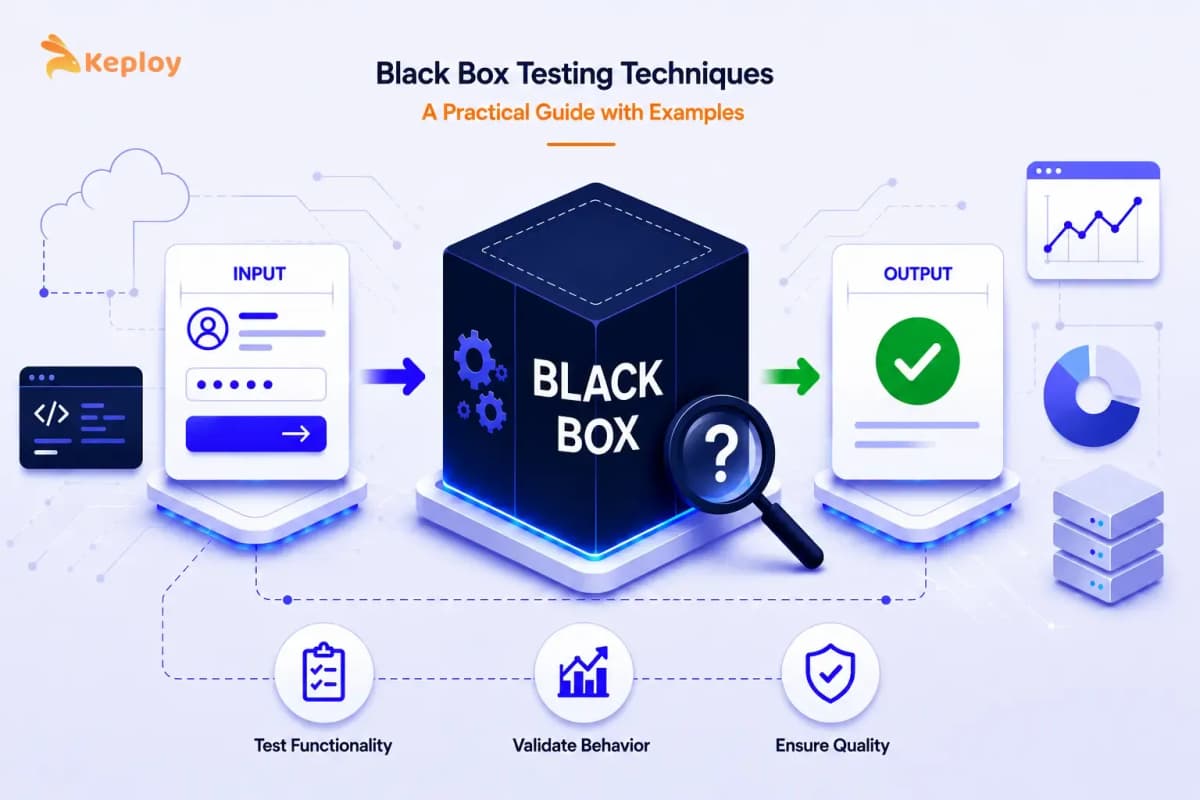






Black box testing techniques are systematic approaches to designing test cases through inputs and outputs alone, without examining source code. The five core methods – equivalence partitioning, boundary value analysis, decision table testing, state transition testing, and error guessing – each target a different failure category. Most teams apply all five in sequence, and the order matters more than most realize.
Black box testing techniques are what turn a vague requirement into a specific, repeatable test case. Most critical bugs in production aren’t found by reading code. They’re found by pushing the right input through a feature and observing what comes back. A blank field where the system expected text. Or a value just past the accepted range. Sometimes it’s a combination of conditions nobody thought to test together.
These are the failures black box techniques are designed to catch, systematically, without ever looking at the implementation.
What are black box testing techniques?
Black box testing techniques are systematic approaches to designing test cases that validate software behaviour through inputs and outputs alone. Rather than examining source code, testers use these methods to identify what inputs to test, which combinations of conditions to cover, and where failures are most likely to occur. The five core techniques used in software testing are equivalence partitioning (EP), boundary value analysis (BVA), decision table testing, state transition testing, and error guessing.
The Black Box Approach: What It Tests and Why It Matters
The black box approach treats the application as an opaque system. You know what goes in and what should come out. The internal logic (how the code processes the input, what database it queries, which functions it calls) is irrelevant to the test.
This matters because it mirrors how users experience the software. Users don’t care about internal implementation. They care whether the login form accepts their credentials, whether the checkout total calculates correctly, and whether the error message is clear when something goes wrong.
The differences between black box testing and white box testing come down to what the tester knows about the implementation and what they’re trying to validate.
Core Black Box Testing Techniques and Methods
Each black box technique answers a specific question about the system’s behaviour. They’re not interchangeable. Each one is targeting a different category of failure. Here’s how they work, with worked examples using a login system throughout.
1. Equivalence Partitioning
Equivalence partitioning divides all possible inputs into groups where the system’s expected to behave the same way for every value in that group. Instead of testing thousands of individual inputs, you test one representative value from each partition.
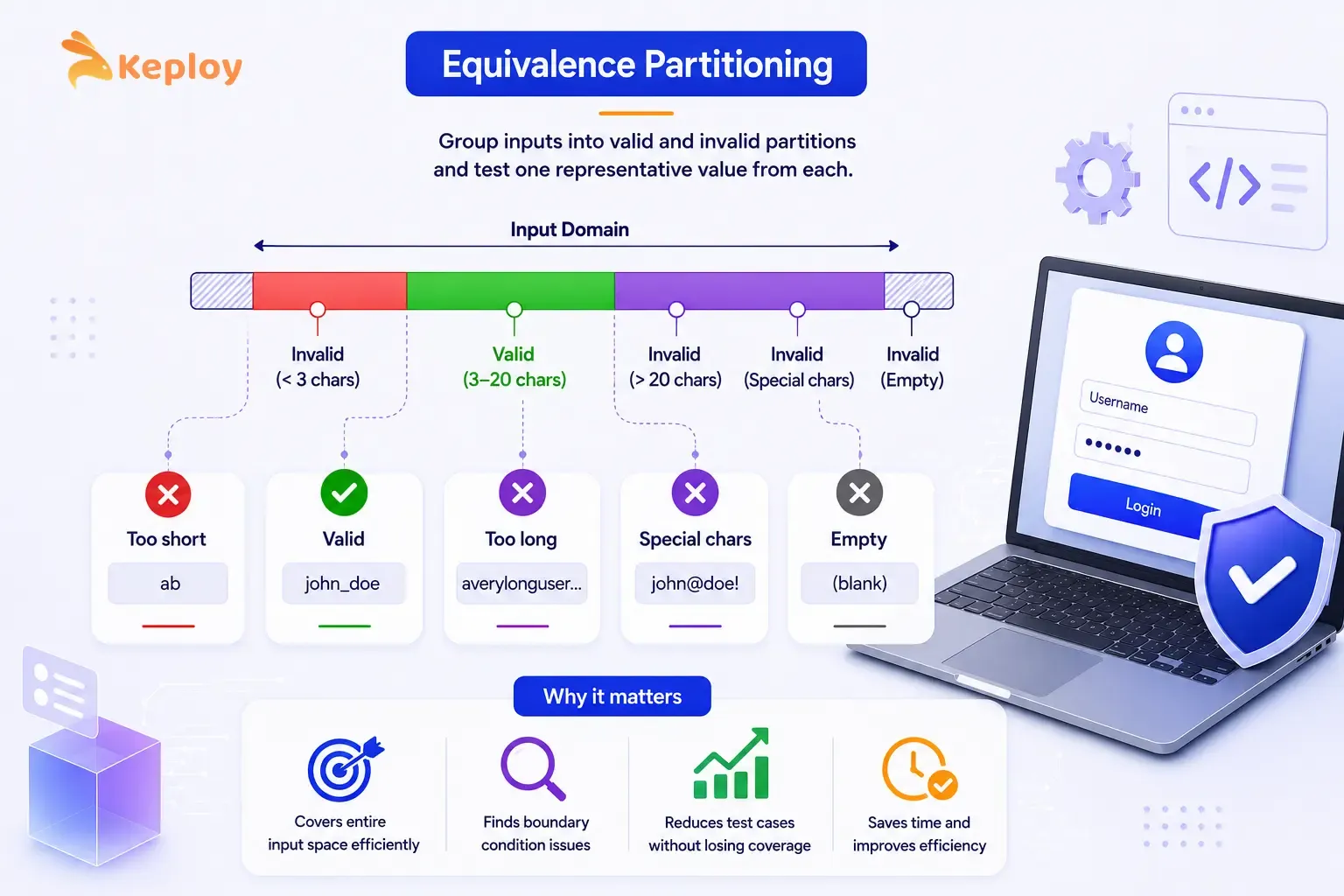
The key insight: if the system handles one value in a partition correctly, it’ll handle every other value in that partition the same way. If it doesn’t, the partition boundary is wrong and you’ve found a bug.
It’s the first technique most teams apply, and for good reason. Any large input space benefits from it: text fields, numeric ranges, dropdown selections, date inputs. One representative value per partition instead of thousands of individual inputs.
Worked example: Username field (3 to 20 characters, letters and numbers only):
| TC ID | Partition Class | Input Value | Expected Result |
|---|---|---|---|
| TC-01 | Valid (3-20 chars) | john_doe | Login attempted |
| TC-02 | Invalid (below minimum) | ab | Error: username too short |
| TC-03 | Invalid (above maximum) | averylongusername12345 | Error: username too long |
| TC-04 | Invalid (special characters) | john@doe! | Error: invalid characters |
| TC-05 | Invalid (empty) | Error: username required |
You don’t need to test abc, abcd, abcde separately. TC-01 covers the entire valid range. TC-02 covers every too-short input. Three partitions, five representative test cases, the full input space covered.
How to measure coverage: Count your equivalence classes (valid and invalid partitions). You’ll need at least one test case per class. Most teams go slightly higher to cover edge-of-partition values, which brings us to the next technique.
2. Boundary Value Analysis
Boundary value analysis (BVA) is a direct extension of equivalence partitioning. Defects cluster at the edges of input ranges: the minimum, the maximum, and the values just inside and just outside each boundary. BVA targets exactly those values.
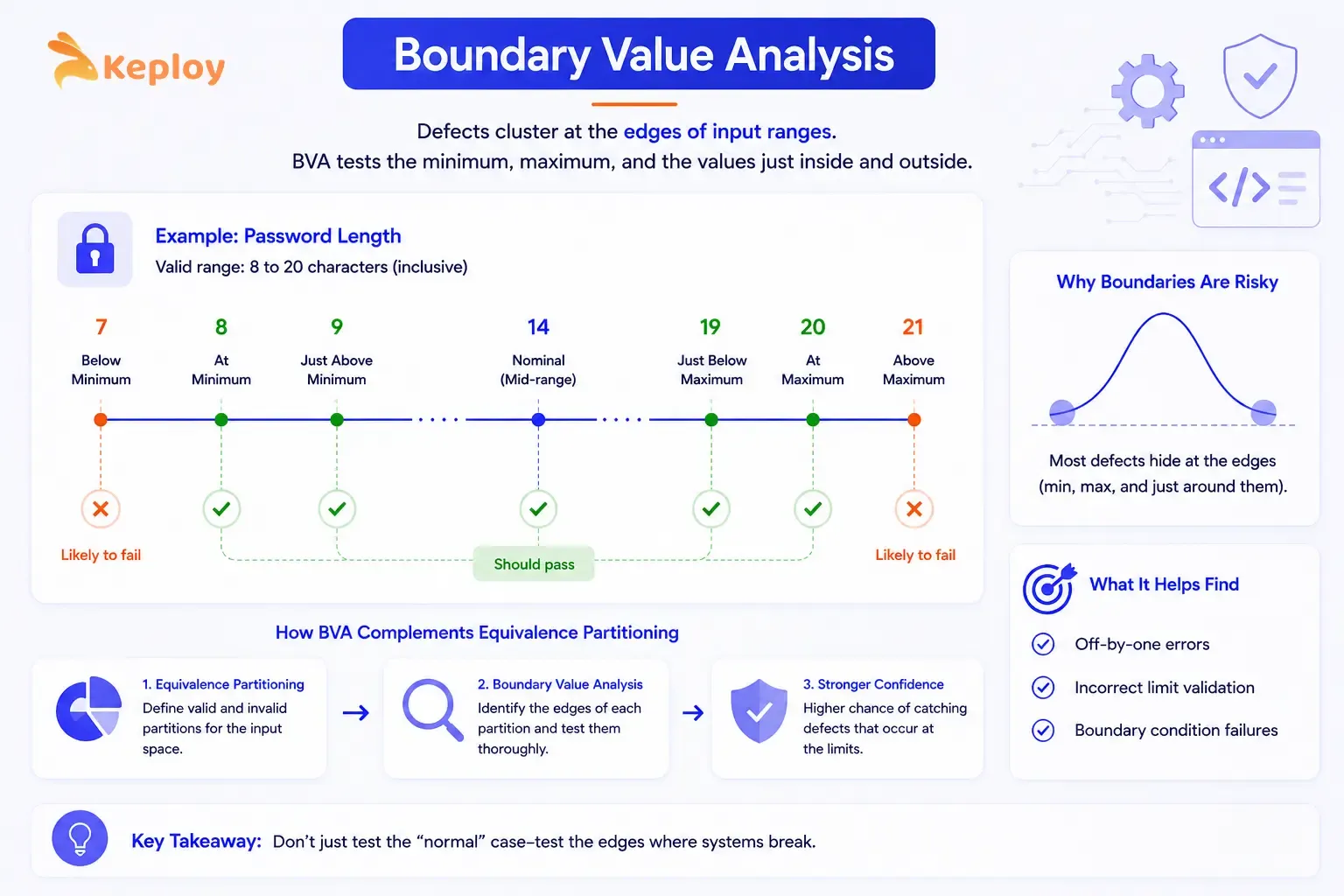
The reason boundaries cause more bugs is that developers’ll often make off-by-one errors at limits. A password field that accepts 8-20 characters is far more likely to fail at length 7, 8, 9, 19, 20, or 21 than at length 14.
Apply it to any numeric range, character limit, date range, or quantity field. It works best after EP. EP establishes the partitions, BVA tests their edges.
Worked example: Password length field (minimum 8, maximum 20 characters):
| TC ID | Boundary Position | Input Length | Input Example | Expected Result |
|---|---|---|---|---|
| TC-06 | Below minimum | 7 | Pass12! | Error: password too short |
| TC-07 | At minimum | 8 | Pass123! | Accepted |
| TC-08 | Just above minimum | 9 | Pass1234! | Accepted |
| TC-09 | Nominal (mid-range) | 14 | SecurePass123! | Accepted |
| TC-10 | Just below maximum | 19 | SecurePassword123! | Accepted |
| TC-11 | At maximum | 20 | SecurePassword1234! | Accepted |
| TC-12 | Above maximum | 21 | SecurePassword12345! | Error: password too long |
Seven test cases cover the full boundary landscape for one field. Without BVA, a team testing only with a "typical" 10-character password wouldn’t catch a bug in the minimum-length validation.
3. Decision Table Testing
Decision table testing handles situations where the output is dependent on multiple conditions acting together. Rather than testing each condition in isolation, you’re mapping every meaningful combination of conditions to its expected output.
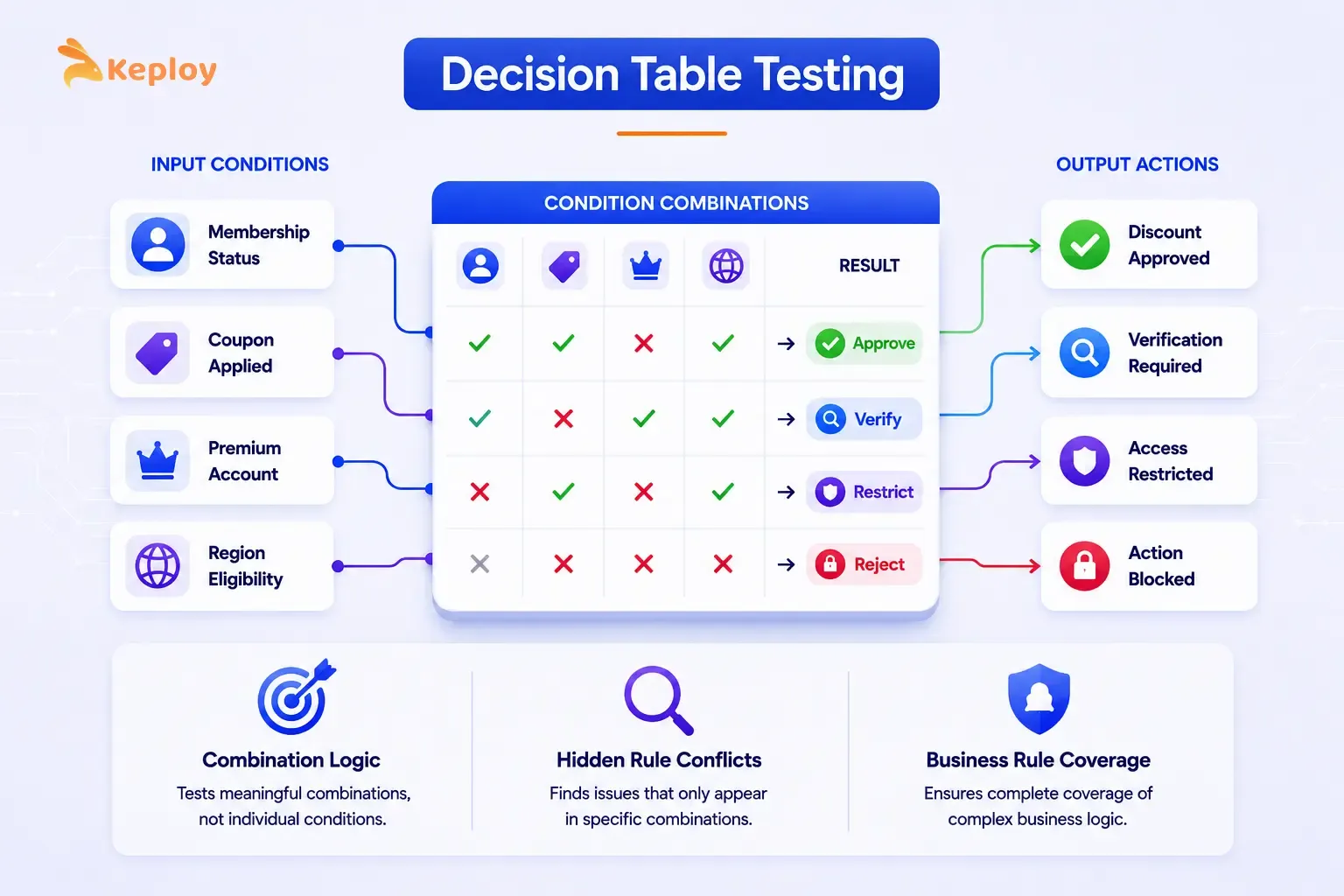
This technique forces you to think through cases that aren’t individually documented but emerge from combinations. It’s common for teams to test conditions separately, pass all their individual tests, and then discover that a specific combination produces an unexpected result in production.
Microsoft’s enterprise QA teams apply this technique as standard practice for products like Azure and Microsoft 365, where access control and eligibility logic depends on multiple conditions acting together. Building the decision table before writing test cases forces every condition combination to be explicitly considered rather than discovered in production.
Decision tables earn their place when two or more conditions together drive the outcome. Login flows with 2FA, discount eligibility rules, access control logic: these are the scenarios where testing conditions in isolation won’t catch the real failures.
Worked example: Login with 2FA and Remember Me:
Conditions:
-
C1: Credentials valid? (Yes/No)
-
C2: 2FA enabled? (Yes/No)
-
C3: Remember Me checked? (Yes/No)
| Conditions / Actions | Rule 1 | Rule 2 | Rule 3 | Rule 4 | Rule 5 |
|---|---|---|---|---|---|
| C1: Credentials valid | Yes | Yes | Yes | Yes | No |
| C2: 2FA enabled | Yes | Yes | No | No | – |
| C3: Remember Me checked | Yes | No | Yes | No | – |
| Action: Show 2FA prompt | Yes | Yes | No | No | No |
| Action: Save session | Yes | No | Yes | No | No |
| Action: Login successful | Yes | Yes | Yes | Yes | No |
| Action: Show error | No | No | No | No | Yes |
Rule 1 is the complete success path: valid credentials, 2FA enabled, Remember Me checked: show the 2FA prompt and save the session. Rule 5 catches any invalid credential combination in one test case regardless of the other conditions.
Black box testing sample test cases from this table:
| TC ID | Conditions | Input | Expected Result |
|---|---|---|---|
| TC-13 | Valid creds + 2FA + Remember Me | admin/pass + code + checked | 2FA prompt shown, session saved |
| TC-14 | Valid creds + 2FA + no Remember Me | admin/pass + code + unchecked | 2FA prompt shown, no session |
| TC-15 | Valid creds + no 2FA + Remember Me | admin/pass + unchecked + checked | Direct login, session saved |
| TC-16 | Valid creds + no 2FA + no Remember Me | admin/pass + unchecked + unchecked | Direct login, no session |
| TC-17 | Invalid credentials | wrong/wrong | Error message displayed |
4. State Transition Testing
State transition testing focuses on how the system moves between states in response to specific events or inputs. Not all systems are purely input-output. Many have states that persist between interactions and change how the system responds to the same input at different times.
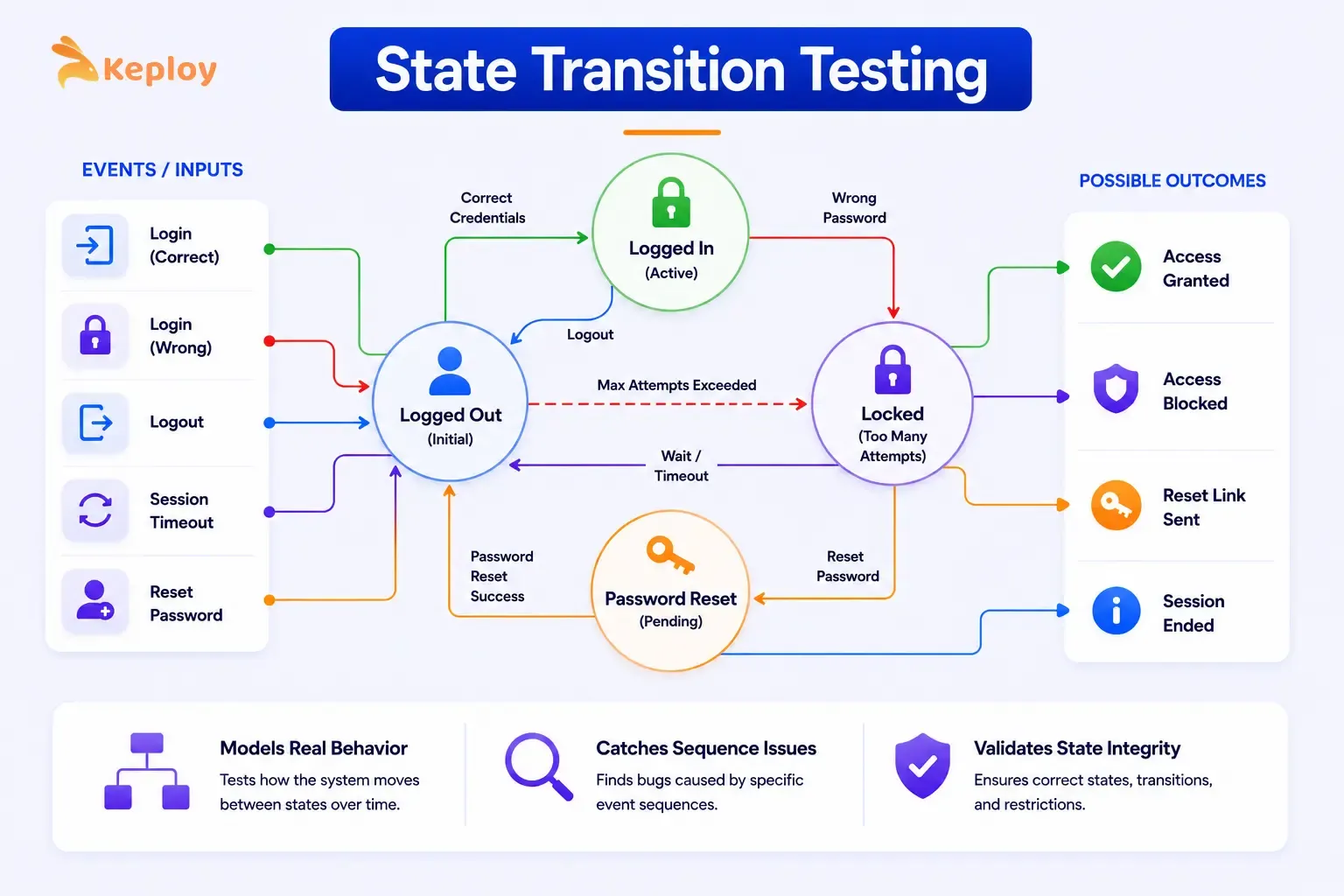
A login system is a perfect example. The same input ("wrong password") produces different outcomes depending on the current state of the account.
The technique applies wherever the system has memory. Account status, shopping cart contents, session management, onboarding progress: any feature where previous interactions change how the system responds to new ones.
Worked example: User account status (login system):
States: Pending Verification, Active, Locked, Suspended
| Current State | Event | Next State | Expected Output |
|---|---|---|---|
| Pending Verification | Email verified | Active | "Account activated" message |
| Pending Verification | Verification link expired | Pending Verification | "Resend verification" prompt |
| Active | Successful login | Active | Dashboard loaded |
| Active | 3 consecutive failed logins | Locked | "Account locked" message |
| Active | Admin suspends account | Suspended | Access denied on next login |
| Locked | Admin unlocks | Active | Account accessible again |
| Locked | Password reset completed | Active | Login prompt shown |
| Suspended | Admin reinstates | Active | Account accessible again |
| Suspended | Successful login attempt | Suspended | Access denied message |
Test cases derived from the state table:
| TC ID | Current State | Input/Event | Expected Next State | Expected Output |
|---|---|---|---|---|
| TC-18 | Active | 3 wrong passwords | Locked | Account locked message |
| TC-19 | Locked | Correct password | Locked | Still locked, no access |
| TC-20 | Locked | Password reset | Active | Login prompt |
| TC-21 | Suspended | Any login attempt | Suspended | Access denied |
| TC-22 | Pending | Email link clicked | Active | Account activated |
TC-19 is the most important test here. It verifies that a locked account stays locked even with the correct password. Without state transition testing, this specific scenario is easy to miss.
5. Error Guessing
Error guessing is experience-driven. Instead of a formal technique with defined rules, it relies on the tester’s knowledge of where similar systems typically fail. It’s less structured but often finds the bugs that formal techniques miss.
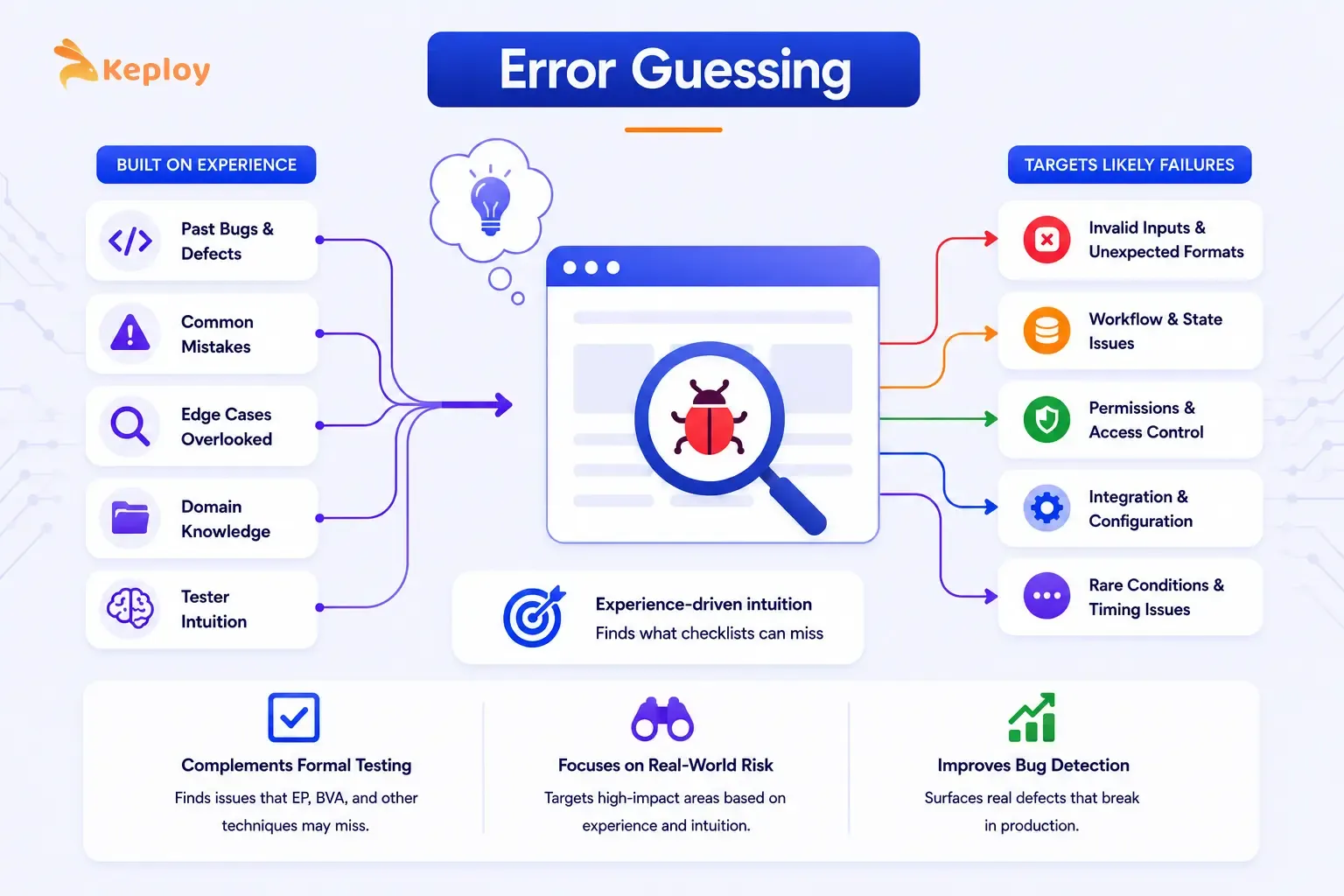
Good error guessing isn’t random. It follows patterns of common implementation mistakes, edge cases developers overlook, and failure modes the team has encountered on previous projects.
Use it after the formal techniques are done. It doesn’t replace EP or BVA. It’s what you add on top. The scenarios it targets don’t fit neatly into partitions or boundaries, but they’re often exactly where bugs hide.
Common error categories to target in a login system:
| Error Category | Specific Test Ideas |
|---|---|
| Empty and null inputs | Submit with no username, no password, or both empty |
| Whitespace handling | Leading/trailing spaces in username (" john ") – does the system trim or reject? |
| Case sensitivity | Username John vs john vs JOHN – are they treated as the same account? |
| SQL injection | ‘ OR ‘1’=’1 as username – does the system sanitise input? |
| Very long inputs | 10,000-character username – does the system handle it gracefully or crash? |
| Special characters | <script>alert(1)</script> as username – XSS validation |
| Repeated attempts | 50 rapid login attempts – does rate limiting kick in? |
| Copy-pasted passwords | Passwords copied from password managers with hidden characters |
These aren’t covered by EP or BVA because they’re not standard input values. They’re adversarial or edge inputs that expose gaps in validation logic.
6. Use Case Testing
Use case testing designs test cases around complete user journeys rather than individual inputs. Instead of testing one field in isolation, you walk through a full scenario from start to finish.
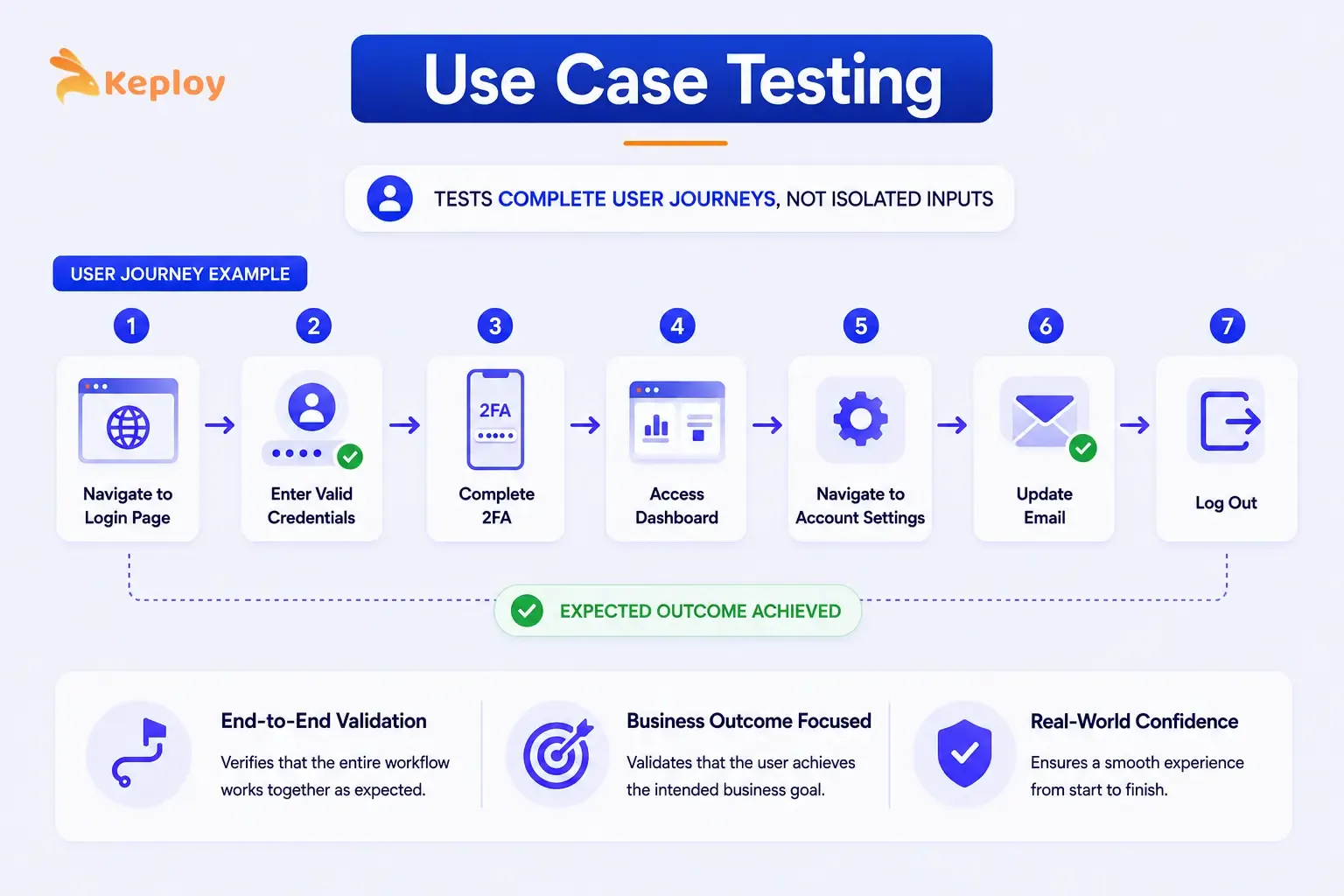
It’s the right choice for end-to-end validation and acceptance testing, anywhere a sequence of steps must produce a specific business outcome rather than just an isolated correct output.
For a login system, a use case test might cover: navigate to login page → enter valid credentials → complete 2FA → access dashboard → navigate to account settings → update email → log out. The test validates the full journey, not individual fields.
Black Box Testing Sample Test Cases: A Complete Example
Here’s how you combine multiple techniques to test a single feature. This shows what a real black box testing sample test case suite looks like for the login system when EP, BVA, and decision tables are applied together.
The login form accepts:
-
Username: 3-20 alphanumeric characters
-
Password: 8-20 characters, at least one number and one special character
-
2FA code: 6-digit numeric, valid for 30 seconds
| TC ID | Technique | Input Description | Input Values | Expected Result |
|---|---|---|---|---|
| TC-01 | EP – Valid username | Typical valid username | john_doe | Accepted |
| TC-02 | EP – Short username | Below 3-char minimum | ab | Error: too short |
| TC-03 | EP – Long username | Above 20-char maximum | averylongusername123 | Error: too long |
| TC-06 | BVA – Min password | Exactly 8 characters | Pass123! | Accepted |
| TC-07 | BVA – Below min password | 7 characters | Pass12! | Error: too short |
| TC-11 | BVA – Max password | Exactly 20 characters | SecurePassword1234! | Accepted |
| TC-12 | BVA – Above max password | 21 characters | SecurePassword12345! | Error: too long |
| TC-13 | Decision Table – Full success | Valid creds + 2FA + Remember Me | All valid | 2FA prompt, session saved |
| TC-17 | Decision Table – Wrong creds | Invalid credentials | Wrong username/pass | Error message |
| TC-18 | State Transition – Account lock | 3 consecutive failures | 3x wrong password | Account locked |
| TC-19 | State Transition – Locked access | Correct creds on locked account | Right pass, locked | Still locked |
| TC-EG-01 | Error Guessing – Whitespace | Username with spaces | " john " | Trimmed or rejected |
| TC-EG-02 | Error Guessing – SQL | Injection attempt | ‘ OR ‘1’=’1 | Sanitised, error |
| TC-EG-03 | Error Guessing – XSS | Script in username | <script>alert(1)</script> |
Sanitised, error |
It’s a coherent, traceable test suite. Each test case has a clear technique source, making it easy to report coverage and justify why specific inputs were chosen.
Which Black Box Testing Technique to Use and When
The techniques aren’t interchangeable. Each one is optimised for a specific type of input or behaviour.
|
Technique |
Best suited for |
Strength |
Avoid when |
|
Equivalence Partitioning |
Large input spaces, text fields, numeric ranges |
Reduces test cases while maintaining coverage |
Output depends on multiple conditions together |
|
Boundary Value Analysis |
Numeric ranges, character limits, date ranges |
Catches off-by-one errors at input edges |
Inputs have no meaningful boundaries |
|
Decision Table Testing |
Multiple conditions producing different outputs |
Covers combination logic exhaustively |
Only one condition determines the output |
|
State Transition Testing |
Features with persistent state, multi-step flows |
Tests valid and invalid state changes |
System is stateless (output depends only on current input) |
|
Error Guessing |
Any feature, as a complement to formal techniques |
Finds bugs formal techniques miss based on experience |
Used as a substitute for formal techniques |
|
Use Case Testing |
End-to-end user journeys, acceptance criteria |
Validates complete business scenarios |
Detailed field-level validation is needed |
The practical sequence most teams follow: Start with EP to partition the input space. Apply BVA to the boundaries of each partition. Use decision tables where multiple conditions interact. Add state transition testing for any stateful flows. Fill the remaining gaps with error guessing.
Black Box Testing Methodologies in Modern Testing Pipelines
From Manual Techniques to Automated Black Box Testing
The techniques covered above were originally designed for manual test case design. The shift to automated testing doesn’t make them obsolete. It changes where and how they’re applied.
Equivalence partitioning and BVA still drive test case design, but the resulting test cases get executed automatically in CI rather than run manually by a tester. Decision tables translate naturally into parameterised test runs where each rule becomes a test case with specific input combinations.
The volume advantage is significant. With Keploy capturing real API traffic and converting it into replayable test cases automatically, teams get black box coverage of the input combinations that users actually trigger, without manually authoring thousands of individual test cases.
How Black Box Principles Apply to API Testing
API testing is fundamentally black box testing applied at the service layer. You send a request (input) and verify the response (output) without needing to understand the service’s internal implementation.
EP applies directly to API request parameters: group valid request bodies, invalid parameter values, missing required fields, and malformed payloads into partitions and test one representative from each.
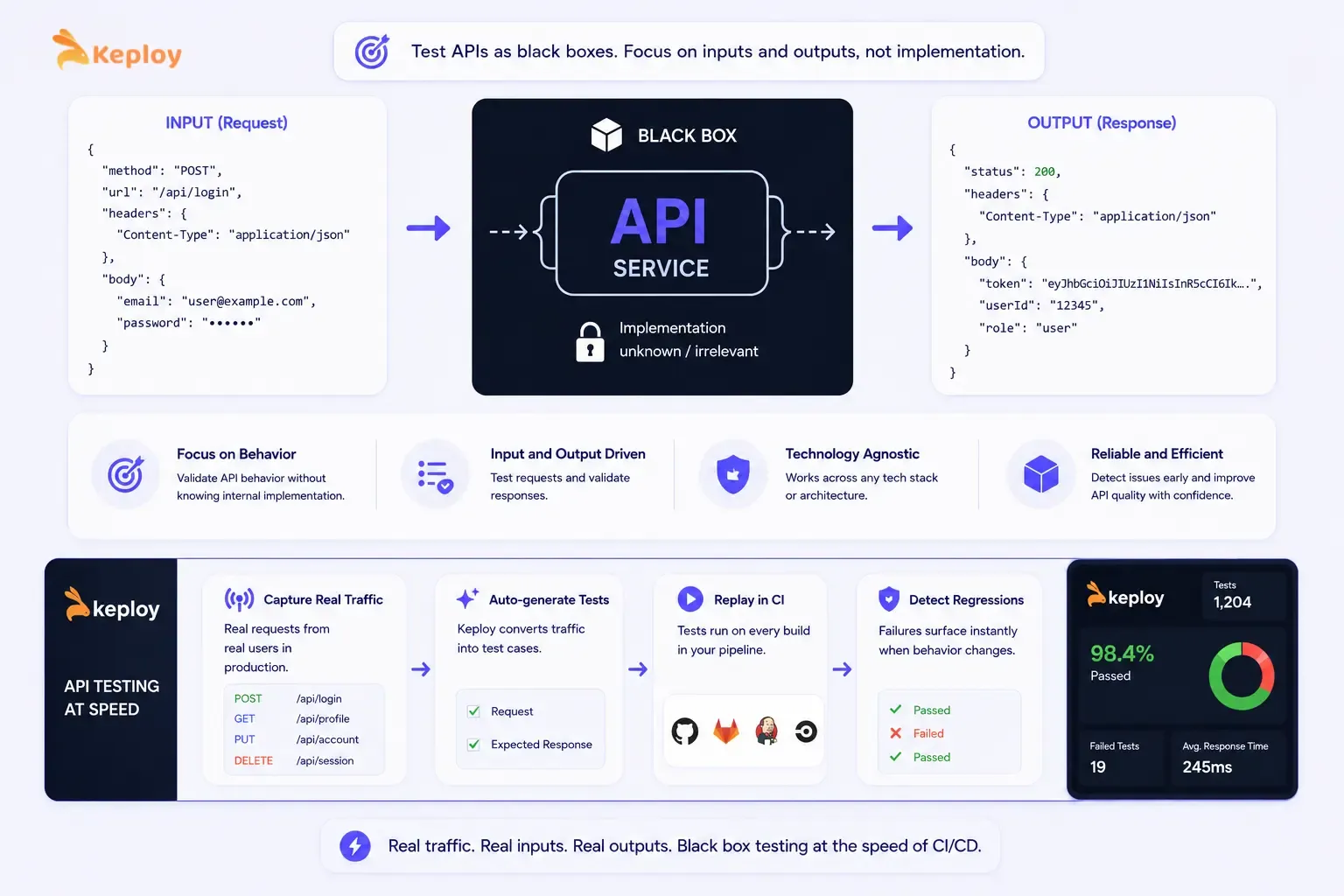
BVA applies to numeric parameters, string lengths, and array sizes. Decision table testing covers APIs where the response varies based on multiple request conditions.
That’s the principle Keploy applies at the API layer. Real traffic, real inputs, real outputs, replayed in CI. Each captured request-response pair is a real-world instance of "given this input, expect this output": the core principle of black box testing, generated from actual user behaviour rather than manually authored
When an API changes and previously captured test cases fail, the failure surface is immediately visible without needing to understand the implementation. That’s the black box approach operating at the speed of CI/CD.
Conclusion
Black box testing techniques work because they force you to think about the system from the outside. You start with what the user experiences: inputs and outputs, working backwards to find the scenarios most likely to reveal failures.
The formal techniques aren’t complicated. Equivalence partitioning reduces a large input space to a manageable set of representative cases. BVA targets the edges where developers make mistakes. Decision tables expose combination logic that individual condition tests miss. State transition testing validates behaviour that only emerges over multiple interactions. Error guessing fills the gaps with experience.
Used together on a single feature, they produce a coherent test suite with clear coverage and a traceable rationale for every test case. That traceability (knowing which technique produced which test case and why) is what separates a black box test suite that finds bugs from one that just runs green.
Frequently Asked Questions
What are the main black box testing techniques?
The five core techniques are equivalence partitioning (grouping inputs by expected behaviour), boundary value analysis (testing at the edges of input ranges), decision table testing (mapping combinations of conditions to expected outputs), state transition testing (validating how the system moves between states), and error guessing (targeting likely failure points based on experience). Most test suites use a combination of all five.
What is the difference between equivalence partitioning and boundary value analysis?
Equivalence partitioning divides the input space into groups and tests one value from each group. Boundary value analysis tests the specific values at the edges of those groups, where bugs are most likely. They’re complementary. EP tells you which partitions exist, BVA tells you which specific values within those partitions to test.
What is the difference between static and dynamic black box testing?
Static black box testing involves reviewing documents, requirements, and specifications without executing the software, finding ambiguities, contradictions, and gaps in the spec before any code runs. Dynamic black box testing involves executing the system and observing its behaviour in response to inputs. Both are valid. Static testing catches issues earlier and at lower cost. Dynamic testing validates actual system behaviour.
When should you use decision table testing?
Use it when the output depends on multiple conditions acting together and different combinations produce different outcomes. Login flows with 2FA, discount eligibility rules, access control logic, and any feature with compound conditional logic are good candidates. If a single condition determines the outcome, equivalence partitioning is simpler and sufficient.
What is error guessing in software testing?
Error guessing is a technique where testers identify likely failure points based on experience and domain knowledge rather than formal rules. Common error guessing targets include empty inputs, whitespace handling, SQL injection, very long strings, special characters, and boundary-adjacent values that formal techniques don’t specifically target. It’s most effective as a complement to formal techniques, not a replacement.
When should you choose black box testing over white box testing?
Black box testing is the better choice when you want to validate what the system does from a user’s perspective rather than how it does it. It’s preferred for system and acceptance testing, for testing APIs and services where internal implementation is intentionally hidden, and when the tester doesn’t have access to source code. White box testing’s better for unit-level validation of internal logic, code coverage analysis, and security audits that require code inspection.
How do you design test cases using black box techniques?
Start by identifying the input space for the feature you’re testing. Apply equivalence partitioning to divide inputs into valid and invalid groups. Apply BVA to the boundaries of each partition. Map any combination logic to a decision table. Identify any stateful behaviour and build a state transition table. Finally, add error guessing test cases for inputs that formal techniques don’t explicitly cover. Each technique produces a specific set of test cases with clear inputs and expected outputs.
What are black box testing methods used for in automation?
Black box testing methods drive the test case design phase of automation. They determine what to test, not how to automate it. EP and BVA produce the specific input values that feed parameterised automated tests. Decision tables map directly to data-driven test configurations. The technique outputs (test case ID, input, expected result) become the test data that automation frameworks execute at scale on every build.