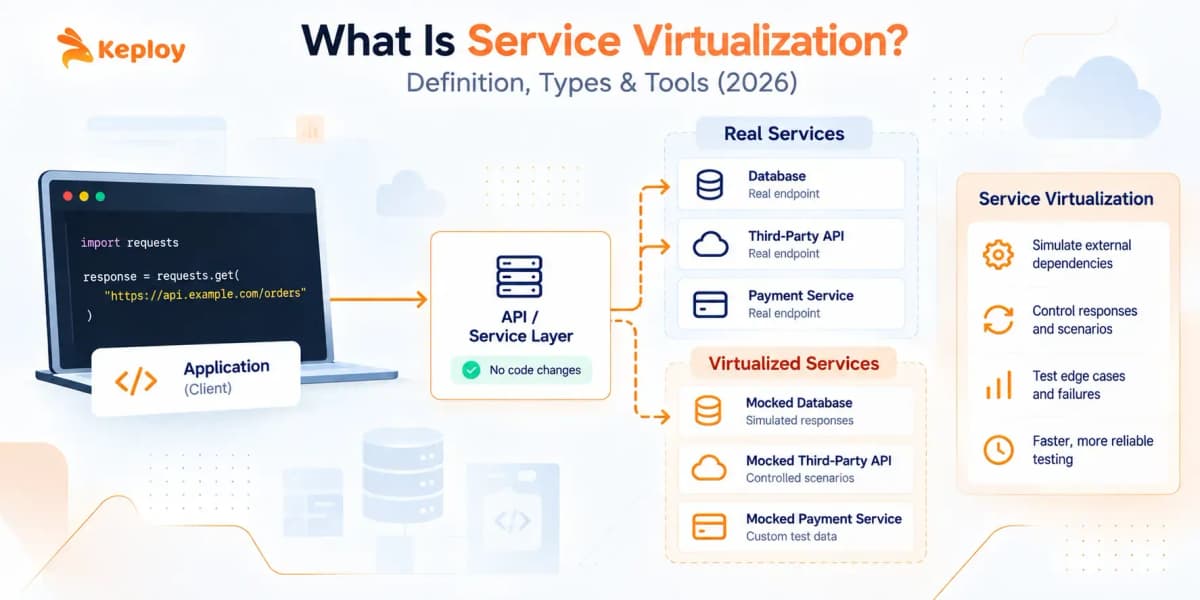






Service virtualization replaces real external dependencies (APIs, databases, queues, or third-party services) with controlled simulations that respond like the real thing. Tests run against these virtual services whether the real dependency is unavailable, expensive to call, or still being built. Keploy implements this by capturing real dependency interactions from live traffic and replaying them automatically in CI.
Service virtualization addresses a testing problem that gets worse as applications grow: the code is ready to test, but the services it depends on aren’t cooperating. Those dependencies take different forms. A third-party payment API that charges per call. An internal microservice another team is still building.
A legacy system with a 30-minute access window each week, a shared staging environment that breaks when two teams run tests at the same time. When any of these create a bottleneck, integration testing stalls, defects surface late, and release cycles slow to match someone else’s availability.
What Is Service Virtualization?
Service virtualization is a software testing technique that creates virtual replicas of dependent services, APIs, databases, or queues so testing can proceed without those dependencies being live. The virtual service sits in place of the real one, intercepts calls from the application under test, and returns realistic responses on demand.
Service virtualization is sometimes called dependency virtualization, because what gets virtualized is any dependency the application calls, not just web services. The simulated dependencies are referred to as virtualized services or virtual services.
The concept is more specific than it sounds. Service virtualization isn’t just about replacing an unavailable service. It’s about replacing it with something controllable: a simulation that responds predictably, can be configured to return errors or edge cases, and doesn’t cost money per call or require someone else’s uptime to run. That control is what makes it valuable for service virtualization testing at scale.
How Does Service Virtualization Work?
Service virtualization works by intercepting the calls an application makes to its dependencies and returning configured or recorded responses instead of passing requests to the real service.
There are two main approaches:
- Configuration-based: An engineer defines the virtual service behavior manually. They specify which requests the virtual service should match and what response it should return. WireMock’s stub configuration is an example: you write JSON or DSL rules that say “when request X arrives, return response Y.”
- Traffic-capture-based: A tool records real interactions between the application and its dependency during a live run, then replays those recorded responses during tests. No manual specification required. Keploy uses this approach, capturing HTTP calls, database queries, gRPC calls, and queue operations at the kernel level via eBPF. The virtual service reflects what the real dependency actually returned rather than what an engineer predicted it would return.
Before and After Service Virtualization: A Real Example
A QA team is validating an e-commerce checkout flow. The flow calls a third-party payment gateway to authorize transactions.
The problem: the gateway’s sandbox isn’t ready yet. When it becomes available, calling it in every CI run would incur per-transaction fees and occasionally hit rate limits. Simulating a declined card or a network timeout against the real sandbox is unreliable at best, impossible at worst.
Before service virtualization: Testing stalls. Engineers test isolated checkout logic but can’t validate the full end-to-end flow. Error handling for declined payments and timeouts goes untested until UAT. Defects surface late.
After service virtualization: The team creates a virtual payment service exposing the same API path (/api/payments/authorize). It returns:
- 200 OK with a token for approved transactions
- 402 Payment Required for declined cards
- 504 Gateway Timeout to simulate network latency
The full checkout flow gets tested on every commit. Error handling, retry logic, and fallback states all get coverage. Zero transaction fees. Zero dependency on external uptime. Defects surface in CI before they reach UAT.
What Can Service Virtualization Simulate?
The simplest use of service virtualization is replacing an unavailable service with something that returns a normal response. But the real value goes further. Virtual services give teams control over dependency behavior in ways the real service doesn’t allow.
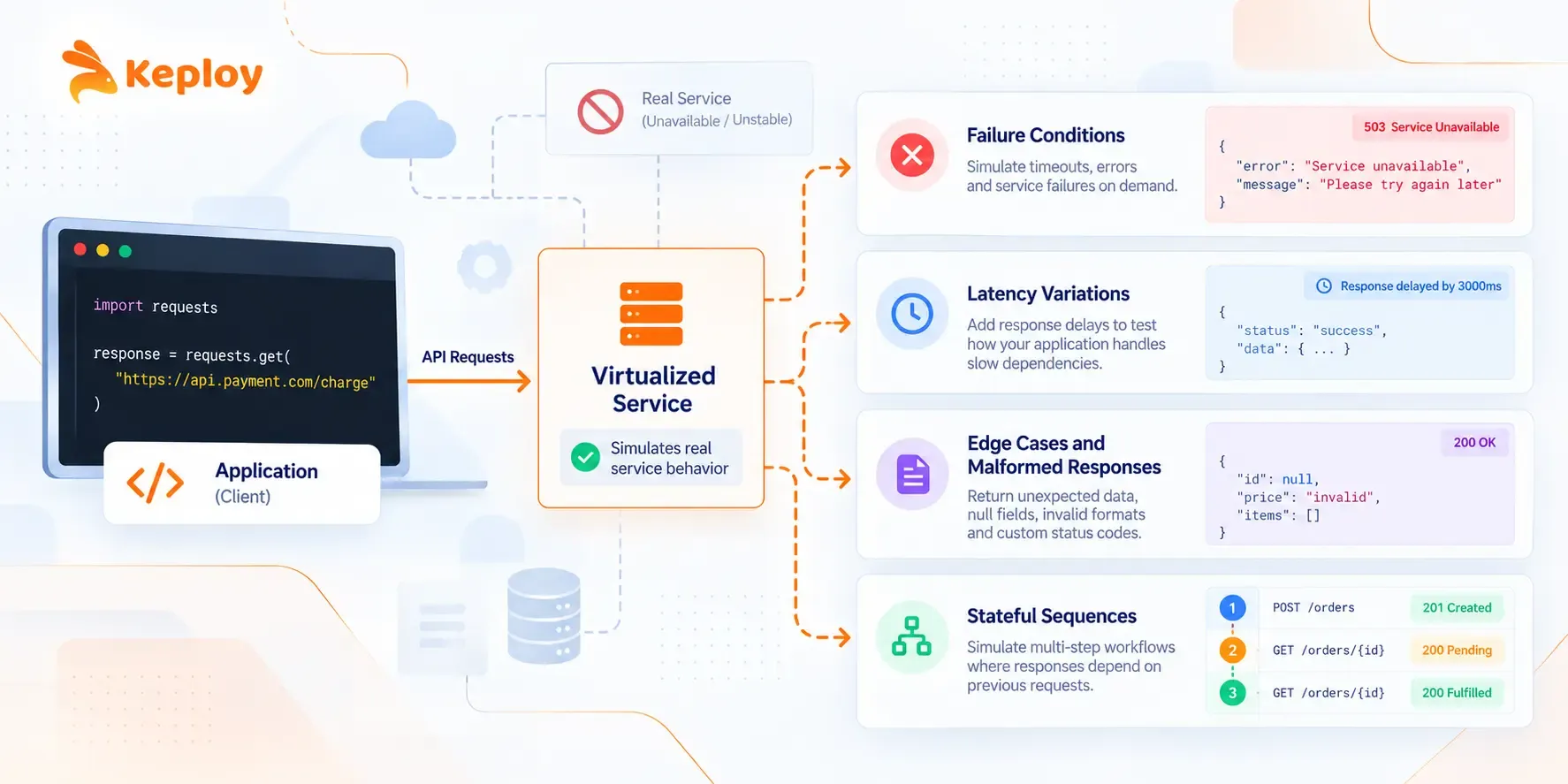
- Failure conditions. The real payment gateway rarely returns a timeout during testing because it’s usually up. A virtual service can return a timeout on demand, every time, on the specific test case that needs it.
- Latency variations. Does the application handle gracefully when a downstream service is slow? Configuring a virtual service to add a 3-second delay to every response lets you test that without waiting for a real degraded environment.
- Edge cases and malformed responses. What happens when a pricing API returns a null field your code assumed would always be populated? Virtual services can return malformed payloads, unexpected status codes, and boundary values that are difficult or impossible to trigger against real systems.
- Stateful sequences. Some dependencies change behavior across a session. An order service that moves through states from pending to confirmed to fulfilled. Service virtualization platforms can simulate stateful behavior where the response to request three depends on what requests one and two contained.
This range of control is what separates service virtualization from simple stubs. A stub returns the same response every time. A virtual service can be configured to behave differently based on request content, sequence, and state.
What Are the Benefits of Service Virtualization?
- Test earlier. You don’t have to wait for a dependency to be available to test against it. A team building a new microservice can validate their integration logic against a virtualized version of the downstream service before that service is written.
- Test more completely. Some scenarios are unsafe or impossible to trigger against live systems: a payment gateway under load, a mainframe system during a 30-minute maintenance window, a third-party service returning a 500 error at exactly the right moment. Virtual services make all of these routine.
- Eliminate costs. APIs that charge per call stop being a concern. A checkout flow tested 500 times in CI against a virtual payment service costs nothing in transaction fees.
- Remove environment bottlenecks. Shared staging environments are a common source of flaky tests. One team’s test data changes the state another team’s tests expect. Virtual services are isolated by definition. Each team’s test environment sees exactly the state it configured.
- Make CI deterministic. Virtual services return predictable responses on every run. The intermittent failures caused by external service availability, rate limiting, and environment inconsistency go away.
When Should You Use Service Virtualization?
Service virtualization isn’t the right tool for every testing scenario. It’s most valuable when a real dependency creates a specific constraint.
- The dependency doesn’t exist yet. Another team is building a service your application will call. The API contract has been agreed on but the service isn’t running. Virtual services let you develop and test against the agreed contract before anything is deployed.
- The dependency is too expensive to call in tests. Payment processors, SMS gateways, mapping APIs. Many third-party services charge per request. Running those calls in CI for every commit adds up. Service virtualization replaces them with free local simulations.
- The dependency is rate-limited or shared. Third-party APIs cap the number of requests per minute. Shared staging environments get contested when multiple teams run tests simultaneously. Both problems disappear when you’re not calling the real service.
- The dependency is hard to configure for testing. Legacy systems, mainframes, and complex message queues often take significant setup time to get into the right state for a test. Virtual services can be put into any state immediately.
- You need to test scenarios the real dependency doesn’t expose. Declined payment cards, service outages, malformed responses, race conditions. These are either difficult or impossible to trigger reliably against real systems. Virtual services make them reproducible.
Once you know you need it, choosing between service virtualization tools comes down to protocol coverage, capture approach, and CI fit
Service Virtualization Testing Across the Test Lifecycle
Service virtualization testing isn’t one test type. It’s a way of removing dependencies from whichever test type is blocked by them. Here is where virtualization testing fits at each stage:
- Integration testing: Virtual services stand in for downstream APIs, databases and queues so integration tests run before every dependency is deployed.
- Dependency testing: Teams can check how their service behaves when a dependency returns errors, slow responses or unexpected payloads, without waiting for that dependency to actually fail.
- Performance testing: Load tests can run against virtual services instead of third-party APIs that rate-limit or charge per call. This keeps the test focused on your own service’s performance.
- Continuous testing: In a CI/CD pipeline, every commit triggers tests. If those tests call live dependencies, the pipeline is only as reliable as the least reliable dependency. Continuous testing with service virtualization gives every pipeline run the same dependency behaviour, so a failed build points to a code change rather than an outage somewhere else.
The common thread: service virtualization in testing moves dependency-related failures out of your results, so the tests that fail are the ones that found a real bug.
How Service Virtualization Reduces Test Environment Setup
A full test environment usually means provisioning every service, database and third-party integration an application touches. That is slow to set up, expensive to keep running, and often shared between teams, which leads to contention and environment drift.
Service virtualization shrinks what a test environment has to contain. Instead of deploying every dependency, the environment runs the service under test plus virtual services for everything it calls. The result:
- Faster setup: a test environment needs the application and its virtual services, not a full copy of production.
- No contention: each team or CI job gets its own virtual dependencies, so one team’s test data can’t break another team’s tests.
- Consistent state: virtual services start from the same recorded or configured state on every run.
This is also why service virtualization pairs naturally with sandbox testing: a sandbox gives you isolation, and virtual services give that sandbox realistic dependencies. For a broader view of environment types, see what is a test environment.
How Is Service Virtualization Different from Mocking and Stubbing?
The terms are used interchangeably in some contexts, but they describe different things in practice. Understanding the distinction helps teams choose the right tool.
- Stubbing replaces a dependency with a hardcoded response for a single test. Stubs are usually created per test, test file, or test class. They’re simple, lightweight, and appropriate for unit testing where you need to isolate one piece of code from its dependencies.
- Mocking is similar but adds verification: the test asserts not just that the response was correct but that the dependency was called in a specific way. Mock testing frameworks operate at the code level, within the application’s language and runtime.
- Service virtualization operates at the network level, outside the application code. It intercepts calls the application makes over HTTP, gRPC, JDBC, or other protocols and responds without the application needing to know it’s talking to a simulation rather than the real service.
| Stub | Mock | Service Virtualization | |
|---|---|---|---|
| Created by | Hand-coded per test | Hand-coded per test | Configured or traffic-captured |
| Scope | Single function or class | Single function or class | Full service or dependency |
| Stateful | No | No | Yes |
| Protocol support | In-process | In-process | HTTP, gRPC, SOAP, MQ, JDBC, and more |
| Reusable across team | No | No | Yes |
| Typical use | Unit test isolation | Unit test verification | Integration and system testing |
The practical rule: stubs and mocks for unit testing. Service virtualization for integration testing, system testing, and CI pipelines where real dependency behavior matters. When the dependency is an HTTP API and the stand-in runs as its own process, the practice is often called API simulation.
What Are the Main Service Virtualization Tools?
Service virtualization tools split into three categories by approach.
Traffic-Capture Tools
Traffic-capture tools record what the real service actually returns during a live run and replay those interactions as a virtual service during tests. The virtual service reflects real dependency behavior rather than predicted behavior. No manual response configuration required.
- Keploy captures HTTP requests, database queries, gRPC calls, and queue operations from live traffic at the kernel level using eBPF. The captured interactions run as virtual services in CI pipelines without any live dependency present. No code changes or proxy setup. Open source under Apache 2.0.
- Hoverfly records HTTP traffic as simulation files that commit to version control and replay in any environment. Lighter than WireMock for teams primarily needing traffic replay rather than flexible stub rules.
Open-Source Stub Servers
- WireMock handles HTTP service virtualization through JSON or DSL configuration: define the request pattern, specify the response. The most widely used open-source option for HTTP service virtualization, with strong CI integration documentation and broad language support for configuration clients. The ceiling is maintenance. Stubs must be updated manually when the real service changes.
- Mountebank extends the stub-server model to multiple protocols alongside HTTP: HTTPS, SMTP, and TCP. Useful when teams need to virtualize dependencies beyond standard REST APIs.
- Mockoon offers a GUI-based alternative for teams that prefer visual configuration over JSON files.
Enterprise Service Virtualization Platforms
- Parasoft Virtualize supports protocols beyond HTTP: SOAP, MQ, JDBC. Built for environments with mainframe or legacy system dependencies. Includes governance features for managing virtual services across teams at scale. The tradeoff is significant setup investment and enterprise pricing. See how it compares with Keploy at Parasoft Virtualize.
- SmartBear ReadyAPI Service Virtualization targets teams already running ReadyAPI for API testing, keeping virtualization inside one platform.
What Is API Service Virtualization?
API service virtualization applies the same principles to REST, gRPC, and GraphQL endpoints specifically, the layer most modern backend teams interact with directly.
Service virtualization for API testing is the most common way developer teams use the technique today.
Traditional service virtualization tools were built for enterprise environments with SOAP, mainframe protocols, and complex message brokers. API service virtualization strips that down to what a typical microservices team actually needs: simulating the HTTP and gRPC dependencies a backend service calls, in a form that works locally and in CI without enterprise licensing or infrastructure.
The setup is simpler. The configuration is developer-readable. And the integration with modern CI pipelines is a first-class concern rather than an afterthought.
For API testing, service virtualization means tests that call external APIs (payment processors, shipping providers, internal services from other teams) run against local simulations rather than live endpoints. This is also what makes API regression testing practical in CI: the same regression suite can run on every pull request without waiting for, or paying for, the real dependencies.
The dependency mocking and service virtualization approaches used by API-first teams are increasingly built around recorded traffic rather than hand-configured stubs.
How Has Service Virtualization Evolved?
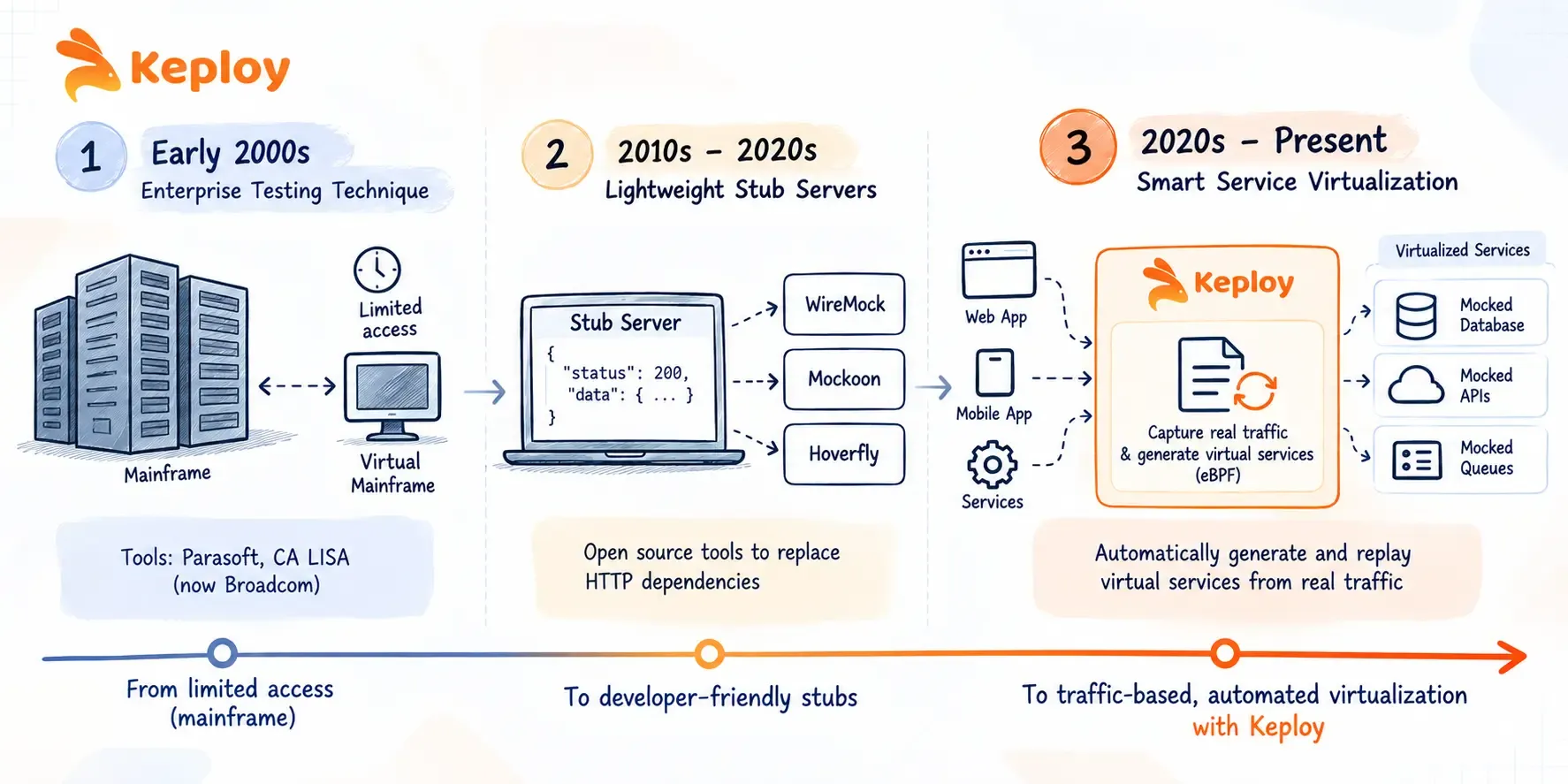
- Service virtualization started as an enterprise testing technique in the early 2000s, built primarily to handle mainframe access constraints. If a team could only access the mainframe for 30 minutes a month, a virtual mainframe gave them access all month.
- The tools that came out of this era (Parasoft, CA LISA, now Broadcom) were powerful but heavy. They required dedicated tooling teams, significant setup effort, and enterprise budgets. Most developer teams never touched them.
- The second wave brought lightweight stub servers. WireMock, Mockoon, and Hoverfly made service virtualization accessible to developers who needed to replace HTTP dependencies during testing. Configuration was still manual but the tools were open source and the setup was measured in hours, not weeks.
- The current evolution is “smart service virtualization“: automatic virtual service generation from observed traffic rather than manual configuration. Instead of an engineer specifying what the virtual service should return, a tool captures what the real service actually returns during a representative run and uses those captures as the simulation. This matters because manual configuration drifts. The stubs an engineer wrote six months ago reflect what the API looked like six months ago. Traffic-capture generates simulations from real current behavior and re-captures when behavior changes.
The practical impact: virtual services generated from traffic captures stay accurate longer than hand-configured stubs because they reflect what the real service actually does, not what an engineer documented it does. Keploy sits in this third wave, using eBPF to capture the full dependency chain (HTTP calls, database queries, and queue operations) in a single recording session and replaying them in CI without any live dependency present.
What Is a Service Virtualization Maturity Model?
A service virtualization maturity model describes how teams typically progress from ad-hoc stubs to virtual services that are automated across the delivery pipeline. Most teams move through four stages:
| Stage | What it looks like | Typical limitation |
|---|---|---|
| 1. Ad-hoc stubs | Developers hand-write stubs and mocks inside individual tests. | Not reusable; each team rebuilds the same fakes. |
| 2. Shared virtual services | A team maintains virtual services (for example in WireMock) that other teams reuse. | Manual updates; virtual services drift from the real API. |
| 3. Pipeline-integrated | Virtual services start automatically in CI for every build. | Still depends on someone keeping responses current. |
| 4. Traffic-generated | Virtual services are created and refreshed from recorded real traffic. | Needs representative traffic to record from. |
Moving up a stage is less about buying a bigger tool and more about reducing how much of the virtual service a human has to write and maintain.
What Are the Limitations of Service Virtualization?
Service virtualization is genuinely useful. It’s also genuinely limited in specific ways that teams find out after adoption, not before.
- Virtual services drift. A virtual service configured or captured from real traffic is accurate at the time of creation. When the real service changes its response format, adds a field, or changes a status code, the virtual service stays the same. Without a process for keeping virtual services current, they gradually diverge from the real service’s behavior and tests start passing against behavior that no longer exists in production.
- Traffic-capture needs real traffic. If you’re building a brand-new service with no traffic yet, there’s nothing to capture. Configuration-based approaches work here; capture-based approaches don’t.
- Initial setup has a cost. Recording real traffic or configuring virtual service behavior takes time. For simple tests against a small number of well-understood endpoints, a hand-written stub is less effort. Service virtualization pays off at scale, not for one-off tests.
- Protocol coverage varies. Not every tool supports every protocol. A team virtualizing HTTP and JDBC interactions might need two different tools if neither supports both, adding integration complexity.
- Not a substitute for production testing. Virtual services verify that your application handles expected interactions correctly. They don’t cover unexpected behavior that only emerges in production: the combination of real data, real load, and real network conditions.
Service virtualization improves test coverage; it doesn’t replace observability and production monitoring.
How Does Keploy Implement Service Virtualization?
Keploy implements service virtualization through traffic capture at the kernel level rather than manual configuration or proxy-based recording.
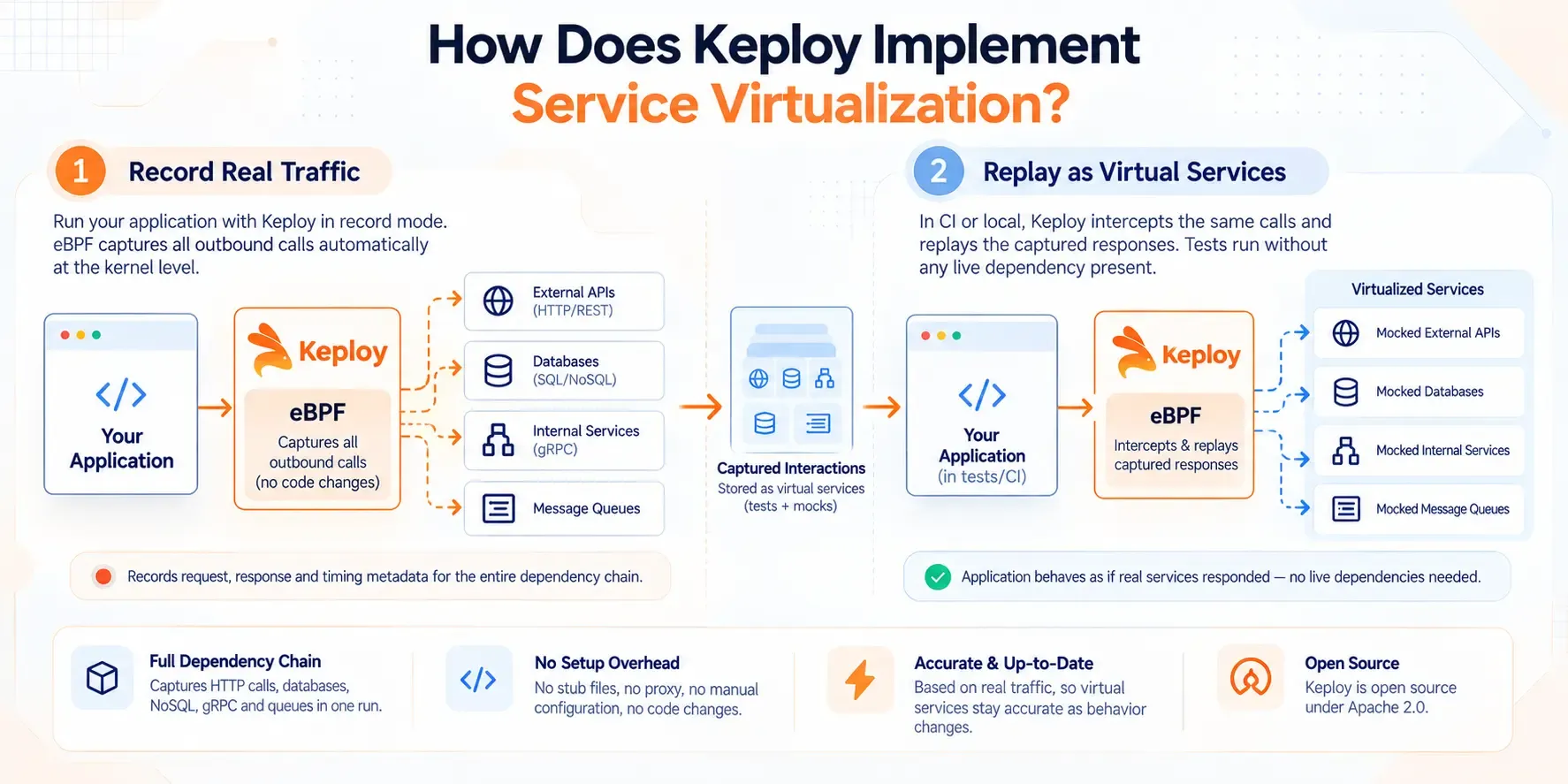
- When a service runs with Keploy in record mode, eBPF intercepts all outbound calls the application makes: HTTP requests to external APIs, SQL queries to databases, NoSQL reads and writes, gRPC calls to internal services, and queue operations. The full interaction gets recorded: request, response, and timing metadata, with no code changes, SDK installation, or proxy configuration on the application side.
- Those captured interactions become the virtual service layer for CI. On every subsequent test run, Keploy intercepts the same outbound calls and replays the captured responses instead of letting them reach the live dependency. The application behaves as if the real services responded. Tests run without any live dependency present.
- What this covers beyond HTTP-only tools: the full dependency chain behind an API call. If an endpoint queries a database, calls a downstream service, and publishes to a queue before returning a response, Keploy captures all of those interactions in one recording session and replays all of them in CI. The coverage is at the network layer, not just the HTTP surface.
Getting started means running the application once in record mode. The virtual service layer builds from that traffic capture. No stub files to write, no proxy to configure, no contracts to maintain by hand. Keploy is open source under Apache 2.0.
Conclusion
Service virtualization solves a problem that doesn’t go away on its own: the more services an application depends on, the more points of failure testing acquires from the environment rather than from the code. Virtual services transfer that control back to the team doing the testing.
The right approach depends on what your dependencies look like and how much setup you’re willing to invest. Configuration-based tools like WireMock give you precise control over HTTP interactions and work well at smaller scale. Enterprise platforms add stateful simulation and protocol depth for complex environments. Traffic-capture tools remove the configuration step entirely, deriving virtual services from real observed behavior.
What all three share: tests that don’t stall waiting for external systems and CI pipelines that produce the same result on every run.
Frequently Asked Questions
What problems does service virtualization solve in software testing?
Service virtualization removes the dependency constraints that stall testing: services not yet built, third-party APIs that charge per call, shared staging environments that break under concurrent load, and rate limits that make CI runs unpredictable. Instead of waiting for all dependencies to be available, teams test against virtual services that respond like the real thing, on demand, at no per-call cost.
What is the difference between service virtualization and mocking?
Mocking simulates a single function or endpoint within the application’s code for one isolated test. Service virtualization simulates the full behavior of an external service at the network level, built once and reused across teams and environments. Mocking is appropriate for unit testing. Service virtualization is built for integration testing where the full interaction with an external service matters.
What is the difference between service virtualization and server virtualization?
Service virtualization simulates the behavior of software services (APIs, databases, third-party systems) for testing purposes. Server virtualization divides a physical server into multiple virtual machines, each running its own OS. They operate at completely different levels: service virtualization at the application layer, server virtualization at the infrastructure layer. The names are similar but the purpose is entirely different.
When should I use service virtualization instead of a mock?
Use service virtualization when the dependency you’re replacing is an external service that multiple tests or teams need to interact with, when you need stateful behavior across a sequence of calls, when you need to simulate network-level behavior (latency, errors, timeouts), or when you’re doing integration testing rather than unit testing. Use mocks for isolating a single unit of code in a unit test.
How does service virtualization work in CI/CD pipelines?
Service virtualization in CI removes the live dependencies that cause CI tests to be flaky or slow. Virtual services are deployed as part of the test environment, intercepting calls the application makes to external services and returning captured or configured responses. Tests run faster, cost less (no per-call fees), and produce consistent results on every run regardless of external service availability.
### What is an example of service virtualization?
A common example is a checkout flow that calls a third-party payment gateway. Instead of calling the real gateway in every test run, the team uses a virtual payment service that returns an approval, a declined card or a timeout on demand. The full checkout flow can then be tested on every commit with no transaction fees.
### What is dependency testing in service virtualization?
Dependency testing checks how an application behaves when the services it depends on respond slowly, return errors or send unexpected data. Service virtualization makes these scenarios repeatable, because the virtual service can be told to fail in exactly the same way on every run.