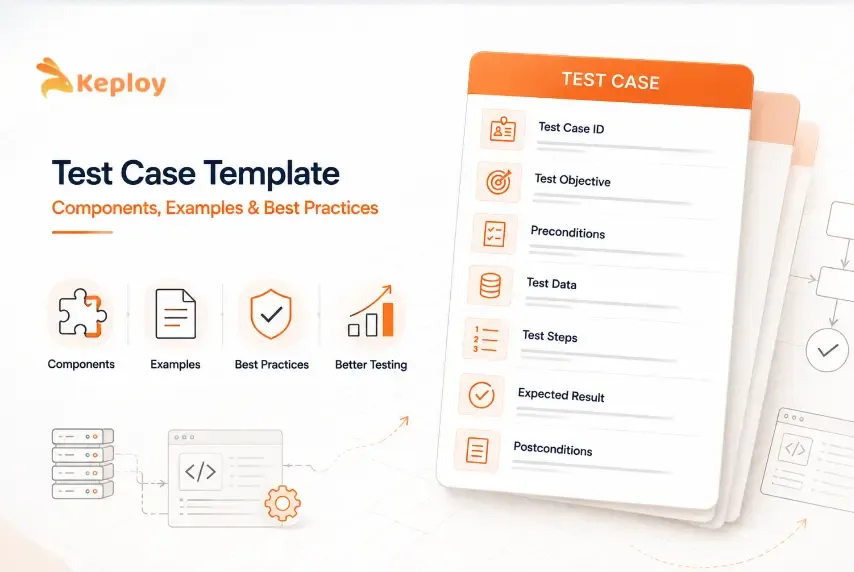






Without a test case template, test cases drift. One tester writes three-word steps. Another skips preconditions entirely and wonders six months later why nobody can reproduce the bug that shipped to production. A third writes paragraphs where steps should be.
The test case template fixes this. It gives every tester on your team the same starting point: the same test case format, the same fields, the same expectations for what "documented" means. The goal isn’t bureaucracy. It’s making sure the person running your tests six months from now understands what you meant when you wrote them.
What is a test case template?
A test case template is a standardized document structure used by QA teams to write, organize, and execute software tests consistently. It defines which fields every test case must include (such as test steps, expected results, and preconditions) so that tests are reproducible, traceable, and useful across the full testing lifecycle.
This guide includes three templates you can copy directly:
-
General test case template (functional testing)
-
API test case template (REST endpoint testing)
-
Automation-ready test case template
No download required. Copy each table directly from the page into your test management tool, Google Sheets, Notion, or Confluence.
What Is a Test Case in Software Testing?
A test case is a specific, documented set of conditions and steps used in software testing to verify that a feature of an application behaves as intended. It has a defined input, a sequence of actions, and an expected outcome. Pass or fail, a test case gives you a clear answer for one specific scenario.
Test Case vs Test Scenario vs Test Script vs Test Plan
These terms get confused constantly. Here’s the distinction:
| Term | What it describes |
|---|---|
| Test scenario | The high-level behavior to validate: "user can log in" |
| Test case | One specific path through that scenario with defined steps, data, and expected outcome |
| Test script | Executable instructions for a test: either manual step instructions or automated code |
| Test suite | A collection of related test cases grouped by module or feature |
| Test plan | The overall testing strategy for a project: scope, schedule, resources, risks |
One scenario produces multiple test cases. When those test cases get automated, they become test scripts. A collection of related test cases forms a test suite. Test plans govern the entire effort: scope, resources, and schedule for all of it.
Read our comprehensive guide on test cases vs test scenarios to learn more about the specific key differences between the two.
What Are the Components of a Test Case Template?
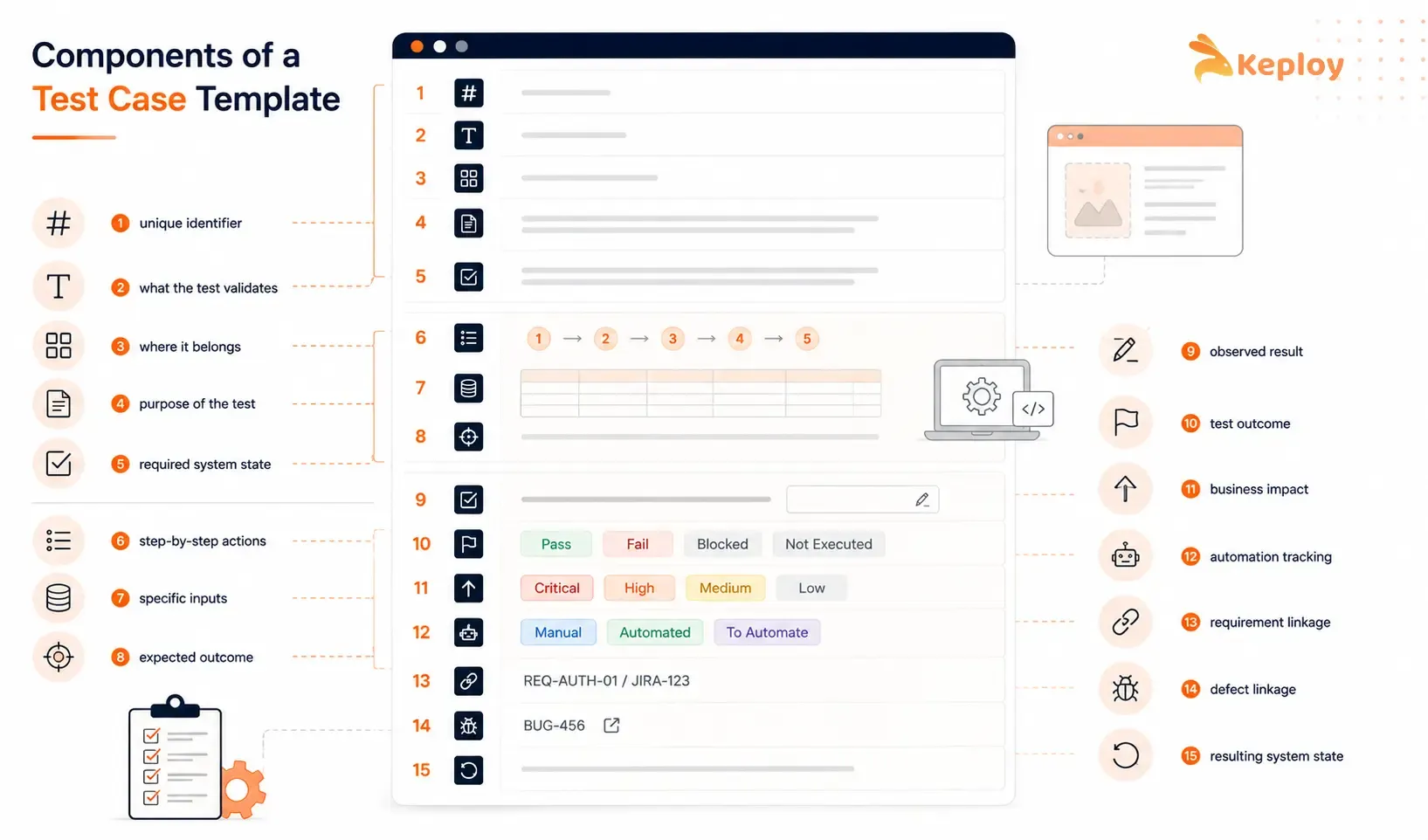
The structure of a test case determines whether it’s useful or not. These fields define the standard test case format. Include them consistently, and the template works across teams, tools, and handoffs:
1. Test Case ID: a unique identifier like TC_LOGIN_001. It lets you reference specific tests in bug reports, regression plans, and traceability matrices without ambiguity.
2. Test Case Title: a one-line description of what the test validates. "Successful login with valid credentials" is good. "Login test" isn’t.
3. Module: the application area the test belongs to (Authentication, Checkout, API/Users). Makes filtering and grouping manageable at scale.
4. Description: a brief explanation of what the test covers and why it exists. Useful for new team members and when revisiting tests after a long gap.
5. Preconditions: the exact state the system must be in before the test runs. "User account must exist and be active" is a precondition. Skipping this is the most common reason tests fail to reproduce.
6. Test Steps: numbered, sequential actions a tester or automated script performs. One action per step. "Navigate to login page, enter credentials, click Login" should be three separate steps, not one.
7. Test Data: the specific inputs used. Not "enter valid credentials." Use actual values like email: user@example.com, password: Test@1234. Vague test data produces unreproducible results.
8. Expected Result: what the system should do after the steps are completed. Be specific: "user is redirected to /dashboard and their name appears in the top-right navigation" beats "login succeeds."
9. Actual Result: what the system actually did during execution. Left blank before the test runs, filled in after.
10. Status: the outcome. Common statuses include Pass, Fail, Blocked, and Not Executed. Different test management tools use slightly different variations.
11. Priority: Critical, High, Medium, or Low based on business impact. Critical tests run first. Low-priority tests may be skipped in time-constrained regression cycles.
12. Automation Status: useful for teams managing both manual and automated tests. Common values include Manual, Automated, and Candidate for Automation.
13. Traceability ID: links the test case to a requirement, user story, or ticket (REQ-AUTH-01 or JIRA-123). Without this, you can’t answer "did we test this requirement?" during release reviews.
14. Defect/Bug ID: links a failed test to the issue raised for investigation and retesting. Particularly useful for regression testing where you need to confirm a fix actually resolves the original failure.
15. Post-Condition: the expected system state after the test completes. "User session is active, redirect to dashboard complete." Especially important for tests that change system state.
Test Case Template Examples: Ready to Copy
General Test Case Template
Use this for functional and UI testing. Copy the table directly into your tool of choice.
| Field | Details |
|---|---|
| Test Case ID | TC_LOGIN_001 |
| Title | Successful login with valid credentials |
| Module | Authentication |
| Description | Verifies that a registered user can log in with correct email and password |
| Preconditions | User account exists and is active. Application is accessible at /login. |
| Test Steps | 1. Navigate to /login 2. Enter email: user@example.com 3. Enter password: Test@1234 4. Click the Login button |
| Test Data | Email: user@example.com, Password: Test@1234 |
| Expected Result | User is redirected to /dashboard. Username appears in top-right navigation. |
| Actual Result | [To be filled during execution] |
| Status | Not Executed |
| Priority | High |
| Automation Status | Automated |
| Traceability ID | REQ-AUTH-01 |
| Defect/Bug ID | [To be filled if test fails] |
| Post-Condition | User session active. /dashboard loads with personalized content. |
API Test Case Template
API testing needs a few fields that aren’t usually present in a basic functional test case template: the endpoint, HTTP method, request headers, request body, expected status code, and expected response body. Copy and adapt this for any REST endpoint.
Positive API test case:
| Field | Details |
|---|---|
| Test Case ID | TC_API_REG_001 |
| Title | Successful user registration via POST /api/users |
| Endpoint | POST /api/users |
| HTTP Method | POST |
| Request Headers | Content-Type: application/json, Authorization: Bearer {token} |
| Request Body | {"name": "John Doe", "email": "john@example.com", "password": "Test@1234"} |
| Preconditions | Email address not already registered in the system |
| Expected Status Code | 201 Created |
| Expected Response Body | {"id": "usr_123", "email": "john@example.com", "status": "active"} |
| Actual Response | [To be filled during execution] |
| Status | Not Executed |
| Priority | High |
| Automation Status | Automated |
| Traceability ID | REQ-REG-01 |
| Defect/Bug ID | [To be filled if test fails] |
| Post-Condition | User record created in database. Welcome email queued. |
Negative API test case:
| Field | Details |
|---|---|
| Test Case ID | TC_API_REG_002 |
| Title | Registration rejected for duplicate email via POST /api/users |
| Endpoint | POST /api/users |
| HTTP Method | POST |
| Request Headers | Content-Type: application/json |
| Request Body | {"name": "Jane Doe", "email": "john@example.com", "password": "Test@1234"} |
| Preconditions | Account with email john@example.com already exists in the system |
| Expected Status Code | 409 Conflict |
| Expected Response Body | {"error": "email_already_registered", "message": "An account with this email already exists"} |
| Actual Response | [To be filled during execution] |
| Status | Not Executed |
| Priority | High |
| Automation Status | Automated |
| Post-Condition | No duplicate user record created. Existing user record unchanged. |
Automation-Ready Test Case Template
When your team migrates manual tests to automation, add these fields to your existing template. They give automation engineers the context they need without hunting through Slack or Confluence.
| Field | Details |
|---|---|
| Test Case ID | TC_AUTO_001 |
| Title | Automated checkout flow: guest user |
| Module | Checkout |
| Preconditions | Test environment running. Product catalog seeded with at least 10 items. |
| Test Steps | 1. Navigate to /shop 2. Add item to cart 3. Proceed to checkout 4. Enter guest email 5. Submit order |
| Test Data | Email: guest@qatest.com, Card: [use sandbox/test card from your payment provider] |
| Expected Result | Order confirmation page displays with order ID |
| Actual Result | [Automated: logged to CI dashboard] |
| Status | Not Executed |
| Priority | Critical |
| Test Script Path | /tests/checkout/guest-checkout.test.js |
| Framework | Playwright |
| Execution Time | [measured per environment] |
| Automation Status | Fully Automated |
| Last Updated By | QA Team |
Test Case Template in Excel
For teams that prefer spreadsheets, the same template works in Excel or Google Sheets. Each row is one test case. Each column is one field. Filter by Module to view tests for a specific area. Filter by Status to find everything that’s still Not Executed. Filter by Priority to run Critical tests first.
The copy-paste tables above map directly to spreadsheet columns. Open Google Sheets, paste the table, and the structure transfers automatically. Excel works the same way: paste as plain text and the tab-separated format creates clean columns.
The main limitation: spreadsheets work well for teams of up to 10-15 testers with a few hundred test cases. Beyond that, dedicated test management tools (TestRail, Zephyr, Xray) become more practical because they handle traceability, execution history, and reporting in ways spreadsheets don’t.
What Are the Different Types of Test Cases in Software Testing?
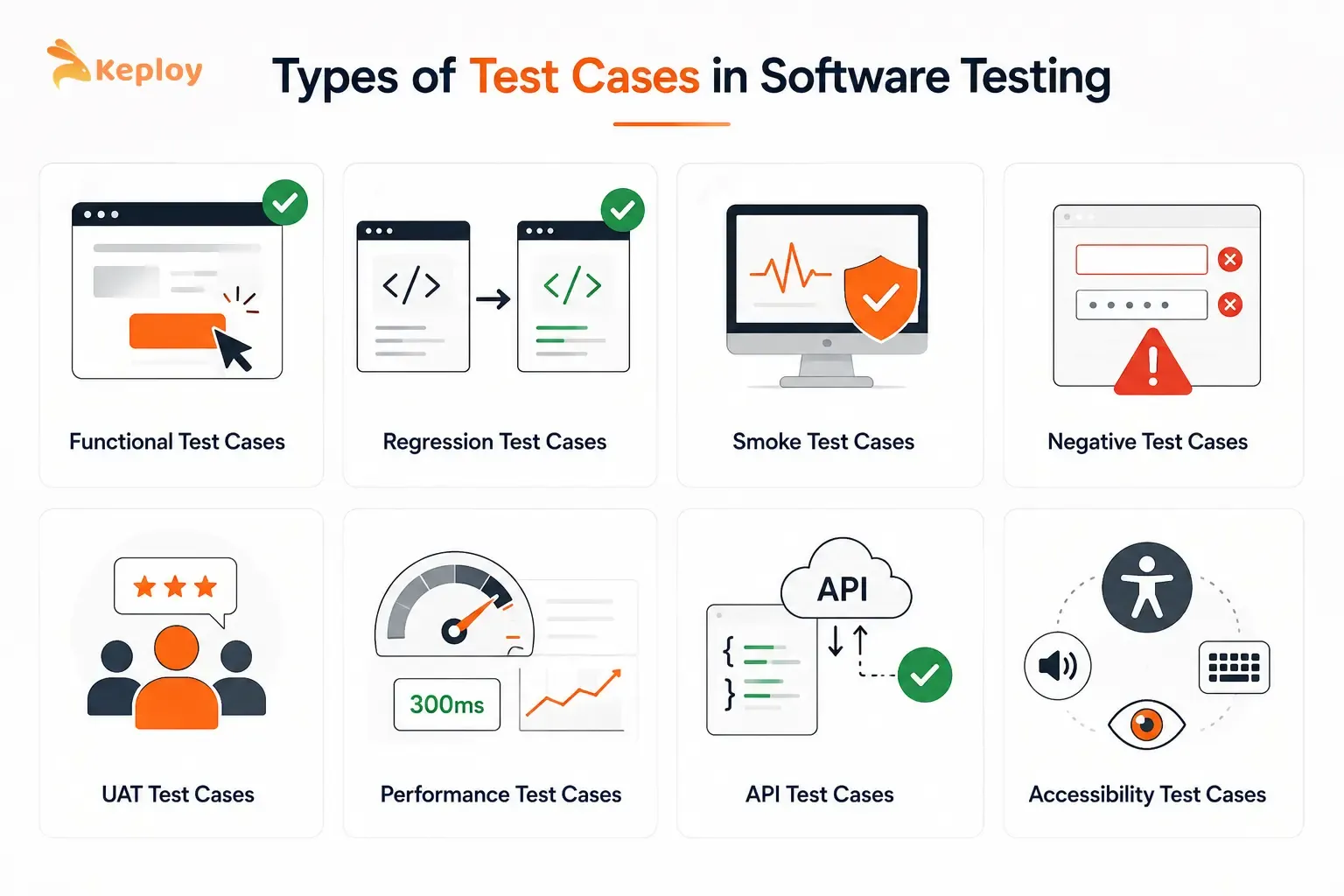
Not every test type uses the same template structure. The testing goal determines which fields matter most and which scenarios to cover.
-
Functional test cases validate that a specific feature does what it’s supposed to do. They follow the standard template format above. Most teams write these first when a new feature ships.
-
Regression test cases build on functional test cases by verifying that existing functionality still works after a change. Same format as functional test cases but chosen specifically for features most likely to break when related code changes. Regression suites may run on every deployment, on pull requests, or at defined release checkpoints depending on the team’s workflow.
-
Smoke test cases are a minimal set of tests that confirm the application is stable enough to test further. Does the app load? Can users log in? Does checkout reach the payment screen? Teams may stop broader regression testing when critical smoke tests fail because the environment or build may not be ready for deeper validation.
-
Negative test cases take the opposite approach: they test what happens when users do something unexpected or wrong. Empty forms, strings where numbers are expected, pages users don’t have permission to view. Most functional test cases check the happy path. Negative test cases check everything else. That’s where most real bugs hide.
-
UAT (User Acceptance Testing) test cases shift focus from technical behavior to business outcomes. Written from the end user’s perspective, they’re often developed alongside product managers or business analysts.
-
Performance test cases take a different approach entirely, validating system behavior under load. The template fields change: instead of expected result you’re defining thresholds like "response time under 300ms at 1,000 concurrent users."
-
API test cases validate the behavior of an API endpoint independent of any UI: request structure, response codes, response body schema, error handling. The positive and negative API templates above cover both sides of this.
-
Accessibility test cases round out the set, verifying that the application is usable by people with disabilities: screen reader compatibility, keyboard navigation, colour contrast ratios. Often missing from standard test plans but increasingly required for compliance in regulated industries.
How Do You Write an Effective Test Case?
-
Write one action per step. "Navigate to login page, enter credentials, and click Login" is three actions in one step. When it fails, you don’t know which action caused it. Keep each step atomic.
-
Once steps are clear, make the test data equally specific. "Enter valid email" tells a tester nothing reproducible. "Enter user@example.com" is unambiguous across team members and execution environments.
-
Write preconditions as if someone new will run the test. They probably will. "User must be logged in" isn’t a precondition. It’s a reminder. A real precondition is: "User account with email user@example.com must exist and have the ‘admin’ role assigned."
-
With steps and data in place, make sure you’re covering the full range. Most teams write happy-path tests and stop there. Negative scenarios are where real bugs hide. Budget at least one negative test case per positive one for critical flows.
-
Link every test case to a requirement. The traceability ID field exists for a reason. Teams that skip it discover during release reviews that nobody can confirm whether the new payment flow was actually tested.
-
Finally, review test cases before you execute them. A short peer review can catch ambiguous steps, missing test data, and incorrect expected results before execution. It’s five minutes that saves hours.
Test Case Template vs Test Plan Template
These serve different purposes. One documents a specific test. The other documents the entire testing strategy.
| Aspect | Test case | Test plan |
|---|---|---|
| Purpose | Documents one specific test | Defines the overall testing approach |
| Scope | Individual scenario | Project or release |
| Contains | Steps, data, expected result | Scope, strategy, resources, risks |
| Used by | Testers and QA engineers | QA leads and project teams |
A test case answers: "What exactly will we test and how?" A test plan answers: "Why are we testing, what’s in scope, who’s responsible, and when does it happen?"
Read our guide on software test planning that covers the full structure of a test plan, including a test plan example with scope, schedule, and risk sections, including entry and exit criteria, test environments, and how to scope a testing effort at the project level.
Beyond Manual Templates: How Automated Test Case Generation Works
Templates standardise test documentation. Automation reduces manual execution. But there’s a third step most teams don’t invest in: reducing the effort of test case authoring itself.
Here’s how these three things relate:
-
Manual templates document test cases that testers write by hand, predicting which scenarios matter based on requirements and experience. Automation tools then execute those documented cases without human intervention. Test generation takes this further: instead of manually authoring what to test, the system derives test cases from observed application behavior.
-
Traffic-based test generation is the most accurate form of this. Instead of predicting which API scenarios to test, you capture the ones that actually happen. Real users make real requests to real endpoints, and those interactions become test cases. The fields you’d fill in manually (endpoint, HTTP method, headers, request body, expected status code, expected response) get populated from actual traffic rather than predicted scenarios.
Keploy works this way. It captures real API traffic from production or staging environments using eBPF and converts those request-response pairs into regression tests that run in CI. When an API changes and a previously captured interaction no longer matches the response, the test fails in CI before the change reaches production. The same purpose a manual test case template serves, but the authoring happens automatically, and the coverage grows with actual usage rather than with what engineers anticipated.
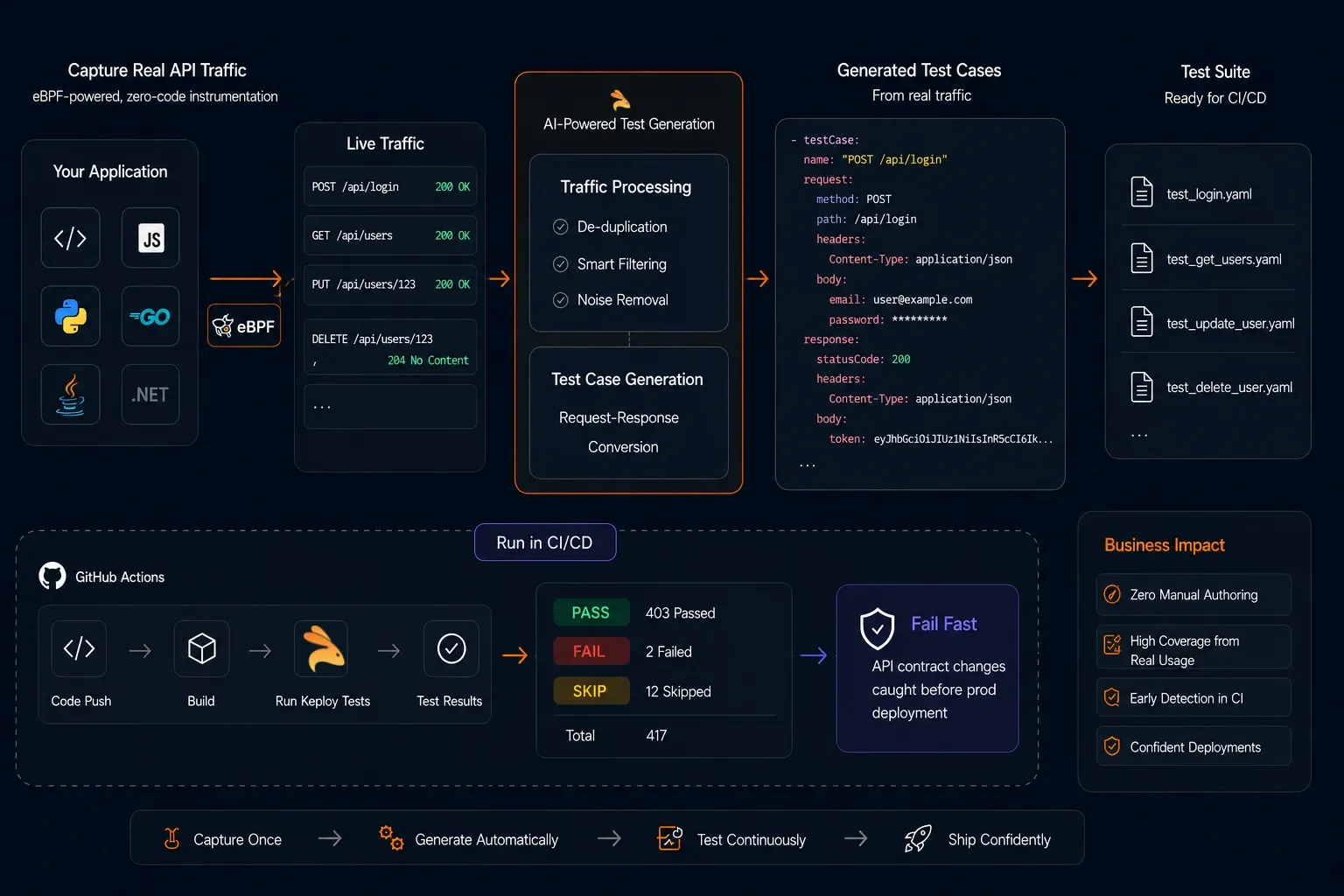
For teams where code volume is growing faster than QA capacity, this matters especially. Every new endpoint is a new set of test cases that needs to exist. Generating those from real traffic keeps the suite current without proportionally increasing manual authoring effort.
Conclusion
A good test case template does one thing: it makes tests usable by anyone on the team, not just the person who wrote them. That means clear preconditions, specific test data, unambiguous steps, and an expected result detailed enough to verify without interpretation.
Start with the general template for functional tests. Switch to the API template for service-level testing, and include negative test cases alongside positive ones. Use the automation-ready format when test cases move into a CI pipeline.
The templates here are ready to copy. The fields are there. The examples are filled in.
Frequently Asked Questions
What should a test case include?
Every test case needs at minimum: a unique ID, a title, preconditions, numbered test steps, test data, expected result, actual result, and status. Add priority, traceability ID, defect/bug ID, and post-condition as the team and test suite grow.
What is a test case template in Excel?
In Excel or Google Sheets, each row represents one test case and each column represents one field (Test Case ID, Title, Preconditions, Test Steps, Test Data, Expected Result, Status, and so on). The tables in this guide copy directly into spreadsheets. Excel works well for small to mid-sized teams. Dedicated test management tools become more practical beyond a few hundred test cases.
What is the difference between a test case and a test scenario?
A test scenario is the high-level behavior to validate: "user can reset their password." A test case is one specific path through that scenario with defined steps, test data, and an expected outcome. One scenario typically produces multiple test cases covering different conditions and inputs.
What fields should a test case template always include?
The minimum viable set is: Test Case ID, Title, Preconditions, Test Steps, Test Data, Expected Result, Actual Result, and Status. Add Priority, Traceability ID, Defect/Bug ID, and Post-Condition for test suites that need traceability and regression tracking.
What is the difference between a test case template and a test plan template?
A test case template structures how individual tests are documented: steps, data, expected results. A test plan template structures the overall testing strategy for a project: scope, schedule, resources, risks. You use test case templates to write what to test. You use a test plan to document the approach for all of it.
What is the best format for an API test case?
An API test case needs fields that a standard functional template doesn’t include: Endpoint, HTTP Method, Request Headers, Request Body, Expected Status Code, and Expected Response Body. Both positive and negative examples matter. The positive example confirms the happy path. The negative example confirms the API handles invalid inputs correctly (duplicate email returning 409, missing field returning 400, and so on).
How do I write a test case for a login page?
Define the precondition (user account exists and is active), list exact steps (navigate to /login, enter specific credentials, click Login), specify exact test data (real values, not placeholders), and define the expected result precisely (redirect to /dashboard, username visible in navigation). The filled-in General Test Case Template in this guide is a complete login test case you can copy.
Can test cases be generated automatically?
Yes. Tools like Keploy capture real API traffic from production and convert those interactions into structured test cases that run in CI. AI tools can also generate test cases from written requirements. Those reflect predicted scenarios rather than actual user behavior. Traffic-based generation produces test cases from what users actually do.
What is a simple test case template?
The minimum usable test case template has five fields: Test Case ID, Test Steps, Test Data, Expected Result, and Status. It’s enough for a small team on a new project. Add Preconditions, Priority, and Traceability ID as the project grows and handoffs between team members become more frequent.
What should a software test plan template include?
A software test plan template should cover: test scope (what’s in and out of scope), test strategy (approach, types, tools), test environment requirements, schedule with entry and exit criteria, resource and role assignments, deliverables, and a risk log with mitigation plans.