





Vibe testing is what happens when the way software gets built changes faster than the way it gets tested. For years, QA worked on a simple assumption: developers write the code, testers verify it. That assumption breaks down when the code is being generated by an AI from a plain English prompt.
The person shipping the feature may not have written a single line of it – and may not fully understand how it works under the hood. Developers are shipping AI-generated code at a pace that traditional QA was never built to handle. Vibe testing is the response to that problem.
What Is Vibe Testing?
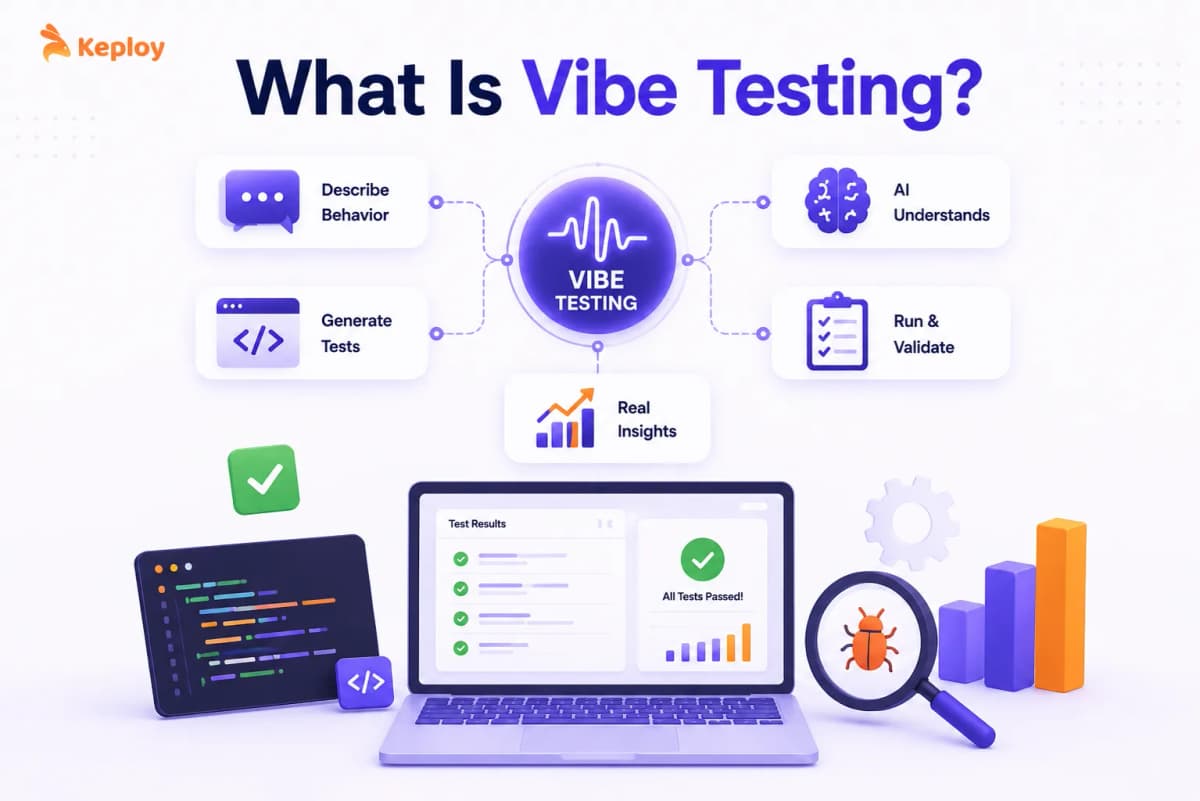
Vibe testing is an AI-assisted software testing approach that validates how an application behaves and feels to real users – not just whether it clears a checklist of predefined functional checks. It uses natural language to define what the experience should look and feel like, and AI to generate, execute, and adapt the tests accordingly.
Vibe testing is the QA counterpart to vibe coding: vibe coding produces AI-generated code, and vibe testing verifies it. If vibe coding means describing what you want to build in plain English and letting AI write the code, vibe testing means describing how the app should behave and feel, and letting AI generate and run the tests to verify it.
In practice, vibe testing shows up in two ways:
-
The first is validating AI-generated code – rigorously checking software built with tools like Cursor, Replit, Lovable, or Bolt. That code often works on the surface but carries inconsistencies and edge case failures that only show up under real conditions.
-
The second is natural language test authoring – writing test scenarios in plain English instead of code, and having AI convert those descriptions into executable tests. Both are part of the same shift happening in QA right now.
Once a significant portion of your codebase is AI-generated, the question is no longer "did a developer write this correctly?" It becomes "does this system actually behave the way users expect, under real conditions, across edge cases the AI never anticipated?" That is what vibe testing is designed to answer.
The Real Cost of Shipping Untested AI-Generated Code
The data on AI-generated code quality is hard to ignore.
-
The Veracode 2025 GenAI Code Security Report tested over 100 large language models across 80 coding tasks and found that 45% of AI-generated code introduced OWASP Top 10 security vulnerabilities. Java was the worst performer, with a security failure rate above 70%.
-
The CodeRabbit State of AI vs Human Code Generation Report analyzed 470 real-world open-source pull requests and found that AI co-authored code had 1.7x more issues overall than human-written code. Logic and correctness issues were 75% more common. Security vulnerabilities were up to 2.74x higher.
-
And yet adoption is accelerating, not slowing. According to the Stack Overflow 2025 Developer Survey, 84% of developers are now using or planning to use AI tools in their workflow. TechCrunch reported that 25% of Y Combinator’s Winter 2025 batch had codebases that were 95% AI-generated.
More code, faster delivery, and a significant chunk of it carrying unverified risks. That is the exact environment vibe testing was built for.
Core Principles of Vibe Testing
1. Intent-Driven Testing Over Instruction-Based Testing
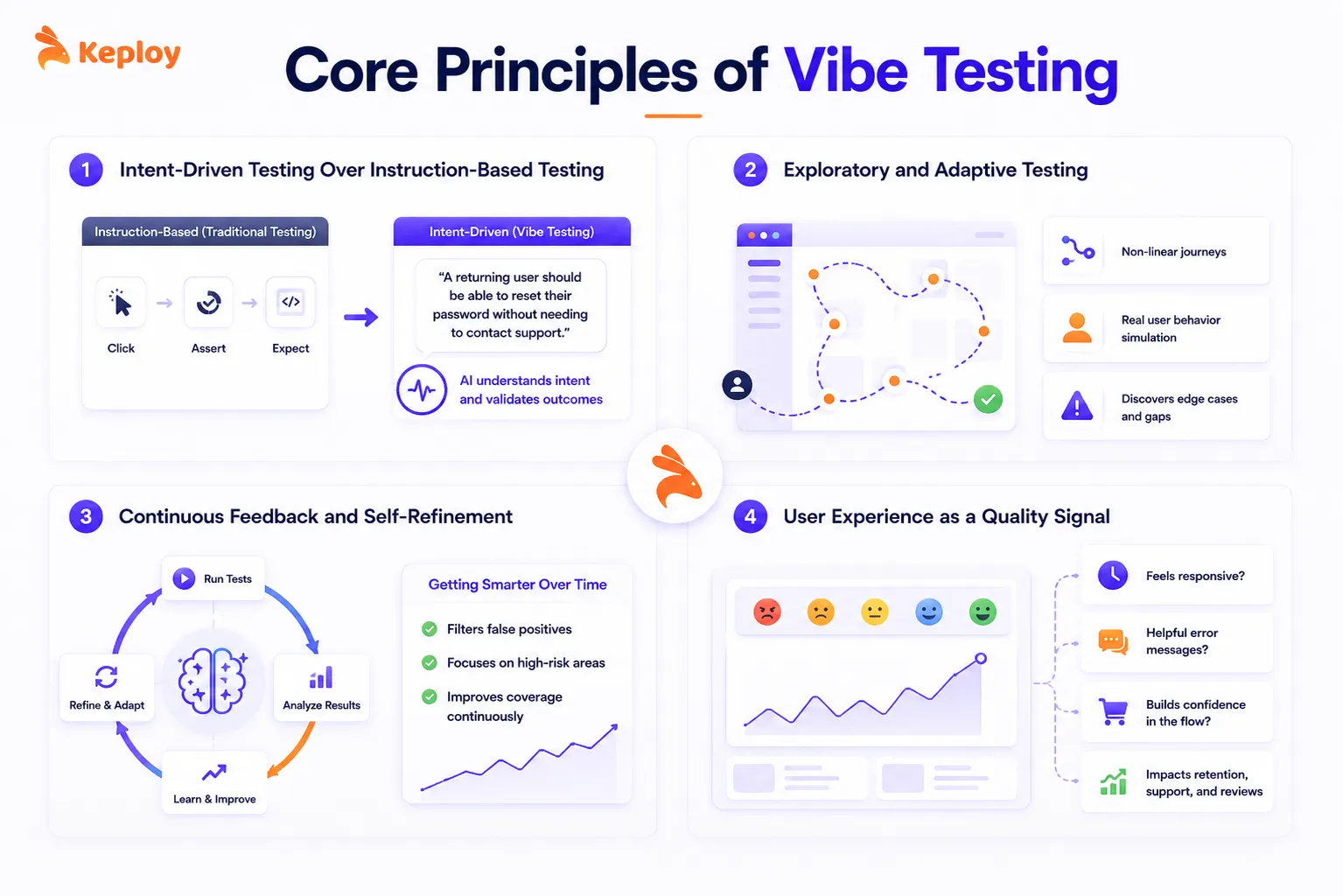
Traditional tests are instructions. You tell the test runner: click this element, assert this value, expect this response code.
Vibe testing starts with intent. You describe what a user is trying to accomplish, and the AI figures out how to test whether that goal is achievable. "A returning user should be able to reset their password without needing to contact support" is a vibe test. It captures user intent, not just system mechanics.
2. Exploratory and Adaptive Testing
AI-generated code is not written the way a human developer would structure it. Logic gets duplicated. Edge cases get missed. Behavior in one part of the app can be inconsistent with behavior in another.
Vibe testing leans into exploratory approaches. Rather than following a fixed script, AI agents simulate real user behavior, including non-linear journeys, hesitation patterns, and unexpected inputs, to find the gaps that scripted tests walk straight past.
3. Continuous Feedback and Self-Refinement
A vibe test gets smarter over time. When tests run and results come back, the system learns from previous executions. False positives get filtered. Test coverage shifts toward areas where issues are more likely to appear. The feedback loop is continuous, not batched.
4. User Experience as a Quality Signal
Vibe testing measures what traditional QA has always treated as subjective: does this feel right?
Does the loading state feel responsive or sluggish? Does the error message actually help the user? Is the checkout flow building confidence or creating friction? These are real quality signals, and they show up in retention data, support tickets, and user reviews long before they show up in a test report.
Why Is There a Growing Need for Vibe Testing in QA Teams?
Traditional Tests Validate Behavior, Not Experience
A unit test checks whether a function returns the right value. An integration test checks whether two services talk to each other correctly. Neither one tells you whether the experience of using the product is good.
As software has shifted toward speed of delivery and AI-assisted development, the gap between "technically functional" and "actually good" has grown. Teams shipping every day cannot afford to rely only on tests that measure the former.
AI-Generated Code Is Structurally Unpredictable
When a human developer writes code, there is usually a consistent mental model behind it. Variables are named intentionally. Logic flows in a way the developer can explain. Tests can be built around that structure.
AI-generated code does not work the same way. The same feature prompt, run twice in Cursor or Replit, can produce two structurally different implementations. Logic may be scattered across functions. Dependencies may be implicit. A change in one part of the app can silently break another part in ways that no one anticipated, including the AI that wrote it.
Traditional test automation assumes predictability. Vibe testing does not.
Test Scripts Cannot Keep Up with Rapid UI Changes
One of the most painful realities of vibe-coded apps is how often the UI changes. A single follow-up prompt to the AI can restructure a page, rename a button, or change a component hierarchy. Every one of those changes breaks selector-based tests.
Self-healing test automation, a core feature of vibe testing tools, adapts to those changes automatically. The test understands what it is trying to validate, not just where to click.
Non-Technical Contributors Need to Participate in QA
Product managers, designers, and business stakeholders have always had opinions about software quality. Vibe testing gives them a way to contribute directly. Writing a test in plain English is accessible to anyone who can write a user story. That shift changes the coverage and diversity of tests a team can run.
How Is Vibe Testing Performed?
Step 1: Define the Expected User Intent in Natural Language
Start by writing what you want to verify in plain English. Focus on user goals rather than system mechanics.
Good example: "A user should be able to complete checkout with a saved credit card in under three steps without encountering any error states."
This becomes the input for your vibe test. The clearer and more specific the intent, the better the AI-generated test coverage.
Step 2: Let AI Generate and Execute Test Cases
The AI interprets your natural language input and generates executable test cases. Depending on the tool, this might produce end-to-end tests, API call sequences, or UI interaction scripts. The AI also runs those tests against your application and reports results.
Step 3: Review and Validate AI-Generated Results
AI-generated test results still need human review. The steps, assertions, and diagnostics the AI produces should be checked against what you actually intended to test. This step catches cases where the AI misinterpreted intent or covered a different part of the flow than expected.
Step 4: Capture Real Traffic and Replay for Regression
This is the step that most vibe testing guides skip entirely.
If your application is already in production, or being tested against a staging environment with real traffic, tools like Keploy can capture actual API calls, including all dependency interactions with databases and downstream services, and convert them into replayable test cases.
This matters for vibe-coded apps specifically because the edge cases that only appear under real conditions become test cases you can run on every pull request. You are not guessing at what to test. You are testing what actually happened.
Step 5: Integrate into Your CI/CD Pipeline
Vibe tests should run automatically on every pull request and before every deployment. Most vibe testing tools support integration with GitHub Actions, Jenkins, and GitLab CI. The goal is to make vibe testing a quality gate, not a manual activity.
Vibe Testing in Action: Real-World Examples
Example 1: Testing a Vibe-Coded E-Commerce Checkout Flow
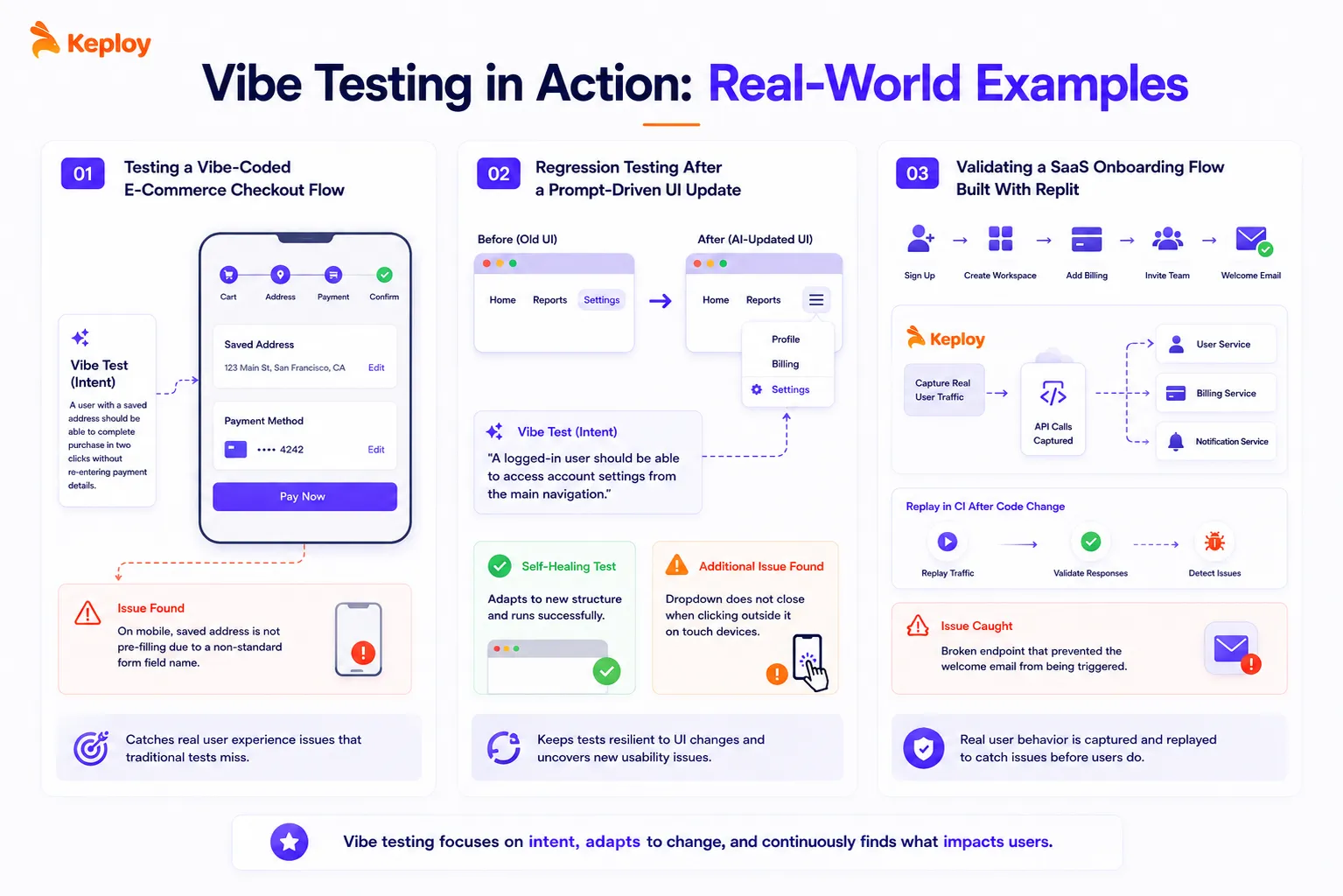
A startup uses Lovable to build their checkout flow. The AI generates a multi-step form with address validation, payment processing, and order confirmation. It looks correct.
A vibe test describes the expected experience: "A user with a saved address should be able to complete purchase in two clicks without re-entering payment details." The AI agent runs the flow, discovers that on mobile, the saved address is not pre-filling because the AI used a non-standard form field name. The bug would not have shown up in a unit test.
Example 2: Regression Testing After a Prompt-Driven UI Update
A team using Cursor updates their dashboard UI with a prompt: "Make the navigation cleaner and move the settings to a dropdown." The AI restructures the nav. Three selector-based tests immediately break.
With vibe testing, the test intent stays the same: "A logged-in user should be able to access account settings from the main navigation." The self-healing test adapts to the new structure, runs successfully, and flags a separate issue: the dropdown does not close when clicking outside it on touch devices.
Example 3: Validating a SaaS Onboarding Flow Built With Replit
A developer builds an onboarding sequence using Replit Agent. Keploy captures real user traffic from a beta cohort, including API calls to the user service, billing service, and notification service. Those captured interactions become regression tests. When the developer pushes a code change the next morning, Keploy replays the traffic in CI and catches a broken endpoint that would have silently failed to trigger the welcome email.
Vibe Testing vs. Traditional Testing
| Traditional Testing | Vibe Testing | |
|---|---|---|
| Test authoring | Code-based (Selenium, Cypress scripts) | Natural language prompts |
| What it validates | Functional correctness | Functional correctness + user experience |
| Adaptability | Breaks on UI changes | Self-healing, adapts to changes |
| Who can write tests | Developers and QA engineers | Anyone on the team |
| Coverage focus | Predefined test cases | Intent-driven, exploratory |
| Maintenance overhead | High (selector updates on every UI change) | Low (AI handles adaptation) |
| Best for | Stable, structured codebases | Rapidly iterating, AI-generated codebases |
| Blind spots | UX issues, non-linear user behavior | Security, performance, low-level logic |
Traditional testing and vibe testing are not substitutes for each other. They cover different failure modes. The teams that ship reliable software in 2026 run both.
Vibe Testing Tools: What to Use and When
The set of tools built for vibe testing has grown quickly over the past year. Rather than listing every option, here is a breakdown by what you actually need to do.
Why Dedicated Vibe Testing Tools Matter
Standard test automation tools were not designed for natural language inputs, AI-generated code, or self-healing across rapid UI changes. Applying them to vibe testing results in incomplete coverage of the failure modes that matter most.
Natural Language Test Generation
These tools take plain English test descriptions and convert them into executable tests.
-
testRigor: Write tests in plain English ("generate unique email, enter into Email field, save as newEmail"). No code needed. Self-healing element detection built in.
-
KaneAI by TestMu AI: GenAI-native test agent that creates, evolves, and debugs end-to-end tests from natural language. Integrates with Jira, Slack, and GitHub for triggering tests from existing workflows.
-
Momentic: AI-powered testing agent for web apps. Describe what to check, and Momentic generates and runs the tests. Handles dynamic content well.
Traffic Capture and Regression Replay
These tools capture real API behavior and turn it into repeatable test cases, the most direct solution for testing AI-generated code against real-world conditions.
-
Keploy: Records API traffic from production or staging environments, including all dependency calls to databases and external services, and generates regression tests that run in CI. Zero manual test authoring. Purpose-built for the "code I didn’t write" problem.
-
GoReplay: Open-source HTTP traffic replication tool. Captures production traffic and replays it against a new version of your service for comparison testing.
-
Shadowtraffic: Generates synthetic production-like traffic for testing without requiring a live environment. Useful for load testing and edge case generation on vibe-coded apps before they go live.
Visual and UX Validation
These tools check whether the interface looks and behaves the way it should across browsers, devices, and screen sizes.
-
Applitools: AI-powered visual testing that detects layout differences, font changes, and rendering issues across environments. Handles dynamic content without fragile pixel comparisons.
-
Mabl: Combines functional testing, visual testing, and accessibility checks in one agent. Auto-healing tests adapt to UI changes across releases.
-
Reflect: Record-and-replay testing with natural language AI prompts. Define what you want the app to look and feel like, and Reflect tests against that description.
How to Choose the Right Tool for Your Stack
Three questions are worth asking before committing to a vibe testing tool. First, does it integrate with your existing CI/CD setup? A tool that runs outside your pipeline is a tool your team will stop using within a month. Second, how does it handle AI-generated code specifically? Self-healing and intent-based validation matter more than feature count for this use case. Third, what does the review process look like? Any tool that generates tests automatically needs to surface results in a way that is easy for a human to verify quickly.
The Role of Agentic AI in Vibe Testing
From Reactive Testing to Predictive Test Execution
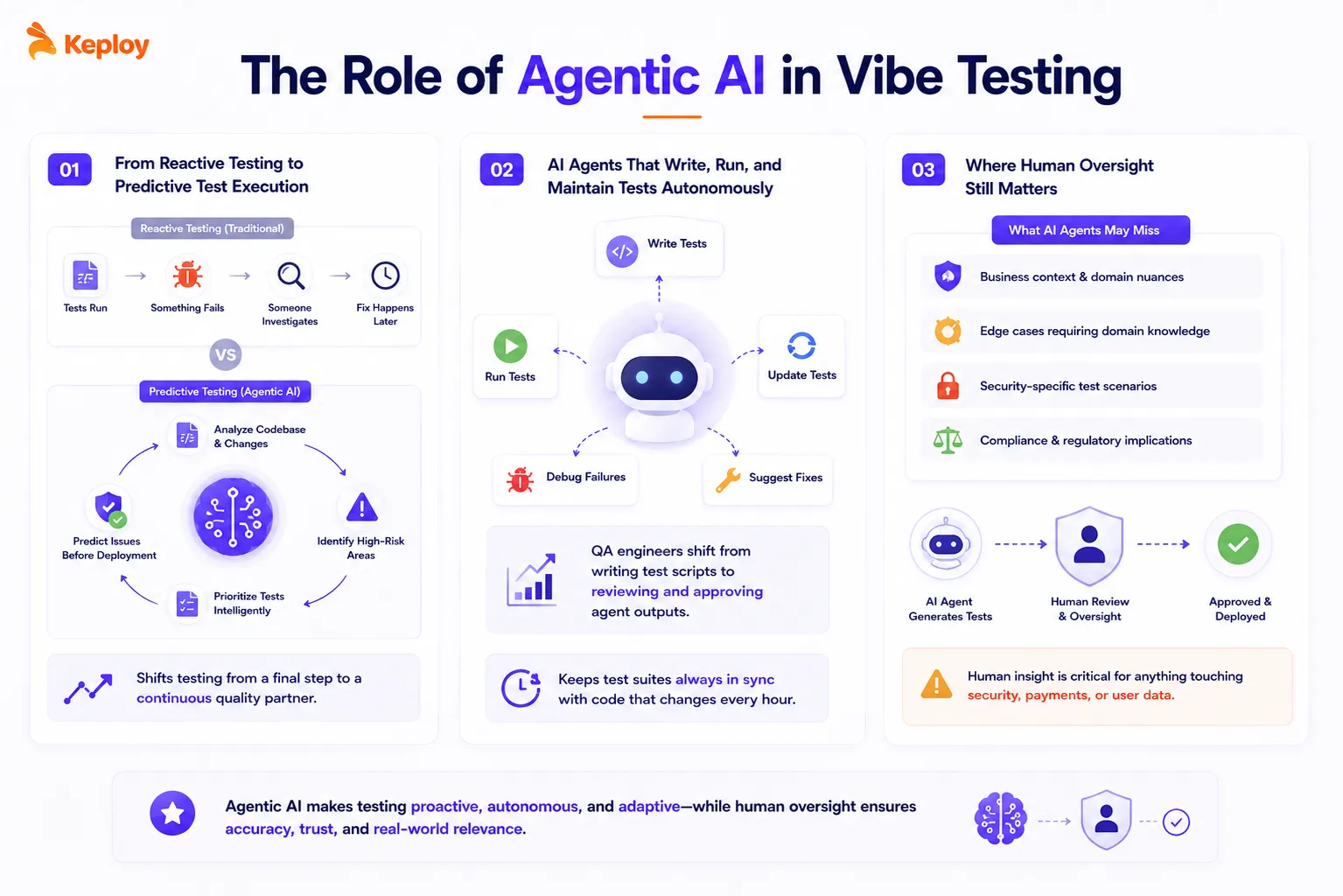
Traditional test automation is reactive. A test runs, something fails, someone investigates. Agentic AI changes that loop.
AI agents in testing contexts can analyze your codebase, identify high-risk areas based on recent changes, prioritize which tests to run first, and flag potential failures before a deployment happens. That shifts testing from a verification step at the end of development to an active participant throughout it.
AI Agents That Write, Run, and Maintain Tests Autonomously
The newest generation of testing agents, tools like KaneAI and CoTester, do not just execute tests. They write them, update them when the application changes, debug failures, and suggest fixes. A QA engineer’s job on a team using these tools shifts from writing test scripts to reviewing and approving what the agent produces.
For teams using vibe coding at scale, this is significant. You are no longer trying to manually keep a test suite current with code that changes every hour.
Where Human Oversight Still Matters
AI agents are good at generating broad coverage fast. They are not good at understanding business context, edge cases that require domain knowledge, or security-specific test scenarios.
A vibe testing agent might miss a GDPR-relevant data exposure because it did not know that field was considered personal data in your product. A human tester would catch it. The right workflow keeps humans in the review loop, especially for anything touching security, payments, or user data.
What Are the Limitations of Vibe Testing?
1. Prompt Quality Directly Affects Test Accuracy
The quality of a natural language test input determines the quality of the tests the AI produces. A vague prompt like "test the signup flow" generates shallow coverage. A precise prompt like "verify that a user with an already-registered email receives a clear error message and is offered a login option" generates useful coverage.
Prompt engineering is a real skill in vibe testing. Teams that treat it as an afterthought will get inconsistent results.
2. Not a Replacement for Unit, Security, or Performance Testing
Vibe testing covers UX flows, integration behavior, and exploratory scenarios well. It does not replace unit testing for individual functions, dedicated security scanning, or performance and load testing.
45% of AI-generated code carries OWASP Top 10 vulnerabilities – vibe testing will not catch most of those. Security-focused SAST and DAST tools still need to be in your pipeline alongside it.
3. AI-Generated Test Results Still Need Human Review
Auto-generated test steps and assertions are a starting point, not a finished product. The AI may test a slightly different flow than you intended, make incorrect assumptions about expected behavior, or miss an assertion that a human would consider obvious.
Reviewing AI test output should be a regular part of your QA process, not optional.
4. Tooling Maturity Varies Widely
This is a young category. Some tools have been in production use for years under different names. Others are six months old with thin documentation and support teams that are still figuring out edge cases. Before adopting a vibe testing tool for critical workflows, check the maturity of its CI/CD integration, how it handles flaky tests, and whether its self-healing actually holds up under real UI change patterns.
Conclusion
Vibe testing is not a trend. It is a response to a real shift in how software gets built. When 25% of startup codebases are 95% AI-generated and nearly half of that code has known security vulnerabilities baked in, the question of how to test it properly becomes non-optional. Traditional QA practices were built for code that humans wrote, reviewed, and understood. They were not built for code that an AI produced in 30 seconds from a prompt.
Vibe testing fills that gap. Natural language test authoring makes coverage faster and more accessible. Traffic capture and replay turns real-world behavior into regression protection. Agentic AI keeps test suites current without constant manual maintenance. The teams that figure out how to run vibe coding and vibe testing together will ship faster and break less. The teams that skip the testing half of that equation will find out why it matters the hard way.
Frequently Asked Questions
What is vibe testing?
Vibe testing is an AI-assisted approach to software quality assurance that validates how software behaves and feels to real users, not just whether it passes predefined functional checks. It uses natural language to define test intent and AI to generate, execute, and maintain the tests. It is particularly relevant for teams building with vibe coding tools, where the codebase is largely AI-generated.
How is vibe testing different from vibe coding?
Vibe coding is how you build software with AI. You describe what you want in plain English, and an AI assistant generates the code. Vibe testing is how you verify the software. You describe how the app should behave and feel, and AI generates and runs tests against that description. One is a development practice; the other is a quality practice. They are designed to work together.
What are the best vibe testing tools in 2026?
It depends on what you need. For natural language test generation, testRigor and KaneAI are strong options. For capturing real traffic and converting it into regression tests, Keploy is the most direct solution for AI-generated codebases. For visual and UX validation, Applitools and Mabl cover the most ground. Most teams use a combination of two or three tools, depending on what part of the stack they are testing.
Is vibe testing suitable for CI/CD pipelines?
Yes. Most vibe testing tools integrate with GitHub Actions, Jenkins, and GitLab CI out of the box. The goal is to make vibe testing a quality gate on every pull request, not a manual activity. Keploy’s traffic replay approach is particularly well-suited for CI because it runs in milliseconds and does not require a live environment.
Can vibe testing replace traditional testing?
No. Vibe testing covers UX flows, exploratory scenarios, and integration behavior well. It does not replace unit tests, security scanning, or performance testing. The best testing strategy in 2026 runs vibe testing alongside traditional approaches, not instead of them.
What skills do you need for vibe testing?
The core skill is prompt engineering: knowing how to describe user intent clearly enough that AI-generated tests produce meaningful coverage. Beyond that, you need the same QA fundamentals as always: understanding what failure modes matter, how to review test results critically, and when to escalate something to a human tester.