UI Testing walkthrough: from first visit to journeys
This walkthrough picks up where the dashboard quickstart ends. You record five visits to the sample shop along three paths, then follow them through the Keploy dashboard: capture status, flows, one flow's steps and calls, and the journeys the visits took, with each journey's share of sessions. Then you read the same data with curl and clean up. It takes about 20 minutes. Every screenshot on this page comes from these five visits.
UI Testing is in beta. Recording visits and reading them as flows and journeys works today. Replaying journeys as Playwright tests is in beta too, and its runner is not in a release build yet, so this walkthrough reads journeys and does not replay them. See what works today.
What you'll do
- Set up the sample shop with an ingest key.
- Record five visits with the shop's scripted visits.
- Watch capture status go from sessions arriving to flows ready.
- Read the flows, and one flow's steps and network calls.
- See the journeys the visits took, and their shares of sessions.
- Read the same data from a script.
- Clean up.
1. Set up
Follow steps 1 to 4 of the dashboard quickstart:
- Get the sample shop.
- Open UI Testing → UI Flows with your app selected.
- Create an ingest key.
- Add the key to the shop: put it in the shop's
.env.
Use an app with no sessions yet, so the figures you see match the ones here.
2. Record five visits
Build the shop and serve the build. In a second terminal, install Playwright's Chromium once, then run the scripted visits:
npm run build && npm run preview # http://localhost:4173
npx playwright install chromium   # once
npm run demo:visits
npm run demo:visits drives five visits through the shop in a headless Chromium, using the endpoint and key from .env. It stays six seconds on each page, so that each page's calls stay in that page's flow. It ends each visit and marks it complete (POST /ui/v1/sessions/<session id>/complete, with the key), so Keploy turns it into flows within a minute or two instead of after 30 idle minutes. Each visit is printed with its session:
visit 1/5: / > /products > /cart > /checkout -- session 5f0c… completed
The five visits take three paths through the shop:
| Visit | Pages | What it does on the way |
|---|---|---|
| 1, 2 | / → /products → /cart → /checkout | Searches for kettle, adds it to the cart, places an order |
| 3 | / → /about | |
| 4 | / → /products | Searches for kettle |
| 5 | / → /products → /cart | Adds the kettle to the cart |
The visits type only made-up data: the catalogue word kettle and the address shopper@example.com.
To record visits by hand instead, open http://localhost:4173 and shop. A visit you make by hand becomes flows 30 minutes after its last activity, unless you complete it.
3. Watch capture status
Open UI Testing → UI Flows. Until the app has flows, the page shows the setup card, whose 3. Check that sessions arrive says what has reached Keploy. Its counts check again every 30 seconds. The line under them is the same state that GET …/ui/capture-status (MCP: uiCaptureStatus) returns to a script or an agent:
| State | The card says |
|---|---|
NO_SESSIONS | No sessions yet. Open your app in a browser with the SDK installed; check the browser console for a [keploy] message if nothing arrives. |
RECORDING | Sessions are arriving. Each visit becomes flows about 30 minutes after its last activity. |
PROCESSING | Visits have finished and their flows are being extracted, normally within a minute. |
FLOWS_READY | Flows are ready — see the Flows tab. |
NO_FLOWS | Visits were processed, but none had a click, typing or navigation to make a flow from. Record a visit that uses the app. |
ALL_FAILED | Every finished visit failed to process. Record a fresh visit; if it fails again, contact Keploy support. |
While a visit is recording, until it is completed or has been idle for 30 minutes, the card counts its session and no flows yet:

Once the first completed visit is processed, the page switches to its tabs on its own, and the card moves to the Setup tab. After all five visits, it counts five sessions and their flows:

4. Read the flows
Open the Flows tab. Since SDK 3.1.0 each route a visitor opens is its own flow, so a visit to four pages makes four flows. The five visits make 15 flows. Each row names its session, so the flows of one visit share one session.
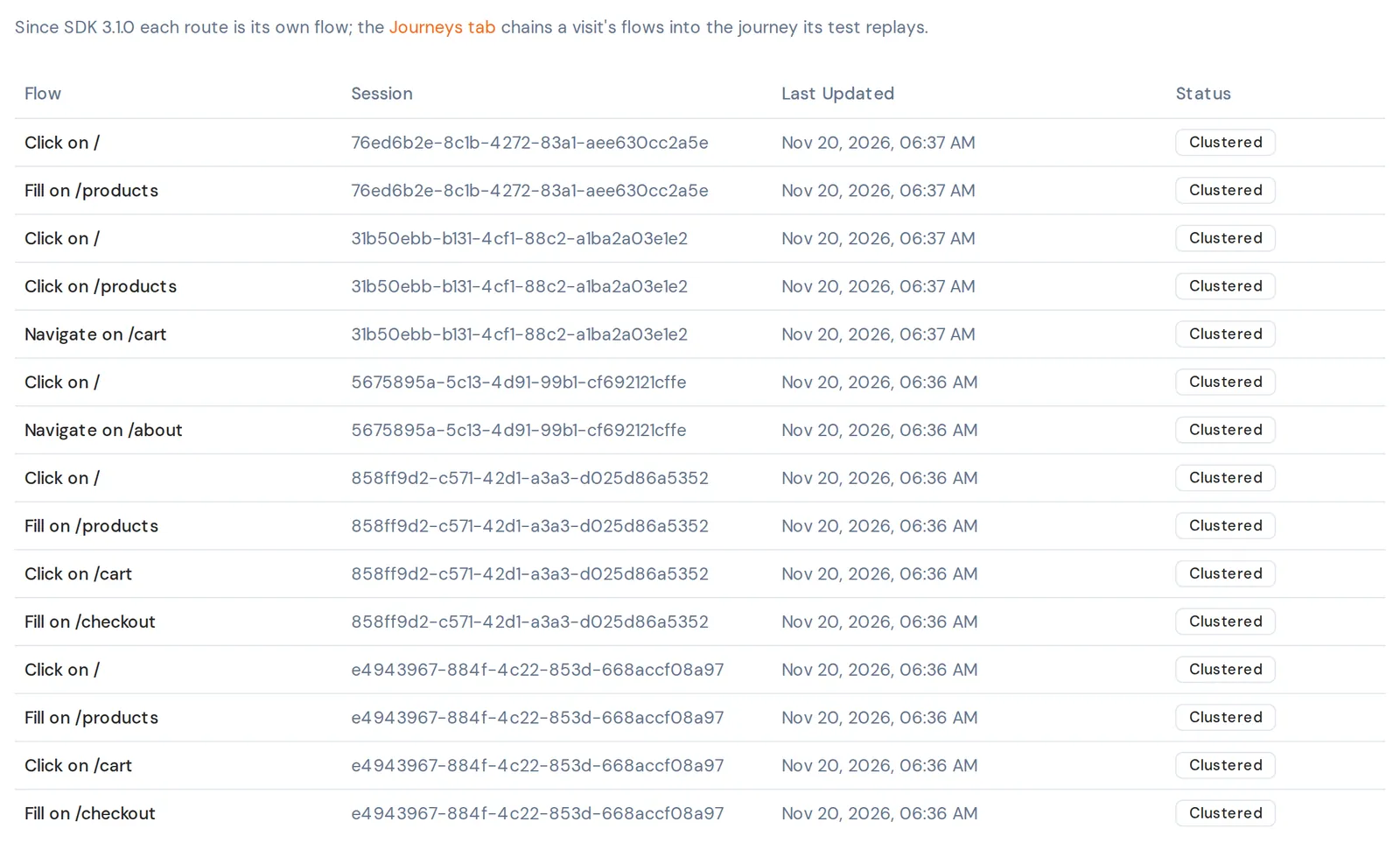
A flow's name is a verb and the page it happened on. The verb is Fill when something was typed, else Click when something was clicked, else Navigate: the visitor only arrived. These are the flows the five visits make:
| Flow | Flows | Where they come from |
|---|---|---|
Click on / | 5 | Every visit's home page, where each visit clicked a link |
Fill on /products | 3 | The Products page of the visits that searched (1, 2 and 4) |
Click on /products | 1 | Visit 5 on the Products page, adding the kettle without a search |
Click on /cart | 2 | Visits 1 and 2 on the Cart page, clicking through to Checkout |
Fill on /checkout | 2 | Visits 1 and 2 typing the email address and placing the order |
Navigate on /cart | 1 | Visit 5 arriving on the Cart page and doing nothing there |
Navigate on /about | 1 | Visit 3 arriving on the About page |
5. Inspect a flow
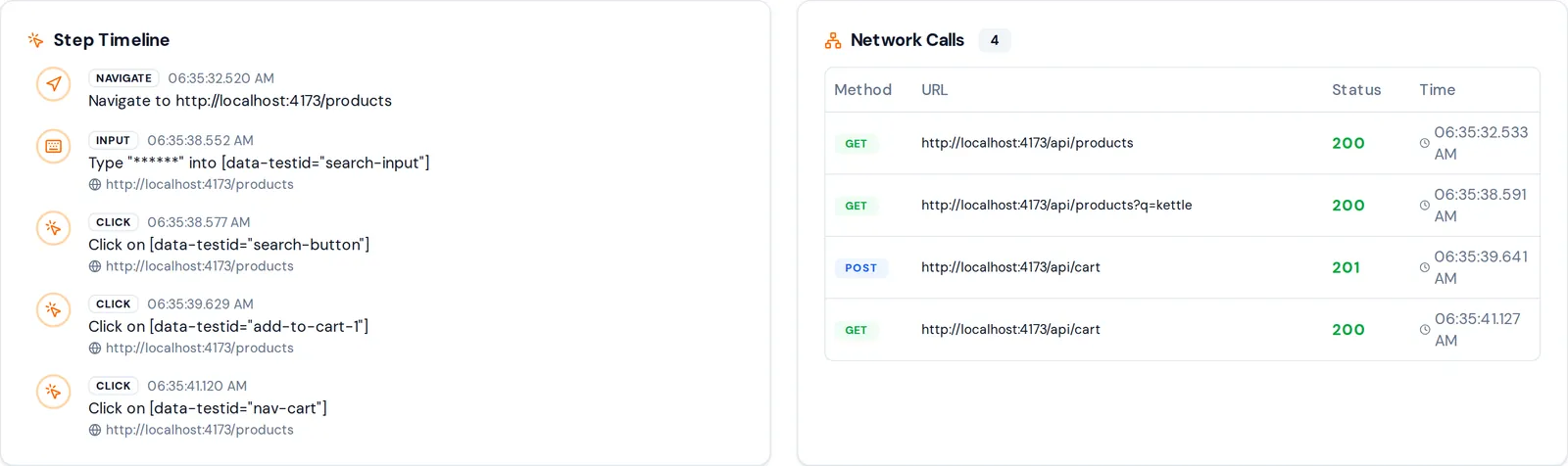
Click a Fill on /products flow. The one below is from a visit that searched for kettle and added it to the cart. The flow's header shows its status and how many steps and network calls it has, and below it:
- Step Timeline lists each step with its time: what was typed or clicked, and on which page. What the visit typed is masked in the browser before it is sent: the search for
kettleshows as six asterisks. - Network Calls lists each call the steps made, with its method, URL, status and time. The search's URL keeps its query,
?q=kettle: under the defaultprivacyMode: "balanced", only typed values are masked, and a query value whose name is not a credential's is kept."strict"replaces every query value.
6. See the journeys
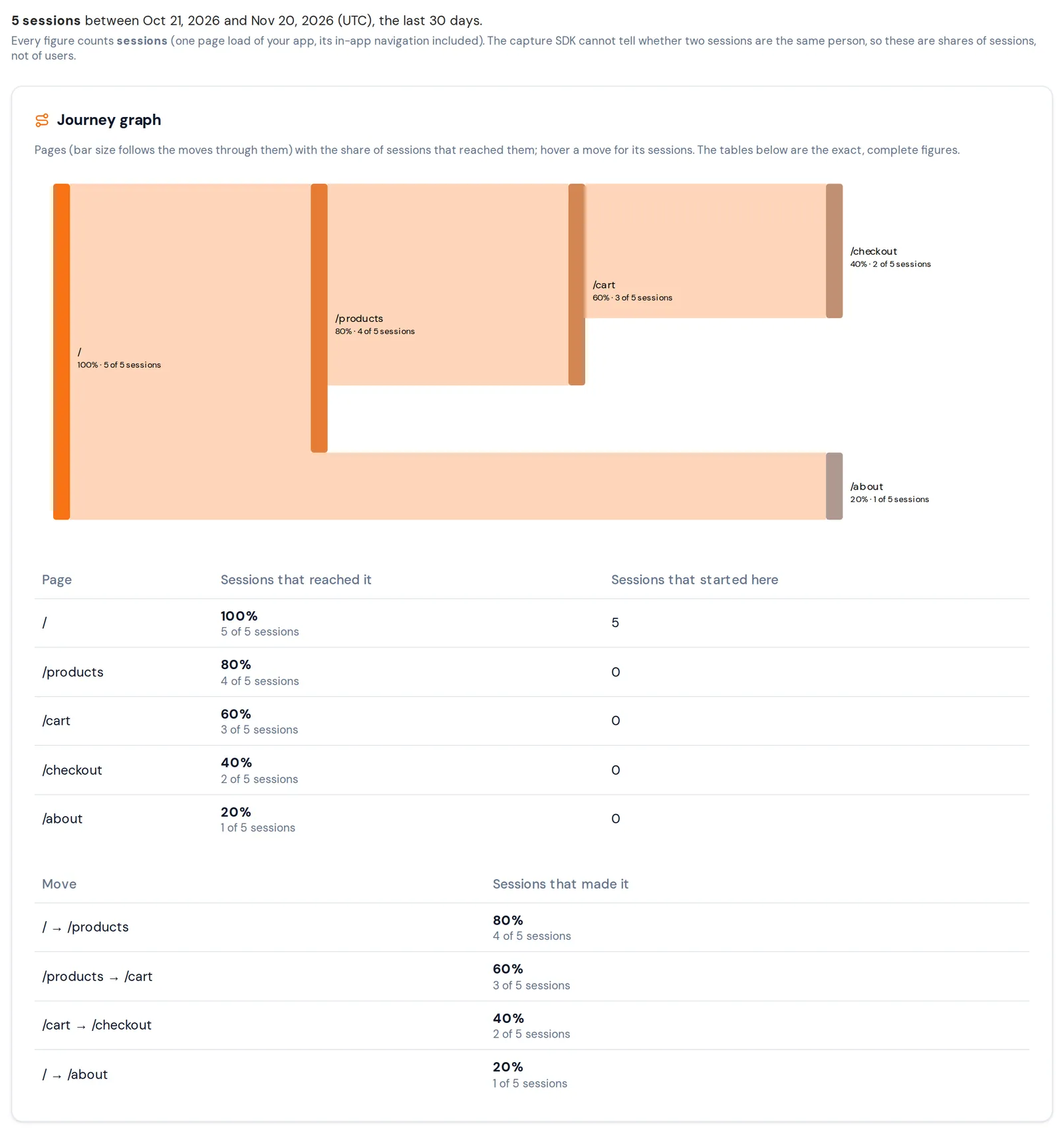
Open the Journeys tab. A journey is the path of pages a session took, from the page it landed on. The tab starts with how many sessions it counts, between which days, and a note on the unit: every figure counts sessions, one page load of your app with its in-app navigation, not people. The capture SDK cannot tell whether two sessions are the same person.
Journey graph. The chart draws the pages and the moves between them, with each page's share of the sessions that reached it. The tables under it are the exact figures: each page with the sessions that reached it and that started there, and each move between two pages with the sessions that made it.
Journey tests. The journeys Keploy selects to replay as tests. A session took a journey when its pages start with the journey's pages, so a longer journey's sessions are also in the shorter ones: the four sessions that went from / to /products include the three that went on to /cart. Each row has its share of sessions, when a session last took it, and badges: Selected for a journey Keploy picked; Runs when a session recorded the journey whole without an error response, so a test has a recording to replay; and Not run with the reason when none did, for example when every session that took it got an error response.
Other frequent journeys. The journeys sessions took that are not in the test plan, with the same figures.
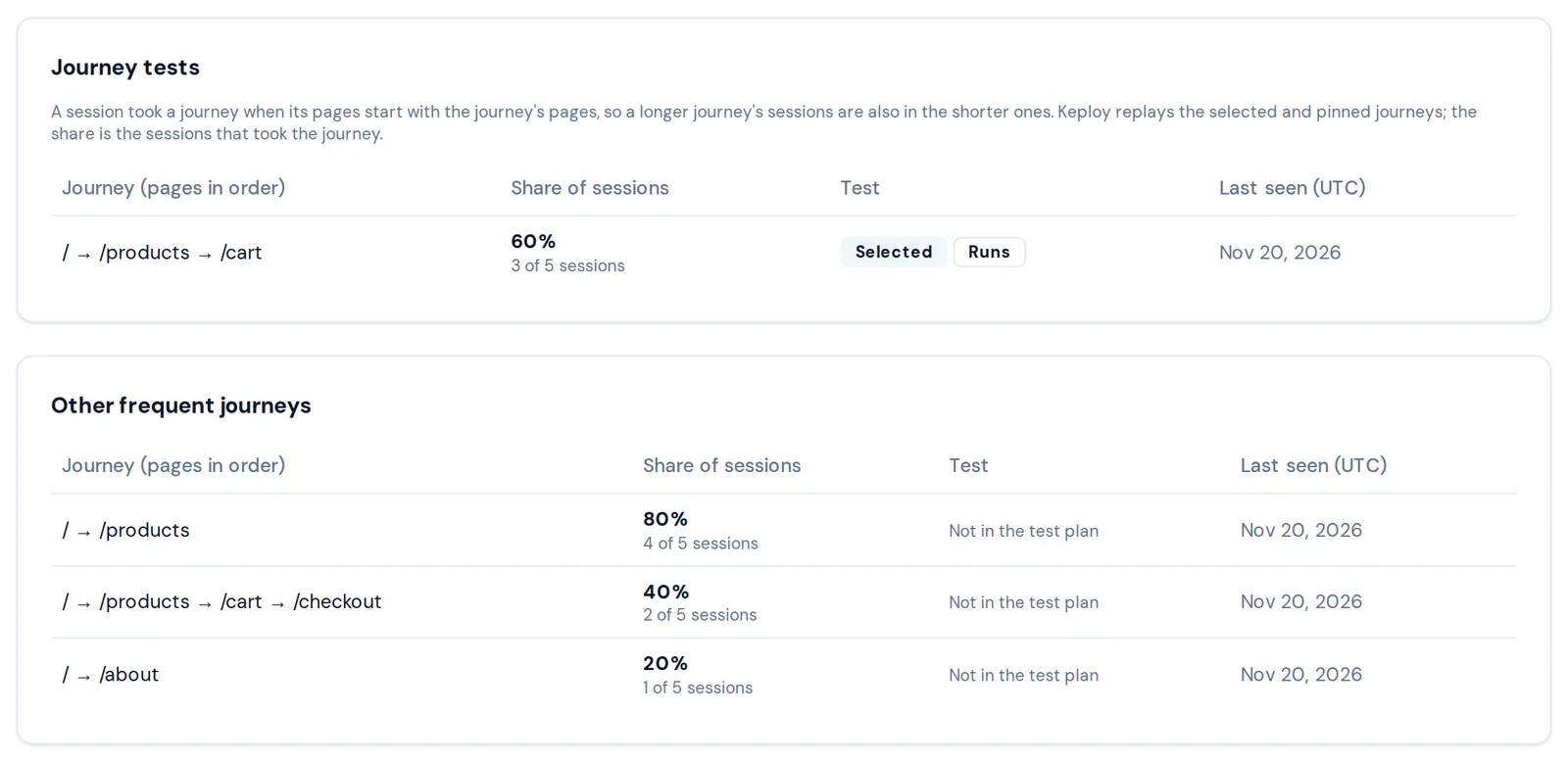
Keploy takes the most taken journeys in turn until they cover 80% of the window's moves between pages, counting each move by the sessions that made it and landing on the first page as a move, and takes at most 20. A journey that continues one already taken replaces it, because its test replays the shorter journey's pages too. Here one journey is enough: / → /products → /cart covers landing on / (5 sessions), / → /products (4) and /products → /cart (3), which is 12 of the 15 the moves weigh. It replaces / → /products, which is why that one is listed under Other frequent journeys.
Replaying the selected journeys as Playwright tests is in beta, and its runner is not in a release build yet.
7. Read the same data from a script
The same flows and journeys are on the Keploy Public API, and as tools on the Keploy MCP server. Use an API key with read scope from Settings → API Keys, and your app's ID: the setup card's command for a script, under Setting this up with an AI agent or a script?, shows it in its URL.
Capture status. The same state as the card's, with the counts and the most recent sessions:
curl https://api.keploy.io/client/v1/apps/<appId>/ui/capture-status \
  -H "Authorization: Bearer kep_YOUR_API_KEY"
{
  "data": {
    "state": "FLOWS_READY",
    "explanation": "flows have been extracted from recorded sessions",
    "next": [
      "read them with GET /client/v1/apps/<appId>/ui/flows (MCP: listUIFlows)",
      "each flow lists its steps and the network calls it made"
    ],
    "endpoint": "https://api.keploy.io/ui/v1/ingest",
    "idleAfterSeconds": 1800,
    "totalSessions": 5,
    "sessionsByStatus": {"PROCESSED": 5},
    "lastBatchAt": 1795156629,
    "totalFlows": 15,
    "recentSessions": [
      {
        "id": "934c1a89-806f-47e5-9366-3afdf1929f46",
        "sdkSessionId": "3424f2bf-2271-4a66-83d4-2edfa422a7ae",
        "status": "PROCESSED",
        "startedAt": 1795156620,
        "lastBatchAt": 1795156629,
        "completedAt": 1795156634,
        "eventCount": 31,
        "batches": 3,
        "sdkVersion": "3.1.0"
      }
    ]
  }
}
This response is shortened: recentSessions lists the five sessions, newest first. A session's id is the sessionId its flows carry; sdkSessionId is the browser's own id for the visit, the one the shop logs and /complete takes. Timestamps are in seconds.
Flows. Each flow with its name, session and counts. GET …/ui/flows/<flowId> returns one flow's steps and network calls:
curl https://api.keploy.io/client/v1/apps/<appId>/ui/flows \
  -H "Authorization: Bearer kep_YOUR_API_KEY"

curl https://api.keploy.io/client/v1/apps/<appId>/ui/flows/<flowId> \
  -H "Authorization: Bearer kep_YOUR_API_KEY"
{
  "data": {
    "id": "2276a4a5-73c9-4815-be09-b7dc8c483c09",
    "name": "Fill on /products",
    "description": "5 steps, 4 API calls, 8.6s",
    "status": "CLUSTERED",
    "sessionId": "df71c5fc-fe59-45f3-934a-2b8346059092",
    "clusterId": "1cecbc2d-8f03-4b8a-8c16-d4b9c4846a8f",
    "steps": 5,
    "networkCalls": 4,
    "createdAt": 1795156600,
    "stepList": [
      {
        "index": 1,
        "action": "input",
        "selector": "[data-testid=\"search-input\"]",
        "hasValue": true,
        "pageUrl": "http://localhost:4173/products",
        "timestamp": 1795156538552
      },
      {
        "index": 2,
        "action": "click",
        "selector": "[data-testid=\"search-button\"]",
        "pageUrl": "http://localhost:4173/products",
        "timestamp": 1795156538577
      }
    ],
    "networkCallList": [
      {
        "method": "GET",
        "url": "http://localhost:4173/api/products",
        "responseStatus": 200,
        "timestamp": 1795156538591
      },
      {
        "method": "POST",
        "url": "http://localhost:4173/api/cart",
        "responseStatus": 201,
        "timestamp": 1795156539641
      }
    ]
  }
}
This is the flow from step 5, shortened to two of its five steps and two of its four calls. A flow's step and call timestamps are in milliseconds. The API returns less than the dashboard: a step says that a value was typed (hasValue) and never what, and URLs come without their query, so the search's call has no ?q=kettle. What an agent sees lists what is left out.
Journeys. The same plan as the Journeys tab:
curl https://api.keploy.io/client/v1/apps/<appId>/ui/journeys \
  -H "Authorization: Bearer kep_YOUR_API_KEY"
{
  "data": {
    "planId": "55d10d00-14df-48d8-adfd-a3375c552f29",
    "windowDays": 30,
    "totalSessions": 5,
    "coveragePermille": 800,
    "coverageTargetPermille": 800,
    "maxJourneys": 20,
    "journeys": [
      {
        "id": "5520e1875d1e42296f14e8bcd944c8e6",
        "pages": ["/", "/products", "/cart"],
        "sessions": 3,
        "sessionPercentage": 60,
        "lastSeenAt": 1795156620,
        "selected": true,
        "pinned": false,
        "representativeSessionId": "934c1a89-806f-47e5-9366-3afdf1929f46",
        "sdkVersion": "3.1.0",
        "flowIds": [
          "7884b42d-b0fc-42ce-8cfc-b0a0dbc3e216",
          "004b5a8d-d018-4f8e-847a-99914919a940",
          "477c7cdd-a3a7-4f93-b646-b0aa8bb6a1aa"
        ]
      }
    ]
  }
}
This response is shortened too. It also carries ranked, the most taken journeys, with / → /products first; nodes and edges, the graph's pages and moves; and freshness, which says when the plan was computed. flowIds are the recording a test of the journey replays, each a flow you can read with GET …/ui/flows/<flowId>.
The Keploy MCP server has the same calls as tools: uiCaptureStatus, listUIFlows, getUIFlow and uiJourneys. See From an AI agent (MCP).
8. Clean up
Revoke the ingest key. Open the Setup tab. Under Ingest keys, click the trash icon next to the key. The row asks you to confirm: Pages using it stop recording. Click Revoke.

Pages that use the key stop recording within about 30 seconds. The key stays in the list as revoked.
Delete the app if you made it for this walkthrough. Deleting an app needs an API key with the admin scope:
curl -X DELETE https://api.keploy.io/client/v1/apps/<appId> \
  -H "Authorization: Bearer kep_YOUR_ADMIN_KEY"
What's next
- Install the SDK in your own app, as early in its startup as you can.
- Set up UI capture from an AI agent through the Keploy MCP server.
- UI Capture errors and warnings: what each
KUI_E_code means and how to fix it.