Developer Workflow with Keploy Proxy
Once recording works in your cluster, the next question is how your team edits test data without stepping on each other and how those edits land in main only after review. Keploy mirrors the git workflow: every change to a test case or a mock lives on a Keploy branch, a teammate reviews the diff in the dashboard, and CI replays the branch on every pull request before folding it into main on merge.
This page walks through the two halves of that workflow:
- Editing test cases and mocks on a branch—how a developer adds a new mock, edits a test case, or uploads a freshly recorded test set.
- Wiring up your CI pipeline—how to run cloud replay against the branch on PR open, gate the merge on review, and merge the branch into main when the PR merges.
The pipeline section assumes the application is already recording—see K8s Record Replay to set that up first.
Editing test cases and mocks on a branch
1. Create a Keploy branch
Every write—adding a mock, editing a test case, uploading a recording—must happen on a branch. Direct writes to main are rejected. The branch name typically mirrors your git branch so reviewers can correlate the two.
There are two ways to create one.
Option A—From the dashboard. Open your app → Branches → Create branch and enter a name (use your git branch name).
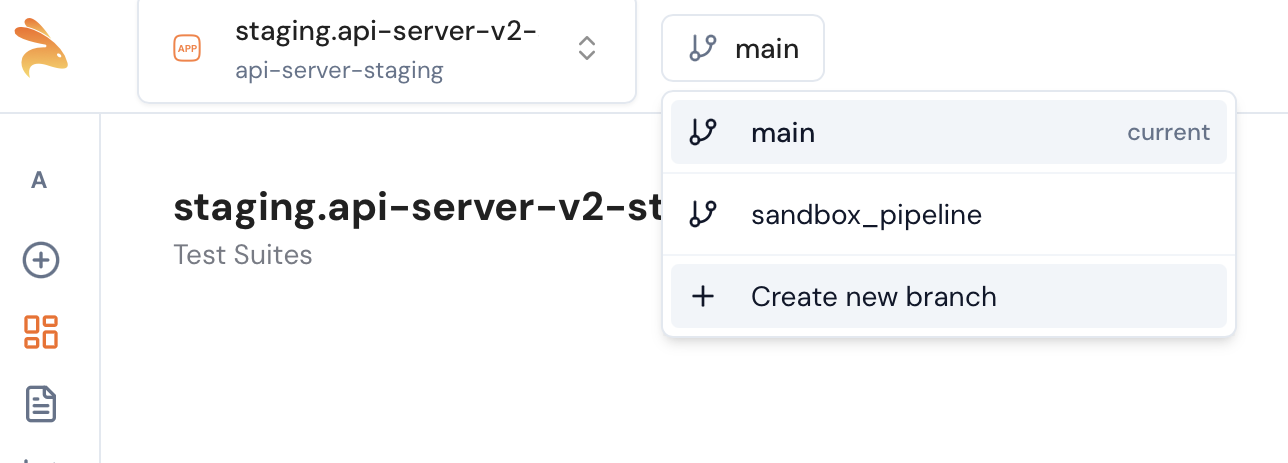
Option B—From the MCP server / REST API. When you're driving Keploy from an IDE agent (Claude Code, Cursor, Windsurf), the agent calls the create_branch MCP tool. The same operation is also exposed as a plain REST endpoint for scripts and other automation.
-
MCP tool:
create_branch{
"app_id": "<keploy-app-uuid>",
"name": "feat/discount-flow"
}Returns
{branch_id, name, status, created}. Find-or-create: passing a name that already exists on a writable branch reuses it (created: false); a fresh name mints a new one (created: true). Pass the returnedbranch_idto every subsequent write tool—direct writes tomainare rejected. -
REST API (what the MCP tool calls under the hood):
curl -X POST "$KEPLOY_API_SERVER/client/v1/apps/<app-id>/branches/ci" \
  -H "Authorization: Bearer $KEPLOY_API_KEY" \
  -H "Content-Type: application/json" \
  -d '{"name": "feat/discount-flow"}'
POST /client/v1/apps/{appId}/branches/ci—same find-or-create semantics. Returns the branch on success; an existing-but-non-writable name (e.g. already merged) returnsErrBranchNameTaken.
2. Edit test cases or mocks
There are three ways to add or edit test data on the branch. Pick whichever matches how you're working—they all write to the same branch overlay, so the dashboard diff page sees every change regardless of source.
From your IDE (MCP): Keploy ships an MCP server that Claude Code, Cursor, and Windsurf can connect to. The agent exposes tools like create_mock, update_mock, delete_mock, link_mock, upload_recording, and delete_recording. All write tools require a branch_id argument; calling them without one is rejected, which is what keeps main untouched. The full tool surface is auto-generated from the api-server's /client/v1 OpenAPI spec—browse it at api.keploy.io/client/v1/docs for the underlying REST shape each tool wraps.
From the dashboard UI: open the Recordings page, switch to your branch in the branch selector, and use the + menu to add a mock or edit an existing test case inline. Edits flow through the same branch overlay.
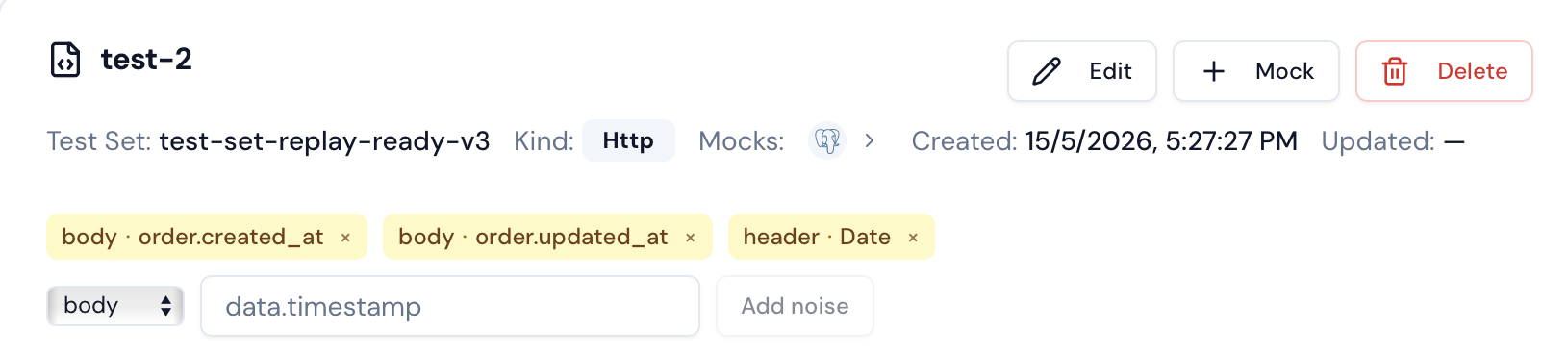
From the CLI (for whole test sets): if you just recorded a new flow with keploy record on your laptop, upload the resulting keploy/test-set-N/ directory as a single bundle:
keploy upload test-set \
  --app <namespace>.<deployment> \
  --branch $(git rev-parse --abbrev-ref HEAD) \
  --test-set keploy/test-set-0 \
  --name checkout-happy-path
This posts the whole bundle (cases + mocks + mapping) to the JWT-gated /atg/recordings/bundle endpoint in one request—much faster than emitting the bundle through MCP tool arguments.
3. Validate the branch locally
Before opening a pull request, replay the branch from your machine to make sure the changes you made don't break anything. The CLI accepts --branch-name to scope the run to your branch overlay:
keploy cloud replay \
  --app <namespace>.<deployment> \
  --branch-name $(git rev-parse --abbrev-ref HEAD)
The command fetches the test sets and mocks from the branch view, runs each case against your deployed cluster, and prints pass/fail per suite. If a case fails, fix the mock or case on the branch (step 2) and re-run.
4. Open a pull request
Push your code changes to git and open the PR as usual. The Keploy branch with the same name now travels alongside your code change—the CI pipeline picks it up on the next step.
Wiring up your CI pipeline
The pipeline has two jobs:
- On pull-request open / sync: run
keploy cloud replayagainst the pull request's branch. If the branch has changes that haven't been reviewed, the command exits non-zero and the CI job fails with a dashboard URL the reviewer can open. - On pull-request merge: run
keploy cloud branch-mergeto fold the branch's overlay intomainso subsequent runs againstmainsee the new test data.
The examples below use GitHub Actions; the same two commands work in GitLab CI, Jenkins, or any other runner.
1. Replay on PR open
# .github/workflows/keploy-replay.yml
name: Keploy Replay
on:
  pull_request:
    types: [opened, synchronize, reopened]

jobs:
  replay:
    runs-on: ubuntu-latest
    steps:
      - uses: actions/checkout@v4

      - name: Install Keploy
        run: curl -sSL https://keploy.io/install.sh | bash

      - name: Replay against the PR branch
        env:
          KEPLOY_API_KEY: ${{ secrets.KEPLOY_API_KEY }}
        run: |
          keploy cloud replay \
            --app <namespace>.<deployment> \
            --create-branch ${{ github.head_ref }}
What happens on each PR:
- Keploy looks up (or creates) a branch named after
github.head_ref—the same name your developer used in step 1. - It replays every test set on the branch overlay against your deployed cluster.
- After the replay finishes, the CI approval gate runs. The gate blocks the job (exit code non-zero) when all four are true:
- The job is running in a CI environment.
- The branch has diffs against main (added / modified / deleted entities).
- Some local test set passed, so the replay actually exercised changed data.
- The branch's
Statusis not yetapproved.
When the gate blocks, the CLI prints a dashboard URL pointing at the branch's diff page. Without all four conditions, the gate is a no-op and the job's pass/fail is determined by the replay result alone.
2. Approve the test-data diff in the dashboard
A reviewer (typically the same person reviewing the code PR) opens the URL the CI job printed. The page shows every changed mock and test case side-by-side—added rows in green, modified rows with inline diff, deleted rows in red.
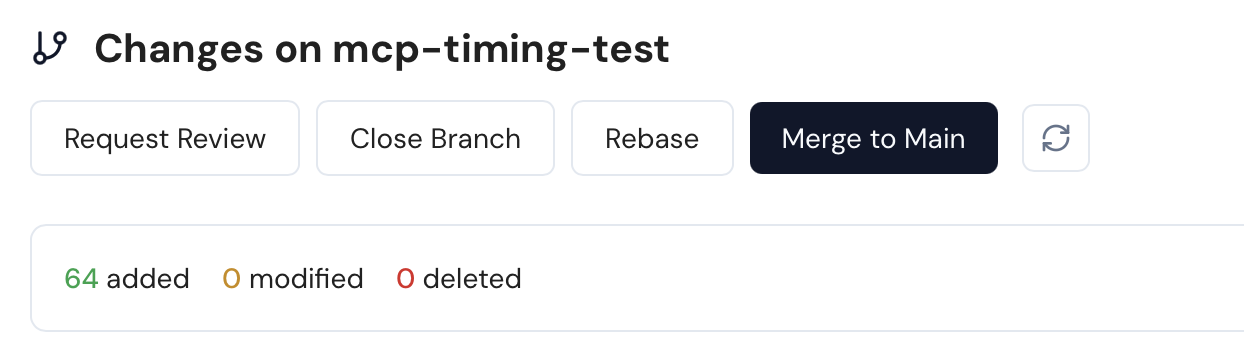
After confirming the changes look right, the reviewer clicks Approve. The branch's status flips to approved, the gate stops blocking, and the next CI run on that PR turns green without any other change.
3. Merge the branch on PR merge
On PR merge, run keploy cloud branch-merge to fold the branch overlay into main. After this step, the branch's recordings and mocks are part of the main view; subsequent replays on main (e.g., nightly regression runs) include the changes you just merged.
# .github/workflows/keploy-branch-merge.yml
name: Keploy Branch Merge
on:
  pull_request:
    types: [closed]

jobs:
  merge:
    if: github.event.pull_request.merged == true
    runs-on: ubuntu-latest
    steps:
      - uses: actions/checkout@v4

      - name: Install Keploy
        run: curl -sSL https://keploy.io/install.sh | bash

      - name: Merge the Keploy branch
        env:
          KEPLOY_API_KEY: ${{ secrets.KEPLOY_API_KEY }}
        run: |
          keploy cloud branch-merge \
            --app <namespace>.<deployment> \
            --branch ${{ github.head_ref }}
--app accepts either a namespace.deployment identifier (k8s-proxy apps, e.g. prod.orders) or a raw app UUID (non-proxy apps). The same form you use for keploy upload test-set and keploy cloud replay works here.
keploy cloud branch-merge is idempotent—running it twice on an already-merged branch is a no-op. If the PR was closed without merging, the if: guard above keeps the job from firing.
Putting it together
A typical day with this workflow looks like:
- A developer cuts a git branch and creates a matching Keploy branch with
--create-branch. - They add or edit mocks and test cases on that branch (from their IDE via MCP, the dashboard, or a CLI upload).
- They replay the branch locally with
keploy cloud replay --branch-name, fix anything that broke. - They push the code change and open a PR.
- CI replays the branch and either passes or asks for review via the approval gate.
- A reviewer approves the test-data diff in the dashboard.
- On PR merge, CI runs
keploy cloud branch-mergeand the new test data lands onmain.
Related
- K8s Record Replay — record and replay in Kubernetes.
- Developer + LLM Workflow with Keploy Proxy — the same flow driven by an LLM.
- E-commerce Microservices — multi-service app to record.