Single-page apps and navigation in UI capture
In a single-page app, a click on a link changes the route without loading a page. Since SDK 3.1.0 the capture SDK records each such route change, so every step it records belongs to the page it happened on, and Keploy makes each route its own flow. This page says what counts as a page change, what a route change records, and what the SDK cannot see.
Sessions and page loads
The SDK starts a session when init() runs, once per page load, and a single-page app's route changes stay in that session. So a visit to Home, Products, Cart and Checkout in the React sample shop is one session holding four pages. A session also ends at maxSessionDuration, 10 minutes by default; with continuous: true, the next one starts at the visitor's next click, tap or key press. KeployCapture.stop() ends the capture for good. On a site whose links load pages, such as the plain HTML shop, every page load starts a session of its own. Sessions and sampling says when a session starts and ends.
What counts as a page change
A route change without a page load is recorded the way rrweb records a page load: as a Meta event with the new URL. These count:
- a
history.pushState, or ahistory.replaceStatethat changes the path, as a router makes them; - the visitor going back or forward, or the page's own
history.back(),forward()orgo(); - a hash router's change of
#/route.
These are not page changes and record no navigation of their own:
- A change of the query alone, pushed, replaced or traversed, such as a router syncing a filter or a search box that pushes
?q=on every keystroke. The URL recorded is always the one the page is on, so a snapshot taken later, when a hidden tab comes back or atresume(), carries the query as it is then. - An in-page anchor, such as
#reviews.
What a route change records
Each route change's Meta event says what moved the page, as cause:
cause | What moved the page |
|---|---|
push | A navigation that added a history entry: history.pushState, as a router calls it to follow a link, or the Navigation API reporting a push |
replace | A history.replaceState that changes the path, such as a redirect |
traverse | A move through the session history: the browser's Back or Forward, or the page's own history.back() or go() |
hash | A fragment navigation the History API did not make: a link to #/route, or location.hash = ... |
The Meta event rrweb writes with every full snapshot (a page load, a tab that comes back, resume()) has no cause. The React and Next.js sample shops' tests check that every route change their links make is recorded with cause: "push".
Two more fields can say who moved the page:
userInitiated, where the browser has the Navigation API, as itsnavigateevent reported it:truewhen the visitor started the move,falsewhen the page's script did. Browsers differ, and the SDK records what each says: apushStateorhistory.back()called from a click handler readstruein WebKit andfalsein Chromium and Firefox. So this field alone does not tell an in-app Back button from the browser's own Back in every browser.initiator: "script", on a traversal the page's own script asked for:history.back(),forward()orgo(), or the Navigation API'snavigation.back(),forward()ortraverseTo(), as an in-app Back button calls them. This one tells an in-app Back from the browser's Back in every browser that has the Navigation API, WebKit included.
Hash routers
A hash router's route change is recorded as a page change. Where the browser has the Navigation API, a fragment navigation the History API did not make is recorded with cause: "hash". Where it has none, the browser fires popstate before hashchange for that navigation, and the change reads as traverse.
An anchor link inside a page, such as #reviews, is not a page change.
How the SDK sees route changes
To record route changes, the SDK wraps history.pushState, replaceState, back, forward and go, and, where the browser has the Navigation API, navigation.back, forward and traverseTo, once per page. It records a change only once the URL has changed.
- Where the browser has the Navigation API, as every shipping Chromium does, its
currententrychangeevent decides. It comes beforepopstate, so the browser's Back is atraverseeven when a router redirects from its ownpopstatelistener; the redirect is then areplaceof its own. It also reports a navigation that calls nopushState, such as one an app intercepts withnavigation.navigate(). - Without it, the History API calls and the
popstateandhashchangeevents decide. - A router that wraps any of these methods after the SDK keeps its own wrapper when the capture stops.
Routers that keep their own pushState
A router that calls a pushState or replaceState it kept from before init(), as SvelteKit does, does not go through the SDK's wrapper. Where the browser has the Navigation API, it still reports the move, and the route change is recorded. Where it has none, the SDK finds the move only when the next event is recorded, and records it just before that event: as a traverse when that event comes during a popstate, otherwise as a push, a replace included. A history.back() such a router kept from before init() carries no initiator.
When the SDK cannot wrap history
The SDK wraps all of these methods or none. If code that ran before init() made one of them impossible to replace and put back, such as an own property that is neither writable nor configurable, or a frozen history or navigation, the SDK wraps none and writes one KUI_E_NAVIGATION_UNWRAPPED warning to the console, naming the method. The capture goes on. Route changes are still recorded, from the page's navigation events, with less detail: no traversal carries initiator, and, in a browser without the Navigation API, a pushState or replaceState is found only at the next recorded event. To fix it, remove the code that locks the method, then reload the page.
One flow per route; journeys chain them
Keploy never lets a flow span a navigation, so each route a visitor opens is its own flow, holding the steps taken there. One visit to Products, Cart and Checkout makes a flow for each of the three pages. The dashboard's Flows tab says so above the table:
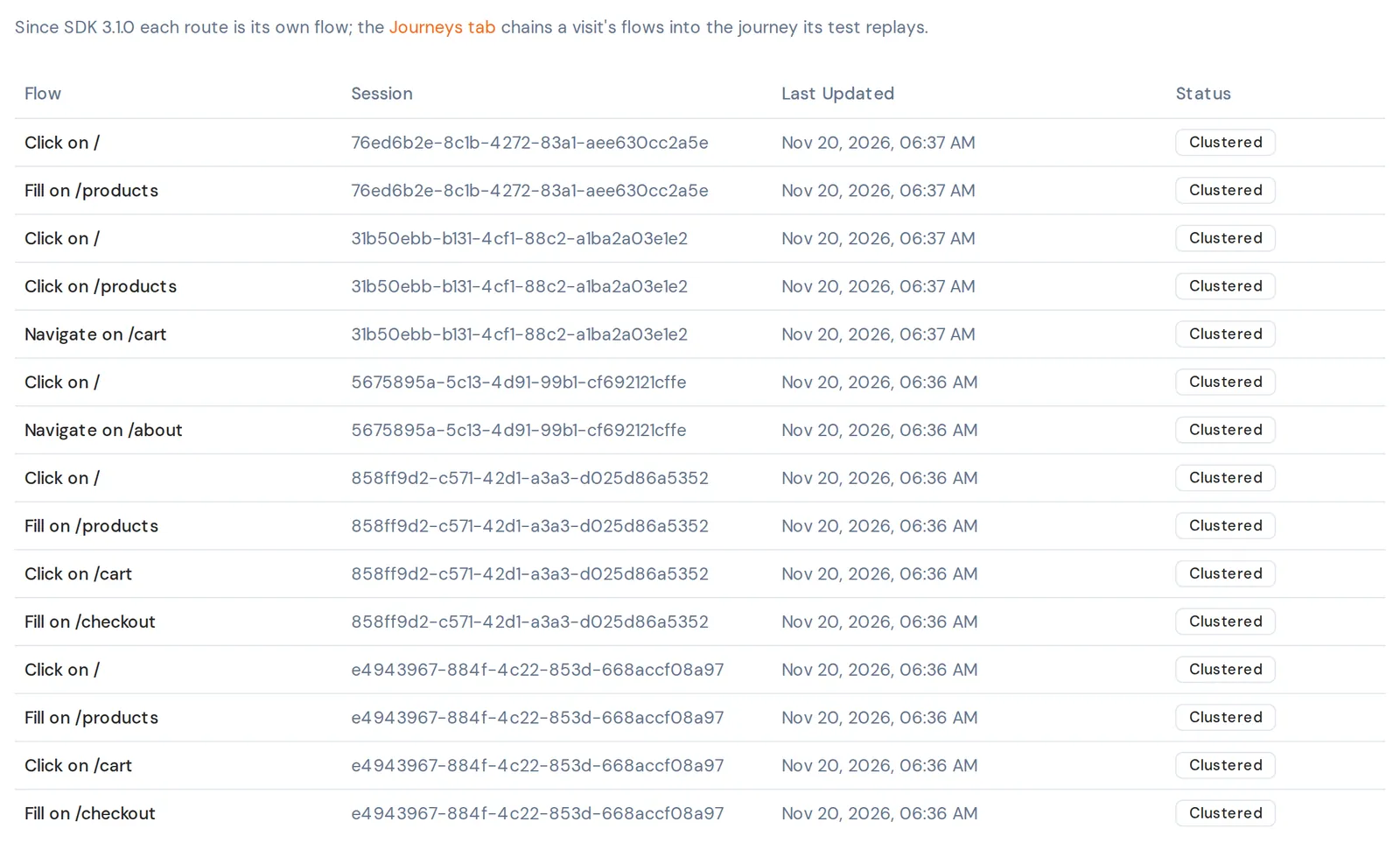
The Journeys tab chains a session's flows back together, in order, into the path the visit took, and shows each journey's share of sessions. On a site whose links load pages, each page load is a session of its own, so its journeys never span a page load.
Before 3.1.0
@keploy/capture-sdk 3.0.1 recorded no navigation at history.pushState, so a visit that changed route by script was a single flow, on the page where it landed. If a test or a dashboard of yours expects one flow per single-page-app visit, look at the flow for each route instead. The 3.1.0 release notes list this change.