UI journeys and replay (beta)
Keploy chains each visit's flows, in order, into the path the visit took through your pages: its journey. From the journeys of an app's recent visits it builds a journey plan: how sessions move between pages, the journeys they take, each with its share of sessions, and the journeys Keploy selects to replay as tests. This page explains how the plan is built and where to read it: the dashboard's Journeys tab, the REST API and MCP.
UI Testing is in beta. Journeys and their shares work today. Replaying journeys as Playwright tests is in beta too, and its runner is not in a release build yet: see Replay (beta).
What a journey is
A session's journey is the pages it went through, in order: the page it landed on, then the page of each of its flows, in the order they happened. A page that follows itself counts once, and a journey holds at most 16 pages.
- A page is its path, with IDs folded. A path segment that is a number, a UUID, a MongoDB ObjectId or a ULID is written
:id, a long hexadecimal one:hash, and a JWT:token, so/orders/1042and/orders/1043are one page,/orders/:id. The query is left out. - A session took a journey when its pages start with the journey's pages. A session that went
/→/products→/carttook/→/productstoo, so a longer journey's sessions are also in the shorter ones. The plan lists as journeys the paths at least one session took whole, from its landing page to its last. - Every figure counts sessions, one page load of your app with its in-app navigation, never people: the capture SDK carries no identity of the visitor. On a site whose links load pages, each page load is a session of its own, so its journeys are each one page long. See Sessions and sampling.
- A journey's ID is stable: it is computed from its pages, so the same pages have the same ID in every plan.
A plan reads the app's sessions that started in the last 30 days and have been turned into flows (PROCESSED), at most the newest 50,000. A session that reached no page is counted apart, as sessionsOnNoPage, and is in no journey and no total.
Which journeys Keploy selects to test
Keploy ranks the journeys by how many sessions took them, the most recently seen first among equals. It then takes them in that order, skipping any that adds no move between pages not yet covered, until the journeys taken cover 80% of the window's moves, or until it has taken 20:
- Moves are weighed by sessions. Each move from one page to the next counts the sessions that made it, and landing on a page counts as a move too.
- A longer journey replaces a shorter one it continues, because its test replays the shorter journey's pages too.
- A journey with no recording to replay is not run. Each selected journey is replayed from one session: the newest that took exactly that journey with no error response, preferring one that did something on its pages over one that only landed. Its
flowIdsare the recording a test of the journey replays. A journey is not run, and Keploy moves on, when there is no such session:ERRORS_ONLYwhen every session that took exactly that journey got an error response (a status of 400 or more, or no response), andNO_REPLAYABLE_RECORDINGwhen none recorded it whole, because each had more than 100 flows.
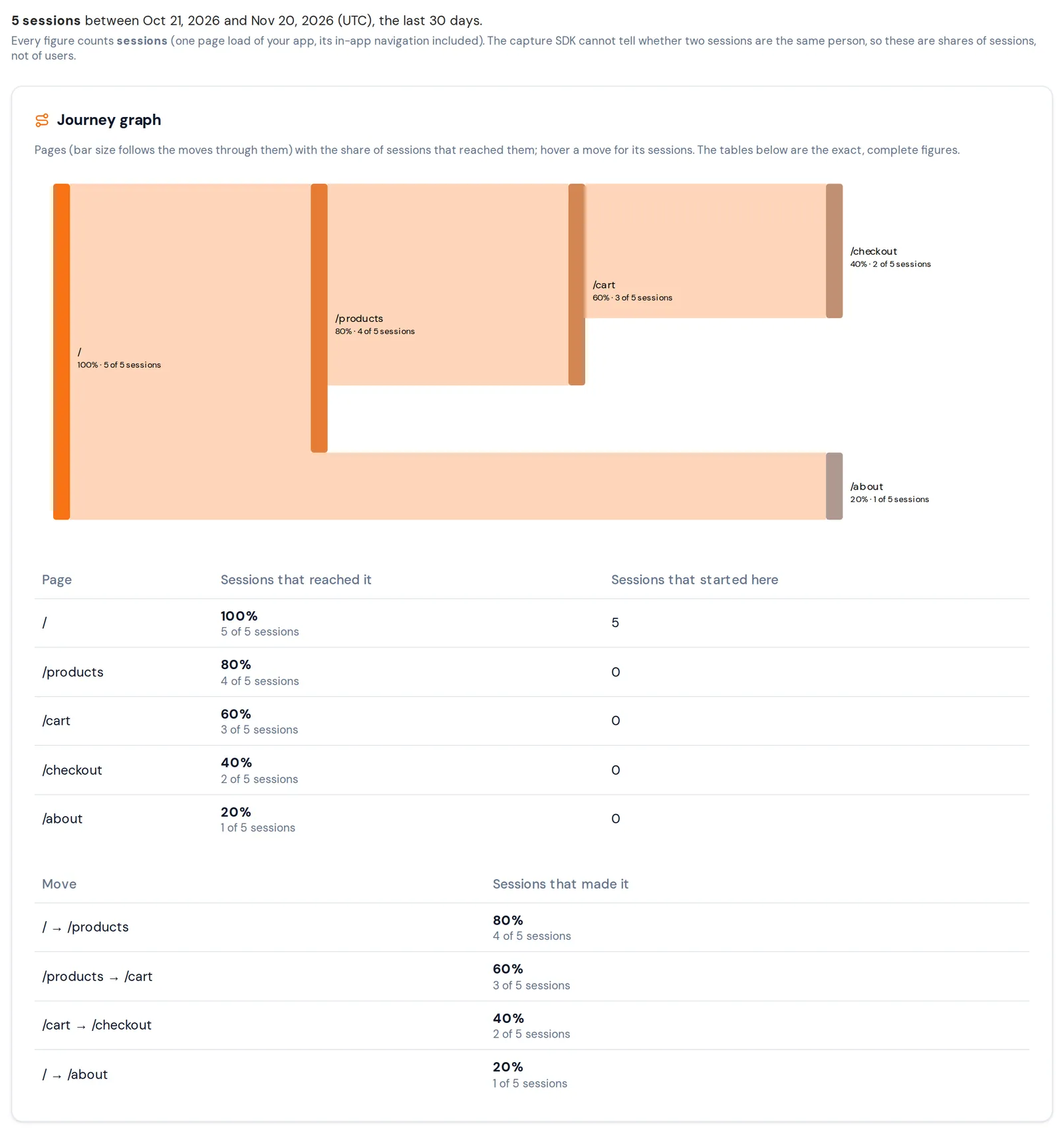
The walkthrough works through one plan: five visits along three paths, where a single journey covers 12 of the 15 weighed moves.
The Journeys tab
Open UI Testing → UI Flows, select your app in the header, and open the Journeys tab. It starts with how many sessions it counts, between which days (UTC), and a note on the unit: every figure counts sessions, not users. A note under it says when a bound left sessions out, such as "Only the newest 50,000 sessions in the window were read; older ones are not counted."
Journey graph draws the pages and the moves between them, with each page's share of the sessions that reached it; a move back to a page already on the path is not drawn. The two tables under it are the complete figures: one of pages, with the sessions that reached each page and the sessions that started there, and one of moves, with the sessions that made each move.
Journey tests lists the journeys Keploy replays, with the pages in order, the share of sessions, the badges under Test, and when a session last took it (Last seen (UTC)). Selected marks a journey Keploy picked, and Runs says a test of it has a recording to replay. A pinned journey is marked Pinned, and Not run, with the reason, when it has no recording to replay, such as "every session that took it got an error response, so there is no clean recording to replay". Other frequent journeys lists the most taken journeys that are not in the test plan, marked Not in the test plan.
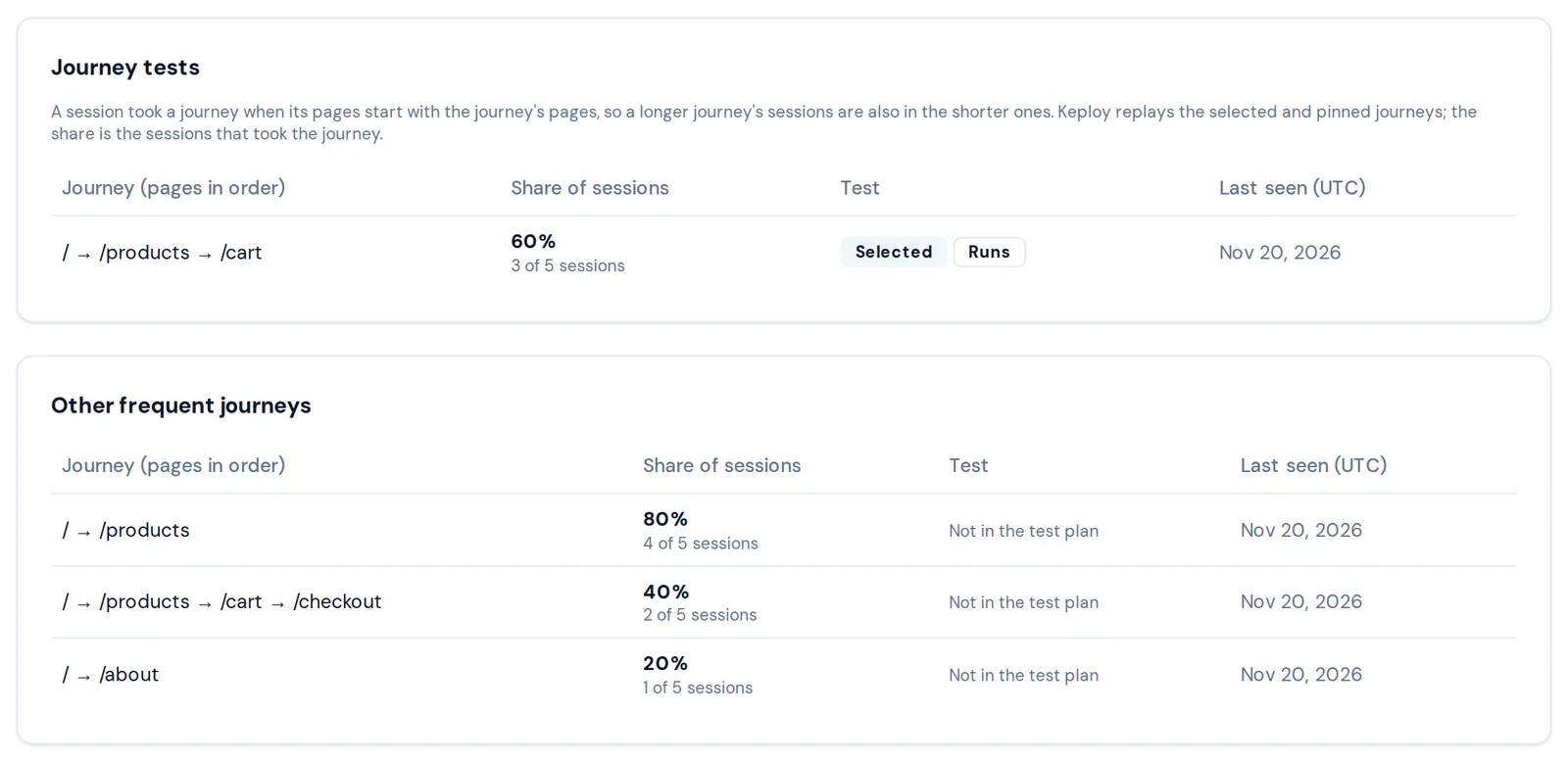
Each share is the server's: the sessions, the total they are a share of, and the percentage, shown to two decimals. A share under 0.01% shows as <0.01%, never as 0.
When the tab has no plan to show, it says why: No sessions in this window when no session started in the last 30 days, and No session has a journey yet when sessions were read but none could be counted yet.
The plan over REST and MCP
The same plan is GET /client/v1/apps/{appId}/ui/journeys on the REST API, and the tool uiJourneys on the Keploy MCP server, with an API key that has the read scope and app:view on the app. Journey plan lists its fields with a real answer. What differs from the tab:
- Pages are shown as an agent may read them: a path segment that reads as a secret or a person's data is replaced with
REDACTED, as in What an agent sees, and pages that read alike are one, counted inpagesMerged. The graph is cut to 200 pages and 100 moves, andrankedto the 50 most taken journeys; what is left out is counted. freshnesssays how current the plan is. A plan is served for up to 24 hours, or until the sessions processed since it was computed reach a tenth of those it read (at least one; a plan that read the full 50,000 keeps its 24 hours), and the next read then computes a new one.refresh=truecomputes one now, at most once a minute per app; it needs thewritescope andtestgen:runon the app.- A read may have to wait. When the server's queue of plan computations is full, or the request ends before its plan is ready, the answer is
429RATE_LIMITED: retry in 10 seconds.
A plan is kept for 14 days; its planId names it in share of sessions calls until then.
Share of sessions affected
GET /client/v1/apps/{appId}/ui/journeys/impact?planId=<planId>&journeyIds=<id>,<id>, or the MCP tool uiJourneyImpact, says how many of a plan's sessions took at least one of a set of its journeys: the share of sessions a change to those journeys would touch. It is a union, never a sum: a session that took two of the journeys counts once, so the share of two journeys can be less than their shares added up.
journeyIdstakes 1 to 100 of the plan'sjourneys, the ones Keploy runs, joined with commas. Over MCP it is one string.- A journey that is not one of the plan's
journeysis400INVALID_PARAMETER; a plan older than 14 days is404.
The agent walkthrough shows a call and its answer.
The flow graph
GET /client/v1/apps/{appId}/ui/flow-graph, or the MCP tool uiFlowGraph, is a second view of how visits move: built from the app's 10,000 most recent flows, a page for each page pattern with its number of flows and its share of sessions, and a link for each move between a session's consecutive flows, with how often it happened and up to five of the flows it led to. Links only go forward in one page order, so moves back to an earlier page are counted in backLinksDropped. Flow graph has a real answer.
The flow graph is on the REST API and MCP only. The dashboard's Flow Graph panel on the Flows tab does not draw it: it says that the server does not expose uiFlowGraph and that the figure was never measured.
Replay (beta)
Replay is what the journey plan is for: Keploy turns the plan's journeys into Playwright tests that replay each journey's recording, its flows, against mocks of the network calls recorded with it. The capture SDK only records; generating and running the tests is Keploy's side.
Replaying journeys as Playwright tests is in beta, and the keploy ui commands, its runner keploy ui run among them, are not in a release build yet. So no test runs today, and this page gives no steps to run one.
What you can see of it today:
- Generate Test. A flow's page in the dashboard has a Generate Test button. It creates a UI test run, and says: "Test run
<id>is PENDING, waiting for a runner. UI tests run in your own CI, not on Keploy's servers: a runner there claims the run, executes it and reports the result here. No runner ships in this release, so the run stays pending until one does." - Test runs. That run is listed on the Test Runs tab, as Pending, and over the REST API and MCP: List test runs and
listUITestRuns, Get a test run andgetUITestRun. A pending run has no results, and itsnextsays that no runner has claimed it and not to poll for it. No API call creates or runs a test. - Verdicts. A run's results use a closed set of verdicts, shown in the dashboard with these labels:
| Verdict | Dashboard label | What it means |
|---|---|---|
PASSED | Passed | Replayed, and no change from the recording. |
FAILED | Failed | A real difference from the recording. |
UNCOVERED | No recording | In scope, but no recording exists to compare to. |
UNPROVEN | Not proven | A comparison was attempted, but its result is not trustworthy. |
NONDETERMINISTIC | Did not reproduce | The run did not reproduce itself. |
BLOCKED | Blocked | The environment stopped it; nothing was measured. |
PENDING | Pending | Not run yet. |
Pinning
A pinned journey is tested whatever its rank, and the plan has room for 50. Pinning is not available to you yet: the dashboard, the REST API and MCP have no way to pin a journey. The plan's pinned field, and the tab's Pinned badge, are for it.