Replay in CI
Run keploy cloud replay in your CI pipeline to replay your recorded tests against every pull request. When a pull request changes your app's behavior on purpose, some tests fail as expected. Keploy then creates a Keploy branch for the pull request, where you delete those tests and get the deletion reviewed. When the pull request merges, Keploy merges the branch into main, so main's tests match the new behavior.
Add Keploy to your pipeline
Run the replay on pull requests and on pushes to main. For example, with GitHub Actions:
on:
  pull_request:
  push:
    branches: [main]

jobs:
  keploy-replay:
    runs-on: ubuntu-latest
    steps:
      - uses: actions/checkout@v4
        with:
          fetch-depth: 0
      - name: Install Keploy
        run: source /dev/stdin <<<"$(curl -fsSL https://keploy.io/install.sh)"
      - name: Replay
        env:
          KEPLOY_API_KEY: ${{ secrets.KEPLOY_API_KEY }}
        run: keploy cloud replay --app "<namespace>.<deployment>" --cluster "<cluster>" --image "<image>:<tag>"
- API key: create one under Settings → API Keys and store it as a CI secret. To merge pull requests' branches into main, the key needs the
branch:mergepermission on the app. A key that belongs to a CI account or a service account can create branches and replay, but it can't update a branch with main's changes, and it merges only approved branches. - Image: pass the image your pipeline built with
--image, so the replay tests the pull request's code. To replay in the cluster instead of on the CI runner, add--trigger; the cluster must be able to pull the image. See Run a manual replay. - Full history: check out with full history (
fetch-depth: 0on GitHub Actions). After a pull request merges, Keploy reads the git history to find it.
Keploy recognizes pull requests and pushes on GitHub Actions, GitLab CI, CircleCI, Azure Pipelines, Bitbucket Pipelines, AWS CodeBuild, Jenkins and Woodpecker. On another CI system, set KEPLOY_CI_PR_NUMBER, KEPLOY_CI_REPOSITORY, KEPLOY_CI_PR_SOURCE_BRANCH and KEPLOY_CI_PR_TARGET_BRANCH on pull-request runs, and KEPLOY_CI_BRANCH on push runs.
What happens on a pull request
- Keploy replays main. The run replays main's recorded tests against the pull request's code. If they pass, the run passes.
- If tests fail, Keploy creates a branch. The run creates a Keploy branch for the pull request, named after its git branch. If that name is taken, Keploy adds the pull request number, for example
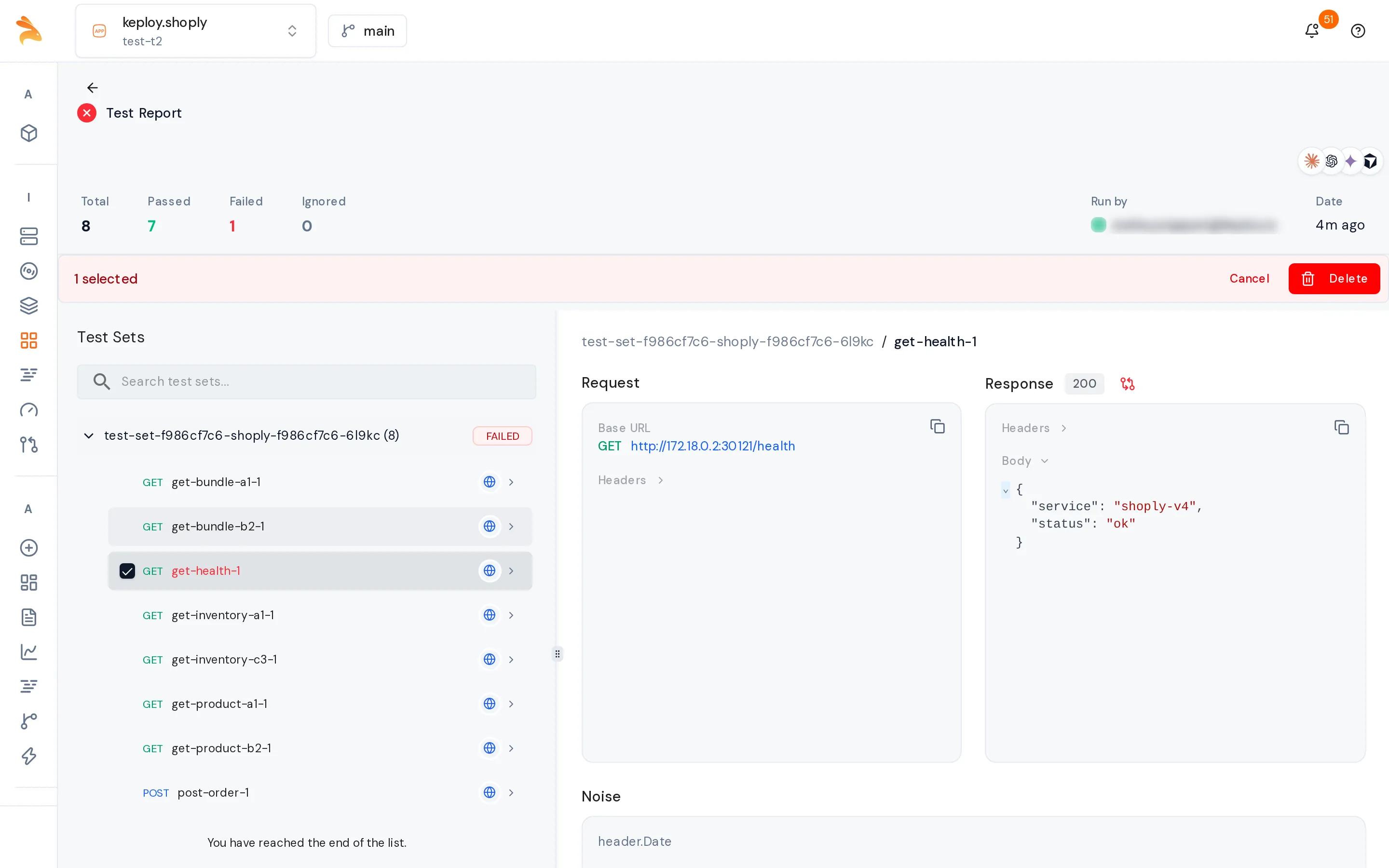
feature-x-pr42. The run then fails and prints the failed tests, the branch's name and link, and what to do next. - You decide what each failure is. If a failure is a regression, fix the code and push. If it's an intended change, open the run's Test Report and delete the failed tests there. The deletes go straight to the pull request's branch. Then, on the branch's page, commit the deletes and request a review. See Delete a test case.
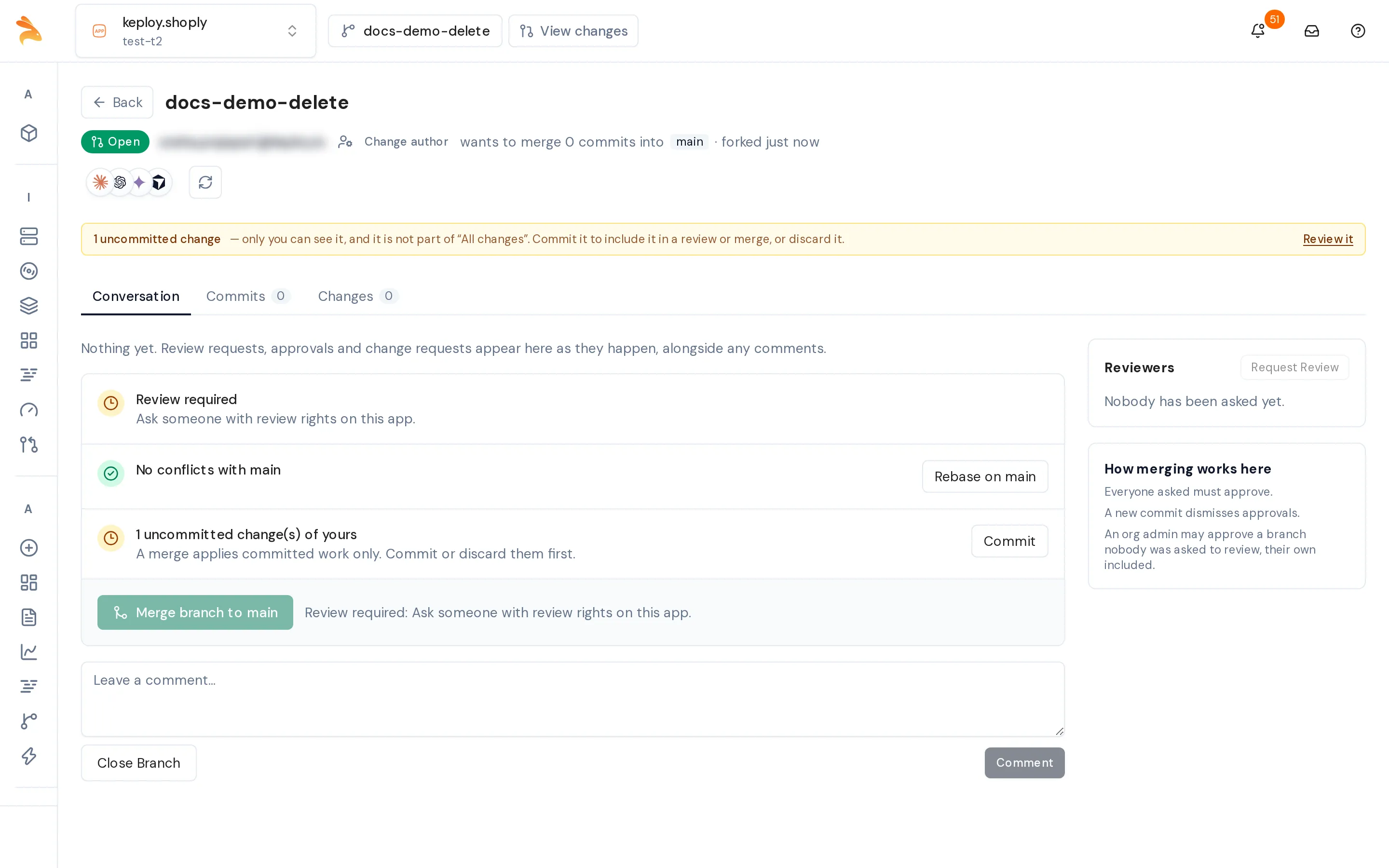
- The next run replays the branch. Once the branch has committed changes, each run first updates the branch with main's latest changes, then replays it. The tests you deleted don't run.
- The run waits for the review. When the tests pass but the branch's changes aren't approved yet, the run keeps waiting, and the pull request shows the check as pending. The run passes as soon as a reviewer approves the branch. It fails if a reviewer requests changes, if the branch is closed, or if no one approves it within 30 minutes; after an approval, re-run the pipeline.
If main changed the same test case after the branch did, the run fails with a conflict and links to the branch's page. Resolve the conflict there, get the branch approved again, and re-run the pipeline.
To work through failures from a terminal instead of the dashboard, run the keploy cloud triage command that the failed run prints. It explains the failures one group at a time. Then keploy cloud accept deletes the tests you marked as intended on the pull request's branch, commits the deletion and, with --reviewer, requests a review.
After the pull request merges
The next pipeline run that targets main, such as the push that merges the pull request, finds the merged pull request in the git history and merges its Keploy branch into main. From then on, main's tests include the deletes.
-
If the branch can't merge, for example because it isn't approved, has uncommitted changes or conflicts with main, the run doesn't fail. It logs why and what to do, and the next run on main tries again.
-
Branches older than 30 days are no longer checked. Merge such a branch by hand:
keploy cloud branch-merge --app "<namespace>.<deployment>" --branch "<branch>" -
With an Admin's key, these merges bypass review, and the server records each bypass. Use a non-admin key with
branch:mergeto keep reviews required.
Pipeline options
| Option | Default | What it does |
|---|---|---|
--no-auto-branch, or KEPLOY_AUTO_BRANCH=false | Off | Always replays main on pull requests and never creates a branch. |
--no-branch-catchup | Off | Skips merging merged pull requests' branches into main. |
--require-approval, or KEPLOY_REQUIRE_APPROVAL=true | Off | Fails at once, instead of waiting, when the tests pass but the branch isn't approved. |
--approval-timeout, or KEPLOY_APPROVAL_TIMEOUT | 30m | How long a run waits for the approval. |
--base-branch | main | The git branch that Keploy's main follows. |
--branch-name <name> or --create-branch <name> | None | Replays the named branch, or creates it. Keploy doesn't choose a branch then, and an unapproved branch fails the run at once. |
Related
- Fix failing tests: delete test cases, then commit, review and merge a branch.
- Run a manual replay: the three ways to run
keploy cloud replay. - Cloud Replay Command Reference: every flag of
keploy cloud replay.